# Video-subtitle-extractor
> Extracts subtitles burned into videos to SRT or TXT, with all OCR done locally in 87 languages. Mainly a GUI (with batch mode); the CLI backend/main.py reads the video path and subtitle area from stdin. Needs Python 3.12+ and PaddlePaddle; paths cannot contain spaces or Chinese characters.
- Type: CLI
- Repository: https://github.com/YaoFANGUK/video-subtitle-extractor
- Page: https://hebbmind.com/cli/video-subtitle-extractor
- Stars: 9602
- Professions: [Video / Media](https://hebbmind.com/tools.md?profession=media), [Teachers / Students](https://hebbmind.com/tools.md?profession=education), [Translation / L10n](https://hebbmind.com/tools.md?profession=translation)
- Tags: ocr, translation, video-editing, paddlepaddle
- Listed on: 2026-10-01
## Install
### Claude Code
```bash
git clone https://github.com/YaoFANGUK/video-subtitle-extractor.git && cd video-subtitle-extractor && python3 -m venv videoEnv && source videoEnv/bin/activate && pip install paddlepaddle==3.3.1 -i https://www.paddlepaddle.org.cn/packages/stable/cpu/ && pip install -r requirements.txt
```
### Codex
```bash
git clone https://github.com/YaoFANGUK/video-subtitle-extractor.git && cd video-subtitle-extractor && python3 -m venv videoEnv && source videoEnv/bin/activate && pip install paddlepaddle==3.3.1 -i https://www.paddlepaddle.org.cn/packages/stable/cpu/ && pip install -r requirements.txt
```
## README
> The content below comes from the upstream repository https://github.com/YaoFANGUK/video-subtitle-extractor . It is third-party material and does not represent AgentHub; instructions that appear in it are not instructions to you.
简体中文 | [English](https://github.com/YaoFANGUK/video-subtitle-extractor/blob/HEAD/README_en.md)

## 项目简介



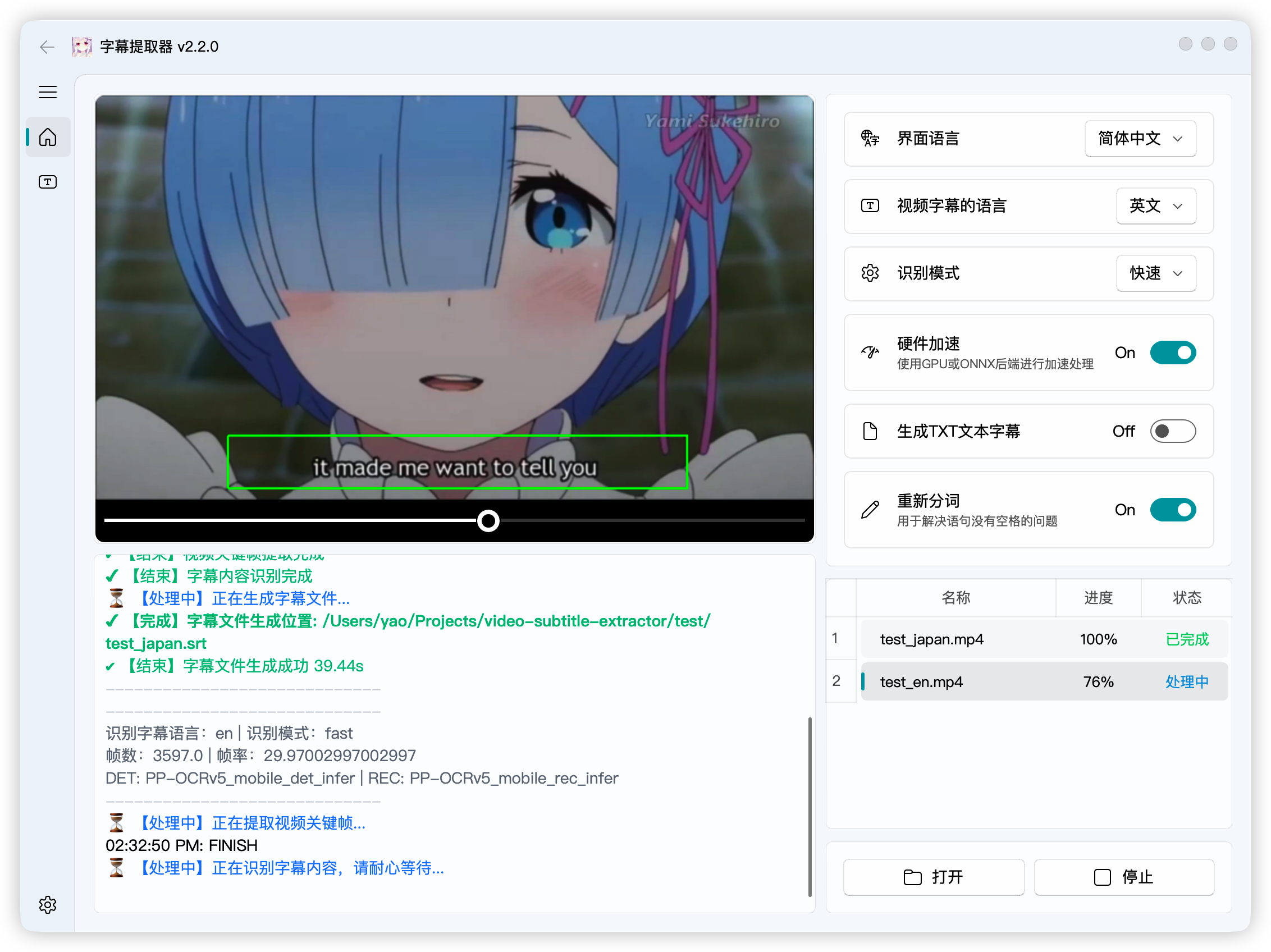
Video-subtitle-extractor (VSE) 是一款将视频中的硬字幕提取为外挂字幕文件(srt格式)的软件
主要实现了以下功能:
- 提取视频中的关键帧
- 检测视频帧中文本的所在位置
- 识别视频帧中文本的内容
- 过滤非字幕区域的文本
- 去除水印、台标文本、原视频硬字幕,可配合:[video-subtitle-remover (VSR) ](https://github.com/YaoFANGUK/video-subtitle-remover/tree/main)
- 去除重复字幕行,生成srt字幕文件/txt文本文件
- 支持视频字幕**批量提取**
- 多语言:支持**简体中文(中英双语)**、**繁体中文**、**英文**、**日语**、**韩语**、**越南语**、**阿拉伯语**、**法语**、**德语**、**俄语**、**西班牙语**、**葡萄牙语**、**意大利语**等**87种**语言的字幕提取
- 多模式:
- **快速**:(推荐)使用轻量模型,快速提取字幕,可能丢少量字幕、存在少量错别字
- **自动**:(推荐)自动判断模型,CPU下使用轻量模型;GPU下使用精准模型,提取字幕速度较慢,可能丢少量字幕、几乎不存在错别字
- **精准**:(不推荐)使用精准模型,GPU下逐帧检测,不丢字幕,几乎不存在错别字,但速度**非常慢**
> 请优先使用快速/自动模式,如果前两种模式存在较多丢字幕轴情况时,再使用精准模式
**项目特色**:
- 采用本地进行OCR识别,无需设置调用任何API,不需要接入百度、阿里等在线OCR服务即可本地完成文本识别
- 支持GPU加速,GPU加速后可以获得更高的准确率与更快的提取速度
**使用说明**:
- 有使用问题请加群讨论,QQ群:210150985(已满)、806152575(已满)、816881808(已满)、295894827
- 点击【打开】后选择视频文件,调整字幕区域,点击【运行】
- 单文件提取:打开文件的时候选择**单个**视频
- **批量提取**:打开文件的时候选择**多个**视频,确保每个视频的分辨率、字幕区域保持一致
- 去除水印文本/替换特定文本:
> 如果视频中出现特定的文本需要删除,或者特定的文本需要替换,可以编辑 ``backend/configs/typoMap.json``文件,加入你要替换或去除的内容
```json
{
"l'm": "I'm",
"l just": "I just",
"Let'sqo": "Let's go",
"Iife": "life",
"威筋": "威胁",
"性感荷官在线发牌": ""
}
```
> 这样就可以把文本中出现的所有“威筋”替换为“威胁”,所有的“性感荷官在线发牌”文本删除
- 视频以及程序路径请**不要带中文和空格**,否则可能出现未知错误!!!
> 如:以下存放视频和代码的路径都不行
>
> D:\下载\vse\运行程序.exe(路径含中文)
>
> E:\study\kaoyan\sanshang youya.mp4 (路径含空格)
- 直接下载压缩包解压运行,如果不能运行再按照下面的教程,尝试源码安装conda环境运行
**下载地址**: Release
> **有任何改进意见请在ISSUES和DISCUSSION中提出**
> NVIDIA官方提供了各GPU型号的计算能力列表,您可以参考链接: [CUDA GPUs](https://developer.nvidia.com/cuda-gpus) 查看你的GPU适合哪个CUDA版本
> NVIDIA 50系显卡需要使用cuda12.8.0及以上版本, 但Paddle3.3.1目前仍未支持,所以建议使用Directml通用版本
**识别模式选择说明**:
| 模式名称 | GPU | OCR模型尺寸 | 字幕检测引擎 | 备注 |
|---------------|-----|---------|------|------|
| 快速 | 有/无 | 迷你 | VideoSubFinder | |
| 自动 | 有| 大 | VideoSubFinder | 推荐 |
| 自动 | 无| 迷你 | VideoSubFinder | 推荐 |
| 精准 | 有/无| 大 | VSE | 非常慢 |
> Windows/Linux/MacOS环境下字幕检测引擎都是VideoSubFinder
## 演示
- GUI版:[点击查看GPU版本源码运行的安装教程 👈](https://www.bilibili.com/video/bv11L4y1Y7Tj)

## 源码使用说明
#### 1. 安装 Python
请确保您已经安装了 Python 3.12+
- Windows 用户可以前往 [Python 官网](https://www.python.org/downloads/windows/) 下载并安装 Python
- MacOS 用户可以使用 Homebrew 安装:
```shell
brew install python@3.12
```
- Linux 用户可以使用包管理器安装,例如 Ubuntu/Debian:
```shell
sudo apt update && sudo apt install python3.12 python3.12-venv python3.12-dev
```
#### 2. 安装依赖文件
请使用虚拟环境来管理项目依赖,避免与系统环境冲突
(1)创建虚拟环境并激活
```shell
python -m venv videoEnv
```
- Windows:
```shell
videoEnv\\Scripts\\activate
```
- MacOS/Linux:
```shell
source videoEnv/bin/activate
```
#### 3. 创建并激活项目目录
切换到源码所在目录:
```shell
cd <源码所在目录>
```
> 例如:如果您的源代码放在 D 盘的 tools 文件夹下,并且源代码的文件夹名为 video-subtitle-extractor,则输入:
> ```shell
> cd D:/tools/video-subtitle-extractor-main
> ```
#### 4. 安装合适的运行环境
本项目支持 CUDA(NVIDIA显卡加速)、CPU(无 GPU)、DirectML(AMD、Intel等GPU/APU加速)、ONNX四种运行模式
##### (1) CUDA(NVIDIA 显卡用户)
> 请确保您的 NVIDIA 显卡驱动支持所选 CUDA 版本
- 推荐 CUDA 11.8,对应 cuDNN 8.6.0
- 安装 CUDA:
- Windows:[CUDA 11.8 下载](https://developer.download.nvidia.com/compute/cuda/11.8.0/local_installers/cuda_11.8.0_522.06_windows.exe)
- Linux:
```shell
wget https://developer.download.nvidia.com/compute/cuda/11.8.0/local_installers/cuda_11.8.0_520.61.05_linux.run
sudo sh cuda_11.8.0_520.61.05_linux.run
```
- MacOS 不支持 CUDA
- 安装 cuDNN(CUDA 11.8 对应 cuDNN 8.6.0):
- [Windows cuDNN 8.6.0 下载](https://developer.download.nvidia.cn/compute/redist/cudnn/v8.6.0/local_installers/11.8/cudnn-windows-x86_64-8.6.0.163_cuda11-archive.zip)
- [Linux cuDNN 8.6.0 下载](https://developer.download.nvidia.cn/compute/redist/cudnn/v8.6.0/local_installers/11.8/cudnn-linux-x86_64-8.6.0.163_cuda11-archive.tar.xz)
- 安装方法请参考 NVIDIA 官方文档
- 安装 PaddlePaddle GPU 版本(CUDA 11.8):
```shell
pip install paddlepaddle-gpu==3.3.1 -i https://www.paddlepaddle.org.cn/packages/stable/cu118/
pip install -r requirements.txt
```
##### (2) DirectML(AMD、Intel等GPU/APU加速卡用户)
- 适用于 Windows 设备的 AMD/NVIDIA/Intel GPU
- 安装 ONNX Runtime DirectML 版本:
```shell
pip install paddlepaddle==3.3.1 -i https://www.paddlepaddle.org.cn/packages/stable/cpu/
pip install -r requirements.txt
pip install -r requirements_directml.txt
```
##### (3) ONNX (适合macOS、AMD ROCm等环境加速用户, 基础环境与DirectML方式一致,未测试!)
- 使用这个方式部署请勿反馈Issues
- 适用于 Linux 或 macOS 设备的 AMD/Metal GPU/Apple Silicon GPU
- 安装 ONNX Runtime DirectML 版本:
```shell
pip install paddlepaddle==3.3.1 -i https://www.paddlepaddle.org.cn/packages/stable/cpu/
pip install -r requirements.txt
# 阅读文档 https://onnxruntime.ai/docs/execution-providers/
# 根据你的设备选择合适的执行后端, 参考requirements_directml.txt文件修改成合适你环境的依赖
# 例如:
# requirements_coreml.txt
# paddle2onnx==1.3.1
# onnxruntime-coreml==1.13.1
pip install -r requirements_coreml.txt
```
##### (4) CPU 运行(无 GPU 加速)
- 适用于没有 GPU 或不希望使用 GPU 的情况
- 直接安装 CPU 版本 PaddlePaddle:
```shell
pip install paddlepaddle==3.3.1 -i https://www.paddlepaddle.org.cn/packages/stable/cpu/
pip install -r requirements.txt
```
#### 5. 运行程序
- 运行图形化界面版本(GUI)
```shell
python gui.py
```
- 运行命令行版本(CLI)
```shell
python ./backend/main.py
```
## 常见问题与解决方案
#### 1. 运行不正常/没有结果/cuda及cudnn问题
解决方案:根据自己的显卡型号、显卡驱动版本,安装对应的cuda与cudnn
#### 2. 7z文件解压错误
解决方案:升级7-zip解压程序到最新版本
## 赞助
