# textlint
> Pluggable natural-language linter that checks Markdown and plain text for wording, punctuation and terminology consistency like code, with auto-fix, and can also run as an MCP server. Rules are installed separately, mostly for Japanese and English; requires Node.js 20+.
- Type: CLI
- Repository: https://github.com/textlint/textlint
- Page: https://hebbmind.com/de/cli/textlint
- Stars: 3201
- Professions: [Full-stack / Indie](https://hebbmind.com/de/tools.md?profession=fullstack), [Writing / Content](https://hebbmind.com/de/tools.md?profession=writing), [Translation / L10n](https://hebbmind.com/de/tools.md?profession=translation)
- Tags: writing, translation, technical-writing, markdown, nodejs
- Listed on: 2026-10-01
## Install
### Claude Code
```bash
npm install --save-dev textlint && npx textlint --init
```
### Codex
```bash
npm install --save-dev textlint && npx textlint --init
```
## README
> The content below comes from the upstream repository https://github.com/textlint/textlint . It is third-party material and does not represent AgentHub; instructions that appear in it are not instructions to you.
# textlint
 > The pluggable linting tool for natural language.
textlint is similar to [ESLint](http://eslint.org/ "ESLint"), but it's for use with natural language.
[](https://github.com/textlint/textlint/actions?workflow=CI)
## Website
- Online demo
- Searchable documents
- Release blog
Visit [https://textlint.org/](https://textlint.org/).
## Features
- No bundled rules.
- To use a rule, install a textlint rule via npm.
- `npm install textlint-rule-xxx`.
- See [collection of textlint rules](https://github.com/textlint/textlint/wiki/Collection-of-textlint-rule "Collection of textlint rule · textlint/textlint Wiki")
- [Markdown](https://github.com/textlint/textlint/blob/HEAD/packages/%40textlint/textlint-plugin-markdown) and [plain text](https://github.com/textlint/textlint/blob/HEAD/packages/%40textlint/textlint-plugin-text) are supported by default. Support is available for [HTML](https://github.com/textlint/textlint-plugin-html) and [other file formats](https://github.com/textlint/textlint#supported-file-formats) via plugins.
- Supports the use of custom formatters and formatter bundles [formatter(reporter)](https://github.com/textlint/textlint/blob/HEAD/packages/%40textlint/linter-formatter)
## Quick Tour
For a quick tour of textlint, checkout our [Getting Started](https://github.com/textlint/textlint/blob/HEAD/docs/getting-started.md) guide :squirrel:
## Installation
You can install the `textlint` command using npm:
```
$ npm install textlint --save-dev
```
**Requirements**:
- Node.js 20+
If you're not sure what version of Node you're running, you can run `node -v` in your console to find out.
**:warning: Warning:**
- If you have installed `textlint` globally you must install each reference rule globally as well.
- If you have installed `textlint` locally you must install each rule locally as well.
We recommend installing `textlint` locally.
### For Node.js beginners
If you've never used Node.js and npm, please see the following:
- [Installing Node.js and updating npm | npm Documentation](https://docs.npmjs.com/getting-started/installing-node "02 - Installing Node.js and updating npm | npm Documentation")
## Usage

textlint has no default rules!!
You can run textlint with `.textlintrc.json` config file.
```sh
# Install textlint and rules into local directory
npm install --save-dev textlint textlint-rule-no-todo
```
`npx textlint --init` command creates `.textlintrc.json` file from installed rules.
```bash
npx textlint --init
```
`.textlintrc.json` will be created like this:
```json
{
"rules": {
"no-todo": true
}
}
```
Lint files via textlint:
```sh
npx textlint ./README.md
```
`textlint` load `.textlintrc.json` from current directory and lint `README.md`.
## CLI
Run `npx textlint -h` for information on how to use the CLI.
```
$ textlint [options] file.md [file|dir|glob*]
Options:
-h, --help Show help.
-c, --config path::String Use configuration from this file or sharable config.
--ignore-path path::String Specify path to a file containing patterns that describes files to ignore. - default: .textlintignore
--init Create the config file if not existed. - default: false
--fix Automatically fix problems
--dry-run Enable dry-run mode for --fix. Only show result, don't change the file.
--debug Outputs debugging information
--print-config Print the config object to stdout
-v, --version Outputs the version number.
Using stdin:
--stdin Lint text provided on . - default: false
--stdin-filename String Specify filename to process STDIN as
Output:
-o, --output-file path::String Enable report to be written to a file.
-f, --format String Use a specific output format.
Available formatter : checkstyle, compact, github, jslint-xml, json, junit, pretty-error, stylish, table, tap, unix
Available formatter for --fix: compats, diff, fixed-result, json, stylish - default: stylish
--no-color Disable color in piped output.
--quiet Report errors only. - default: false
Specifying rules and plugins:
--no-textlintrc Disable .textlintrc
--plugin [String] Set plugin package name
--rule [String] Set rule package name
--preset [String] Set preset package name and load rules from preset package.
--rulesdir [path::String] Use additional rules from this directory
Caching:
--cache Only check changed files - default: false
--cache-location path::String Path to the cache file or directory - default: .textlintcache
--cache-strategy String Strategy for detecting changed files - either: metadata or content - default: metadata
Experimental:
--experimental Enable experimental flag.Some feature use on experimental.
--rules-base-directory path::String Set module base directory. textlint load modules(rules/presets/plugins) from the base directory.
--mcp Start textlint as the Model Context Protocol (MCP) server.
```
When running textlint, you can target files to lint using the glob patterns.
Make sure that you enclose any glob parameter you pass in quotes.
```sh
$ npx textlint "docs/**"
```
For more details, see [CLI](https://github.com/textlint/textlint/blob/HEAD/docs/cli.md) documentation.
- Documentation: [CLI](https://github.com/textlint/textlint/blob/HEAD/docs/cli.md)
Example:
- :information_source: See [examples/cli](https://github.com/textlint/textlint/blob/HEAD/examples/cli)
## .textlintrc
`.textlintrc` is config file that is loaded as JSON, YAML or JS via [azu/rc-config-loader](https://github.com/azu/rc-config-loader).
Running textlint with the following arguments
```
$ npx textlint --rule no-todo --rule very-nice-rule README.md
```
is equivalent to running `textlint README.md` in a directory with a `.textlintrc.json` containing the following json
```json
{
"rules": {
"no-todo": true,
"very-nice-rule": true
}
}
```
You can also configure options for specific rules in your `.textlintrc.json` file.
```json
{
"rules": {
"no-todo": false, // disable
"very-nice-rule": {
"key": "value"
}
}
}
```
For example here we pass the options ("key": "value") to `very-nice-rule`.
Options can be specified in your `.textlintrc.json` file as follows:
```js
{
// Allow to comment in JSON
"rules": {
"": true | false | object
}
}
```
:information_source: for more details see
- [docs/configuring](https://github.com/textlint/textlint/blob/HEAD/docs/configuring.md)
- [examples/config-file](https://github.com/textlint/textlint/blob/HEAD/examples/config-file)
### Plugin
A textlint plugin is a set of rules and rulesConfig or customize parser.
To enable plugin, put the "plugin-name" into `.textlintrc.json`.
```js
// `.textlintrc.json`
{
"plugins": [
"plugin-name"
],
// overwrite-plugins rules config
// /
"rules": {
"plugin-name/rule-name" : false
}
}
```
:information_source: See [docs/plugin.md](https://github.com/textlint/textlint/blob/HEAD/docs/plugin.md)
### Supported file formats
textlint supports Markdown and plain text by default.
Install **Processor Plugin** and add new file format support.
For example, if you want to lint HTML, use [textlint-plugin-html](https://github.com/textlint/textlint-plugin-html "textlint-plugin-html") as a plugin.
npm install textlint-plugin-html --save-dev
Add `"html"` to `.textlintrc.json`
```
{
"plugins": [
"html"
]
}
```
Run textlint on `.html` files:
textlint index.html
- Example: [examples/html-plugin](https://github.com/textlint/textlint/blob/HEAD/examples/html-plugin)
- Documentation: [docs/plugin.md](https://github.com/textlint/textlint/blob/HEAD/docs/plugin.md)
Optional supported file types:
- HTML: [textlint-plugin-html](https://github.com/textlint/textlint-plugin-html "textlint-plugin-html")
- reStructuredText: [textlint-plugin-rst](https://github.com/jimo1001/textlint-plugin-rst "textlint-plugin-rst")
- Fork: [shiguredo/textlint-plugin-rst](https://github.com/shiguredo/textlint-plugin-rst)
- AsciiDoc/Asciidoctor: [textlint-plugin-asciidoc-loose](https://github.com/azu/textlint-plugin-asciidoc-loose "textlint-plugin-asciidoc-loose")
- Re:VIEW: [textlint-plugin-review](https://github.com/orangain/textlint-plugin-review "textlint-plugin-review")
- Org-mode: [textlint-plugin-org](https://github.com/kijimaD/textlint-plugin-org "textlint-plugin-org")
See [Processor Plugin List](https://github.com/textlint/textlint/wiki/Collection-of-textlint-rule#processor-plugin-list "Processor Plugin List") for details.
### Rules list :green_heart:
- Check it: [A Collection of textlint rule · textlint/textlint Wiki](https://github.com/textlint/textlint/wiki/Collection-of-textlint-rule "Collection of textlint rule · textlint/textlint Wiki")
textlint has no built-in rules, but there are 100+ pluggable rules:
- [textlint-rule-no-todo](https://github.com/textlint-rule/textlint-rule-no-todo)
- [textlint-rule-max-number-of-lines](https://github.com/azu/textlint-rule-max-number-of-lines)
- [textlint-rule-common-misspellings](https://github.com/io-monad/textlint-rule-common-misspellings)
- [etc...](https://github.com/textlint/textlint/wiki/Collection-of-textlint-rule)
See [A Collection of textlint rule · textlint/textlint Wiki](https://github.com/textlint/textlint/wiki/Collection-of-textlint-rule "Collection of textlint rule · textlint/textlint Wiki") for more details.
If you create a new rule, please add it to the wiki :)
### Fixable
[](https://textlint.org/)
Some rules are fixable using the `--fix` command line flag.
``` sh
$ npx textlint --fix README.md
# If possible, textlint will fix the content.
```
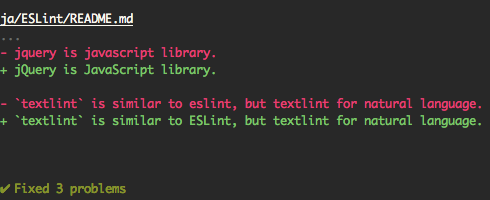
Also, support [dry run](https://en.wikipedia.org/wiki/Dry_run_(testing) "dry run") mode.
```
$ npx textlint --fix --dry-run --format diff README.md
# show the difference between fixed content and original content.
```
You can copy and paste to your README.
```markdown
[](https://textlint.org/)
```
### Built-in formatters
Use the following formatters:
- stylish (defaults)
- compact
- checkstyle
- github
- jslint-xml
- junit
- tap
- table
- pretty-error
- json
- unix
e.g. use `pretty-error` formatter:
```
$ npx textlint -f pretty-error file.md
```
More details in [@textlint/linter-formatter](https://github.com/textlint/textlint/blob/HEAD/packages/%40textlint/linter-formatter "@textlint/linter-formatter").
## Use as node module
You can use textlint as node module.
```
$ npm install textlint --save-dev
```
Minimal usage:
```js
import { createLinter, loadTextlintrc, loadLinterFormatter } from "textlint";
const descriptor = await loadTextlintrc();
const linter = createLinter({ descriptor });
const results = await linter.lintFiles(["*.md"]);
// textlint has two types formatter sets for linter and fixer
const formatter = await loadLinterFormatter({ formatterName: "stylish" });
const output = formatter.format(results);
console.log(output);
```
For more details, please read the following documents:
- See [docs/use-as-modules.md](https://github.com/textlint/textlint/blob/HEAD/docs/use-as-modules.md)
[@textlint/kernel](https://github.com/textlint/textlint/blob/HEAD/packages/%40textlint/kernel "@textlint/kernel") is a low level API for textlint.
It is useful for the browser or non-Node.js environments.
```js
import assert from "node:assert";
import { createRequire } from "node:module";
import { TextlintKernel } from "@textlint/kernel";
import markdownPlugin from "@textlint/textlint-plugin-markdown";
const require = createRequire(import.meta.url);
const kernel = new TextlintKernel();
const options = {
filePath: "/path/to/file.md",
ext: ".md",
plugins: [
{
pluginId: "markdown",
plugin: markdownPlugin
}
],
rules: [
{
ruleId: "no-todo",
rule: require("textlint-rule-no-todo").default
}
]
};
const result = await kernel.lintText("TODO: text", options);
assert.ok(typeof result.filePath === "string");
assert.ok(result.messages.length === 1);
```
## Conclusion
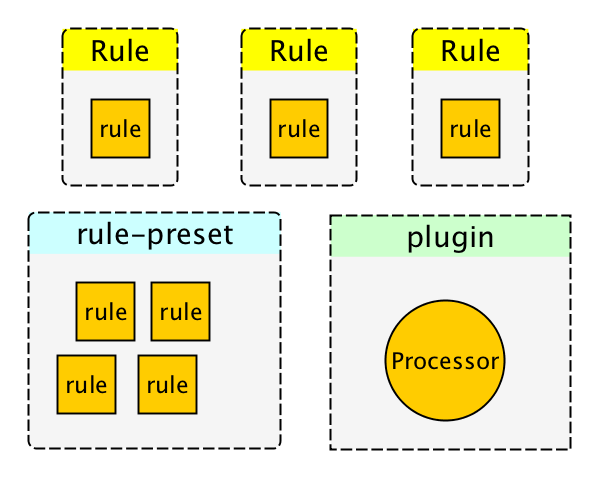
textlint has four extensible points:
- [rule](https://github.com/textlint/textlint/blob/HEAD/docs/rule.md)
- rule is a rule for linting.
- [filter rule](https://github.com/textlint/textlint/blob/HEAD/docs/filter-rule.md)
- filter rule is a rule for filtering result of errors.
- [rule-preset](https://github.com/textlint/textlint/blob/HEAD/docs/rule-preset.md)
- rule-preset contains rules.
- [plugin](https://github.com/textlint/textlint/blob/HEAD/docs/plugin.md)
- plugin contains a processor.
## FAQ: How to create rules?
Please see docs/
- [docs/txtnode.md](https://github.com/textlint/textlint/blob/HEAD/docs/txtnode.md)
- What is TxtNode?
- [docs/rule.md](https://github.com/textlint/textlint/blob/HEAD/docs/rule.md)
- How to create rules?
- Tutorial: creating `no-todo` rule.
- [docs/rule-advanced.md](https://github.com/textlint/textlint/blob/HEAD/docs/rule-advanced.md)
- Advanced tutorial for creating rule.
## FAQ: How to suppress error by comments like ``?
You can use filter rule like [textlint-filter-rule-comments](https://github.com/textlint/textlint-filter-rule-comments "textlint-filter-rule-comments").
Please see [Ignoring Text · textlint](https://textlint.org/docs/ignore.html) for more details.
## Integrations
For more details, see [integrations document](https://github.com/textlint/textlint/blob/HEAD/docs/integrations.md).
### AI Assistants (MCP)
textlint can be used as a [Model Context Protocol (MCP)](https://modelcontextprotocol.io/) server, enabling AI assistants to interact with textlint directly:
```bash
npx textlint --mcp
```
Supported editors:
- VS Code with GitHub Copilot
- Cursor
- Windsurf
- etc.
For setup instructions, see [MCP Setup Guide](https://github.com/textlint/textlint/blob/HEAD/docs/mcp.md).
### App
- [textlint-app](https://github.com/textlint/textlint-app "textlint-app")
- Standalone cross platform app. No need Node.js environment.
### Build Systems
- gulp plugin
- [gulp-textlint](https://github.com/textlint/gulp-textlint "gulp-textlint")
- Grunt plugin
- [grunt-textlint](https://github.com/textlint/grunt-textlint "grunt-textlint")
### Editors
- Atom Editor
- [1000ch/linter-textlint](https://github.com/1000ch/linter-textlint "1000ch/linter-textlint")
- SublimeText
- [joeybaker/sublimelinter-textlint](https://github.com/joeybaker/sublimelinter-textlint)
- Vim
- [vim-textlint](https://github.com/heavenshell/vim-textlint "vim-textlint")
- [scrooloose/syntastic](https://github.com/vim-syntastic/syntastic "scrooloose/syntastic")
- See [Markdown](https://github.com/vim-syntastic/syntastic/wiki/Markdown "Markdown"), [Text](https://github.com/vim-syntastic/syntastic/wiki/Text "Text") and [HTML](https://github.com/vim-syntastic/syntastic/wiki/HTML "HTML") of [scrooloose/syntastic Wiki](https://github.com/vim-syntastic/syntastic/wiki/Syntax-Checkers "Syntax Checkers · scrooloose/syntastic Wiki")
- VS Code
- [textlint/vscode-textlint](https://github.com/textlint/vscode-textlint)
- [micro](https://github.com/zyedidia/micro "micro")
- [hidaruma/micro-textlint-plugin](https://github.com/hidaruma/micro-textlint-plugin "hidaruma/micro-textlint-plugin: textlint plugin for micro-editor")
- NetBeans
- [netbeans-textlint-plugin](https://github.com/junichi11/netbeans-textlint-plugin "netbeans-textlint-plugin")
### Browser
- Chrome Extension
- [Chrome: textlint-proofreader](https://chrome.google.com/webstore/detail/textlint-proofreader/hdongmdneapmhfblomidbafplpanpdmm)
- [io-monad/textlint-chrome-extension: textlint Chrome Extension](https://github.com/io-monad/textlint-chrome-extension "io-monad/textlint-chrome-extension: textlint Chrome Extension")
### Other
- [Pronto](https://github.com/prontolabs/pronto "Pronto"): [pronto-textlint](https://github.com/seikichi/pronto-textlint "pronto-textlint")
- [reviewdog](https://github.com/reviewdog/reviewdog "reviewdog"): [azu/textlint-reviewdog-example](https://github.com/azu/textlint-reviewdog-example "azu/textlint-reviewdog-example: textlint + reviewdog example project")
## Who's using textlint?
- [survivejs/webpack-book](https://github.com/survivejs/webpack-book "survivejs/webpack-book: From apprentice to master (CC BY-NC-ND)")
- [hoodiehq/hoodie](https://github.com/hoodiehq/hoodie "hoodiehq/hoodie")
- [asciidwango/js-primer](https://github.com/asciidwango/js-primer "asciidwango/js-primer: JavaScriptの入門書")
- [vuejs-jp/vuejs.org](https://github.com/vuejs-jp/jp.vuejs.org "vuejs-jp/vuejs.org")
- [cypress-io/cypress-documentation](https://github.com/cypress-io/cypress-documentation "cypress-io/cypress-documentation: Cypress Documentation including Guides, API, Plugins, Examples, & FAQ. docs.cypress.io")
## Packages
This repository is a monorepo that we manage using [Lerna](https://github.com/lerna/lerna). That means that we actually publish [several packages](https://github.com/textlint/textlint/blob/HEAD/packages) to npm from the same codebase, including:
### Core
These modules are parts of textlint.
| Package | Version | Description |
| :--------------------------------------- | :--------------------------------------- |:--------------------------------------------------------|
| [`textlint`](./packages/textlint) | [](https://www.npmjs.com/package/textlint) | textlint command line tool itself |
| [`@textlint/kernel`](./packages/@textlint/kernel) | [](https://www.npmjs.com/package/@textlint/kernel) | textlint main logic module. It is universal JavaScript. |
| [`@textlint/linter-formatter`](./packages/@textlint/linter-formatter) | [](https://www.npmjs.com/package/@textlint/linter-formatter) | textlint output formatter |
| [`@textlint/fixer-formatter`](./packages/@textlint/fixer-formatter) | [](https://www.npmjs.com/package/@textlint/fixer-formatter) | textlint output formatter for fixer |
| [`@textlint/textlint-plugin-markdown`](./packages/@textlint/textlint-plugin-markdown) | [](https://www.npmjs.com/package/@textlint/textlint-plugin-markdown) | markdown support for textlint |
| [`@textlint/textlint-plugin-text`](./packages/@textlint/textlint-plugin-text) | [](https://www.npmjs.com/package/@textlint/textlint-plugin-text) | plain text support for textlint |
| [`@textlint/ast-tester`](./packages/@textlint/ast-tester) | [](https://www.npmjs.com/package/@textlint/ast-tester) | Compliance tests for textlint's AST |
| [`@textlint/markdown-to-ast`](./packages/@textlint/markdown-to-ast) | [](https://www.npmjs.com/package/@textlint/markdown-to-ast) | markdown parser |
| [`@textlint/ast-traverse`](./packages/@textlint/ast-traverse) | [](https://www.npmjs.com/package/@textlint/ast-traverse) | TxtNode traverse library |
| [`@textlint/text-to-ast`](./packages/@textlint/text-to-ast) | [](https://www.npmjs.com/package/@textlint/text-to-ast) | plain text parser |
| [`@textlint/config-loader`](./packages/@textlint/config-loader) | [](https://www.npmjs.com/package/@textlint/config-loader) | Load .textlintrc config file |
### Rule/Plugin helper
These modules are useful for textlint rule/plugin author.
| Package | Version | Description |
| :------------------------------------------------------------------------- | :-------------------------------------------------------------------------------------------------------------------------------------------- | :---------------------------------------------------------------------- |
| [`@textlint/ast-node-types`](./packages/@textlint/ast-node-types) | [](https://www.npmjs.com/package/@textlint/ast-node-types) | [textlint AST(Abstract Syntax Tree)](https://github.com/textlint/textlint/blob/HEAD/docs/txtnode.md) type definition |
| [`textlint-tester`](./packages/textlint-tester) | [](https://www.npmjs.com/package/textlint-tester) | textlint rule testing tools |
| [`textlint-scripts`](./packages/textlint-scripts) | [](https://www.npmjs.com/package/textlint-scripts) | textlint rule npm run-scripts |
| [`create-textlint-rule`](https://github.com/textlint/create-textlint-rule) | [](https://www.npmjs.com/package/create-textlint-rule) | create textlint rule with no build configuration |
### Integrations
These modules are useful integration with textlint.
| Package | Version | Description |
| :--------------------------------------- | :--------------------------------------- | :----------------------- |
| [`gulp-textlint`](https://github.com/textlint/gulp-textlint) | [](https://www.npmjs.com/package/gulp-textlint) | gulp plugin for textlint |
### Internal
These modules are internal usage in the monorepo.
| Package | Version | Description |
| :--------------------------------------- | :--------------------------------------- | :------------------- |
| [`@textlint/feature-flag`](./packages/@textlint/feature-flag) | [](https://www.npmjs.com/package/@textlint/feature-flag) | feature flag manager |
## Semantic Versioning Policy
textlint project follow [Semantic Versioning](https://semver.org/ "Semantic Versioning").
However, textlint is not different from most semver project.
- Patch release (intended to not break your lint build)
- A bug fix to the CLI or core (including formatters).
- Improvements to documentation.
- Non-user-facing changes such as refactoring.
- Re-releasing after a failed release (i.e., publishing a release that doesn't work for anyone).
- Minor release (might break your lint build)
- A new option.
- An existing rule is deprecated.
- A new CLI capability is created.
- New public API are added (new classes, new methods, new arguments to existing methods, etc.).
- It might break type interface(`.d.ts`)
- A new formatter is created.
- Major release (break your lint build)
- A new option to an existing rule that results in textlint reporting more errors by default.
- An existing formatter is removed.
- Part of the public API is removed or changed in an incompatible way.
## Contributing
For bugs and feature requests, [please create an issue](https://github.com/textlint/textlint/issues).
Pull requests are always welcome.
For more details, see [Contributing Guide](https://github.com/textlint/textlint/blob/HEAD/docs/CONTRIBUTING.md).
## License
MIT © azu
Copy some code from ESLint.
ESLint
Copyright (c) 2013 Nicholas C. Zakas. All rights reserved.
https://github.com/eslint/eslint/blob/master/LICENSE
## Logos & Icons
Download from [textlint/media](https://github.com/textlint/media "textlint/media: Official logo and icon.").
## Related Work
- [SCG: TextLint](http://scg.unibe.ch/research/textlint "SCG: TextLint")
## Acknowledgements
Thanks to [ESLint](https://eslint.org/ "ESLint").
> The pluggable linting tool for natural language.
textlint is similar to [ESLint](http://eslint.org/ "ESLint"), but it's for use with natural language.
[](https://github.com/textlint/textlint/actions?workflow=CI)
## Website
- Online demo
- Searchable documents
- Release blog
Visit [https://textlint.org/](https://textlint.org/).
## Features
- No bundled rules.
- To use a rule, install a textlint rule via npm.
- `npm install textlint-rule-xxx`.
- See [collection of textlint rules](https://github.com/textlint/textlint/wiki/Collection-of-textlint-rule "Collection of textlint rule · textlint/textlint Wiki")
- [Markdown](https://github.com/textlint/textlint/blob/HEAD/packages/%40textlint/textlint-plugin-markdown) and [plain text](https://github.com/textlint/textlint/blob/HEAD/packages/%40textlint/textlint-plugin-text) are supported by default. Support is available for [HTML](https://github.com/textlint/textlint-plugin-html) and [other file formats](https://github.com/textlint/textlint#supported-file-formats) via plugins.
- Supports the use of custom formatters and formatter bundles [formatter(reporter)](https://github.com/textlint/textlint/blob/HEAD/packages/%40textlint/linter-formatter)
## Quick Tour
For a quick tour of textlint, checkout our [Getting Started](https://github.com/textlint/textlint/blob/HEAD/docs/getting-started.md) guide :squirrel:
## Installation
You can install the `textlint` command using npm:
```
$ npm install textlint --save-dev
```
**Requirements**:
- Node.js 20+
If you're not sure what version of Node you're running, you can run `node -v` in your console to find out.
**:warning: Warning:**
- If you have installed `textlint` globally you must install each reference rule globally as well.
- If you have installed `textlint` locally you must install each rule locally as well.
We recommend installing `textlint` locally.
### For Node.js beginners
If you've never used Node.js and npm, please see the following:
- [Installing Node.js and updating npm | npm Documentation](https://docs.npmjs.com/getting-started/installing-node "02 - Installing Node.js and updating npm | npm Documentation")
## Usage

textlint has no default rules!!
You can run textlint with `.textlintrc.json` config file.
```sh
# Install textlint and rules into local directory
npm install --save-dev textlint textlint-rule-no-todo
```
`npx textlint --init` command creates `.textlintrc.json` file from installed rules.
```bash
npx textlint --init
```
`.textlintrc.json` will be created like this:
```json
{
"rules": {
"no-todo": true
}
}
```
Lint files via textlint:
```sh
npx textlint ./README.md
```
`textlint` load `.textlintrc.json` from current directory and lint `README.md`.
## CLI
Run `npx textlint -h` for information on how to use the CLI.
```
$ textlint [options] file.md [file|dir|glob*]
Options:
-h, --help Show help.
-c, --config path::String Use configuration from this file or sharable config.
--ignore-path path::String Specify path to a file containing patterns that describes files to ignore. - default: .textlintignore
--init Create the config file if not existed. - default: false
--fix Automatically fix problems
--dry-run Enable dry-run mode for --fix. Only show result, don't change the file.
--debug Outputs debugging information
--print-config Print the config object to stdout
-v, --version Outputs the version number.
Using stdin:
--stdin Lint text provided on . - default: false
--stdin-filename String Specify filename to process STDIN as
Output:
-o, --output-file path::String Enable report to be written to a file.
-f, --format String Use a specific output format.
Available formatter : checkstyle, compact, github, jslint-xml, json, junit, pretty-error, stylish, table, tap, unix
Available formatter for --fix: compats, diff, fixed-result, json, stylish - default: stylish
--no-color Disable color in piped output.
--quiet Report errors only. - default: false
Specifying rules and plugins:
--no-textlintrc Disable .textlintrc
--plugin [String] Set plugin package name
--rule [String] Set rule package name
--preset [String] Set preset package name and load rules from preset package.
--rulesdir [path::String] Use additional rules from this directory
Caching:
--cache Only check changed files - default: false
--cache-location path::String Path to the cache file or directory - default: .textlintcache
--cache-strategy String Strategy for detecting changed files - either: metadata or content - default: metadata
Experimental:
--experimental Enable experimental flag.Some feature use on experimental.
--rules-base-directory path::String Set module base directory. textlint load modules(rules/presets/plugins) from the base directory.
--mcp Start textlint as the Model Context Protocol (MCP) server.
```
When running textlint, you can target files to lint using the glob patterns.
Make sure that you enclose any glob parameter you pass in quotes.
```sh
$ npx textlint "docs/**"
```
For more details, see [CLI](https://github.com/textlint/textlint/blob/HEAD/docs/cli.md) documentation.
- Documentation: [CLI](https://github.com/textlint/textlint/blob/HEAD/docs/cli.md)
Example:
- :information_source: See [examples/cli](https://github.com/textlint/textlint/blob/HEAD/examples/cli)
## .textlintrc
`.textlintrc` is config file that is loaded as JSON, YAML or JS via [azu/rc-config-loader](https://github.com/azu/rc-config-loader).
Running textlint with the following arguments
```
$ npx textlint --rule no-todo --rule very-nice-rule README.md
```
is equivalent to running `textlint README.md` in a directory with a `.textlintrc.json` containing the following json
```json
{
"rules": {
"no-todo": true,
"very-nice-rule": true
}
}
```
You can also configure options for specific rules in your `.textlintrc.json` file.
```json
{
"rules": {
"no-todo": false, // disable
"very-nice-rule": {
"key": "value"
}
}
}
```
For example here we pass the options ("key": "value") to `very-nice-rule`.
Options can be specified in your `.textlintrc.json` file as follows:
```js
{
// Allow to comment in JSON
"rules": {
"": true | false | object
}
}
```
:information_source: for more details see
- [docs/configuring](https://github.com/textlint/textlint/blob/HEAD/docs/configuring.md)
- [examples/config-file](https://github.com/textlint/textlint/blob/HEAD/examples/config-file)
### Plugin
A textlint plugin is a set of rules and rulesConfig or customize parser.
To enable plugin, put the "plugin-name" into `.textlintrc.json`.
```js
// `.textlintrc.json`
{
"plugins": [
"plugin-name"
],
// overwrite-plugins rules config
// /
"rules": {
"plugin-name/rule-name" : false
}
}
```
:information_source: See [docs/plugin.md](https://github.com/textlint/textlint/blob/HEAD/docs/plugin.md)
### Supported file formats
textlint supports Markdown and plain text by default.
Install **Processor Plugin** and add new file format support.
For example, if you want to lint HTML, use [textlint-plugin-html](https://github.com/textlint/textlint-plugin-html "textlint-plugin-html") as a plugin.
npm install textlint-plugin-html --save-dev
Add `"html"` to `.textlintrc.json`
```
{
"plugins": [
"html"
]
}
```
Run textlint on `.html` files:
textlint index.html
- Example: [examples/html-plugin](https://github.com/textlint/textlint/blob/HEAD/examples/html-plugin)
- Documentation: [docs/plugin.md](https://github.com/textlint/textlint/blob/HEAD/docs/plugin.md)
Optional supported file types:
- HTML: [textlint-plugin-html](https://github.com/textlint/textlint-plugin-html "textlint-plugin-html")
- reStructuredText: [textlint-plugin-rst](https://github.com/jimo1001/textlint-plugin-rst "textlint-plugin-rst")
- Fork: [shiguredo/textlint-plugin-rst](https://github.com/shiguredo/textlint-plugin-rst)
- AsciiDoc/Asciidoctor: [textlint-plugin-asciidoc-loose](https://github.com/azu/textlint-plugin-asciidoc-loose "textlint-plugin-asciidoc-loose")
- Re:VIEW: [textlint-plugin-review](https://github.com/orangain/textlint-plugin-review "textlint-plugin-review")
- Org-mode: [textlint-plugin-org](https://github.com/kijimaD/textlint-plugin-org "textlint-plugin-org")
See [Processor Plugin List](https://github.com/textlint/textlint/wiki/Collection-of-textlint-rule#processor-plugin-list "Processor Plugin List") for details.
### Rules list :green_heart:
- Check it: [A Collection of textlint rule · textlint/textlint Wiki](https://github.com/textlint/textlint/wiki/Collection-of-textlint-rule "Collection of textlint rule · textlint/textlint Wiki")
textlint has no built-in rules, but there are 100+ pluggable rules:
- [textlint-rule-no-todo](https://github.com/textlint-rule/textlint-rule-no-todo)
- [textlint-rule-max-number-of-lines](https://github.com/azu/textlint-rule-max-number-of-lines)
- [textlint-rule-common-misspellings](https://github.com/io-monad/textlint-rule-common-misspellings)
- [etc...](https://github.com/textlint/textlint/wiki/Collection-of-textlint-rule)
See [A Collection of textlint rule · textlint/textlint Wiki](https://github.com/textlint/textlint/wiki/Collection-of-textlint-rule "Collection of textlint rule · textlint/textlint Wiki") for more details.
If you create a new rule, please add it to the wiki :)
### Fixable
[](https://textlint.org/)
Some rules are fixable using the `--fix` command line flag.
``` sh
$ npx textlint --fix README.md
# If possible, textlint will fix the content.
```

Also, support [dry run](https://en.wikipedia.org/wiki/Dry_run_(testing) "dry run") mode.
```
$ npx textlint --fix --dry-run --format diff README.md
# show the difference between fixed content and original content.
```
You can copy and paste to your README.
```markdown
[](https://textlint.org/)
```
### Built-in formatters
Use the following formatters:
- stylish (defaults)
- compact
- checkstyle
- github
- jslint-xml
- junit
- tap
- table
- pretty-error
- json
- unix
e.g. use `pretty-error` formatter:
```
$ npx textlint -f pretty-error file.md
```
More details in [@textlint/linter-formatter](https://github.com/textlint/textlint/blob/HEAD/packages/%40textlint/linter-formatter "@textlint/linter-formatter").
## Use as node module
You can use textlint as node module.
```
$ npm install textlint --save-dev
```
Minimal usage:
```js
import { createLinter, loadTextlintrc, loadLinterFormatter } from "textlint";
const descriptor = await loadTextlintrc();
const linter = createLinter({ descriptor });
const results = await linter.lintFiles(["*.md"]);
// textlint has two types formatter sets for linter and fixer
const formatter = await loadLinterFormatter({ formatterName: "stylish" });
const output = formatter.format(results);
console.log(output);
```
For more details, please read the following documents:
- See [docs/use-as-modules.md](https://github.com/textlint/textlint/blob/HEAD/docs/use-as-modules.md)
[@textlint/kernel](https://github.com/textlint/textlint/blob/HEAD/packages/%40textlint/kernel "@textlint/kernel") is a low level API for textlint.
It is useful for the browser or non-Node.js environments.
```js
import assert from "node:assert";
import { createRequire } from "node:module";
import { TextlintKernel } from "@textlint/kernel";
import markdownPlugin from "@textlint/textlint-plugin-markdown";
const require = createRequire(import.meta.url);
const kernel = new TextlintKernel();
const options = {
filePath: "/path/to/file.md",
ext: ".md",
plugins: [
{
pluginId: "markdown",
plugin: markdownPlugin
}
],
rules: [
{
ruleId: "no-todo",
rule: require("textlint-rule-no-todo").default
}
]
};
const result = await kernel.lintText("TODO: text", options);
assert.ok(typeof result.filePath === "string");
assert.ok(result.messages.length === 1);
```
## Conclusion
textlint has four extensible points:
- [rule](https://github.com/textlint/textlint/blob/HEAD/docs/rule.md)
- rule is a rule for linting.
- [filter rule](https://github.com/textlint/textlint/blob/HEAD/docs/filter-rule.md)
- filter rule is a rule for filtering result of errors.
- [rule-preset](https://github.com/textlint/textlint/blob/HEAD/docs/rule-preset.md)
- rule-preset contains rules.
- [plugin](https://github.com/textlint/textlint/blob/HEAD/docs/plugin.md)
- plugin contains a processor.

## FAQ: How to create rules?
Please see docs/
- [docs/txtnode.md](https://github.com/textlint/textlint/blob/HEAD/docs/txtnode.md)
- What is TxtNode?
- [docs/rule.md](https://github.com/textlint/textlint/blob/HEAD/docs/rule.md)
- How to create rules?
- Tutorial: creating `no-todo` rule.
- [docs/rule-advanced.md](https://github.com/textlint/textlint/blob/HEAD/docs/rule-advanced.md)
- Advanced tutorial for creating rule.
## FAQ: How to suppress error by comments like ``?
You can use filter rule like [textlint-filter-rule-comments](https://github.com/textlint/textlint-filter-rule-comments "textlint-filter-rule-comments").
Please see [Ignoring Text · textlint](https://textlint.org/docs/ignore.html) for more details.
## Integrations
For more details, see [integrations document](https://github.com/textlint/textlint/blob/HEAD/docs/integrations.md).
### AI Assistants (MCP)
textlint can be used as a [Model Context Protocol (MCP)](https://modelcontextprotocol.io/) server, enabling AI assistants to interact with textlint directly:
```bash
npx textlint --mcp
```
Supported editors:
- VS Code with GitHub Copilot
- Cursor
- Windsurf
- etc.
For setup instructions, see [MCP Setup Guide](https://github.com/textlint/textlint/blob/HEAD/docs/mcp.md).
### App
- [textlint-app](https://github.com/textlint/textlint-app "textlint-app")
- Standalone cross platform app. No need Node.js environment.
### Build Systems
- gulp plugin
- [gulp-textlint](https://github.com/textlint/gulp-textlint "gulp-textlint")
- Grunt plugin
- [grunt-textlint](https://github.com/textlint/grunt-textlint "grunt-textlint")
### Editors
- Atom Editor
- [1000ch/linter-textlint](https://github.com/1000ch/linter-textlint "1000ch/linter-textlint")
- SublimeText
- [joeybaker/sublimelinter-textlint](https://github.com/joeybaker/sublimelinter-textlint)
- Vim
- [vim-textlint](https://github.com/heavenshell/vim-textlint "vim-textlint")
- [scrooloose/syntastic](https://github.com/vim-syntastic/syntastic "scrooloose/syntastic")
- See [Markdown](https://github.com/vim-syntastic/syntastic/wiki/Markdown "Markdown"), [Text](https://github.com/vim-syntastic/syntastic/wiki/Text "Text") and [HTML](https://github.com/vim-syntastic/syntastic/wiki/HTML "HTML") of [scrooloose/syntastic Wiki](https://github.com/vim-syntastic/syntastic/wiki/Syntax-Checkers "Syntax Checkers · scrooloose/syntastic Wiki")
- VS Code
- [textlint/vscode-textlint](https://github.com/textlint/vscode-textlint)
- [micro](https://github.com/zyedidia/micro "micro")
- [hidaruma/micro-textlint-plugin](https://github.com/hidaruma/micro-textlint-plugin "hidaruma/micro-textlint-plugin: textlint plugin for micro-editor")
- NetBeans
- [netbeans-textlint-plugin](https://github.com/junichi11/netbeans-textlint-plugin "netbeans-textlint-plugin")
### Browser
- Chrome Extension
- [Chrome: textlint-proofreader](https://chrome.google.com/webstore/detail/textlint-proofreader/hdongmdneapmhfblomidbafplpanpdmm)
- [io-monad/textlint-chrome-extension: textlint Chrome Extension](https://github.com/io-monad/textlint-chrome-extension "io-monad/textlint-chrome-extension: textlint Chrome Extension")
### Other
- [Pronto](https://github.com/prontolabs/pronto "Pronto"): [pronto-textlint](https://github.com/seikichi/pronto-textlint "pronto-textlint")
- [reviewdog](https://github.com/reviewdog/reviewdog "reviewdog"): [azu/textlint-reviewdog-example](https://github.com/azu/textlint-reviewdog-example "azu/textlint-reviewdog-example: textlint + reviewdog example project")
## Who's using textlint?
- [survivejs/webpack-book](https://github.com/survivejs/webpack-book "survivejs/webpack-book: From apprentice to master (CC BY-NC-ND)")
- [hoodiehq/hoodie](https://github.com/hoodiehq/hoodie "hoodiehq/hoodie")
- [asciidwango/js-primer](https://github.com/asciidwango/js-primer "asciidwango/js-primer: JavaScriptの入門書")
- [vuejs-jp/vuejs.org](https://github.com/vuejs-jp/jp.vuejs.org "vuejs-jp/vuejs.org")
- [cypress-io/cypress-documentation](https://github.com/cypress-io/cypress-documentation "cypress-io/cypress-documentation: Cypress Documentation including Guides, API, Plugins, Examples, & FAQ. docs.cypress.io")
## Packages
This repository is a monorepo that we manage using [Lerna](https://github.com/lerna/lerna). That means that we actually publish [several packages](https://github.com/textlint/textlint/blob/HEAD/packages) to npm from the same codebase, including:
### Core
These modules are parts of textlint.
| Package | Version | Description |
| :--------------------------------------- | :--------------------------------------- |:--------------------------------------------------------|
| [`textlint`](./packages/textlint) | [](https://www.npmjs.com/package/textlint) | textlint command line tool itself |
| [`@textlint/kernel`](./packages/@textlint/kernel) | [](https://www.npmjs.com/package/@textlint/kernel) | textlint main logic module. It is universal JavaScript. |
| [`@textlint/linter-formatter`](./packages/@textlint/linter-formatter) | [](https://www.npmjs.com/package/@textlint/linter-formatter) | textlint output formatter |
| [`@textlint/fixer-formatter`](./packages/@textlint/fixer-formatter) | [](https://www.npmjs.com/package/@textlint/fixer-formatter) | textlint output formatter for fixer |
| [`@textlint/textlint-plugin-markdown`](./packages/@textlint/textlint-plugin-markdown) | [](https://www.npmjs.com/package/@textlint/textlint-plugin-markdown) | markdown support for textlint |
| [`@textlint/textlint-plugin-text`](./packages/@textlint/textlint-plugin-text) | [](https://www.npmjs.com/package/@textlint/textlint-plugin-text) | plain text support for textlint |
| [`@textlint/ast-tester`](./packages/@textlint/ast-tester) | [](https://www.npmjs.com/package/@textlint/ast-tester) | Compliance tests for textlint's AST |
| [`@textlint/markdown-to-ast`](./packages/@textlint/markdown-to-ast) | [](https://www.npmjs.com/package/@textlint/markdown-to-ast) | markdown parser |
| [`@textlint/ast-traverse`](./packages/@textlint/ast-traverse) | [](https://www.npmjs.com/package/@textlint/ast-traverse) | TxtNode traverse library |
| [`@textlint/text-to-ast`](./packages/@textlint/text-to-ast) | [](https://www.npmjs.com/package/@textlint/text-to-ast) | plain text parser |
| [`@textlint/config-loader`](./packages/@textlint/config-loader) | [](https://www.npmjs.com/package/@textlint/config-loader) | Load .textlintrc config file |
### Rule/Plugin helper
These modules are useful for textlint rule/plugin author.
| Package | Version | Description |
| :------------------------------------------------------------------------- | :-------------------------------------------------------------------------------------------------------------------------------------------- | :---------------------------------------------------------------------- |
| [`@textlint/ast-node-types`](./packages/@textlint/ast-node-types) | [](https://www.npmjs.com/package/@textlint/ast-node-types) | [textlint AST(Abstract Syntax Tree)](https://github.com/textlint/textlint/blob/HEAD/docs/txtnode.md) type definition |
| [`textlint-tester`](./packages/textlint-tester) | [](https://www.npmjs.com/package/textlint-tester) | textlint rule testing tools |
| [`textlint-scripts`](./packages/textlint-scripts) | [](https://www.npmjs.com/package/textlint-scripts) | textlint rule npm run-scripts |
| [`create-textlint-rule`](https://github.com/textlint/create-textlint-rule) | [](https://www.npmjs.com/package/create-textlint-rule) | create textlint rule with no build configuration |
### Integrations
These modules are useful integration with textlint.
| Package | Version | Description |
| :--------------------------------------- | :--------------------------------------- | :----------------------- |
| [`gulp-textlint`](https://github.com/textlint/gulp-textlint) | [](https://www.npmjs.com/package/gulp-textlint) | gulp plugin for textlint |
### Internal
These modules are internal usage in the monorepo.
| Package | Version | Description |
| :--------------------------------------- | :--------------------------------------- | :------------------- |
| [`@textlint/feature-flag`](./packages/@textlint/feature-flag) | [](https://www.npmjs.com/package/@textlint/feature-flag) | feature flag manager |
## Semantic Versioning Policy
textlint project follow [Semantic Versioning](https://semver.org/ "Semantic Versioning").
However, textlint is not different from most semver project.
- Patch release (intended to not break your lint build)
- A bug fix to the CLI or core (including formatters).
- Improvements to documentation.
- Non-user-facing changes such as refactoring.
- Re-releasing after a failed release (i.e., publishing a release that doesn't work for anyone).
- Minor release (might break your lint build)
- A new option.
- An existing rule is deprecated.
- A new CLI capability is created.
- New public API are added (new classes, new methods, new arguments to existing methods, etc.).
- It might break type interface(`.d.ts`)
- A new formatter is created.
- Major release (break your lint build)
- A new option to an existing rule that results in textlint reporting more errors by default.
- An existing formatter is removed.
- Part of the public API is removed or changed in an incompatible way.
## Contributing
For bugs and feature requests, [please create an issue](https://github.com/textlint/textlint/issues).
Pull requests are always welcome.
For more details, see [Contributing Guide](https://github.com/textlint/textlint/blob/HEAD/docs/CONTRIBUTING.md).
## License
MIT © azu
Copy some code from ESLint.
ESLint
Copyright (c) 2013 Nicholas C. Zakas. All rights reserved.
https://github.com/eslint/eslint/blob/master/LICENSE
## Logos & Icons
Download from [textlint/media](https://github.com/textlint/media "textlint/media: Official logo and icon.").
## Related Work
- [SCG: TextLint](http://scg.unibe.ch/research/textlint "SCG: TextLint")
## Acknowledgements
Thanks to [ESLint](https://eslint.org/ "ESLint").
 [](https://deepwiki.com/textlint/textlint)
[](https://deepwiki.com/textlint/textlint)