
EdgarTools
MCPPython library with a built-in MCP server for US SEC EDGAR data: search 10-K, 10-Q, 8-K and other filings and read XBRL-standardized financial statements, Form 4 insider trades and 13F holdings. Free with no API key; just set an EDGAR_IDENTITY.

EdgarTools — Python Library for SEC EDGAR Filings




EdgarTools is a Python library for SEC EDGAR filings as structured data: financial statements, insider trades, fund holdings, proxy statements and dozens of other filing types, through one consistent Python API. SEC publishes every filing since 1994 for free, and almost none of it is ready to use; EdgarTools turns a filing into a typed Python object. Free and open source, MIT-licensed.
Docs · Cheat sheet · Agents: Skill · MCP server · Hosted: edgar.tools
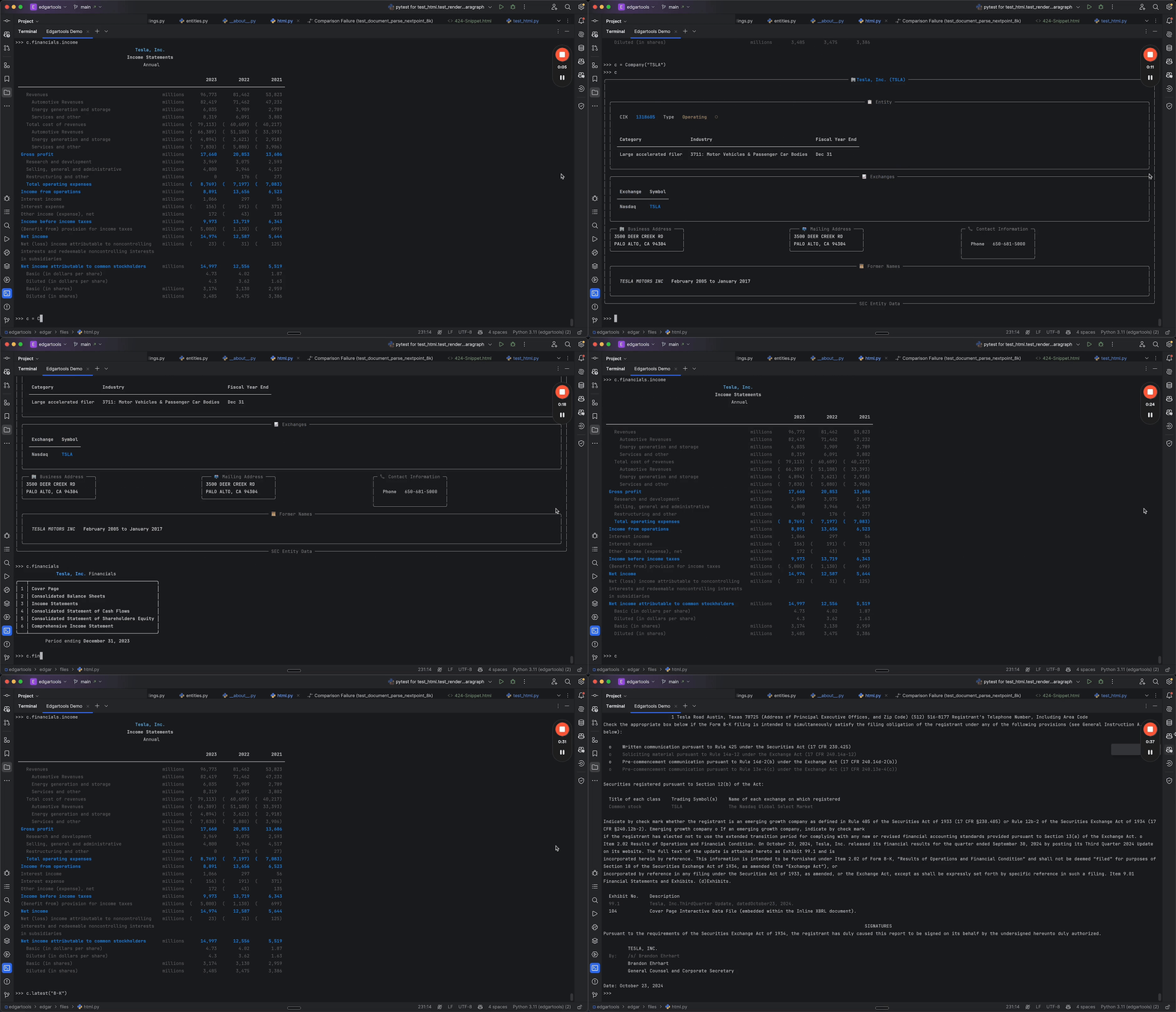
Quick Start
1. Install. The package is edgartools; the module you import is edgar. Python 3.11+.
uv add edgartools # or: pip install edgartools
2. Identify yourself to the SEC. EDGAR requires a contact email on every request. There is no key, signup or rate-limit tier.
from edgar import Company, set_identity

set_identity("your.name@example.com")
3. Get data.
# Five fiscal years of standardized income statement, from XBRL
Company("NVDA").income_statement(periods=5)
#> Total Revenue $215.9B $130.5B $60.9B
Why not just call SEC's APIs?
data.sec.gov gives you JSON facts and filing indexes. Everything past that is your code. EdgarTools does that part:
- Section text and markdown. Item 1A, Item 7 or any Item of a 10-K or 10-Q as text, and whole filings as markdown for RAG. Raw HTML is where hand-rolled parsers break.
- Parsed forms, not XML. 13F holdings, Form 4 transactions, N-PORT portfolios and 8-K items as typed objects and DataFrames.
- Statements that line up. Rows standardized across filers, so "Total Revenue" means the same thing for a bank and a chipmaker, plus discrete quarters (Q4 derived from the 10-K) and trailing twelve months.
- Search and plumbing. Full-text search over filing content, the live filing feed, rate limiting, caching and offline storage.
It runs in your own process, MIT-licensed, with no API key and no vendor quota; SEC's fair-access limit of 10 requests a second still applies, and EdgarTools keeps to it.
What you can do
Full-text search across SEC filings
Search the text of every filing since 2001, not just form types and dates.
from edgar import search_filings

# Every 10-K filed since 2025 that mentions tariffs
results = search_filings("tariff", forms="10-K", start_date="2025-01-01")
hit = results[0]
hit.accession_number, hit.form, hit.filed, hit.company  # a hit's fields; filed is the filing date
hit.get_filing()  # the Filing behind a hit, ready for .obj() or .markdown()

# Structured: 8-Ks that reported a cybersecurity incident (Item 1.05) in 2025
search_filings(forms="8-K", items="1.05", start_date="2025-01-01", end_date="2025-12-31")
#> 19 total
Financial statements over several years
Company("MSFT").income_statement(periods=10) # also .balance_sheet() and .cash_flow_statement()
One metric across companies
Pick rows by their standardized label, never by position: the first row of an income statement is not always total revenue.
import pandas as pd

revenue = {
    ticker: Company(ticker).income_statement(periods=3, as_dataframe=True)
            .set_index("label").filter(like="FY").loc["Total Revenue"] / 1e9
    for ticker in ["JPM", "PFE", "XOM"]
}
pd.DataFrame(revenue).round(1)  # $ billions
#> FY 2025 182.4 62.6 332.2
Quarterly figures and trailing twelve months
nvda = Company("NVDA")
nvda.get_ttm_revenue()                                 # the last four quarters, summed
nvda.income_statement(period="quarterly", periods=8)   # discrete quarters; Q4 is derived from the 10-K
Sections and markdown for RAG
filing = Company("NVDA").latest("10-K")
filing.markdown()          # the whole filing as markdown

tenk = filing.obj()
tenk.risk_factors          # Item 1A as text
tenk["Item 1C"]            # any Item by number
Find filings, by anything
from edgar import find, get_current_filings, get_filings

get_filings(2025, 4, form="10-K")   # every 10-K filed in Q4 2025
get_current_filings()               # the live feed, as SEC posts it
find("0000320193-25-000079")        # an accession number, CIK or ticker


13F institutional holdings
thirteenf = Company("BRK.A").get_filings(form="13F-HR").latest().obj()
thirteenf.holdings  # one row per security: Issuer, Cusip, Ticker, SharesPrnAmount, Value, ...
Institutional Holdings guide →

Insider trades from Form 4
form4 = Company("TSLA").get_filings(form="4").latest().obj()
form4.to_dataframe()  # buys, sells, grants and exercises

Fund holdings from N-PORT
from edgar import Fund

Fund("VOO").get_portfolio()  # the latest N-PORT holdings as a DataFrame
8-K events and earnings releases
eightk = find("0001045810-26-000073").obj()  # NVIDIA, 2026-08-26
eightk.items      # ['Item 2.02', 'Item 9.01']
eightk.earnings   # the EX-99.1 press release tables, parsed
Library or hosted?
EdgarTools is this library: free, MIT-licensed, running in your own Python process. edgar.tools is the hosted platform built on it: the same parsing, kept running and current, with every answer cited to its filing. You are not paying for the parsing; you are paying for it to be run and answerable. No feature is ever removed from the library to sell the platform.
| If you want to… | Use |
|---|---|
| Build something that runs: pipelines, backfills, backtests, model corpora, notebooks, custom joins, anything repeated across hundreds of names or run inside your own network | The library |
| Ask, not build: what the companies you cover filed and what changed since last time, who sold, who holds it, one person across every company they touch, screens across a universe, alerts, cited answers to forward or share with a team. From a browser, a phone, Excel, Claude or ChatGPT, or an agent that cannot run Python | edgar.tools. Free account to start |
| Own a maintained dataset (insider trades, 13F, BDC portfolios, material events), every row traceable to its filing, without running the pipeline | edgar.tools data licensing |
| Fetch one known filing or one JSON document, once, from a script | Neither: call EDGAR directly |
Both have an MCP server: the library's runs locally (see AI Integration below), and edgar.tools' is hosted at app.edgar.tools/mcp. Attach one per client, not both: they overlap and split your assistant's routing.
AI integration
EdgarTools ships an agent skill and a local MCP server, both in the ai extra. For an assistant that cannot run Python, use the hosted connector from the section above instead.
pip install "edgartools[ai]"
python -c "from edgar.ai import install_skill; install_skill()"  # the skill, for Claude Code and Claude Desktop
The MCP server works with any MCP client. For Claude Desktop, add it to claude_desktop_config.json:
{
  "mcpServers": {
    "edgartools": {
      "command": "uvx",
      "args": ["--from", "edgartools[ai]", "edgartools-mcp"],
      "env": {
        "EDGAR_IDENTITY": "Your Name your.email@example.com"
      }
    }
  }
}
uvx needs uv; without it, pip install "edgartools[ai]" and run python -m edgar.ai. Setup for other clients: MCP server guide · Skill guide.
Support the project
The SEC changes filing formats and ships a new XBRL taxonomy every year. Sponsorship is what keeps the parsers current and pays for new ones as new disclosures appear.
- GitHub Sponsors: monthly tiers for individuals, and for teams running EdgarTools in production, tiers with a first-response time on the issues you open and your logo in this README.
- Buy Me a Coffee: a one-time thank-you.
- Consulting: help from the library's author with SEC data pipelines and financial AI built on it.


Docs, help and contributing
- Documentation · Cheat sheet · Notebooks · Blog
- Questions go to Discussions; bugs and feature requests to Issues.
- Contributions are welcome, including AI-assisted ones. Read the contributing guide and point your assistant at AGENTS.md.
EdgarTools is distributed under the MIT License.
Ähnliche Ressourcen

OpenBB Platform CLI
CLICommand-line edition of the open-source OpenBB investment research platform: query stock prices, financial statements, macroeconomic and other financial data from the terminal, and automate data pulls with Routine scripts. Officially maintained; some sources need API keys.
OpenBB-finance/OpenBB74.3k
Finance Toolkit MCP
MCPFrom the FinanceToolkit author: computes ratios, valuation, risk and macro indicators with 500+ transparent formulas, for company comparisons and first-pass due diligence. Hosted, no install; enter a Financial Modeling Prep key on first connect (free tier: US stocks, 5 years). Verify results.
JerBouma/FinanceToolkit5.4k
ExcelMcp
MCPDrives desktop Excel on Windows: refresh Power Query, build pivot tables and charts, evaluate DAX and run VBA while keeping existing formulas and formatting, so finance and admin staff can automate existing reports. Needs Windows, Excel 2016+ and Node.js; no macOS.
sbroenne/mcp-server-excel821
Camelot
CLIOpen-source PDF table extraction with a camelot CLI: exports tables from financial reports, bank statements and statistical reports to Excel, CSV or Markdown, with an accuracy score. Needs Python 3.10+; handles text-based PDFs by default, scans need the ml and ocr extras. Double-check results.
camelot-dev/camelot3.8k
EODHD Claude Skills
PluginEODHD's official plugin (remote MCP, 7 workflow skills, an analyst subagent): quotes, fundamentals and macro data from 70+ exchanges worldwide, company briefs, stock screening and portfolio risk analysis. Needs an EODHD account; free tier: 20 calls/day, basic US data only. Not investment advice.
EodHistoricalData/eodhd-claude-skills46OpenBB MCP Server
MCPOfficial OpenBB MCP server exposing the OpenBB Platform's equity, ETF, macroeconomic, crypto and news data to agents; enable only the tool categories you need to save context. Needs uv locally; some data sources need your own API keys. Not investment advice.
OpenBB-finance/OpenBB74.3k