
ableton-copilot-mcp
MCPAbleton Live assistant: create tracks and clips in Arrangement view, batch add, edit and delete notes, load instruments and effects, and record over a time range; note edits can be undone. Needs Live 12 and Node.js 20+, plus the AbletonJS control script installed and enabled in Live.
ableton-copilot-mcp




An MCP (Model Context Protocol) server built on ableton-js for real-time interaction and control with Ableton Live's Arrangement View, dedicated to assisting music producers in their music production.
🎯 Note
As a music producer, I have some understanding of using Ableton for music creation. During the creative process, we often need to handle various tedious operations, such as humanizing note properties, merging notes, recording one track to another audio track, etc. Previously, we could only rely on the functions provided by the host DAW for these operations. However, with the emergence of large language models and MCP, we now have the possibility to let AI help us with automation. Although it's still not realistic for AI to directly generate notes or create a complete song (it can't generate a good-sounding song), having AI assist us with auxiliary operations presents a new possibility.
🎥 Demo
This is a simple demonstration video of MIDI operations.
https://github.com/user-attachments/assets/8d635c4c-a1f2-44be-93ae-062038d14c71
🚀 Features
🎵 Song Control
- Get basic song information (root note, scale name, tempo, song length, etc.)
- Get a list of all tracks
- Create MIDI, audio, and return tracks
- Delete and duplicate tracks
🎹 Track Management
- Get all clips in a track
- Create empty MIDI clips in the arrangement view tracks
- Create audio clips in tracks based on provided sample file paths
- Set track properties (mute, color, name, arm, solo, etc.)
- Duplicate MIDI clips to specified tracks
🎼 Clip Operations
- Get clips in the piano roll view
- Get and manage all notes in a clip
- Add, delete, and replace notes in clips
- Set clip properties (name, color, looping, loop_start, loop_end, etc.)
🎧 Audio Operations
- Supports recording track content based on time range
🔌 Device Management
- Load audio effects, instruments and plugins
- Modify device parameters
- Browse available devices in the library
📝 State Management
- Operation history tracking and detailed logging
- Support for operation rollback (currently only supports note operations)
- Browse and restore previous states
📝 To-Do List
- Support automatic envelope adjustment
- Support more snapshot types (track properties, device parameters, etc.)
⚠️ Warning
- Direct manipulation of MIDI clips by AI may result in the loss of original notes and cannot be undone with Ctrl + Z. Please operate with caution. If needed, you can ask the AI to help you roll back note operations.
📥 Installation
Prerequisites
- Node.js environment: Ensure Node.js is installed (v20+ recommended) and the
npxcommand is available🔗 Download: Node.js official website
Installation Steps
1. Install AbletonJS MIDI Remote Scripts
Choose ONE of the following three methods to install MIDI Remote Scripts:
-
Method 1: One-line installation (Recommended)
npx @xiaolaa2/ableton-copilot-mcp --install-scripts # or use the short form npx @xiaolaa2/ableton-copilot-mcp -is -
Method 2: Tool-assisted installation
- First, start ableton-copilot-mcp (see Usage section below)
- Let AI assistant or manually call the MCP tool
init_ableton_jsto complete the installation automatically
-
Method 3: Manual installation
- Create a folder named "Remote Scripts" in your Ableton User Library:
- Windows:
C:\Users\[username]\Documents\Ableton\User Library\Remote Scripts - Mac:
/Users/[username]/Music/Ableton/User Library/Remote Scripts
- Windows:
- Download MIDI Remote Scripts from the ableton-js project
- Copy the downloaded
midi-scriptfolder to the location above - Rename it to
AbletonJS
- Create a folder named "Remote Scripts" in your Ableton User Library:
🔧 Usage
Quick Start
-
Launch Ableton Live
-
Enable AbletonJS Control Surface
- Open Ableton Live Preferences:
Preferences→Link/MIDI - In the
MIDItab, locate theControl Surfacesection - Select
AbletonJSfrom the dropdown menu
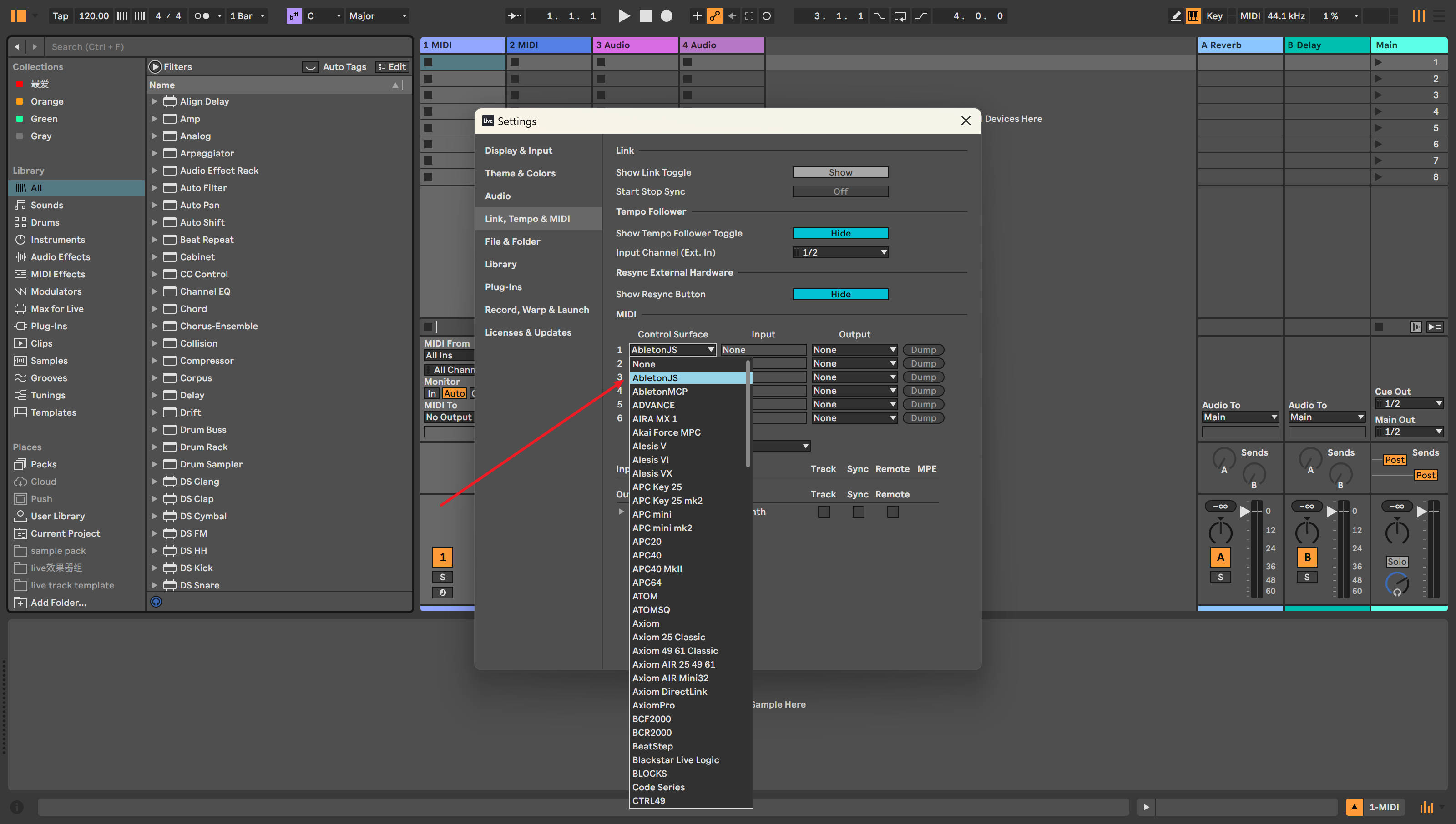
Figure 1: Enabling AbletonJS Control Surface in Ableton Live Configuration
- Open Ableton Live Preferences:
-
Connect using an MCP client
The following clients can be used as MCP endpoints:
- Cursor
- Cherry Studio
- Claude Desktop
- Other MCP clients
Client Configuration
Cursor Configuration Example
Add the following configuration to your Cursor settings:
"ableton-js-mcp": {
    "command": "npx",
    "args": [
        "-y",
        "@xiaolaa2/ableton-copilot-mcp"
    ]
}
For the latest version:
"ableton-js-mcp": {
    "command": "npx",
    "args": [
        "-y",
        "@xiaolaa2/ableton-copilot-mcp@latest"
    ]
}
Custom Storage Path (Optional)
You can specify a custom data storage location using the BASE_PATH environment variable:
"ableton-js-mcp": {
    "command": "npx",
    "args": [
        "-y",
        "@xiaolaa2/ableton-copilot-mcp"
    ],
    "env": {
        "BASE_PATH": "D:\\ableton_copilot_mcp"
    }
}
💡 Tip: The storage path is used to save log files, operation history, and state snapshots
✅ Compatibility Testing
Compatibility primarily depends on the version support of the ableton-js library.
| Ableton Live Version | Test Status |
|---|---|
| 12.1.10 | ✅ Tested and working |
| 11.x | ⚠️ Not tested yet |
| 10.x | ⚠️ Not tested yet |
🤝 Contributing
Issues and contributions are welcome. Please submit issues or suggestions through GitHub Issues.
📄 License
This project is licensed under the MIT License.
⚠️ Disclaimer
This is a third-party integration and not made by Ableton.
Recursos relacionados

Ableton MCP
MCPConnects agents to Ableton Live for music production: create MIDI and audio tracks, write notes, load instruments and effects, arrange whole songs and control playback. Requires installing the companion Remote Script in Live; anonymous telemetry is on by default.
ahujasid/ableton-mcp3.2k
Ableton MCP Extended
MCPControl Ableton Live in natural language: create tracks, write MIDI notes, load instruments and effects, and adjust device parameters and scenes; add the ElevenLabs MCP (API key needed) to generate vocals. Needs Live 11+, Python 3.10+ and the Remote Script, installed from source.
uisato/ableton-mcp-extended278
live-coding-music-mcp
MCPLets Claude drive Strudel.cc for live-coded music: generate and play drums, bass and melodies, with music theory helpers, audio analysis and MIDI import/export. Needs Node.js 22 and Playwright browsers; optional AI accompaniment needs a Gemini key or a signed-in Claude/Codex CLI. Unofficial.
williamzujkowski/live-coding-music-mcp244
REAPER MCP Server
MCPLets agents drive REAPER from arrangement through mixing to mastering: create tracks and buses, write MIDI, load effects, automate, render stems, and analyze loudness, spectrum and clipping. Needs REAPER running, Python 3.10+, and a script run inside REAPER to enable the reapy remote API. Alpha.
bonfire-systems/reaper-mcp157
ReaperMCP
MCPHands REAPER to agents for full music production: composition and MIDI editing, vocal slicing, automatic mixing and mastering in 35 styles, and loudness and silence QC, all running locally with no project upload. Needs REAPER 7+, Python 3.10+, and the repo's Lua script loaded in REAPER.
xDarkzx/Reaper-MCP98
flstudio-mcp
MCPLets Claude diagnose mixes and compose in FL Studio: finds clipping and level imbalances and fixes them after you confirm, tweaks EQ, compression and reverb, writes melodies in a key and exports MIDI, with rollback. Needs FL Studio 2025+, Python 3.10+, two virtual MIDI ports; install from source.
rosasynthesiz/flstudio-mcp87