
F2C MCP Server
MCPHands Figma node layout, styles and images to AI coding tools to turn into high-fidelity HTML/CSS, React or Tailwind code, and downloads design images locally. Needs a Figma personal access token; sends basic usage stats; switch to the plugin version if you hit Figma API rate limits.
F2C MCP Server




Due to Figma REST API rate limits, if you are affected, please switch to @f2c/mcp-plugin for normal operation.
English | 简体中文
A Model Context Protocol server for Figma Design to Code using F2C.
Features
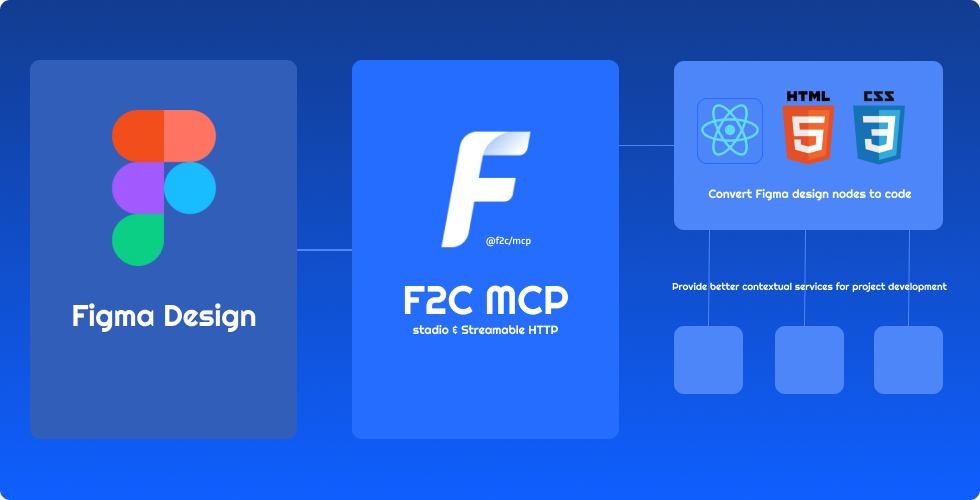
- 🎨 Pixel-Perfect HTML/CSS:F2C converts Figma designs to pixel-perfect HTML/CSS with precision.
- ⚛️ Multi-Framework Support:F2C generates React, CSS Modules, and Tailwind CSS code for fast development.
- 🧠 Figma Design Context:F2C integrates design context, ensuring compatibility with AI tools like Cursor.
- 🔗 Figma File URL Parsing:F2C converts design nodes via Figma URLs, streamlining workflows.
- 🖼️ Remote Image Localization:F2C automates downloading Figma images to local assets for efficiency.
How it works
- Configure the Server in an MCP-supported IDE (e.g., Cursor, Trae).
recommended to use Comate AI IDE
- Open your chat in IDE (e.g. agent mode in Cursor).
- Paste a link to a Figma Node (Right-click any node in the Figma Layer panel to copy it).
- Enter your requirements in the chat, such as fetching node data, downloading images, converting to code, etc.
Configuration and Development
See Configuration and Development
Data Privacy Notice
The logging tools integrated in this project are used solely for basic usage statistics and error log reporting. No sensitive information or user data is collected. All reported data is used exclusively to improve product quality and user experience.
FAQ
See FAQ
Credits
Thanks to:
- Framelink Figma MCP Server Give Cursor and other AI-powered coding tools access to your Figma files with this Model Context Protocol server.
- Cursor Talk to Figma MCP Allowing Cursor to communicate with Figma for reading designs and modifying them programmatically.
- Figma MCP Server This server provides tools for viewing, commenting, and analyzing Figma designs directly through the ModelContextProtocol.
Recursos relacionados

Figma Design to Code
SkillTurns Figma designs into production code in your project, using the design screenshot as the visual target and reusing existing components, design tokens and Code Connect mappings first. Maintained by Figma; needs the Figma MCP server (free plans get only 6 calls a month).
figma/mcp-server-guide2.1kFigma Skills (mcp-server-guide)
SkillFigma's official skill collection: implement designs as code, map components with Code Connect, generate design-system libraries from code, and build screens and FigJam diagrams on the canvas. Needs the Figma MCP server; canvas writes are in beta and currently free.
figma/mcp-server-guide2.1k
Framelink MCP for Figma
MCPSimplifies Figma designs into layout and style data for coding agents, so UIs built from the design are more accurate than working from screenshots. Requires a Figma personal access token.
GLips/Figma-Context-MCP16k
Figma Console MCP
MCPLets agents read and write Figma: extract variables, components and styles, create and edit screens, FigJam boards and slides on the canvas, and run accessibility checks and design-system audits. Needs a Figma personal access token, the Figma desktop app, Node.js and the companion plugin.
southleft/figma-console-mcp2.5kFigma MCP Server
MCPFigma's official remote MCP: hands components, variables and layout from your designs to the agent to generate code, and can create and edit designs on the canvas. Needs Figma sign-in; Starter plans and View or Collab seats get only 6 read calls a month.
figma/mcp-server-guide2.1k
Figwright
MCPFree two-way Figma MCP that needs no paid Dev Mode seat: turns designs into code that fits your existing project, or builds pages and components on the canvas from a description, with data staying on your machine. Needs Node.js 20.19+, the Figma desktop app and the companion plugin.
awdr74100/figwright1.1k