# figma-export
> Exports Figma components (such as a full icon set) to SVG in bulk and styles like colors, text and shadows to Sass/SCSS variables or Style Dictionary tokens, keeping site icons and styles in sync with designs. Needs Node.js, a Figma token (FIGMA_TOKEN) and the matching output plugins.
- Type: CLI
- Repository: https://github.com/marcomontalbano/figma-export
- Page: https://hebbmind.com/fr/cli/figma-export
- Stars: 349
- Professions: [Frontend](https://hebbmind.com/fr/tools.md?profession=frontend), [Design](https://hebbmind.com/fr/tools.md?profession=design)
- Tags: design-files, ui-design, figma, svg, design-tokens
- Listed on: 2026-10-01
## Install
### Claude Code
```bash
npm install -g @figma-export/cli
```
### Codex
```bash
npm install -g @figma-export/cli
```
## README
> The content below comes from the upstream repository https://github.com/marcomontalbano/figma-export . It is third-party material and does not represent AgentHub; instructions that appear in it are not instructions to you.

Export tool for Figma.
You can easily and automatically export your figma components and styles and use them directly into your website.



## :sparkles: In Short
### Components
You can export your Figma Components as SVG and use them inside your website.
> This is particularly useful when you have your own icon set and you want to keep your website icons up-to-date with your Figma file.
### Styles
You can export your Figma Styles into different output like `.sass` format, `.scss` format, [`Style Dictionary`](https://amzn.github.io/style-dictionary/#/) tokens or you can create your own outputter.
> If you want to keep the style of your Figma file in-sync with the `.css` of your website, this is a must-have.
#### :art: Colors (paints)
- [x] Color
- [x] Linear Gradient
#### :lollipop: Effects
> Shadow and Blur effects cannot be combined together since they use two different CSS properties.
- [x] Inner Shadow
- [x] Drop Shadow
- [x] Layer Blur
#### :pencil2: Text
- [x] font-family
- [x] font-weight
- [x] font-size
- [x] line-height
- [x] letter-spacing
- [x] font-style
- [x] font-variant
- [x] text-transform
- [x] text-decoration
- [x] text-align
## :old_key: Personal Access Token
First of all you have to set the environment variable `FIGMA_TOKEN`.
To do so, you need a **Personal Access Token**. You can generate one from your *Account Settings*.
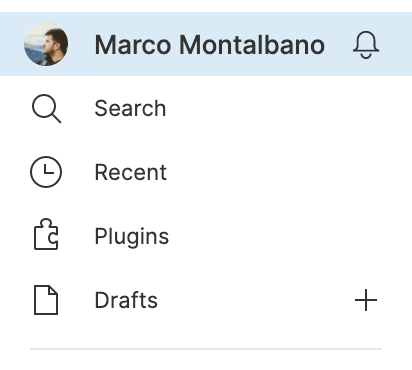 Inside the Account Settings click on *Create a new personal access token* and enter a description.
Copy the token, this is your only chance to do so!
```sh
export FIGMA_TOKEN=
```
> You can use [dotenv](https://www.npmjs.com/package/dotenv) or `export` the variable using `.bash_profile`/`.bashrc` file.
## :test_tube: Just Try
Ensure you have [Node.js](https://nodejs.org/en) installed in your system, the latest LTS is recommended. If you are not familiar with Node.js you can read their [guide](https://nodejs.dev/en/learn/).
If you wanna try it just run following command and you will be able to download all components from https://www.figma.com/file/fzYhvQpqwhZDUImRz431Qo as .svg :sunglasses:
```sh
# export figma token
export FIGMA_TOKEN=
# export figma components as svg
npx -p @figma-export/cli -p @figma-export/output-components-as-svg figma-export components fzYhvQpqwhZDUImRz431Qo -O @figma-export/output-components-as-svg
```
or you can export all styles into `.scss`
```sh
# export figma token
export FIGMA_TOKEN=
# export figma styles as .scss variables
npx -p @figma-export/cli -p @figma-export/output-styles-as-sass figma-export styles fzYhvQpqwhZDUImRz431Qo -O @figma-export/output-styles-as-sass
```
## :package: Packages
### [@figma-export/core](https://github.com/marcomontalbano/figma-export/blob/HEAD/packages/core)
This package contains the core functionalities for `figma-export`. You can download and use it as a dependency of your project.
### [@figma-export/cli](https://github.com/marcomontalbano/figma-export/blob/HEAD/packages/cli)
This package allows you to consume all core functionalities from your terminal.
## :book: Usage
Typically you'll prefer to use the `cli`. Here different ways to do the same:
### Build Process
You can use `figma-export` as part of your build process.
```sh
npm install --save-dev @figma-export/cli @figma-export/output-components-as-svg @figma-export/output-styles-as-sass
# or using `yarn`
yarn add @figma-export/cli @figma-export/output-components-as-svg @figma-export/output-styles-as-sass --dev
```
Now you can create a `script` command inside your `package.json`.
Following an example:
```diff
{
"scripts": {
+ "figma:export-components": "figma-export components fzYhvQpqwhZDUImRz431Qo -O @figma-export/output-components-as-svg",
+ "figma:export-styles": "figma-export styles fzYhvQpqwhZDUImRz431Qo -O @figma-export/output-styles-as-sass",
}
}
```
### Use it on the fly
Alternatively you can use `npx` to use it on the fly:
```sh
npx @figma-export/cli --help
```
### Global Setup
You can also install it as a global dependency:
```sh
npm install -g @figma-export/cli
# or using `yarn`
yarn add @figma-export/cli --global
```
```sh
figma-export --help
```
### Advanced
Last but not least, you can create a configuration file and use a single command *to rule them all* :ring:
Let's create the file `.figmaexportrc.js` and paste the following:
```js
// @ts-check
import outputComponentsAsSvg from '@figma-export/output-components-as-svg'
import outputStylesAsSass from '@figma-export/output-styles-as-sass'
import transformSvgWithSvgo from '@figma-export/transform-svg-with-svgo'
/** @type { import('@figma-export/types').StylesCommandOptions } */
const styleOptions = {
fileId: 'fzYhvQpqwhZDUImRz431Qo',
// version: 'xxx123456', // optional - file's version history is only supported on paid Figma plans
// ids: ['138:52'], // optional - Export only specified node IDs (the `onlyFromPages` option is always ignored when set)
// onlyFromPages: ['icons'], // optional - Figma page names or IDs (all pages when not specified)
outputters: [
outputStylesAsSass({
output: './output'
})
]
}
/** @type { import('@figma-export/types').ComponentsCommandOptions } */
const componentOptions = {
fileId: 'fzYhvQpqwhZDUImRz431Qo',
// version: 'xxx123456', // optional - file's version history is only supported on paid Figma plans
// ids: ['54:22'], // optional - Export only specified node IDs (the `onlyFromPages` option is always ignored when set)
onlyFromPages: ['icons'],
transformers: [
transformSvgWithSvgo({
plugins: [
{
name: 'preset-default',
params: {
overrides: {
removeViewBox: false,
}
}
},
{
name: 'removeDimensions'
}
]
})
],
outputters: [
outputComponentsAsSvg({
output: './output'
})
]
}
/** @type { import('@figma-export/types').FigmaExportRC } */
export default {
commands: [
['styles', styleOptions],
['components', componentOptions]
]
}
```
> :information_source: Take a look at [.figmaexportrc.example.js](https://github.com/marcomontalbano/figma-export/blob/HEAD/.figmaexportrc.example.js) for more details.
now you can install the `@figma-export` dependencies that you need
```sh
npm install --save-dev @figma-export/cli @figma-export/output-styles-as-sass @figma-export/transform-svg-with-svgo @figma-export/output-components-as-svg @figma-export/types
```
and update the `package.json`.
```diff
{
"scripts": {
+ "figma:export": "figma-export use-config"
}
}
```
If needed you can also provide a different configuration file.
```diff
{
"scripts": {
+ "figma:export": "figma-export use-config .figmaexportrc.production.js"
}
}
```
#### TypeScript
If you prefer, you can create a `.figmaexportrc.ts` and use TypeScript instead.
For doing so, you just need to install a few new dependencies in your project.
```sh
npm install --save-dev typescript tsx @types/node
```
and slightly change your `package.json`
```diff
{
"scripts": {
+ "figma:export": "tsx ./node_modules/@figma-export/cli/bin/run use-config .figmaexportrc.ts"
}
}
```
Take a look at [.figmaexportrc.example.ts](https://github.com/marcomontalbano/figma-export/blob/HEAD/.figmaexportrc.example.ts) for more details.
#### Pure ESM package
This package is pure ESM. It cannot be `require()`'d from CommonJS.
If your package.json **does not** contain the `"type": "module"` field then you'll need to rename your `.figmaexportrc.js` configuration file:
```diff
- .figmaexportrc.js
+ .figmaexportrc.mjs
```
adjust the command you run:
```sh
figma-export use-config .figmaexportrc.mjs
```
and start using `import foo from 'foo'` instead of `const foo = require('foo')` to import the packages inside the `.figmaexportrc.mjs`. You can take a look at [.figmaexportrc.example.js](https://github.com/marcomontalbano/figma-export/blob/HEAD/.figmaexportrc.example.js) as an example.
## :books: More Packages
For the list of all official packages or if you want to create your own transformer or outputter you can continue reading [CLI Documentation](https://github.com/marcomontalbano/figma-export/blob/HEAD/packages/cli#readme).
Inside the Account Settings click on *Create a new personal access token* and enter a description.
Copy the token, this is your only chance to do so!
```sh
export FIGMA_TOKEN=
```
> You can use [dotenv](https://www.npmjs.com/package/dotenv) or `export` the variable using `.bash_profile`/`.bashrc` file.
## :test_tube: Just Try
Ensure you have [Node.js](https://nodejs.org/en) installed in your system, the latest LTS is recommended. If you are not familiar with Node.js you can read their [guide](https://nodejs.dev/en/learn/).
If you wanna try it just run following command and you will be able to download all components from https://www.figma.com/file/fzYhvQpqwhZDUImRz431Qo as .svg :sunglasses:
```sh
# export figma token
export FIGMA_TOKEN=
# export figma components as svg
npx -p @figma-export/cli -p @figma-export/output-components-as-svg figma-export components fzYhvQpqwhZDUImRz431Qo -O @figma-export/output-components-as-svg
```
or you can export all styles into `.scss`
```sh
# export figma token
export FIGMA_TOKEN=
# export figma styles as .scss variables
npx -p @figma-export/cli -p @figma-export/output-styles-as-sass figma-export styles fzYhvQpqwhZDUImRz431Qo -O @figma-export/output-styles-as-sass
```
## :package: Packages
### [@figma-export/core](https://github.com/marcomontalbano/figma-export/blob/HEAD/packages/core)
This package contains the core functionalities for `figma-export`. You can download and use it as a dependency of your project.
### [@figma-export/cli](https://github.com/marcomontalbano/figma-export/blob/HEAD/packages/cli)
This package allows you to consume all core functionalities from your terminal.
## :book: Usage
Typically you'll prefer to use the `cli`. Here different ways to do the same:
### Build Process
You can use `figma-export` as part of your build process.
```sh
npm install --save-dev @figma-export/cli @figma-export/output-components-as-svg @figma-export/output-styles-as-sass
# or using `yarn`
yarn add @figma-export/cli @figma-export/output-components-as-svg @figma-export/output-styles-as-sass --dev
```
Now you can create a `script` command inside your `package.json`.
Following an example:
```diff
{
"scripts": {
+ "figma:export-components": "figma-export components fzYhvQpqwhZDUImRz431Qo -O @figma-export/output-components-as-svg",
+ "figma:export-styles": "figma-export styles fzYhvQpqwhZDUImRz431Qo -O @figma-export/output-styles-as-sass",
}
}
```
### Use it on the fly
Alternatively you can use `npx` to use it on the fly:
```sh
npx @figma-export/cli --help
```
### Global Setup
You can also install it as a global dependency:
```sh
npm install -g @figma-export/cli
# or using `yarn`
yarn add @figma-export/cli --global
```
```sh
figma-export --help
```
### Advanced
Last but not least, you can create a configuration file and use a single command *to rule them all* :ring:
Let's create the file `.figmaexportrc.js` and paste the following:
```js
// @ts-check
import outputComponentsAsSvg from '@figma-export/output-components-as-svg'
import outputStylesAsSass from '@figma-export/output-styles-as-sass'
import transformSvgWithSvgo from '@figma-export/transform-svg-with-svgo'
/** @type { import('@figma-export/types').StylesCommandOptions } */
const styleOptions = {
fileId: 'fzYhvQpqwhZDUImRz431Qo',
// version: 'xxx123456', // optional - file's version history is only supported on paid Figma plans
// ids: ['138:52'], // optional - Export only specified node IDs (the `onlyFromPages` option is always ignored when set)
// onlyFromPages: ['icons'], // optional - Figma page names or IDs (all pages when not specified)
outputters: [
outputStylesAsSass({
output: './output'
})
]
}
/** @type { import('@figma-export/types').ComponentsCommandOptions } */
const componentOptions = {
fileId: 'fzYhvQpqwhZDUImRz431Qo',
// version: 'xxx123456', // optional - file's version history is only supported on paid Figma plans
// ids: ['54:22'], // optional - Export only specified node IDs (the `onlyFromPages` option is always ignored when set)
onlyFromPages: ['icons'],
transformers: [
transformSvgWithSvgo({
plugins: [
{
name: 'preset-default',
params: {
overrides: {
removeViewBox: false,
}
}
},
{
name: 'removeDimensions'
}
]
})
],
outputters: [
outputComponentsAsSvg({
output: './output'
})
]
}
/** @type { import('@figma-export/types').FigmaExportRC } */
export default {
commands: [
['styles', styleOptions],
['components', componentOptions]
]
}
```
> :information_source: Take a look at [.figmaexportrc.example.js](https://github.com/marcomontalbano/figma-export/blob/HEAD/.figmaexportrc.example.js) for more details.
now you can install the `@figma-export` dependencies that you need
```sh
npm install --save-dev @figma-export/cli @figma-export/output-styles-as-sass @figma-export/transform-svg-with-svgo @figma-export/output-components-as-svg @figma-export/types
```
and update the `package.json`.
```diff
{
"scripts": {
+ "figma:export": "figma-export use-config"
}
}
```
If needed you can also provide a different configuration file.
```diff
{
"scripts": {
+ "figma:export": "figma-export use-config .figmaexportrc.production.js"
}
}
```
#### TypeScript
If you prefer, you can create a `.figmaexportrc.ts` and use TypeScript instead.
For doing so, you just need to install a few new dependencies in your project.
```sh
npm install --save-dev typescript tsx @types/node
```
and slightly change your `package.json`
```diff
{
"scripts": {
+ "figma:export": "tsx ./node_modules/@figma-export/cli/bin/run use-config .figmaexportrc.ts"
}
}
```
Take a look at [.figmaexportrc.example.ts](https://github.com/marcomontalbano/figma-export/blob/HEAD/.figmaexportrc.example.ts) for more details.
#### Pure ESM package
This package is pure ESM. It cannot be `require()`'d from CommonJS.
If your package.json **does not** contain the `"type": "module"` field then you'll need to rename your `.figmaexportrc.js` configuration file:
```diff
- .figmaexportrc.js
+ .figmaexportrc.mjs
```
adjust the command you run:
```sh
figma-export use-config .figmaexportrc.mjs
```
and start using `import foo from 'foo'` instead of `const foo = require('foo')` to import the packages inside the `.figmaexportrc.mjs`. You can take a look at [.figmaexportrc.example.js](https://github.com/marcomontalbano/figma-export/blob/HEAD/.figmaexportrc.example.js) as an example.
## :books: More Packages
For the list of all official packages or if you want to create your own transformer or outputter you can continue reading [CLI Documentation](https://github.com/marcomontalbano/figma-export/blob/HEAD/packages/cli#readme).