
SQLMesh
CLIFramework for writing data transformation models in SQL or Python, with a Terraform-like plan/apply flow, virtual data environments, unit tests and table diffs, and transpilation across 10+ SQL dialects. A Linux Foundation project and an alternative to dbt.

SQLMesh is a project of the Linux Foundation.
SQLMesh is a next-generation data transformation framework designed to ship data quickly, efficiently, and without error. Data teams can run and deploy data transformations written in SQL or Python with visibility and control at any size.
It is more than just a dbt alternative.
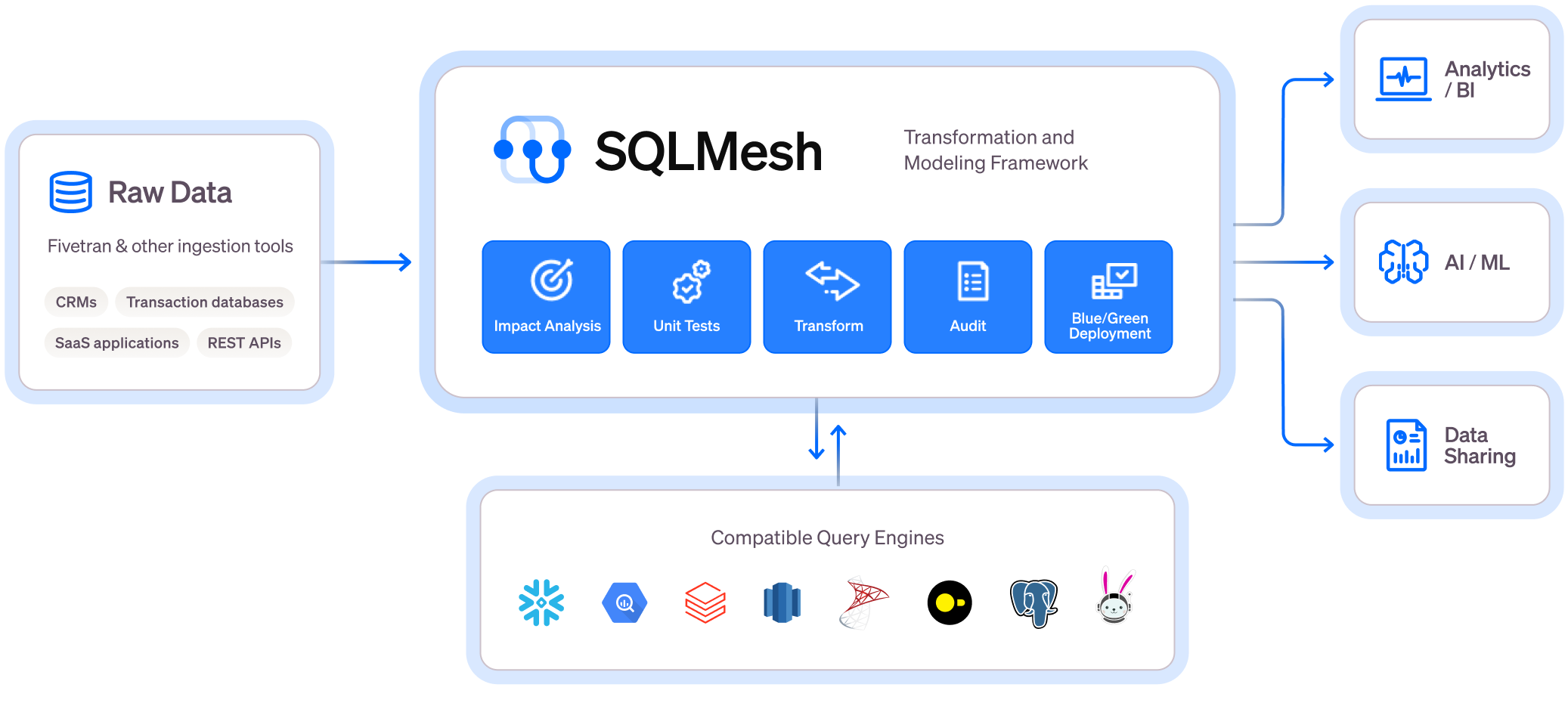
Core Features

Get instant SQL impact and context of your changes, both in the CLI and in the SQLMesh VSCode Extension
Virtual Data Environments
- See a full diagram of how Virtual Data Environments work
- Watch this video to learn more
- Create isolated development environments without data warehouse costs
- Plan / Apply workflow like Terraform to understand potential impact of changes
- Easy to use CI/CD bot for true blue-green deployments
Efficiency and Testing
Running this command will generate a unit test file in the tests/ folder: test_stg_payments.yaml
Runs a live query to generate the expected output of the model
sqlmesh create_test tcloud_demo.stg_payments --query tcloud_demo.seed_raw_payments "select * from tcloud_demo.seed_raw_payments limit 5"

# run the unit test
sqlmesh test
MODEL (
  name tcloud_demo.stg_payments,
  cron '@daily',
  grain payment_id,
  audits (UNIQUE_VALUES(columns = (
      payment_id
  )), NOT_NULL(columns = (
      payment_id
  )))
);

SELECT
    id AS payment_id,
    order_id,
    payment_method,
    amount / 100 AS amount, /* `amount` is currently stored in cents, so we convert it to dollars */
    'new_column' AS new_column, /* non-breaking change example  */
FROM tcloud_demo.seed_raw_payments
test_stg_payments:
model: tcloud_demo.stg_payments
inputs:
    tcloud_demo.seed_raw_payments:
      - id: 66
        order_id: 58
        payment_method: coupon
        amount: 1800
      - id: 27
        order_id: 24
        payment_method: coupon
        amount: 2600
      - id: 30
        order_id: 25
        payment_method: coupon
        amount: 1600
      - id: 109
        order_id: 95
        payment_method: coupon
        amount: 2400
      - id: 3
        order_id: 3
        payment_method: coupon
        amount: 100
outputs:
    query:
      - payment_id: 66
        order_id: 58
        payment_method: coupon
        amount: 18.0
        new_column: new_column
      - payment_id: 27
        order_id: 24
        payment_method: coupon
        amount: 26.0
        new_column: new_column
      - payment_id: 30
        order_id: 25
        payment_method: coupon
        amount: 16.0
        new_column: new_column
      - payment_id: 109
        order_id: 95
        payment_method: coupon
        amount: 24.0
        new_column: new_column
      - payment_id: 3
        order_id: 3
        payment_method: coupon
        amount: 1.0
        new_column: new_column
- Never build a table more than once
- Track what data’s been modified and run only the necessary transformations for incremental models
- Run unit tests for free and configure automated audits
- Run table diffs between prod and dev based on tables/views impacted by a change
Level Up Your SQL
Write SQL in any dialect and SQLMesh will transpile it to your target SQL dialect on the fly before sending it to the warehouse.
- Debug transformation errors before you run them in your warehouse in 10+ different SQL dialects
- Definitions using simply SQL (no need for redundant and confusing
Jinja+YAML) - See impact of changes before you run them in your warehouse with column-level lineage
For more information, check out the documentation.
Getting Started
Install SQLMesh through pypi by running:
mkdir sqlmesh-example
cd sqlmesh-example
python -m venv .venv
source .venv/bin/activate
pip install 'sqlmesh[lsp]' # install the sqlmesh package with extensions to work with VSCode
source .venv/bin/activate # reactivate the venv to ensure you're using the right installation
sqlmesh init # follow the prompts to get started (choose DuckDB)
Note: You may need to run
python3orpip3instead ofpythonorpip, depending on your python installation.
Windows Installation
mkdir sqlmesh-example
cd sqlmesh-example
python -m venv .venv
.\.venv\Scripts\Activate.ps1
pip install 'sqlmesh[lsp]' # install the sqlmesh package with extensions to work with VSCode
.\.venv\Scripts\Activate.ps1 # reactivate the venv to ensure you're using the right installation
sqlmesh init # follow the prompts to get started (choose DuckDB)
Follow the quickstart guide to learn how to use SQLMesh. You already have a head start!
Follow the crash course to learn the core movesets and use the easy to reference cheat sheet.
Follow this example to learn how to use SQLMesh in a full walkthrough.
Join Our Community
Connect with us in the following ways:
- Join the Tobiko Slack Community to ask questions, or just to say hi!
- File an issue on our GitHub
- Send us an email at hello@tobikodata.com with your questions or feedback
- Read our blog
Contributing
We welcome contributions! Please see CONTRIBUTING.md for guidelines on how to contribute, including our DCO sign-off requirement.
Please review our Code of Conduct and Governance documents.
Read more on how to set up your development environment.
License
This project is licensed under the Apache License 2.0. Documentation is licensed under CC-BY-4.0.
Ressources associées

dbt Agent Skills
Skilldbt Labs' official skills: write and edit dbt models, add unit tests and docs, set up the MetricFlow semantic layer, debug failed jobs, and handle dbt version upgrades and cross-platform migrations. Most skills need dbt installed and an existing project.
dbt-labs/dbt-agent-skills737
DuckDB
CLIIn-process analytical SQL database. Its CLI queries CSV, Parquet and JSON files directly with SQL, no import or server needed, so agents can sample and aggregate large files. Officially maintained.
duckdb/duckdb42.2kdbt
CLICommand-line framework for warehouse modeling and ELT transformations: write models in SQL and let dbt handle dependencies, data tests and documentation. v2 is rewritten in Rust as a single binary. Maintained by dbt Labs; needs a data warehouse connection.
dbt-labs/dbt14k
mycli
CLIMySQL terminal client with smart autocompletion and syntax highlighting, also compatible with MariaDB and TiDB. Supports --execute and batch mode with CSV or table output, so agents can run SQL directly.
dbcli/mycli12k
Datasette
CLIPublishes SQLite databases as browsable, queryable web pages and JSON APIs, with SQL queries, metadata and plugins, and deploys to Cloud Run and other platforms with datasette publish. Great for data exploration and data journalism. Needs Python 3.10+.
simonw/datasette11.5k
SQLFluff
CLILinter and formatter for 20+ SQL dialects that auto-fixes most issues and handles Jinja templating and dbt projects (dbt needs a plugin), suited to warehouse code review and CI.
sqlfluff/sqlfluff10k