
Excalidraw MCP App Server
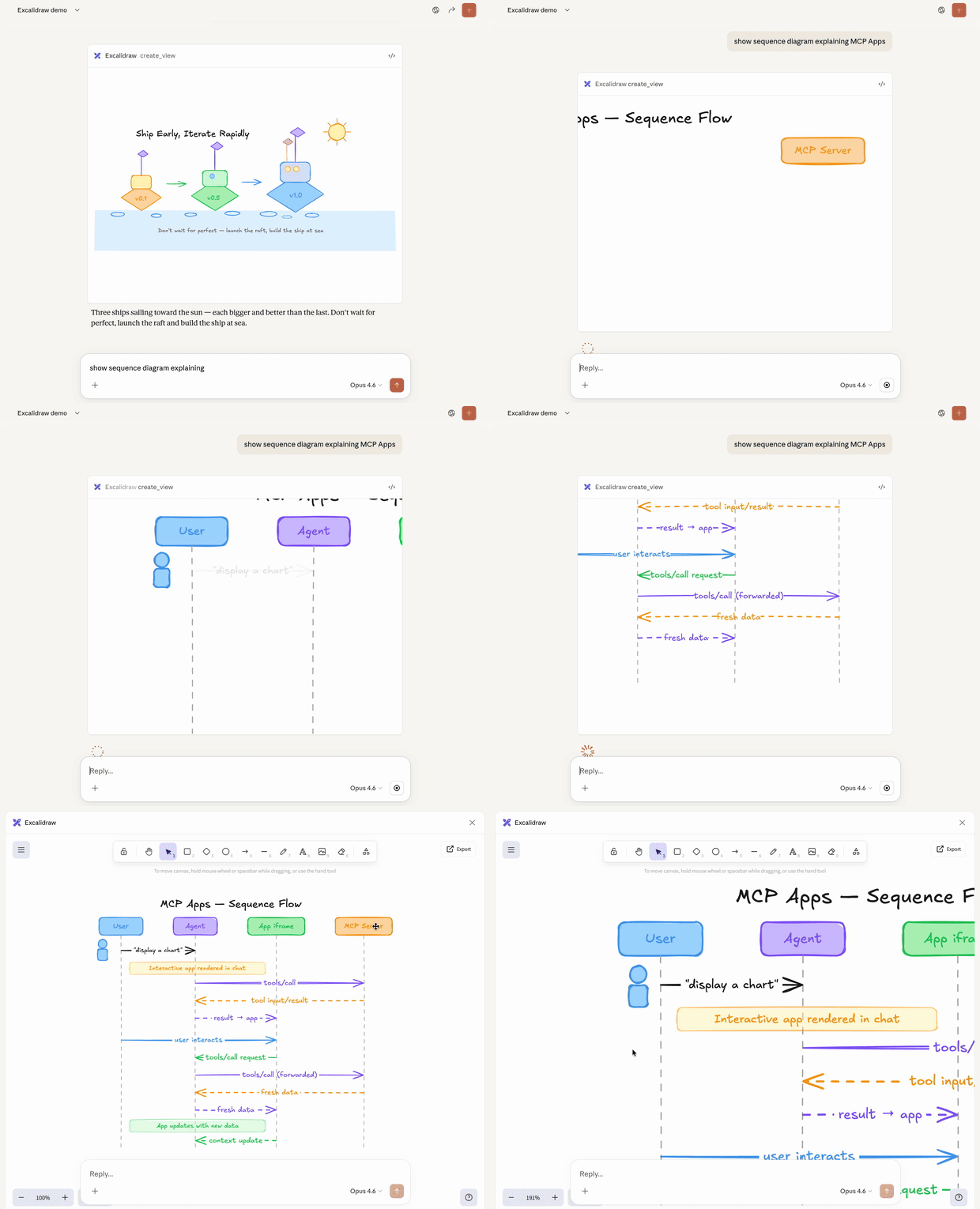
MCPExcalidraw's official MCP App: streams hand-drawn-style architecture diagrams and flowcharts into the conversation, with full-screen editing. Remote endpoint at https://mcp.excalidraw.com; requires a client that supports MCP Apps, such as Claude or ChatGPT.
Excalidraw MCP App Server
MCP server that streams hand-drawn Excalidraw diagrams with smooth viewport camera control and interactive fullscreen editing.
Install
Works with any client that supports MCP Apps — Claude, ChatGPT, VS Code, Goose, and others. If something doesn't work, please open an issue.
Remote (recommended)
https://mcp.excalidraw.com
For apps that don't yet have an official integration, you can add a custom MCP / connector (naming can vary between apps).
Local
Option A: Download Extension
- Download
excalidraw-mcp-app.mcpbfrom Releases - Double-click to install in Claude Desktop
Option B: Build from Source
git clone https://github.com/excalidraw/excalidraw-mcp.git
cd excalidraw-mcp-app
pnpm install && pnpm run build
Add to ~/Library/Application Support/Claude/claude_desktop_config.json:
{
  "mcpServers": {
    "excalidraw": {
      "command": "node",
      "args": ["/path/to/excalidraw-mcp-app/dist/index.js", "--stdio"]
    }
  }
}
Restart Claude Desktop.
Usage
Example prompts:
- "Draw a cute cat using excalidraw"
- "Draw an architecture diagram showing a user connecting to an API server which talks to a database"
What are MCP Apps and how can I build one?
Text responses can only go so far. Sometimes users need to interact with data, not just read about it. MCP Apps is an official Model Context Protocol extension that lets servers return interactive HTML interfaces (data visualizations, forms, dashboards) that render directly in the chat.
- Getting started for humans: documentation
- Getting started for AIs: skill
Contributing
PRs welcome! See Local above for build instructions.
Deploy your own instance
You can deploy your own copy to Vercel in a few clicks:
- Fork this repo
- Go to vercel.com/new and import your fork
- No environment variables needed — just deploy
- Your server will be at
https://your-project.vercel.app/mcp
Release checklist
For maintainers
# 1. Bump version in manifest.json and package.json
# 2. Build and pack
pnpm run build && mcpb pack .

# 3. Create GitHub release
gh release create v0.3.0 excalidraw-mcp-app.mcpb --title "v0.3.0" --notes "What changed"

# 4. Deploy to Vercel
vercel --prod
Credits
Built with Excalidraw — a virtual whiteboard for sketching hand-drawn like diagrams.
License
MIT
관련 리소스

Excalidraw MCP Server
MCPGives agents a live local Excalidraw canvas: add, edit and delete elements to draw architecture diagrams and flowcharts, take screenshots to check the result, convert Mermaid and export .excalidraw files. Runs locally with no API key; also ships a CLI and an agent skill.
yctimlin/mcp_excalidraw2.5k
Excalidraw Diagram Skill
SkillGenerates hand-drawn-style Excalidraw diagrams (.excalidraw files you can keep editing on excalidraw.com) from text, choosing fan-out, timeline or convergence layouts by how concepts relate. Optional uv and Playwright let the agent render and check layouts; colors live in one file you can restyle.
coleam00/excalidraw-diagram-skill5k
Obsidian Visual Skills Pack
PluginVisualization skills for Obsidian that turn text into Excalidraw hand-drawn diagrams, Mermaid charts and Obsidian Canvas mind maps. Marked experimental by the author; the Excalidraw skill needs the matching Obsidian plugin.
axtonliu/axton-obsidian-visual-skills3.6k
Next AI Draw.io MCP Server
MCPLets agents create and edit draw.io diagrams such as flowcharts and architecture diagrams in plain language, with live browser preview, version history and export to .drawio, PNG or SVG. Includes an embedded server; runs locally with no API key.
DayuanJiang/next-ai-draw-io36.3k
Draw.io MCP Server
MCPdraw.io's official MCP: opens XML, CSV or Mermaid diagrams generated by the agent directly in the draw.io editor, good for flowcharts and architecture diagrams. A no-install remote version can also render diagrams inline in the chat.
jgraph/drawio-mcp5.7k
Markmap MCP Server
MCPTurns Markdown outlines into interactive mind map HTML and can export PNG, JPG or SVG server-side (requires Playwright). Runs fully locally with no third-party API key; good for organizing notes, lesson prep and document structure.
jinzcdev/markmap-mcp-server289