
Blueprint Animation
SkillCreates a blueprint-style animation that explains UX decisions step by step for case studies and posts: rebuilds changed parts between Before and After screens, or annotates each module of one screen. Reproduces Figma frames 1:1; CC BY-NC 4.0, non-commercial only.
Blueprint Before/After
A Claude Design skill that explains UX decisions as one continuous, step-by-step blueprint animation. Show a redesign from Before to After, or explain a single finished screen module by module.
Created by Oğuz · @moguzbulbul · oguz.design
Inspired by Arjun Mahesh.
Free for non-commercial use (CC BY-NC 4.0). Commercial use needs written permission.
Watch the full-quality video (MP4)
Two modes
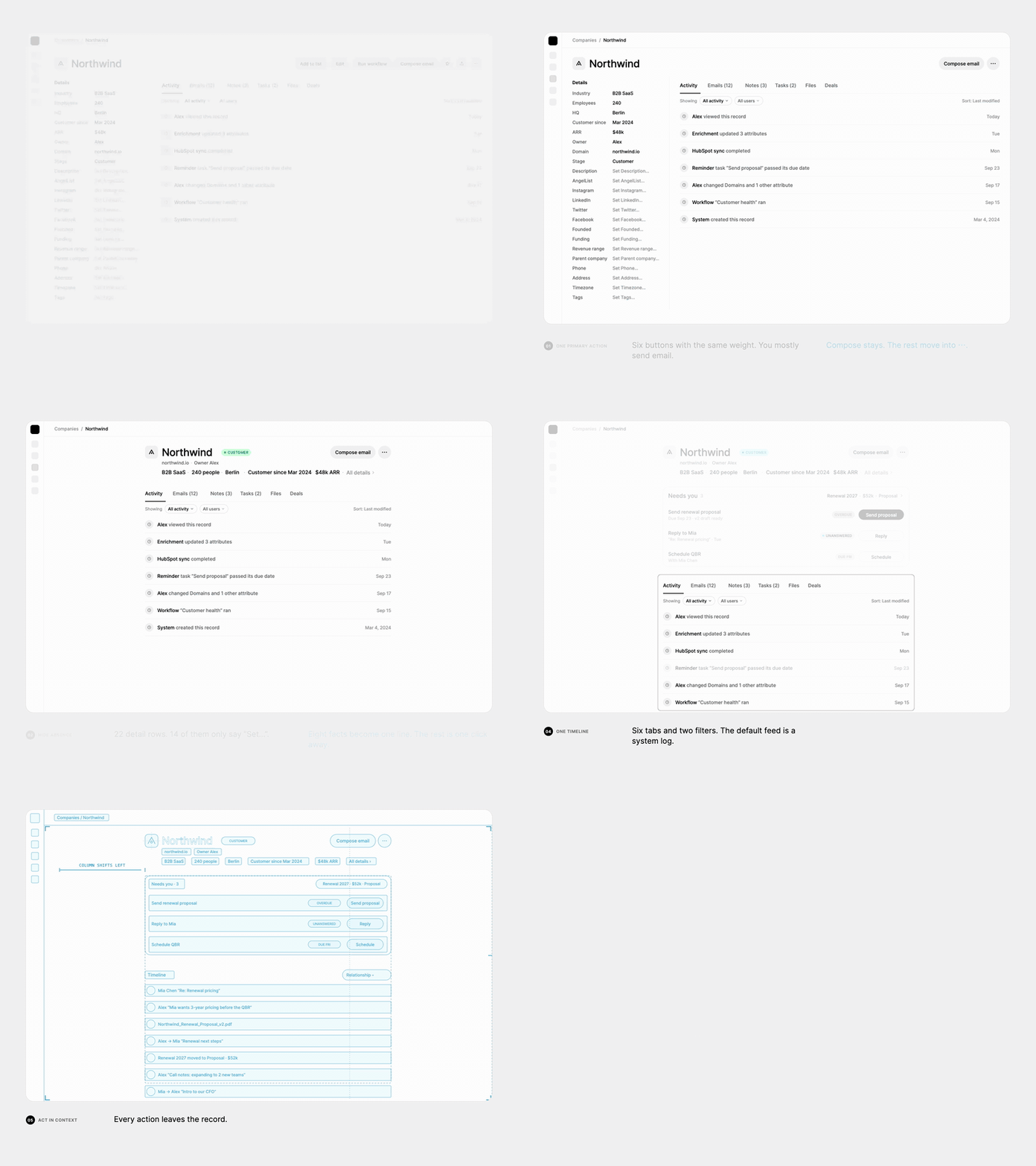
- Redesign (Before + After): the live UI turns into a blueprint, the parts that change rebuild themselves, then the new UI is revealed.
- Explain (one screen): the design never changes. Each module turns into a blueprint in turn, and guides, dimensions and labels show why it is built that way.
What it does
Show why a design works, not only what it looks like. The skill animates one screen that never cuts, in 3–6 numbered steps. Each step explains one UX decision:
- Focus: the rest of the screen fades back, the module is outlined, and the problem (Redesign) or what it is (Explain) appears.
- Blueprint in: a scan line sweeps down and turns the whole screen into a cyan blueprint drawing.
- Construct (Redesign): only the parts that change move, resize or merge. Annotate (Explain): nothing moves; handles, guides, dimension lines and labels draw the reasoning.
- Reveal: the scan line sweeps again and the real UI appears: the new one in Redesign, the same one in Explain.
- Hold: the fix (Redesign) or the why (Explain) sentence fades in, then the next step starts.
Your Figma design is reproduced 1:1. The skill reads every value from the Figma file, uses its real fonts and exported icons, and checks the built screens against the Figma export before it animates anything.
The skill also carries the rules that keep it clean: no text over moving parts, invisible old → new swaps, staggered motion, smooth performance, and a QA checklist before hand-off.
Use it for UX case studies, redesign walkthroughs, design rationale and social posts.
What you give it
- Redesign: the Before and After screens (the After is the source of truth) and 3–6 changes, each with a name, a one-line problem and a one-line fix.
- Explain: the one screen and 3–6 modules, each with a name, what it is and why. Share only the screen and the skill proposes the modules for you to confirm.
- Your design system.
Example
The video above shows Redesign mode: a CRM company page redesigned in 5 steps (One primary action, Hide absence, Open work first, One timeline, Act in context). Its full scene code is in example-scene.jsx.
Install in Claude Design
- Download
blueprint-animation.zip(v1.3.1). - On claude.ai, open Customize → Skills → + → Create skill → Upload a skill and choose the ZIP.
- In Claude Design, share your Before/After screens (or one screen) and ask for a blueprint animation.
Building the ZIP yourself? It must hold blueprint-animation/SKILL.md (not the files at its root). Leave out media, which is only for this page:
zip -r blueprint-animation.zip blueprint-animation -x "blueprint-animation/.git/*" "blueprint-animation/media/*"
License
© 2026 Oğuz (@moguzbulbul). Licensed under CC BY-NC 4.0. See LICENSE.
- You may use, share and adapt this skill for non-commercial purposes, with credit to Oğuz (@moguzbulbul) and a link to this repo.
- Commercial use, for example selling the skill or including it in a paid product or service, needs written permission. Ask on X: @moguzbulbul.
관련 리소스

Figma Design to Code
SkillTurns Figma designs into production code in your project, using the design screenshot as the visual target and reusing existing components, design tokens and Code Connect mappings first. Maintained by Figma; needs the Figma MCP server (free plans get only 6 calls a month).
figma/mcp-server-guide2.1kFigma Skills (mcp-server-guide)
SkillFigma's official skill collection: implement designs as code, map components with Code Connect, generate design-system libraries from code, and build screens and FigJam diagrams on the canvas. Needs the Figma MCP server; canvas writes are in beta and currently free.
figma/mcp-server-guide2.1kFigma Use
SkillFigma's official skill that teaches agents to run Plugin API scripts via use_figma, creating and editing nodes, components, variables and auto layout directly on the canvas. Load it before any use_figma call. Needs a Figma account and the remote MCP server.
figma/mcp-server-guide2.1kfigma-generate-design
SkillBuilds editable Figma designs on the canvas from screens, modals or sidebars in your code, or from a text description, reusing components and variables from the file's published design system first. Maintained by Figma; needs the remote Figma MCP server and the figma-use skill.
figma/mcp-server-guide2.1k
Create Anatomy
SkillRenders a component anatomy annotation in Figma: numbered markers on an instance with an attribute table, plus a section per sub-component listing its internal elements, hidden ones included. Part of uSpec; needs the .md spec from create-component-md, a Figma MCP and a configured template.
redongreen/uSpec247Create Voice
SkillRenders a screen reader spec for a component directly in Figma: focus order plus per-state VoiceOver (iOS), TalkBack (Android) and ARIA (Web) property tables and announcements. Part of uSpec; reads the component .md spec from create-component-md and needs a Figma MCP and a configured template key.
redongreen/uSpec247