
mcptools
MCPPosit's official R package connecting R to Claude Code and other agents: register your own R functions as tools and run them in your open R session, using its data. Out of the box it only switches sessions; add the btw package for docs lookup and data inspection tools. Requires R.
mcptools 


mcptools implements the Model Context Protocol in R. There are two sides to mcptools:
R as an MCP server:
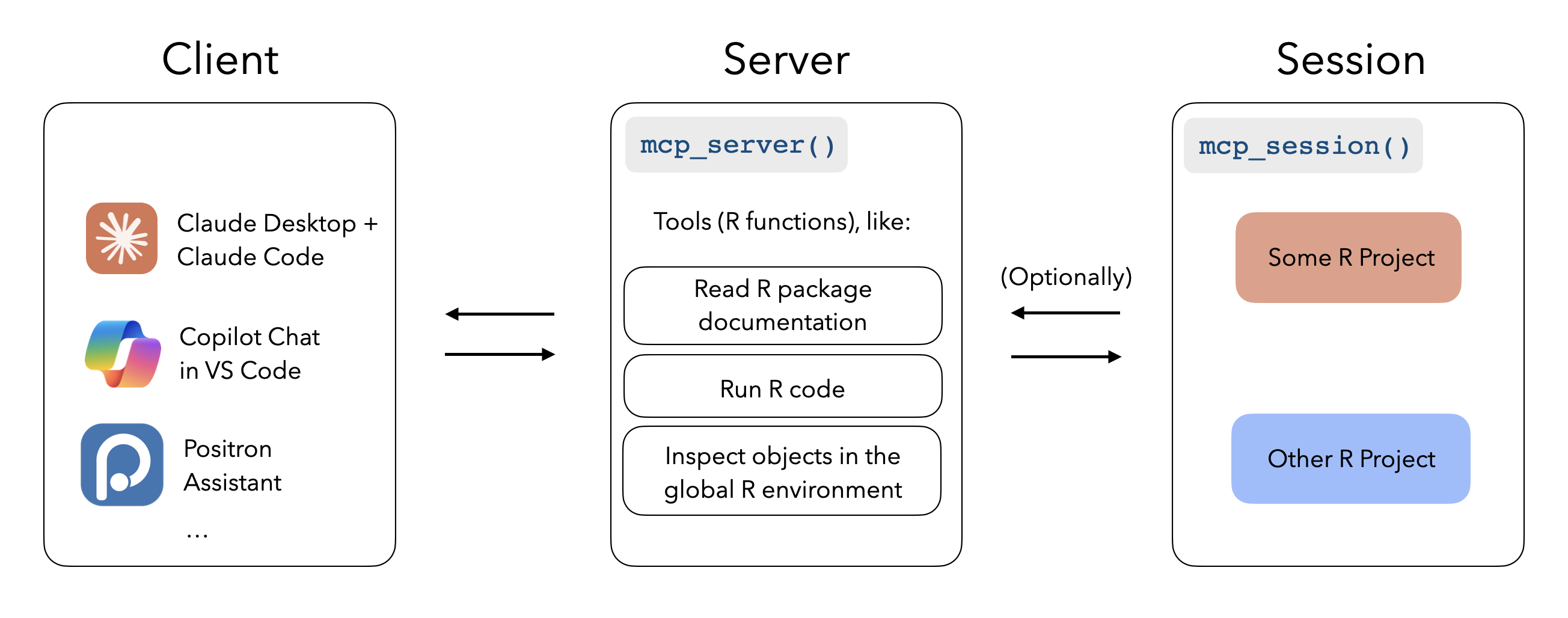
When configured with mcptools, MCP-enabled tools like Claude Desktop, Claude Code, and VS Code GitHub Copilot can run R code in the sessions you have running to answer your questions. While the package supports configuring arbitrary R functions, you may be interested in the btw package’s integrated support for mcptools, which provides a default set of tools to to peruse the documentation of packages you have installed, check out the objects in your global environment, and retrieve metadata about your session and platform.
R as an MCP client:
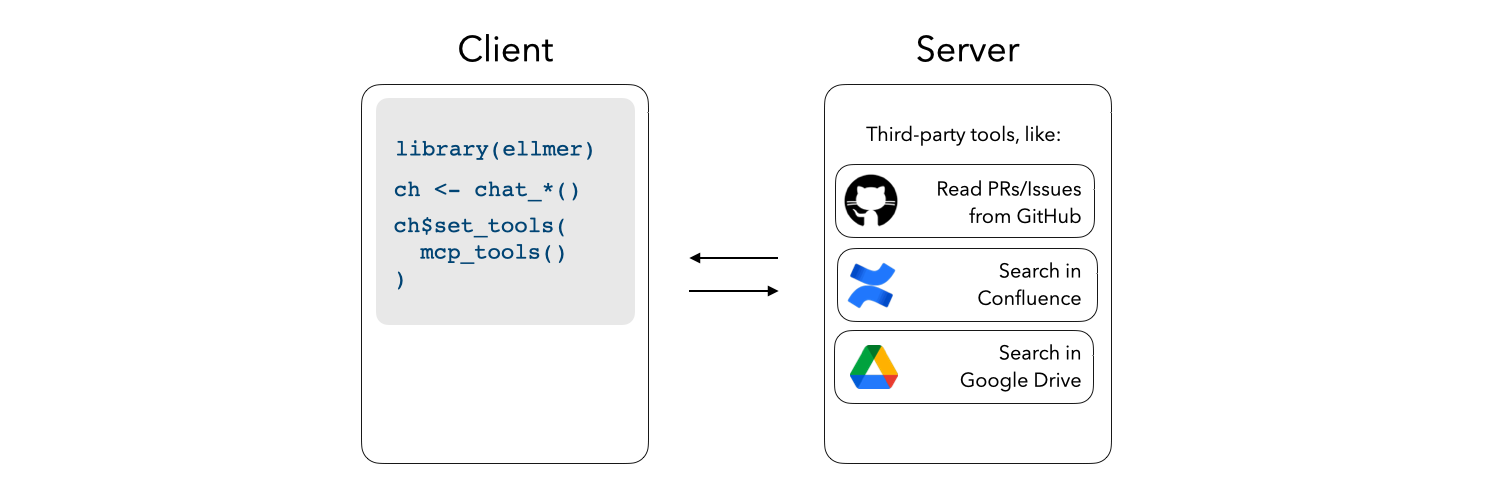
Register third-party MCP servers with ellmer chats to integrate additional context into e.g. shinychat and querychat apps.
Installation
Install mcptools from CRAN with:
install.packages("mcptools")
You can install the development version of mcptools like so:
pak::pak("posit-dev/mcptools")
R as an MCP server
mcptools can be hooked up to any application that supports MCP. For
example, to use with Claude Desktop, you might paste the following in
your Claude Desktop configuration (on macOS, at
~/Library/Application Support/Claude/claude_desktop_config.json):
{
  "mcpServers": {
    "r-mcptools": {
      "command": "Rscript",
      "args": ["-e", "mcptools::mcp_server()"]
    }
  }
}
Or, to use with Claude Code, you might type in a terminal:
claude mcp add -s "user" r-mcptools -- Rscript -e "mcptools::mcp_server()"
Then, if you’d like models to access variables in specific R sessions,
call mcptools::mcp_session() in those sessions. (You might include a
call to this function in your .Rprofile, perhaps using
usethis::edit_r_profile(), to automatically register every session you
start up.)
To deploy an HTTP MCP server to Posit Connect, add a _server.yml file
with engine: mcptools and a tools file:
engine: mcptools
tools: tools.R
Deploy the directory as an R API and mark it as MCP content:
rsconnect::deployAPI(".", contentCategory = "mcp")
If the content URL is https://connect.example.com/content/abc123/, use
https://connect.example.com/content/abc123/mcp as the MCP endpoint.
If you cannot set contentCategory = "mcp" during deployment, set the
MCP category in Connect after deploying and set minimum processes to at
least 1.
R as an MCP client
mcptools uses the Claude Desktop configuration file format to register third-party MCP servers, as most MCP servers provide setup instructions for Claude Desktop in their documentation. For example, here’s what the official GitHub MCP server configuration would look like:
{
  "mcpServers": {
    "github": {
      "command": "docker",
      "args": [
        "run",
        "-i",
        "--rm",
        "-e",
        "GITHUB_PERSONAL_ACCESS_TOKEN",
        "ghcr.io/github/github-mcp-server"
      ],
      "env": {
        "GITHUB_PERSONAL_ACCESS_TOKEN": "<YOUR_TOKEN>"
      }
    }
  }
}
Once the configuration file has been created (by default, mcptools will
look to file.path("~", ".config", "mcptools", "config.json")),
mcp_tools() will return a list of ellmer tools which you can pass
directly to the $set_tools() method from ellmer:
ch <- ellmer::chat_anthropic()
ch$set_tools(mcp_tools())

ch$chat("What issues are open on posit-dev/mcptools?")
Example
In Claude Desktop, I’ll write the following:
“From what year is the earliest recorded sample in the
foresteddata in my Positron session?”
Without mcptools, Claude couldn’t get far here; by default, it can’t run R code and doesn’t have any way to “speak to” my interactive R sessions.
Using the package, the model asks to describe the data frame using a structure that will show summary statistics from the data. mcptools will appropriately route the request to the open Positron session, forwarding the results back to the model for it to situate in a response.
Ressources associées

MATLAB MCP Server
MCPMathWorks' official server that lets agents start your local MATLAB, write and run scripts and unit tests, and check code style and potential errors, for computing, simulation and data analysis. Needs a licensed MATLAB R2021a+ and the downloaded server binary.
matlab/matlab-mcp-server1.7k
Stata MCP
MCPConnects Stata to VS Code or Cursor and exposes a local MCP endpoint so Claude Code or Codex can write and run do-files and read regression output, with graphs shown in the editor; for empirical research. Needs a licensed Stata 17+, the extension installed and the editor open.
hanlulong/stata-mcp511
Wolfram AgentTools
MCPWolfram's official agent tools: use the Wolfram Language and Wolfram|Alpha for symbolic and numeric math and scientific and statistical data, for teaching and research. The command runs the official Docker image with a free developer license; Wolfram 15+ users can install it in the app.
WolframResearch/AgentTools95
Jupyter Notebooks
SkillCreates, edits and validates reproducible Python and SQL Jupyter notebooks: organizes cells as reports or tutorials, checks conclusions against actual output and reruns top to bottom before handoff. Maintained by OpenAI in the Data Analytics plugin of openai/plugins.
openai/plugins7.3k
Math Modeling Skills
SkillTwo skills for the MCM/ICM and China's CUMCM math modeling contests: solver breaks down problems, picks models from a 95+ scenario decision matrix and gives Python or MATLAB templates; paper coaches abstracts, model validation and formatting from winning papers. Needs Python or MATLAB.
Lupynow/math-modeling-skills423
Jupyter MCP Server
MCPConnects agents to live Jupyter notebooks: read, write, insert and execute cells and read multimodal outputs like charts, for interactive data analysis. Bring your own JupyterLab or JupyterHub; open source, maintained by Datalayer.
datalayer/jupyter-mcp-server1.3k