
DBHub
MCPOne server connecting PostgreSQL, MySQL, MariaDB, SQL Server, Oracle and SQLite, exposing just two tools by default to save context, with read-only mode and SSH tunneling. From Bytebase.
[!NOTE]
If you need an enterprise-level database MCP server with built-in guardrails like approval flow, access control, data masking, and audit logging beyond what DBHub offers, check out Bytebase.

            +------------------+    +--------------+    +------------------+
            |                  |    |              |    |                  |
            |  Claude Desktop  +--->+              +--->+    PostgreSQL    |
            |                  |    |              |    |                  |
            |  Claude Code     +--->+              +--->+    SQL Server    |
            |                  |    |              |    |                  |
            |  Cursor          +--->+    DBHub     +--->+    Oracle        |
            |                  |    |              |    |                  |
            |  VS Code         +--->+              +--->+    SQLite        |
            |                  |    |              |    |                  |
            |  Copilot CLI     +--->+              +--->+    MySQL         |
            |                  |    |              |    |                  |
            |                  |    |              +--->+    MariaDB       |
            |                  |    |              |    |                  |
            +------------------+    +--------------+    +------------------+
                 MCP Clients           MCP Server             Databases
DBHub is a minimal MCP server: token-efficient, zero-dependency, and just two tools by default with opt-in extras. This lightweight gateway allows MCP-compatible clients to connect to and explore different databases:
- Minimal: Zero dependency, token efficient with a minimal set of MCP tools to maximize context window
- Multi-Database: PostgreSQL, MySQL, MariaDB, SQL Server, Oracle, and SQLite through a single interface
- Multi-Connection: Connect to multiple databases simultaneously with TOML configuration
- Guardrails: Read-only mode, row limiting, and query timeout to prevent runaway operations
- Secure Access: SSH tunneling and SSL/TLS encryption
DBHub is the official example in the Claude Code docs for connecting to PostgreSQL via MCP.
Token Efficiency
DBHub loads just 2 tools by default at 1.4k tokens — 13-14x fewer than alternatives — keeping the context window open for your actual work.
| MCP Server | Default Config | Default Tools |
|---|---|---|
| DBHub | 1.4k | 2 (execute_sql, search_objects) |
| MCP Toolbox | 19.0k | 28 |
| Supabase MCP | 19.3k | all |
Use Cases
- Local Development: Schema exploration, query validation, and data debugging with Claude Code, VS Code, Cursor, etc.
- Non-Technical Access: Expose curated, read-only views to non-technical staff via Claude Desktop, VS Code, Cursor, etc.
- Multi-Database Consolidation: Replace separate MCP servers for each database with a single DBHub process
- Production Troubleshooting: Read-only diagnostics with guardrails against runaway queries
Supported Databases
PostgreSQL, MySQL, SQL Server, MariaDB, Oracle, and SQLite.
MCP Tools
DBHub implements MCP tools for database operations:
- execute_sql: Execute SQL queries with transaction support and safety controls
- search_objects: Search and explore database schemas, tables, columns, indexes, and procedures with progressive disclosure
- explain_sql (opt-in): Show a query's execution plan without running it
- health_check (opt-in): Report connection pool state and buffer cache hit ratio
- Custom Tools: Define reusable, parameterized SQL operations in your
dbhub.tomlconfiguration file
Workbench
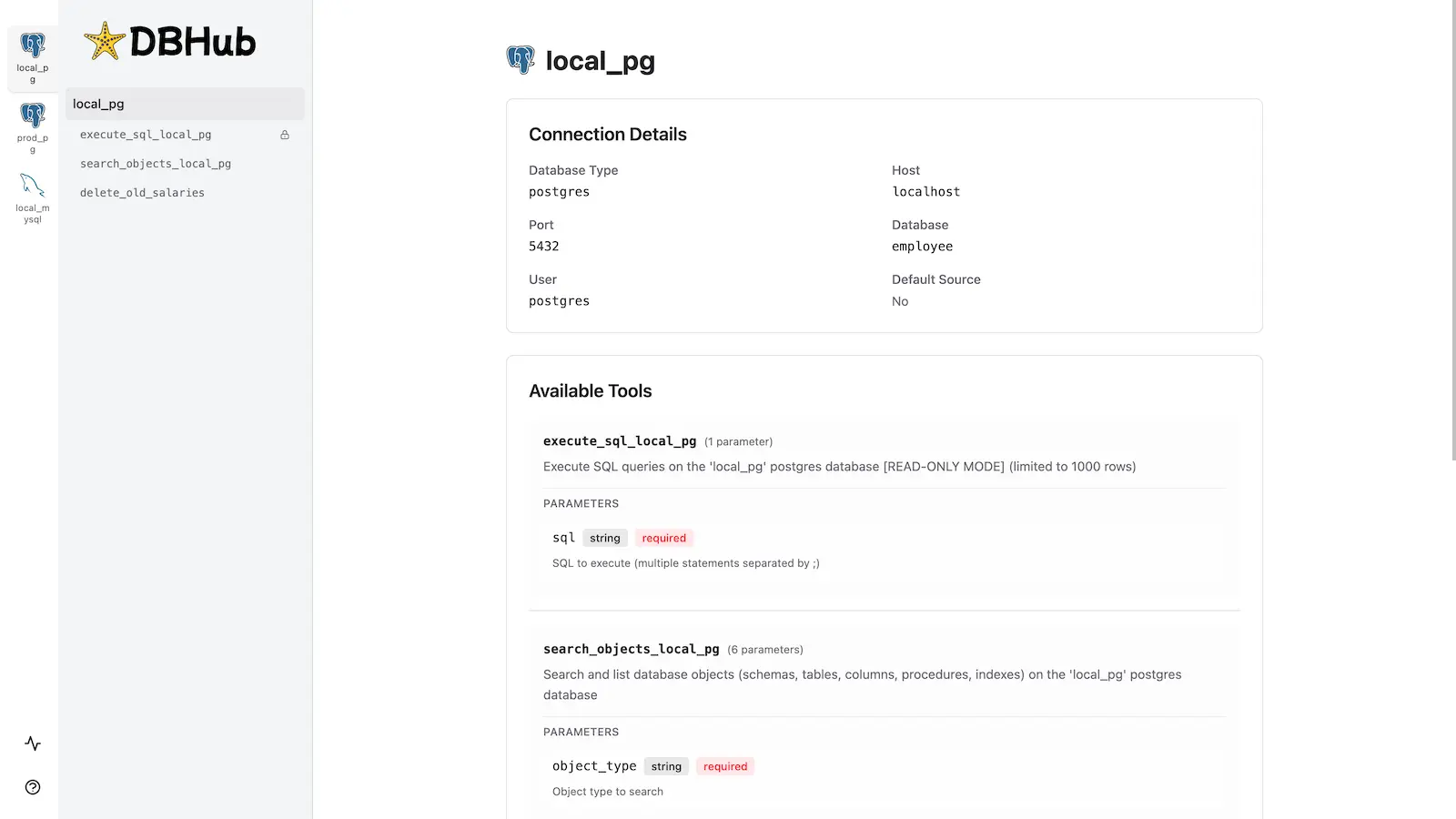
DBHub includes a built-in web interface for interacting with your database tools. It provides a visual way to execute queries, run custom tools, and view request traces without requiring an MCP client.
Installation
npx @bytebase/dbhub@latest --transport http --port 8080 --dsn "postgres://user:password@localhost:5432/dbname?sslmode=disable"
Also available as:
- Docker image
- MCP Bundle (one-click install, read-only)
- Claude Code plugin
See the Installation Guide for all options, Command-Line Options for parameters, and Multi-Database Configuration for connecting several databases at once.
Development
Requires Node.js >= 22.5.0 (DBHub uses the built-in node:sqlite module).
# Install dependencies
pnpm install

# Run in development mode
pnpm dev

# Build and run for production
pnpm build && pnpm start --transport stdio --dsn "postgres://user:password@localhost:5432/dbname"
Contributors
Star History
Recursos relacionados

MCP Toolbox for Databases
MCPGoogle's open-source database MCP server with ready-made query and SQL tools for dozens of sources, including PostgreSQL, MySQL, BigQuery, Spanner and MongoDB. Define controlled custom queries in tools.yaml.
googleapis/mcp-toolbox16.7k
usql
CLIUniversal psql-style SQL command line: one tool to connect to PostgreSQL, MySQL, SQLite, SQL Server, Oracle and dozens of other SQL and NoSQL databases, with support for copying data between databases.
xo/usql10.1k
Atlas
CLIManage database schemas as code: declare the desired schema in SQL, HCL or your ORM and Atlas plans, lints and applies migrations, and can export existing databases as HCL, SQL or Mermaid ER diagrams. Supports PostgreSQL, MySQL and a dozen other databases.
ariga/atlas8.8k
Supabase MCP Server
MCPConnects to your Supabase projects: manage schemas and migrations, run SQL, deploy Edge Functions, create development branches and generate TypeScript types. A remote server hosted by Supabase with OAuth sign-in.
supabase/mcp3k
MySQL MCP Server
MCPGives agents controlled access to MySQL: list databases and tables, inspect schemas and sample data, and run SQL, with multi-database mode, SSL and SSH tunnels. Configure your own database user, ideally with least privilege.
designcomputer/mysql_mcp_server1.4k
Neon MCP Server
MCPManage Postgres databases on Neon in natural language: create projects and branches, run SQL, and use branches for migrations and query tuning. Remote server hosted by Neon with OAuth or API key auth and a read-only mode; Neon recommends it for development only.
neondatabase/mcp-server-neon652