
Bruno CLI
CLIOfficial CLI (bru) for the open-source API client Bruno: runs collections stored as plain text in your repo, switches environments, outputs JSON results and imports collections from OpenAPI, making API tests easy to run in CI.
Bruno CLI
With Bruno CLI, you can now run your API collections with ease using simple command line commands.
This makes it easier to test your APIs in different environments, automate your testing process, and integrate your API tests with your continuous integration and deployment workflows.
For detailed documentation, visit Bruno CLI Documentation.
Installation
To install the Bruno CLI, use the node package manager of your choice, such as NPM:
npm install -g @usebruno/cli
Getting started
Navigate to the directory where your API collection resides, and then run:
bru run
This command will run all the requests in your collection. You can also run a single request by specifying its filename:
bru run request.bru
Or run all requests in a collection's subfolder:
bru run folder
If you need to use an environment, you can specify it with the --env option:
bru run folder --env Local
If you need to collect the results of your API tests, you can specify the --output option:
bru run folder --output results.json
If you need to run a set of requests that connect to peers with both publicly and privately signed certificates respectively, you can add private CA certificates via the --cacert option. By default, these certificates will be used in addition to the default truststore:
bru run folder --cacert myCustomCA.pem
If you need to limit the trusted CA to a specified set when validating the request peer, provide them via --cacert and in addition use --ignore-truststore to disable the default truststore:
bru run request.bru --cacert myCustomCA.pem --ignore-truststore
Importing Collections
You can import collections from other formats, such as OpenAPI, using the import command:
bru import openapi --source api.yml --output ~/Desktop/my-collection --collection-name "My API"
You can also use the shorter form with aliases:
bru import openapi -s api.yml -o ~/Desktop/my-collection -n "My API"
This creates a Bruno collection directory that can be opened in Bruno.
You can also import directly from a URL:
bru import openapi --source https://example.com/api-spec.json --output ~/Desktop --collection-name "Remote API"
You can also export the collection as a JSON file:
bru import openapi --source api.yml --output-file ~/Desktop/my-collection.json --collection-name "My API"
Import Options:
| Option | Details |
|---|---|
| --source, -s | Path to the source file or URL (required) |
| --output, -o | Path to the output directory |
| --output-file, -f | Path to the output JSON file |
| --collection-name, -n | Name for the imported collection |
| --insecure | Skip SSL certificate validation when fetching from URLs |
Command Line Options
| Option | Details |
|---|---|
| -h, --help | Show help |
| --version | Show version number |
| -r | Indicates a recursive run (default: false) |
| --cacert [string] | CA certificate to verify peer against |
| --env [string] | Specify environment to run with |
| --env-var [string] | Overwrite a single environment variable, multiple usages possible |
| -o, --output [string] | Path to write file results to |
| -f, --format [string] | Format of the file results; available formats are "json" (default) or "junit" |
| --reporter-json [string] | Path to generate a JSON report |
| --reporter-junit [string] | Path to generate a JUnit report |
| --reporter-html [string] | Path to generate an HTML report |
| --insecure | Allow insecure server connections |
| --tests-only | Only run requests that have tests |
| --bail | Stop execution after a failure of a request, test, or assertion |
| --csv-file-path | CSV file to run the collection with |
| --reporter--skip-all-headers | Skip all headers in the report |
| --reporter-skip-headers | Skip specific headers in the report |
| --client-cert-config | Client certificate configuration by passing a JSON file |
| --delay [number] | Add delay to each request |
Scripting
Bruno cli returns the following exit status codes:
0-- execution successful1-- an assertion, test, or request in the executed collection failed2-- the specified output directory does not exist3-- the request chain seems to loop endlessly4-- bru was called outside of a collection root directory5-- the specified input file does not exist6-- the specified environment does not exist7-- the environment override was not a string or object8-- an environment override is malformed9-- an invalid output format was requested255-- another error occurred
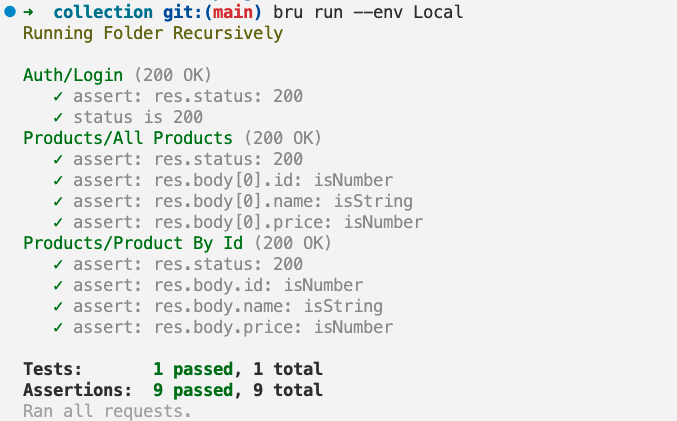
Demo
Support
If you encounter any issues or have any feedback or suggestions, please raise them on our GitHub repository
Thank you for using Bruno CLI!
Changelog
See https://github.com/usebruno/bruno/releases
License
Похожие ресурсы

Hurl
CLIDefine and run chains of HTTP requests in plain text files, capture variables and assert on status codes, headers and JSONPath or XPath results, for both fetching data and API testing in CI. Open source from Orange.
Orange-OpenSource/hurl19.3k
Postman Plugin for Claude Code
PluginPostman's official plugin: sets up the Postman MCP server so Claude Code can sync collections, run API tests and diagnose failures, generate client code, create mocks and docs, and run OWASP API security checks. Needs a Postman account.
Postman-Devrel/postman-claude-code-plugin41
curl
CLICommand-line tool for transferring data by URL over 20+ protocols including HTTP(S), FTP, SFTP, WebSocket and MQTT; a staple for agents calling APIs and downloading files. Preinstalled on macOS and most Linux distributions.
curl/curl43.1k
MCP Inspector
CLIThe official MCP debugging tool: connect to any MCP server through a web UI, CLI or terminal UI to list and call its tools, resources and prompts. CLI mode outputs JSON, suited to scripts and CI smoke tests.
modelcontextprotocol/inspector11.1k
xh
CLIHTTP client CLI that reimplements HTTPie's syntax in Rust with a focus on performance; key-value pairs on the command line are sent as JSON by default, making it quick to debug REST APIs.
ducaale/xh8.1k
Postman MCP Server
MCPPostman's official MCP server: lets agents manage workspaces, collections, environments and API specs, help with API testing and generate client code from API definitions. The remote version uses OAuth; the local version needs a Postman API key.
postmanlabs/postman-mcp-server321