
SolidWorks Automation Skill
SkillDrives SolidWorks from prompts: part modeling, assemblies, drawings and STEP/DXF/PDF export, with multi-view previews for self-checks. A capability list marks what's verified; sheet metal, weldments and FEA are pilots needing engineer review. Needs Windows, Python 3.10+ and licensed SolidWorks.
SolidWorks Automation Skill
AI Skill + MCP toolkit for reliable desktop CAD automation.
让 Codex、Claude、Cursor 等 Agent 通过自然语言调用真实 CAD 软件,并对执行结果进行验证与追踪。
Tool success is not treated as task success.
工具调用成功,不代表任务真的完成;需要 Review 的任务会经过结果验证后再交付。




User → Agent (Codex / Claude / Cursor) → Skill / MCP → Execution Core → CAD → Artifacts + Evidence
AI 负责理解意图、查证 API、规划步骤;Execution Core 保证执行过程可追踪、可验证、失败可恢复。
See It In Action
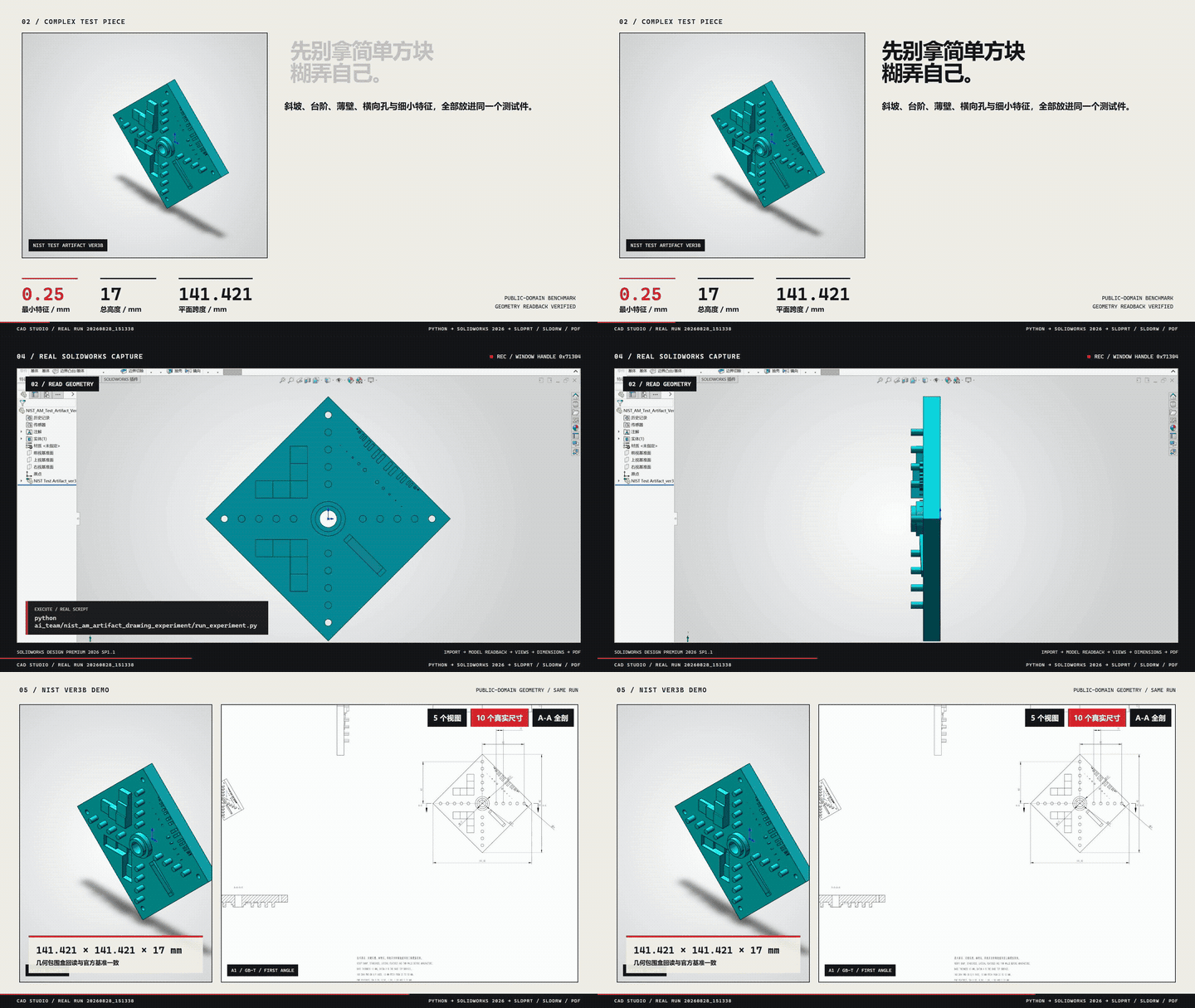
一个真实流程:自然语言需求 → Agent 调用 Skill → SolidWorks 生成原生 SLDPRT + SLDDRW → 导出 PDF → 自动复核尺寸与证据。
| 案例 | 能力 | 状态 |
|---|---|---|
| M6×1 真实螺纹孔 | Metric Tap Thread,重建后回读 | verified |
| CNC 多圆角/倒角安装座 | 语义选边、可变半径、face/full-round/setback | stable |
| 标准渐开线直齿轮 | 模数/齿数/压力角驱动实体 | pilot |
Quick Start
三种入口任选其一即可,不需要同时启动。
Option 1 — Skill(最简单)
npx github:wzyn20051216/solidworks-automation-skill
# 或
claude skill add https://github.com/wzyn20051216/solidworks-automation-skill
Option 2 — MCP
npm install -g @smithery/cli
smithery mcp add wzyn20051216/solidworks-automation-skill --client codex --config '{}'
Option 3 — CAD Studio 桌面版
从 GitHub Releases 下载 Windows 安装包。
Choose one entry point. You do not need to run all three.
| 入口 | 适合谁 | 需要 GUI | 典型用法 |
|---|---|---|---|
| Skill | 支持 skill 导入的 Agent 客户端 | 否 | 自然语言驱动 SolidWorks |
| MCP | Codex / Claude / Cursor / Windsurf 等 MCP 客户端 | 否 | Agent 自动 Tool Calling |
| CAD Studio | 需要图形界面管理项目/任务/预览/交付 | 是 | 桌面端提交任务 |
三者是平级入口,共用同一套能力清单(capabilities.yaml)、脚本与证据系统。安装后可用 python scripts/cad_doctor.py 做环境诊断;详细安装与 CLI 见 docs/CAD_STUDIO_USER_MANUAL.md。
Why This Project
LLM 会规划,但常见的 AI CAD 自动化有几个真实问题:
- LLM 会规划,但不会真正操作桌面 CAD 软件
- Tool 返回
success不代表任务真的完成 - CAD API 版本、环境、Backend 差异复杂
- 固定 Tool 集合覆盖不完所有工程需求
- Agent 执行过程通常不可追踪、不可审计
本项目的解法:
| 问题 | 方案 |
|---|---|
| 自然语言 → 真实操作 | Skill / MCP 接入真实 COM 与后端 |
| Tool success ≠ Task success | Verification-first completion |
| Backend 失败 | Backend Router + Recovery Decision |
| 能力缺失 | Capability Gap → 交还 Agent 查证 |
| 执行不可追踪 | 结构化 Trace |
| 是否可靠 | Golden Workflow Eval |
Architecture
User / Agent
  ↓
Skill / MCP
  ↓
Execution Core(Capability · Verification · Recovery Decision · Trace)
  ↓
Backend Router
  ↓
Python COM / C# / OCCT
  ↓
CAD Software
  ↓
Artifacts + Evidence
-
Root Skill = 通用能力、规则与执行基础设施(连接、建模、审查、MCP)。
-
Subskills = 专项领域工作流(工程图、螺纹孔、CNC 圆角、VibeCAD、AutoCAD),由 Root Skill 按需调用,不需要用户手动启动。
-
Execution Core = 内部可靠执行层:统一状态、结果验证、失败恢复决策与执行追踪。它是内部实现,不是独立服务、不需要用户启动。
-
Capability Gap = 找不到能力时结构化返回
CAPABILITY_GAP,交还 Agent 查证,而不是「做不了」:Existing Tools → Tool Composition → Backend Fallback → Capability Gap → Agent 查 references / 官方 API / SDK → 最小实现 → VerificationExecution Core 自身不会自动联网执行未知代码。
详细:docs/architecture/execution-core.md
Reliability
V2 附带 37 个 deterministic reliability scenarios,覆盖正常执行、故障注入、后端回退、能力缺口与策略门禁。
| Metric | Current baseline |
|---|---|
| Nominal workflow | 10/10 first-pass(基线 v3,warning 等待人工复核) |
| Injected false-completion cases | all detected |
| Escaped false completion | 0 in current deterministic benchmark |
| Regression suite | 当前方案 B 验证记录见 可靠性修复与验收 |
这是 deterministic engineering benchmark(Fake Handler/Reviewer + 故障注入), 不是生产 SLA 或真实用户成功率。详见
docs/architecture/v2-evaluation.md。
原生 SolidWorks 操作当前以 2026 为支持与验收目标。方案 B 保留现有执行架构,修复失败状态、原生阵列、草图可编辑性和文档归属,并提供可选 HTTP 与可验证的产物取回;原有 60 个 MCP 工具的名称和输入 Schema 保持兼容。
Capabilities & Status
| Category | 你能做什么 | 状态 |
|---|---|---|
| Modeling | 零件建模、草图/拉伸/旋转、齿轮、钣金、焊件 | verified + pilot |
| Assembly | 装配、Mate、干涉检查、爆炸视图 | verified |
| Drawing | GB/T 工程图、尺寸链、孔表、BOM | verified + pilot |
| Export | STEP / STL / IGES / PDF / DXF / DWG | verified |
| Motion | 运动算例、旋转马达、结果门禁 | pilot |
| FEA | CalculiX 线性/非线性求解编排与审计 | pilot |
| DFM / Routing | 制造复核、路由复核 | pilot |
| Surface / Mold | 受限 Loft/Sweep/Thicken、模具计划 | pilot |
| AutoCAD | DWG/DXF 二维绘图、图层/标注/预览 | verified / pilot / blocked |
| Open-format | OCCT 无头写入 STEP/BREP/STL/OBJ/GLB 等 | verified |
状态等级(capabilities.yaml 定义):
| Status | 含义 |
|---|---|
verified | 真机验证完成,可按已知范围使用 |
stable | 长期回归覆盖 |
pilot | 已实现但仍需人工复核 |
blocked | 当前环境或能力不允许自动交付 |
真机基线:SolidWorks 2024 / 2026、AutoCAD 2024。未验证能力不会被包装成无人值守交付。
- 完整能力矩阵(每个能力的精确等级/版本/限制)→
capabilities.yaml - 领域工作流 →
subskills/·SUBSKILLS.md
No SolidWorks Installed?
没有 SolidWorks 时,部分开放格式任务仍可完成:
STEP · IGES · BREP · STL · OBJ · GLB · DXF · SVG · PDF · PNG
(通过 OCCT/OCP 隔离进程真实写入。)
但原生 SLDPRT / SLDASM / SLDDRW 仍需要合法 SolidWorks 环境。
Examples
examples/ 目录包含从基础零件到装配、工程图、Motion、FEA 的可运行示例。
Documentation
| Topic | Link |
|---|---|
| MCP Setup | mcp-server/README.md |
| CAD Studio | docs/CAD_STUDIO_USER_MANUAL.md |
| Architecture | docs/architecture/execution-core.md |
| Reliability Eval | docs/architecture/v2-evaluation.md |
| Capability Matrix | capabilities.yaml |
| Subskills | SUBSKILLS.md |
| API / Backend | references/ |
| Troubleshooting | references/troubleshooting.md |
Roadmap & Contributing
Roadmap:更广的真机验证 · 更可靠的能力路由 · 更好的 CAD Studio 可观测性 · 更多 verified 子技能 · 社区贡献工作流。
Contributing:新增能力时,先查 capabilities.yaml,优先复用现有 backend,新增 tests + evidence,不要把未验证 capability 标为 verified。详见 CONTRIBUTING.md。
License & Community
MIT · GitHub Issues · Star History

English
SolidWorks Automation Skill is an AI Skill + MCP toolkit for reliable desktop CAD automation. Codex, Claude, Cursor, and other agents drive real SolidWorks / CAD workflows through natural language, with verification, deterministic recovery decisions, and execution tracing. Three peer entry points — Skill, MCP, and CAD Studio — share one capability registry (capabilities.yaml). Choose one; no extra runtime service is required. See Quick Start above.
关注抖音 @balance. · 嵌入式开发、SolidWorks 自动化和 AI 辅助工程实践持续更新
装配干涉检查 API
solidworks_interference_check 使用 IAssemblyDoc.InterferenceDetectionManager,
通过 GetInterferences() 计算并读取 IInterference.Components 和体积,最后调用
Done()。隐藏实体和已忽略结果参与检查;同一个多实体零件内部的相交不计入。
计算失败、计数读取失败、数组数量不一致或结束检查失败均返回 blocked,不会误报零干涉。
抑制组件不参与计算;零结果仍需核对组件解析状态和设计意图。
离线回归覆盖调用顺序、失败处理和 SI 体积换算(26 项通过)。
SOLIDWORKS 2026 SP4.1(34.4.1)、Python 3.10 上已通过 MCP 实测正常返回;
该真机样例为零干涉,非零结果读取仍以离线回归为证据。
Ressources associées

FreeCAD MCP
MCPLets agents drive the open-source CAD app FreeCAD: create and edit part models in natural language, run Python scripts, capture views and run FEM structural analysis for mechanical and product design. Needs FreeCAD with the addon and its RPC server, plus uv; engineers should verify results.
neka-nat/freecad-mcp2.9k
SolidPilot
MCPLets AI do feature-based modeling in SolidWorks: sketches, extrudes, sheet metal, assemblies and drawings, exporting STEP, DXF or PDF, and can rebuild 3D parts from DXF/DWG drawings. Needs Windows, SolidWorks 2026, a Visual Studio build of the C# layer and a Python adapter; early prototype.
eyfel/mcp-server-solidworks400
RhinoMCP
MCPConnects Rhino 8 and Grasshopper to agents: model in plain language, edit geometry and layers, measure areas and volumes, and build Grasshopper definitions, for architecture and product design. Install the rhinomcp plugin in Rhino, run mcpstart, and have uv installed. Unofficial (not McNeel).
jingcheng-chen/rhinomcp1.2k
Rhino MCP Platform
MCPMcNeel's official Rhino MCP: lets Claude, Codex and other agents model, edit and organize layers in Rhino and Grasshopper, for architectural concepts and product forms. Needs licensed Rhino 8 or 9; install Rhino-MCP-Platform from the package manager and connect with MCPConnect.
mcneel/RhinoAI369
FreeCAD Robust MCP Server
MCPModel by conversation in open-source FreeCAD: create primitives and sketches, extrude and chamfer, run Booleans, export STEP/STL, and write and debug macros. Install and start the Robust MCP Bridge workbench from the FreeCAD Addon Manager, then pip-install the server (Python 3.11).
spkane/freecad-addon-robust-mcp-server257
OpenSCAD MCP Server
MCPCompiles AI-written OpenSCAD code or dimension parameters into editable SCAD and STL models, renders previews from four angles and can export 3MF. Good for parametric parts and 3D printing. Needs OpenSCAD and Python 3.11+ locally; clone the repo and run with uv. No API key.
jhacksman/OpenSCAD-MCP-Server208