
COMSOL MCP Server
MCP100+ tools that let agents drive COMSOL Multiphysics: build models, set geometry and physics (heat transfer, fluids, electrostatics, solid mechanics), mesh, solve and export results; the accompanying paper is in Neurocomputing. Needs licensed COMSOL 5.x/6.x, Python and Java; install from the repo.
COMSOL MCP Server
MCP Server for COMSOL Multiphysics simulation automation via AI agents.
English | 中文
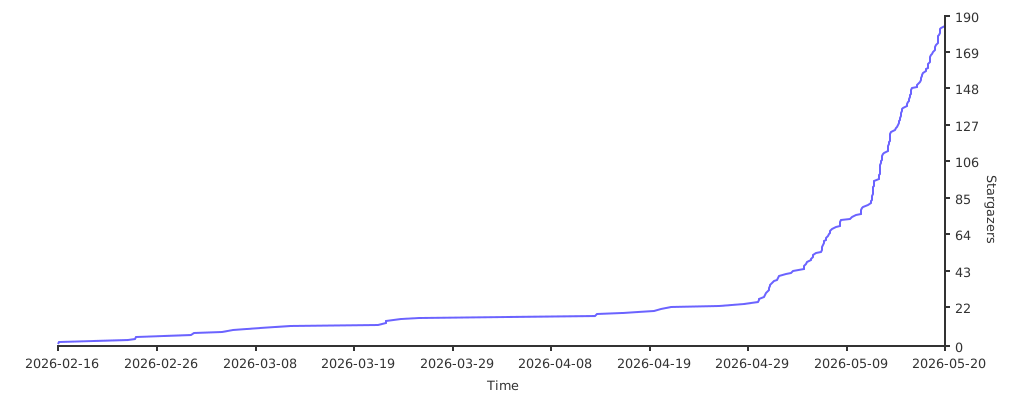
Star History

Publication and Citation
The research paper describing COMSOL-MCP is available in Neurocomputing:
Naiyin Zhang and Junchao Wang, “COMSOL-MCP: An open-source model context protocol interface for AI-assisted multiphysics simulation,” Neurocomputing, vol. 703, article 134481, 2026.
Publisher page: ScienceDirect
If COMSOL-MCP contributes to your research, please cite the paper:
@article{Zhang2026COMSOLMCP,
  title   = {COMSOL-MCP: An Open-Source Model Context Protocol Interface for AI-Assisted Multiphysics Simulation},
  author  = {Zhang, Naiyin and Wang, Junchao},
  journal = {Neurocomputing},
  volume  = {703},
  pages   = {134481},
  year    = {2026},
  doi     = {10.1016/j.neucom.2026.134481},
  url     = {https://doi.org/10.1016/j.neucom.2026.134481}
}
Citation guidance
- Cite the paper when referring to the COMSOL-MCP method, architecture, capabilities, or evaluation.
- If you use or modify the software, cite both the paper and the repository. Use GitHub’s Cite this repository menu, which is backed by
CITATION.cff. - For reproducibility, identify the exact release tag or commit used and include the repository URL and access date in your data/code availability statement.
Project Goal
Build a complete COMSOL MCP Server enabling AI agents (like Claude, opencode) to perform multiphysics simulations through the MCP protocol:
- Model Management - Create, load, save, version control
- Geometry Building - Blocks, cylinders, spheres, boolean operations
- Physics Configuration - Heat transfer, fluid flow, electrostatics, solid mechanics
- Meshing & Solving - Auto mesh, stationary/time-dependent studies
- Results Visualization - Evaluate expressions, export plots
- Knowledge Integration - Embedded guides + PDF semantic search
Requirements
- COMSOL Multiphysics (version 5.x or 6.x)
- Python 3.10+ (NOT Windows Store version)
- Java runtime (required by MPh/COMSOL)
Installation
# Clone repository
git clone https://github.com/wjc9011/COMSOL_Multiphysics_MCP.git
cd COMSOL_Multiphysics_MCP

# Install dependencies
python -m pip install -e .

# Test server
python -m src.server
Building PDF Knowledge Base
# Install additional dependencies
pip install pymupdf chromadb sentence-transformers

# Build knowledge base
python scripts/build_knowledge_base.py

# Check status
python scripts/build_knowledge_base.py --status
Usage
Option 1: With opencode
Create opencode.json in project root:
{
  "$schema": "https://opencode.ai/config.json",
  "mcp": {
    "comsol": {
      "type": "local",
      "command": ["python", "-m", "src.server"],
      "enabled": true,
      "environment": {
        "HF_ENDPOINT": "https://hf-mirror.com"
      },
      "timeout": 30000
    }
  }
}
Option 2: With Claude Desktop
{
  "mcpServers": {
    "comsol": {
      "command": "python",
      "args": ["-m", "src.server"],
      "cwd": "/path/to/COMSOL_Multiphysics_MCP"
    }
  }
}
Code Structure
comsol_mcp/
├── opencode.json                    # MCP server config for opencode
├── pyproject.toml                   # Python project config
├── README.md                        # This file
│
├── src/
│   ├── server.py                    # MCP Server entry point
│   ├── tools/
│   │   ├── session.py               # COMSOL session management (start/stop/status)
│   │   ├── model.py                 # Model CRUD + versioning
│   │   ├── parameters.py            # Parameter management + sweeps
│   │   ├── geometry.py              # Geometry creation (block/cylinder/sphere)
│   │   ├── physics.py               # Physics interfaces + boundary conditions
│   │   ├── mesh.py                  # Mesh generation
│   │   ├── study.py                 # Study creation + solving (sync/async)
│   │   └── results.py               # Results evaluation + export
│   ├── resources/
│   │   └── model_resources.py       # MCP resources (model tree, parameters)
│   ├── knowledge/
│   │   ├── embedded.py              # Embedded physics guides + troubleshooting
│   │   ├── retriever.py             # PDF vector search retriever
│   │   └── pdf_processor.py         # PDF chunking + embedding
│   ├── async_handler/
│   │   └── solver.py                # Async solving with progress tracking
│   └── utils/
│       └── versioning.py            # Model version path management
│
├── scripts/
│   └── build_knowledge_base.py      # Build PDF vector database
│
├── client_script/                   # Standalone modeling scripts (examples)
│   ├── create_chip_tsv_final.py     # Example: Chip thermal model
│   ├── create_micromixer_auto.py    # Example: Fluid flow simulation
│   ├── create_chip_thermal*.py      # Various chip thermal variants
│   ├── create_micromixer*.py        # Various micromixer variants
│   ├── visualize_*.py               # Result visualization scripts
│   ├── add_visualization.py         # Add plot groups to model
│   └── test_*.py                    # Integration tests
│
├── comsol_models/                   # Saved models (structured)
│   ├── chip_tsv_thermal/
│   │   ├── chip_tsv_thermal_20260216_*.mph
│   │   └── chip_tsv_thermal_latest.mph
│   └── micromixer/
│       └── micromixer_*.mph
│
└── tests/
    └── test_basic.py                # Unit tests
Available Tools (100+ total)
Session (4)
| Tool | Description |
|---|---|
comsol_start | Start local COMSOL client |
comsol_connect | Connect to remote server |
comsol_disconnect | Clear session |
comsol_status | Get session info |
Model (9)
| Tool | Description |
|---|---|
model_load | Load .mph file |
model_create | Create empty model |
model_save | Save to file |
model_save_version | Save with timestamp |
model_list | List loaded models |
model_set_current | Set active model |
model_clone | Clone model |
model_remove | Remove from memory |
model_inspect | Get model structure |
Parameters (5)
| Tool | Description |
|---|---|
param_get | Get parameter value |
param_set | Set parameter |
param_list | List all parameters |
param_sweep_setup | Setup parametric sweep |
param_description | Get/set description |
Geometry (16)
| Tool | Description |
|---|---|
geometry_list | List geometry sequences |
geometry_create | Create geometry sequence |
geometry_add_feature | Add generic feature |
geometry_add_block | Add rectangular block |
geometry_add_cylinder | Add cylinder |
geometry_add_sphere | Add sphere |
geometry_add_rectangle | Add 2D rectangle |
geometry_add_circle | Add 2D circle |
geometry_boolean_union | Union objects |
geometry_boolean_difference | Subtract objects |
geometry_import | Import CAD file |
geometry_build | Build geometry |
geometry_list_features | List features |
geometry_get_boundaries | Get boundary numbers |
geometry_create_box_selection | Create a named selection by position |
geometry_create_side_selections | Create left/right/top/bottom selections |
Physics (28)
| Tool | Description |
|---|---|
physics_list | List physics interfaces |
physics_get_available | Available physics types |
physics_add | Add generic physics |
physics_add_electrostatics | Add Electrostatics |
physics_add_solid_mechanics | Add Solid Mechanics |
physics_add_heat_transfer | Add Heat Transfer |
physics_add_laminar_flow | Add Laminar Flow |
physics_add_acoustics | Add a geometry-based acoustic interface by COMSOL type |
physics_add_pressure_acoustics | Add Pressure Acoustics |
physics_add_coefficient_form_pde | Add Coefficient Form PDE |
physics_add_general_form_pde | Add General Form PDE |
physics_add_weak_form_pde | Add Weak Form PDE |
physics_configure_boundary | Configure boundary condition |
physics_configure_acoustic_boundary | Configure one acoustic boundary condition |
physics_setup_acoustic_boundaries | Configure multiple acoustic boundary conditions |
physics_configure_pde_boundary | Configure one PDE boundary condition |
physics_setup_pde_boundaries | Configure multiple PDE boundary conditions |
physics_get_acoustic_boundary_conditions | List common acoustic boundary feature types |
physics_get_pde_boundary_conditions | List common PDE boundary feature types |
physics_set_material | Assign material |
physics_list_features | List physics features |
physics_remove | Remove physics |
multiphysics_add | Add coupling |
physics_interactive_setup_heat | Interactive heat BC setup |
physics_setup_heat_boundaries | Configure heat boundaries |
physics_interactive_setup_flow | Interactive flow BC setup |
physics_boundary_selection | Generic boundary setup |
Electrochemistry (10)
Battery, fuel cell, electrodeposition, and corrosion support backed by a type
registry verified against a live COMSOL 6.3 session (26 interfaces, 600+
feature/subfeature types). A complete worked example — an 18650 cell 1C
constant-current discharge — is included in
src/knowledge/prompts/electrochemistry.md; call docs_get("electrochemistry")
to retrieve it at runtime.
| Tool | Description |
|---|---|
electrochemistry_get_interfaces | List verified interface types (battery, current distribution, corrosion, ...) |
electrochemistry_get_feature_types | List verified feature types of an interface with dimensions |
electrochemistry_add_interface | Add a verified interface (e.g. LithiumIonBatteryMPH, LumpedBattery) |
electrochemistry_list_features | Inspect features with actual COMSOL types (getType()) |
electrochemistry_add_feature | Create a feature, incl. subfeatures via parent_feature |
electrochemistry_set_feature_selection | Assign domains/boundaries to an existing feature |
electrochemistry_set_feature_properties | Set feature properties (rejected names reported) |
electrochemistry_list_feature_properties | Ask COMSOL for a feature's valid property names |
electrochemistry_list_interface_properties | Read interface-level property groups (e.g. BatterySettings) |
electrochemistry_set_interface_properties | Configure interface-level settings (capacity, SOC, current, ...) |
Mesh (4)
| Tool | Description |
|---|---|
mesh_list | List mesh sequences |
mesh_create_sequence | Create a mesh sequence |
mesh_create | Generate mesh |
mesh_info | Get mesh statistics |
Study & Solving (8)
| Tool | Description |
|---|---|
study_list | List studies |
study_solve | Solve synchronously |
study_solve_async | Solve in background |
study_get_progress | Get progress |
study_cancel | Cancel solving |
study_wait | Wait for completion |
solutions_list | List solutions |
datasets_list | List datasets |
Results (9)
| Tool | Description |
|---|---|
results_evaluate | Evaluate expression |
results_global_evaluate | Evaluate scalar |
results_inner_values | Get time steps |
results_outer_values | Get sweep values |
results_export_data | Export data |
results_export_image | Export plot image |
results_exports_list | List export nodes |
results_plots_list | List plot nodes |
Knowledge (8)
| Tool | Description |
|---|---|
docs_get | Get documentation |
docs_list | List available docs |
physics_get_guide | Physics quick guide |
troubleshoot | Troubleshooting help |
modeling_best_practices | Best practices |
pdf_search | Search PDF docs |
pdf_search_status | PDF search status |
pdf_list_modules | List PDF modules |
Example Cases
Case 1: Chip Thermal Model with TSV
3D thermal analysis of a silicon chip with Through-Silicon Via (TSV).
Geometry: 60×60×5 µm chip, 5 µm diameter TSV hole, 10×10 µm heat source
# Key steps:
# 1. Create chip block and TSV cylinder
# 2. Boolean difference (subtract TSV from chip)
# 3. Add Silicon material (k=130 W/m·K)
# 4. Add Heat Transfer physics
# 5. Set heat flux on top, temperature on bottom
# 6. Solve and evaluate temperature distribution
Script: client_script/create_chip_tsv_final.py
Run:
cd /path/to/COMSOL_Multiphysics_MCP
python client_script/create_chip_tsv_final.py
Results: Temperature rise from ambient with heat flux of 1 MW/m²
Case 2: Micromixer Fluid Flow
3D laminar flow simulation in a microfluidic channel.
Geometry: 600×100×50 µm rectangular channel
# Key steps:
# 1. Create rectangular channel block
# 2. Add water material (ρ=1000 kg/m³, μ=0.001 Pa·s)
# 3. Add Laminar Flow physics
# 4. Set inlet velocity (1 mm/s), outlet pressure
# 5. Add Transport of Diluted Species for mixing
# 6. Solve and evaluate velocity profile
Script: client_script/create_micromixer_auto.py
Run:
cd /path/to/COMSOL_Multiphysics_MCP
python client_script/create_micromixer_auto.py
Results: Velocity distribution, concentration mixing profile
Model Versioning
Models are saved with structured paths:
./comsol_models/{model_name}/{model_name}_{timestamp}.mph
./comsol_models/{model_name}/{model_name}_latest.mph
Example:
./comsol_models/chip_tsv_thermal/chip_tsv_thermal_20260216_140514.mph
./comsol_models/chip_tsv_thermal/chip_tsv_thermal_latest.mph
Key Technical Discoveries
1. mph Library API Patterns
# Access Java model via property (not callable)
jm = model.java  # NOT model.java()

# Create component with True flag
comp = jm.component().create('comp1', True)

# Create 3D geometry
geom = comp.geom().create('geom1', 3)

# Create physics with geometry reference
physics = comp.physics().create('spf', 'LaminarFlow', 'geom1')

# Boundary condition with selection
bc = physics.create('inl1', 'InletBoundary')
bc.selection().set([1, 2, 3])
bc.set('U0', '1[mm/s]')
2. Boundary Condition Property Names
| Physics | Condition | Property |
|---|---|---|
| Heat Transfer | HeatFluxBoundary | q0 |
| Heat Transfer | TemperatureBoundary | T0 |
| Heat Transfer | ConvectiveHeatFlux | h, Text |
| Laminar Flow | InletBoundary | U0, NormalInflowVelocity |
| Laminar Flow | OutletBoundary | p0 |
| Pressure Acoustics | SoundHard | No additional property |
| Pressure Acoustics | SoundSoft | No additional property |
| Pressure Acoustics | Pressure | p0 |
| Pressure Acoustics | Impedance | Zn |
| Pressure Acoustics | NormalAcceleration | nacc |
| Pressure Acoustics | NormalVelocity | nvel |
| Pressure Acoustics | PlaneWaveRadiation | No additional property |
| Pressure Acoustics | SphericalWaveRadiation | No additional property |
| PDE | DirichletBoundary | r |
| PDE | FluxBoundary | g, q |
| PDE | ZeroFluxBoundary | No additional property |
| PDE | WeakContribution | weak |
| PDE | PeriodicCondition | No additional property |
3. Client Session Limitation
The mph library creates a singleton COMSOL client. Only one Client can exist per Python process:
# This is handled in session.py - client is kept alive and models are cleared
client.clear()  # Clear models instead of full disconnect
4. Offline Embedding Model
PDF search supports offline operation with local HuggingFace cache:
# Set mirror for China
export HF_ENDPOINT=https://hf-mirror.com
Development Status
| Phase | Description | Status |
|---|---|---|
| 1 | Basic framework + Session + Model | Done |
| 2 | Parameters + Solving + Results | Done |
| 3 | Geometry + Physics + Mesh | Done |
| 4 | Embedded knowledge + Tool docs | Done |
| 5 | PDF vector retrieval | Done |
| 6 | Integration tests | In Progress |
Next Steps
- Complete Phase 6 - Full integration test with proper boundary conditions
- Visualization Export - Generate PNG images from plot groups
- LSP Warnings - Fix type hints in physics.py
- More Examples - Add electrostatics, solid mechanics cases
- Error Handling - Improve error messages and recovery
Resources
| URI | Description |
|---|---|
comsol://session/info | Session information |
comsol://model/{name}/tree | Model tree structure |
comsol://model/{name}/parameters | Model parameters |
comsol://model/{name}/physics | Physics interfaces |
License
MIT
Recursos relacionados

Simulink Agentic Toolkit
PluginMathWorks' official toolkit for reading, building, modifying and testing Simulink models via the MATLAB MCP server, with skills for control design, Simscape, code generation and compliance checks. Needs licensed MATLAB R2023a+ and Simulink; run the official installer in MATLAB first.
matlab/simulink-agentic-toolkit1.2kMATLAB MCP Server
MCPMathWorks' official server that lets agents start your local MATLAB, write and run scripts and unit tests, and check code style and potential errors, for computing, simulation and data analysis. Needs a licensed MATLAB R2021a+ and the downloaded server binary.
matlab/matlab-mcp-server1.7k
FreeCAD MCP
MCPLets agents drive the open-source CAD app FreeCAD: create and edit part models in natural language, run Python scripts, capture views and run FEM structural analysis for mechanical and product design. Needs FreeCAD with the addon and its RPC server, plus uv; engineers should verify results.
neka-nat/freecad-mcp2.9k
ToolUniverse
MCPFrom Harvard Medical School's Zitnik Lab: one MCP connecting 1,000+ scientific tools and databases for drugs and targets, genes and proteins, clinical trials, FDA data and PubMed, for biomedical and drug research. Runs with uv; some sources need API keys; medical conclusions need expert review.
mims-harvard/ToolUniverse1.7k
Jupyter MCP Server
MCPConnects agents to live Jupyter notebooks: read, write, insert and execute cells and read multimodal outputs like charts, for interactive data analysis. Bring your own JupyterLab or JupyterHub; open source, maintained by Datalayer.
datalayer/jupyter-mcp-server1.3k
lean-lsp-mcp
MCPMCP server for the Lean 4 theorem prover: lets agents read proof goals, diagnostics and definitions and search theorems via LeanSearch and Loogle, helping mathematicians and students with formal proofs. Needs uv and the Lean toolchain; run it from the Lean project root.
oOo0oOo/lean-lsp-mcp530