
Wolfram AgentTools
MCPWolfram's official agent tools: use the Wolfram Language and Wolfram|Alpha for symbolic and numeric math and scientific and statistical data, for teaching and research. The command runs the official Docker image with a free developer license; Wolfram 15+ users can install it in the app.
Wolfram/AgentTools


A Wolfram Language toolkit for integrating with AI agents and LLMs — providing MCP servers, agent skills, and other standard interfaces that give AI systems access to Wolfram's computational capabilities.
Table of Contents
- Features
- Requirements
- Installation
- Quick Start
- Predefined Servers
- Supported Clients
- Available Tools
- Creating Custom Servers
- API Reference
- Development
- License
Features
- Predefined servers for common use cases (general computation, Wolfram|Alpha queries, development)
- Semantic search across Wolfram documentation and Wolfram|Alpha results
- Code evaluation with Wolfram Language directly in AI conversations
- Notebook support for reading and writing Wolfram notebooks
- Custom servers with tailored tools for specific needs
- Wide client support including Claude Desktop, Cursor, VS Code, and more
- MCP prompts for enhanced context and workflows
- MCP Apps for interactive UI resources in supported clients (e.g., embedded notebook viewers, Wolfram|Alpha result displays)
- MCP Roots support so the server, evaluator, and external tools (
TestReportand similar) resolve relative paths against the client's project directory - Agent Skills for distributing Wolfram tools as portable skills to AI coding agents (Claude Code, Cursor, Gemini CLI, VS Code, and more); the built-in skills (wolfram-language, wolfram-alpha, wolfram-notebooks, wolfram-paclets, wolfram-debugging) ship with the paclet, and
DeployAgentToolsinstalls them together with the matching MCP server - Paclet extensions allowing third-party paclets to contribute MCP tools, prompts, and servers via the
"AgentTools"extension - Docker image for running the MCP server in a container without a local Wolfram Engine installation
Requirements
- Wolfram Language 15.0 or higher
- An MCP-compatible client application (see Supported Clients)
- Optional: LLMKit subscription for enhanced semantic search capabilities
Installation
Install the Paclet
PacletInstall["Wolfram/AgentTools"]
Load the Package
Needs["Wolfram`AgentTools`"]
Docker Image
A prebuilt Docker image is available as an alternative to a local Wolfram Engine installation. See Docker documentation for setup and MCP client configuration examples.
docker pull ghcr.io/wolframresearch/mcpserver:latest
Quick Start
Install a Wolfram MCP server for Claude Desktop:
InstallMCPServer["ClaudeDesktop"]
(* Out: Success["InstallMCPServer", <|...|>] *)
When no server is specified, each named client gets a sensible default — chat clients (Claude Desktop, Goose) get the general-purpose "Wolfram" server, while coding clients (Claude Code, Cursor, VS Code, etc.) get "WolframLanguage". For File[...] targets, the same per-client default applies when the path or content identifies a known client (or "ApplicationName" is supplied); otherwise it falls back to "Wolfram". Pass an explicit server name as the second argument to override.
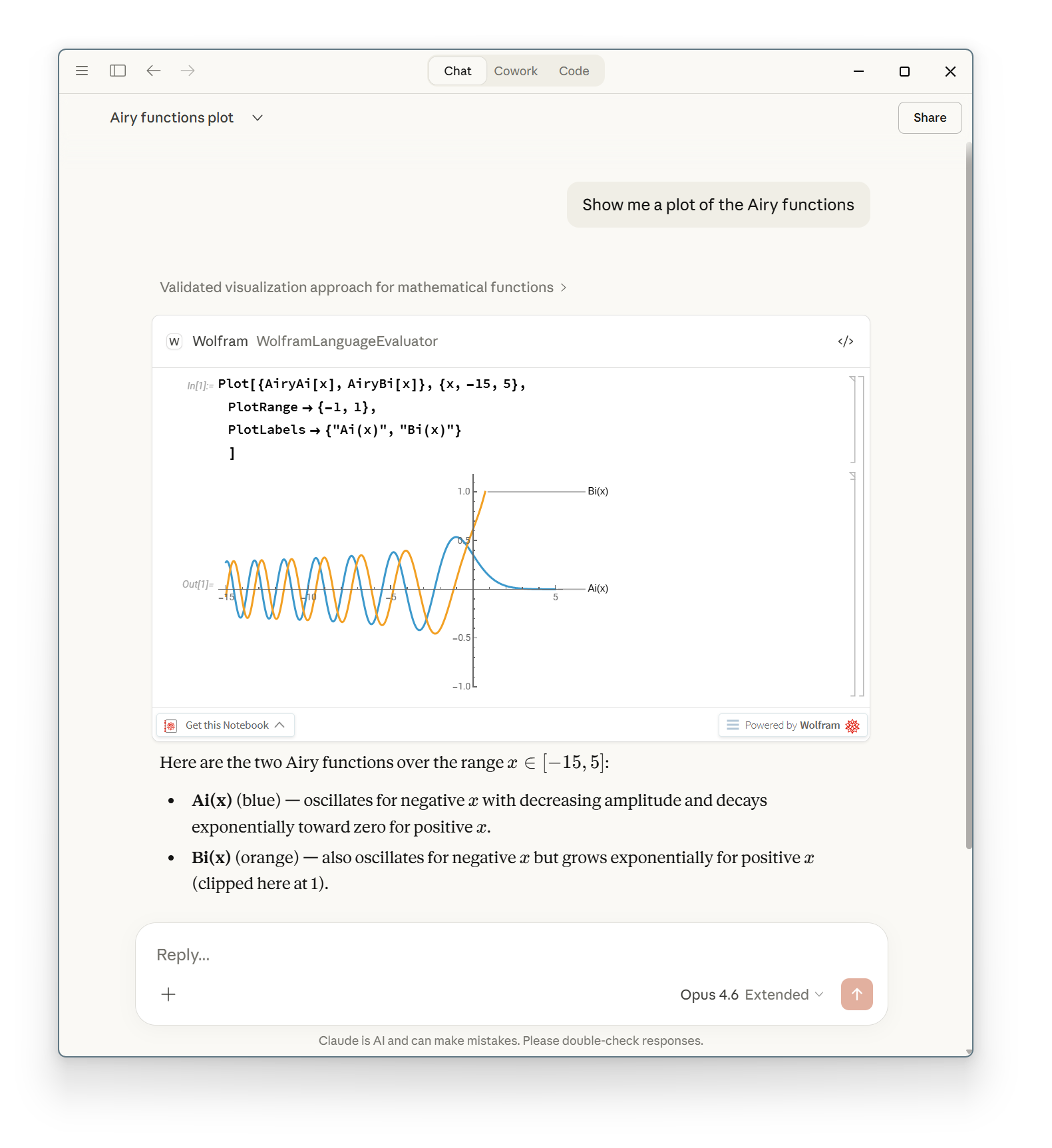
After restarting Claude Desktop, it will have access to Wolfram knowledge and tools:
To install a specific server type:
InstallMCPServer["ClaudeDesktop", "WolframLanguage"]
To uninstall:
UninstallMCPServer["ClaudeDesktop"]              (* Remove all servers *)
UninstallMCPServer["ClaudeDesktop", "Wolfram"]   (* Remove specific server *)
Predefined Servers
AgentTools includes four predefined server configurations, each optimized for different use cases:
| Server | Best For | Tools |
|---|---|---|
| Wolfram (default) | General-purpose use combining computational power with natural language | WolframContext, WolframLanguageEvaluator, WolframAlpha |
| WolframAlpha | Natural language queries without code execution | WolframAlphaContext*, WolframAlpha |
| WolframLanguage | Wolfram Language development and learning | WolframLanguageContext, WolframLanguageEvaluator, ReadNotebook, WriteNotebook, SymbolDefinition, CodeInspector, TestReport |
| WolframPacletDevelopment | Developing and maintaining Wolfram paclets | All WolframLanguage tools plus documentation tools (CreateSymbolDoc, EditSymbolDoc, EditSymbolDocExamples) and paclet release tools (CheckPaclet, BuildPaclet, SubmitPaclet) |
*Requires LLMKit subscription
Install a specific server:
InstallMCPServer["ClaudeDesktop", "WolframLanguage"]
See docs/servers.md for detailed information about each server and guidance on choosing the right one.
Supported Clients
AgentTools can be installed into the following MCP client applications:
| Client | Name | Project Support |
|---|---|---|
| Amazon Q Developer | "AmazonQ" | Yes |
| Augment Code | "AugmentCode" | No |
| Augment Code IDE | "AugmentCodeIDE" | No |
| Claude Code | "ClaudeCode" | Yes |
| Claude Desktop | "ClaudeDesktop" | No |
| Cline | "Cline" | No |
| Continue (VS Code + JetBrains + CLI) | "Continue" | Yes |
| Copilot CLI | "CopilotCLI" | No |
| Cursor | "Cursor" | No |
| Gemini CLI | "GeminiCLI" | No |
| Goose | "Goose" | No |
| Google Antigravity | "Antigravity" | No |
| Junie (JetBrains IDE plugin + CLI) | "Junie" | Yes |
| Kimi Code | "KimiCode" | No |
| LM Studio | "LMStudio" | No |
| OpenAI Codex | "Codex" | Yes |
| OpenCode | "OpenCode" | Yes |
| Qwen Code | "QwenCode" | Yes |
| Visual Studio Code | "VisualStudioCode" | Yes |
| Windsurf | "Windsurf" | No |
| Zed | "Zed" | Yes |
Project-Level Installation
Clients with project support can have servers installed for specific projects:
InstallMCPServer[{"ClaudeCode", "/path/to/project"}, "WolframLanguage"]
Claude Desktop
Claude Desktop offers an excellent integration experience with AgentTools, providing seamless access to Wolfram Language's computational capabilities.
Cursor
Install an MCP server for use in Cursor:
InstallMCPServer["Cursor"]
(* Out: Success["InstallMCPServer", <|...|>] *)
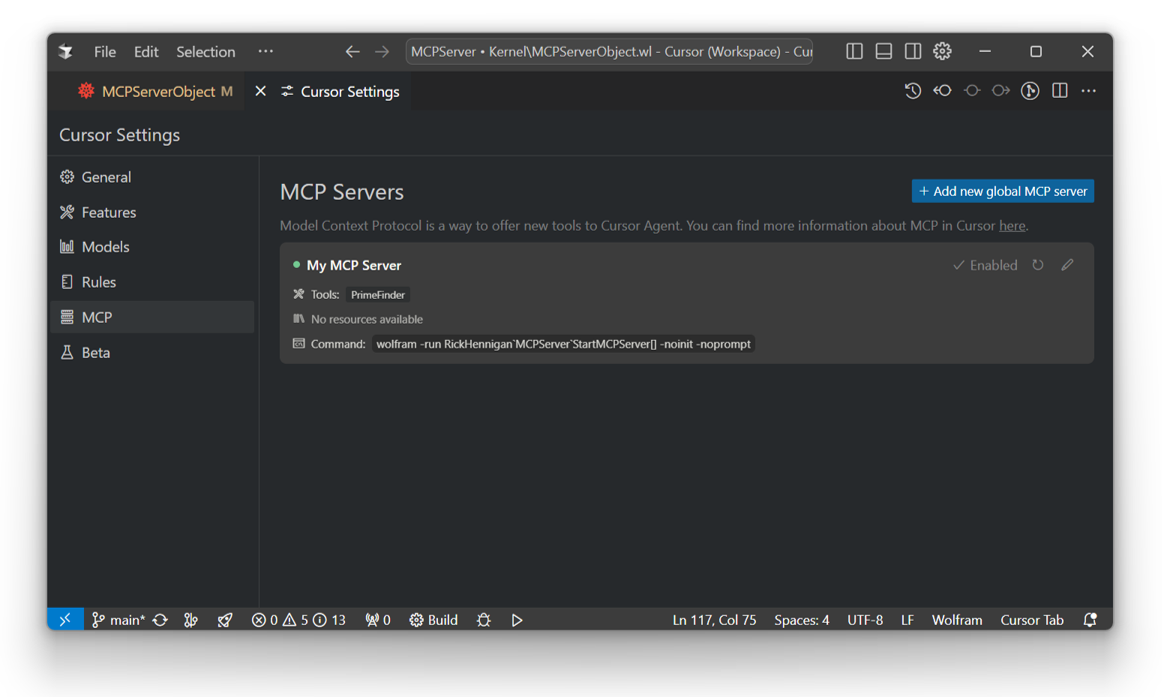
Check the MCP tab in Cursor settings to verify the server connection:
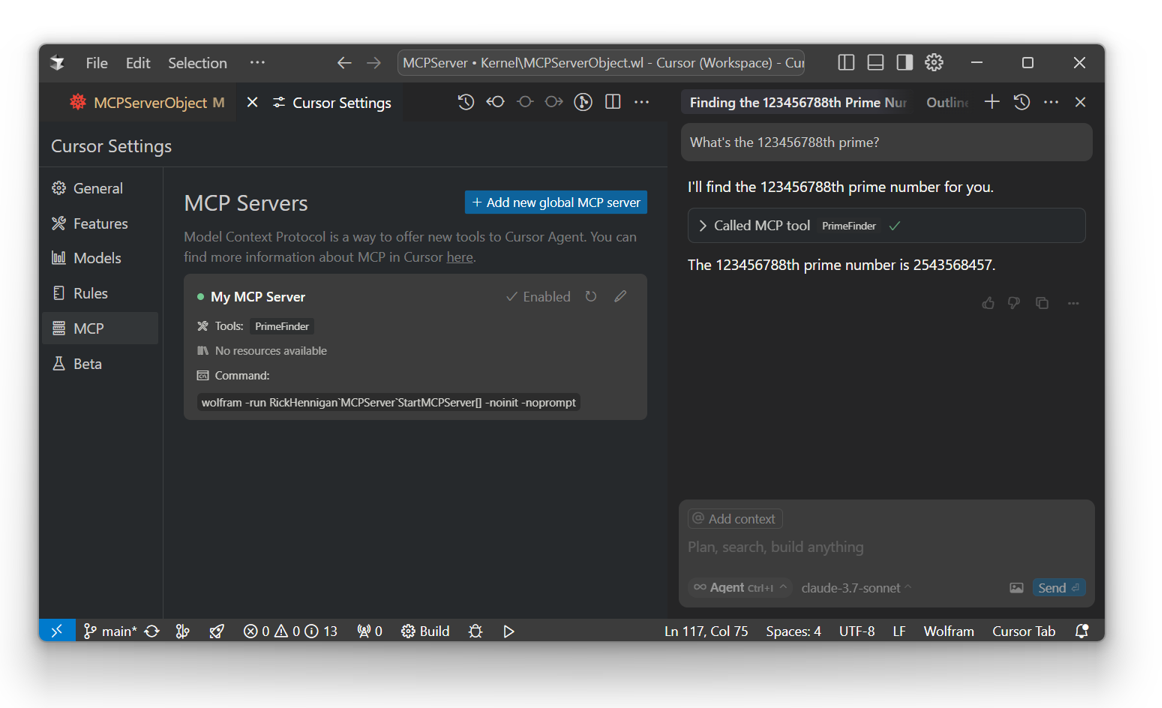
Your Wolfram tools will now be available in Cursor agent chat:
Other Clients
AgentTools works with any stdio-based MCP client. See docs/mcp-clients.md for manual configuration instructions.
Available Tools
AgentTools provides a variety of tools organized by category:
Context Tools (Semantic Search)
Search Wolfram resources using semantic similarity:
- WolframContext - Combines the functionality of
WolframLanguageContextandWolframAlphaContextin a single tool - WolframAlphaContext - Semantic search of Wolfram|Alpha results (requires LLMKit)
- WolframLanguageContext - Semantic search of Wolfram Language documentation and other resources
Note: Since
WolframContextcombines the other two, a server should only include one of these three tools. Without LLMKit,WolframContextis effectively the same asWolframLanguageContextsince the Wolfram|Alpha semantic search functionality is disabled.
Documentation search includes the Function Repository, Data Repository, Neural Net Repository, Paclet Repository, and more.
While only WolframAlphaContext requires an LLMKit subscription, having LLMKit greatly improves search results for all context tools by enabling reranking and filtering.
Code Execution Tools
- WolframLanguageEvaluator - Execute Wolfram Language code with time constraints
- WolframAlpha - Natural language queries to Wolfram|Alpha
- SymbolDefinition - Retrieve symbol definitions in readable markdown format
Notebook Tools
- ReadNotebook - Read Wolfram notebooks (.nb) as markdown text
- WriteNotebook - Convert markdown to Wolfram notebooks
Testing Tools
- TestReport - Run Wolfram Language test files (.wlt) and return reports
Code Analysis Tools
- CodeInspector - Inspect Wolfram Language code for issues and return formatted reports
Documentation Tools (Paclet Development)
- CreateSymbolDoc - Create new symbol documentation pages
- EditSymbolDoc - Edit existing symbol documentation pages
- EditSymbolDocExamples - Edit example sections of documentation
Paclet Release Tools (Paclet Development)
- CheckPaclet - Check a paclet for issues before building or submission
- BuildPaclet - Build a
.pacletarchive for distribution - SubmitPaclet - Submit a paclet to the Wolfram Language Paclet Repository
MCP Apps Tools
- NotebookViewer - Embed interactive Wolfram Cloud notebooks inline
- MCPAppsTest - Diagnostic tool for testing the MCP Apps pipeline
Note: MCP Apps tools require a client that supports the
io.modelcontextprotocol/uiextension. When UI support is available, theWolframAlphaandWolframLanguageEvaluatortools are automatically enhanced with interactive notebook viewers. See docs/mcp-apps.md for details.
See docs/tools.md for detailed information about each tool.
Creating Custom Servers
Create custom MCP servers with your own tools using LLMConfiguration:
config = LLMConfiguration[<|
    "Tools" -> {LLMTool["PrimeFinder", {"n" -> "Integer"}, Prime[#n]&]}
|>];

server = CreateMCPServer["My MCP Server", config]
(* Out: MCPServerObject[...] *)
Install for use in Claude Desktop:
InstallMCPServer["ClaudeDesktop", server]
(* Out: Success["InstallMCPServer", <|...|>] *)
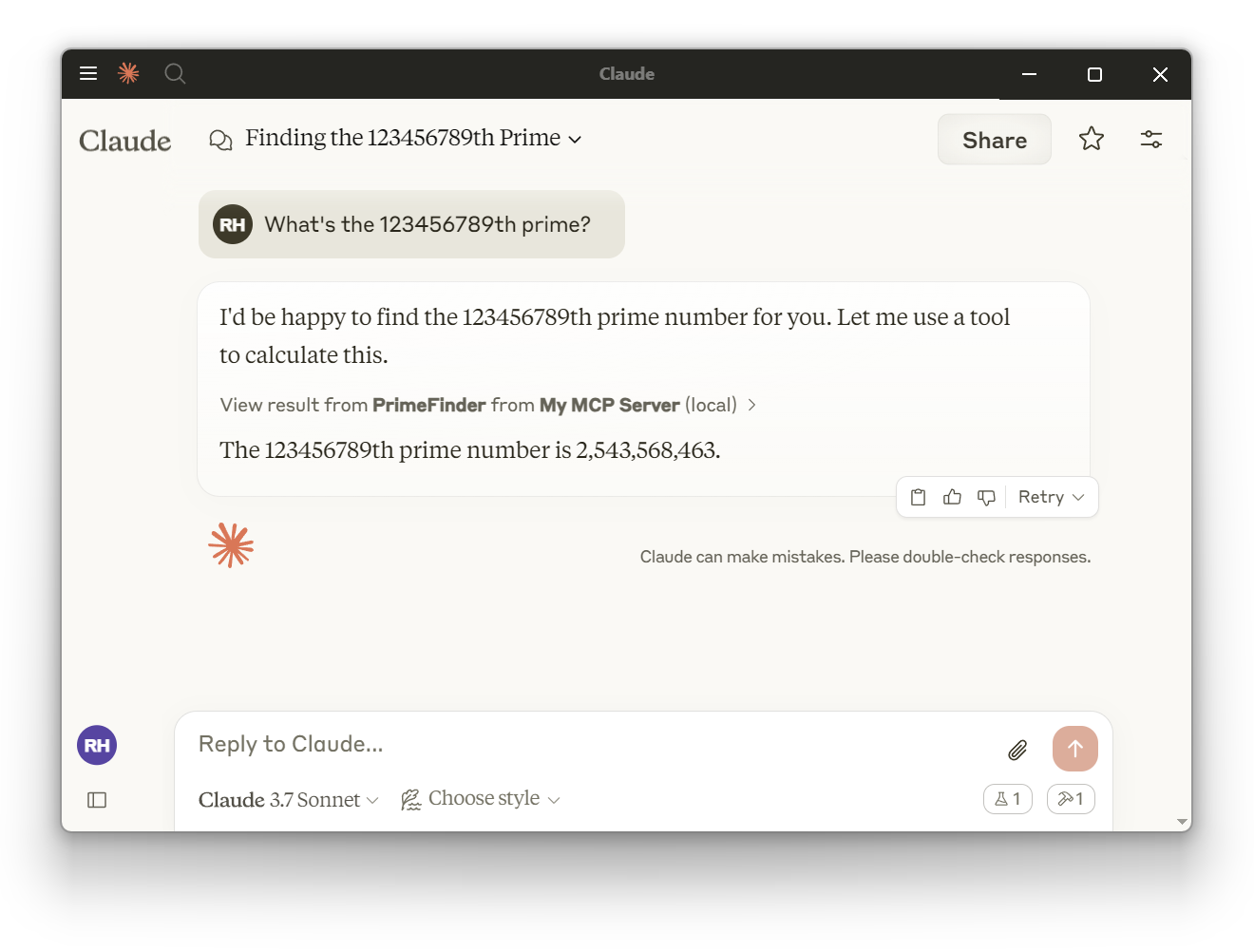
After restarting Claude Desktop, your custom tools will be available:
You can also mix predefined tools with custom tools:
CreateMCPServer["My MCP Server", <|
    "Tools" -> {
        "WolframLanguageEvaluator",  (* Predefined tool *)
        "WolframAlpha",               (* Predefined tool *)
        LLMTool["MyCustomTool", ...]  (* Custom tool *)
    }
|>];
API Reference
Core Functions
| Function | Description |
|---|---|
CreateMCPServer[name, config] | Create a custom MCP server |
InstallMCPServer[client] | Install the default server for a client |
InstallMCPServer[client, server] | Install a specific server for a client |
UninstallMCPServer[client] | Remove all servers from a client |
UninstallMCPServer[client, name] | Remove a specific server from a client |
DetectedMCPClients[] | Subset of $SupportedClients whose MCP config file exists on this machine |
DeployAgentTools[target] | Deploy tools to a client with tracked deployment management |
DeployAgentTools[target, tools] | Deploy a bundle of MCP servers and agent skills (an AgentToolsObject or its name) to a client (see docs/agent-tools-objects.md) |
InstallAgentSkills[client, skills] | Copy agent skills into a client's skills directory (untracked) |
UninstallAgentSkills[client, names] | Remove agent skills from a client's skills directory (untracked) |
DeployAgentTools[All] | Deploy tools to every client in $SupportedClients (see docs/deploy-agent-tools.md) |
ValidateAgentToolsPacletExtension[paclet] | Validate an "AgentTools" paclet extension |
DeployedAgentTools[] | List all tracked deployments |
CreatePreferencesContent[] | Build the preferences panel UI for managing deployed Wolfram toolsets (see docs/preferences-content.md) |
Deployment Objects
| Symbol | Description |
|---|---|
AgentToolsDeployment[...] | Data structure representing a tracked tool deployment |
DeployedAgentTools[] | List all deployments |
DeployedAgentTools[client] | List deployments for a specific client |
Agent Tools Bundles
| Symbol | Description |
|---|---|
AgentToolsObject[...] | A bundle of MCP servers and agent skills (built-in, paclet-defined, or ad hoc) |
AgentToolsObjects[] | List the bundles of installed paclets |
$DefaultAgentTools | The built-in bundles, one per built-in MCP server, each with its built-in agent skills |
Server Objects
| Symbol | Description |
|---|---|
MCPServerObject[...] | Data structure representing an MCP server |
MCPServerObjectQ[expr] | Test if an expression is a valid server object |
MCPServerObjects[] | List all created server objects (includes paclet-backed servers) |
Predefined Resources
| Symbol | Description |
|---|---|
$DefaultMCPServers | Association of predefined server configurations |
$DefaultMCPTools | Association of available tool definitions |
$DefaultMCPToolOptions | Association of default tool option values |
$DefaultMCPPrompts | Association of available prompt definitions |
Options
CreateMCPServer
| Option | Default | Description |
|---|---|---|
OverwriteTarget | False | Overwrite an existing server with the same name |
IncludeDefinitions | True | Include function definitions in the serialized server |
Initialization | None | Code to evaluate when the server starts |
InstallMCPServer
| Option | Default | Description |
|---|---|---|
"EnableLLMKit" | Automatic | Enable or disable LLMKit features in the context tools; False sets LLMKIT_ENABLED=false so they behave as unsubscribed with no subscription warnings |
"EnableMCPApps" | True | Enable or disable MCP Apps UI resources |
"DevelopmentMode" | False | Use local source files instead of installed paclet |
"MCPServerName" | Automatic | Override the config file key for the server entry |
"ToolOptions" | <||> | Customize built-in tool behavior (see docs/tools.md) |
"VerifyLLMKit" | True | Check LLMKit subscription requirements |
Development
See the developer documentation for information on:
- Getting started with development
- Writing and running tests
- Building the paclet
- Adding new tools
- Agent skills for distributing tools to AI coding agents
- Paclet extensions for third-party tool/prompt/server contributions
- Error handling
For AI agents working on this codebase, see AGENTS.md.
License
This project is licensed under the MIT License - see the LICENSE file for details.
Author
Richard Hennigan (Wolfram Research)
関連リソース

Math Modeling Skills
SkillTwo skills for the MCM/ICM and China's CUMCM math modeling contests: solver breaks down problems, picks models from a 95+ scenario decision matrix and gives Python or MATLAB templates; paper coaches abstracts, model validation and formatting from winning papers. Needs Python or MATLAB.
Lupynow/math-modeling-skills423
MATLAB MCP Server
MCPMathWorks' official server that lets agents start your local MATLAB, write and run scripts and unit tests, and check code style and potential errors, for computing, simulation and data analysis. Needs a licensed MATLAB R2021a+ and the downloaded server binary.
matlab/matlab-mcp-server1.7k
Stata MCP
MCPConnects Stata to VS Code or Cursor and exposes a local MCP endpoint so Claude Code or Codex can write and run do-files and read regression output, with graphs shown in the editor; for empirical research. Needs a licensed Stata 17+, the extension installed and the editor open.
hanlulong/stata-mcp511
mcptools
MCPPosit's official R package connecting R to Claude Code and other agents: register your own R functions as tools and run them in your open R session, using its data. Out of the box it only switches sessions; add the btw package for docs lookup and data inspection tools. Requires R.
posit-dev/mcptools202
Jupyter Notebooks
SkillCreates, edits and validates reproducible Python and SQL Jupyter notebooks: organizes cells as reports or tutorials, checks conclusions against actual output and reruns top to bottom before handoff. Maintained by OpenAI in the Data Analytics plugin of openai/plugins.
openai/plugins7.5k
Math Modeling Skill
SkillA three-stage workflow for math modeling contests like MCM/ICM and CUMCM: analysis, solving and plotting in Python or MATLAB, and a Word (optionally LaTeX) paper, with stage-check subagents and OpenAlex plus AnySearch literature search. Generated papers are for reference only.
XiaoMaColtAI/math-modeling-skill1.9k