
ableton-copilot-mcp
MCP面向音乐制作人的 Ableton Live 助手:在编曲视图里建轨、建片段,批量增删改音符,加载乐器和效果器,按时间段录制音轨,音符改动可回滚。需 Ableton Live 12 与 Node.js 20 以上,首次使用先用命令安装 AbletonJS 控制脚本,并在 Live 设置里启用它。
ableton-copilot-mcp



An MCP (Model Context Protocol) server built on ableton-js for real-time interaction and control with Ableton Live's Arrangement View, dedicated to assisting music producers in their music production.
🎯 Note
As a music producer, I have some understanding of using Ableton for music creation. During the creative process, we often need to handle various tedious operations, such as humanizing note properties, merging notes, recording one track to another audio track, etc. Previously, we could only rely on the functions provided by the host DAW for these operations. However, with the emergence of large language models and MCP, we now have the possibility to let AI help us with automation. Although it's still not realistic for AI to directly generate notes or create a complete song (it can't generate a good-sounding song), having AI assist us with auxiliary operations presents a new possibility.
🎥 Demo
This is a simple demonstration video of MIDI operations.
https://github.com/user-attachments/assets/8d635c4c-a1f2-44be-93ae-062038d14c71
🚀 Features
🎵 Song Control
- Get basic song information (root note, scale name, tempo, song length, etc.)
- Get a list of all tracks
- Create MIDI, audio, and return tracks
- Delete and duplicate tracks
🎹 Track Management
- Get all clips in a track
- Create empty MIDI clips in the arrangement view tracks
- Create audio clips in tracks based on provided sample file paths
- Set track properties (mute, color, name, arm, solo, etc.)
- Duplicate MIDI clips to specified tracks
🎼 Clip Operations
- Get clips in the piano roll view
- Get and manage all notes in a clip
- Add, delete, and replace notes in clips
- Set clip properties (name, color, looping, loop_start, loop_end, etc.)
🎧 Audio Operations
- Supports recording track content based on time range
🔌 Device Management
- Load audio effects, instruments and plugins
- Modify device parameters
- Browse available devices in the library
📝 State Management
- Operation history tracking and detailed logging
- Support for operation rollback (currently only supports note operations)
- Browse and restore previous states
📝 To-Do List
- Support automatic envelope adjustment
- Support more snapshot types (track properties, device parameters, etc.)
⚠️ Warning
- Direct manipulation of MIDI clips by AI may result in the loss of original notes and cannot be undone with Ctrl + Z. Please operate with caution. If needed, you can ask the AI to help you roll back note operations.
📥 Installation
Prerequisites
- Node.js environment: Ensure Node.js is installed (v20+ recommended) and the
npxcommand is available🔗 Download: Node.js official website
Installation Steps
1. Install AbletonJS MIDI Remote Scripts
Choose ONE of the following three methods to install MIDI Remote Scripts:
-
Method 1: One-line installation (Recommended)
npx @xiaolaa2/ableton-copilot-mcp --install-scripts # or use the short form npx @xiaolaa2/ableton-copilot-mcp -is -
Method 2: Tool-assisted installation
- First, start ableton-copilot-mcp (see Usage section below)
- Let AI assistant or manually call the MCP tool
init_ableton_jsto complete the installation automatically
-
Method 3: Manual installation
- Create a folder named "Remote Scripts" in your Ableton User Library:
- Windows:
C:\Users\[username]\Documents\Ableton\User Library\Remote Scripts - Mac:
/Users/[username]/Music/Ableton/User Library/Remote Scripts
- Windows:
- Download MIDI Remote Scripts from the ableton-js project
- Copy the downloaded
midi-scriptfolder to the location above - Rename it to
AbletonJS
- Create a folder named "Remote Scripts" in your Ableton User Library:
🔧 Usage
Quick Start
-
Launch Ableton Live
-
Enable AbletonJS Control Surface
- Open Ableton Live Preferences:
Preferences→Link/MIDI - In the
MIDItab, locate theControl Surfacesection - Select
AbletonJSfrom the dropdown menu
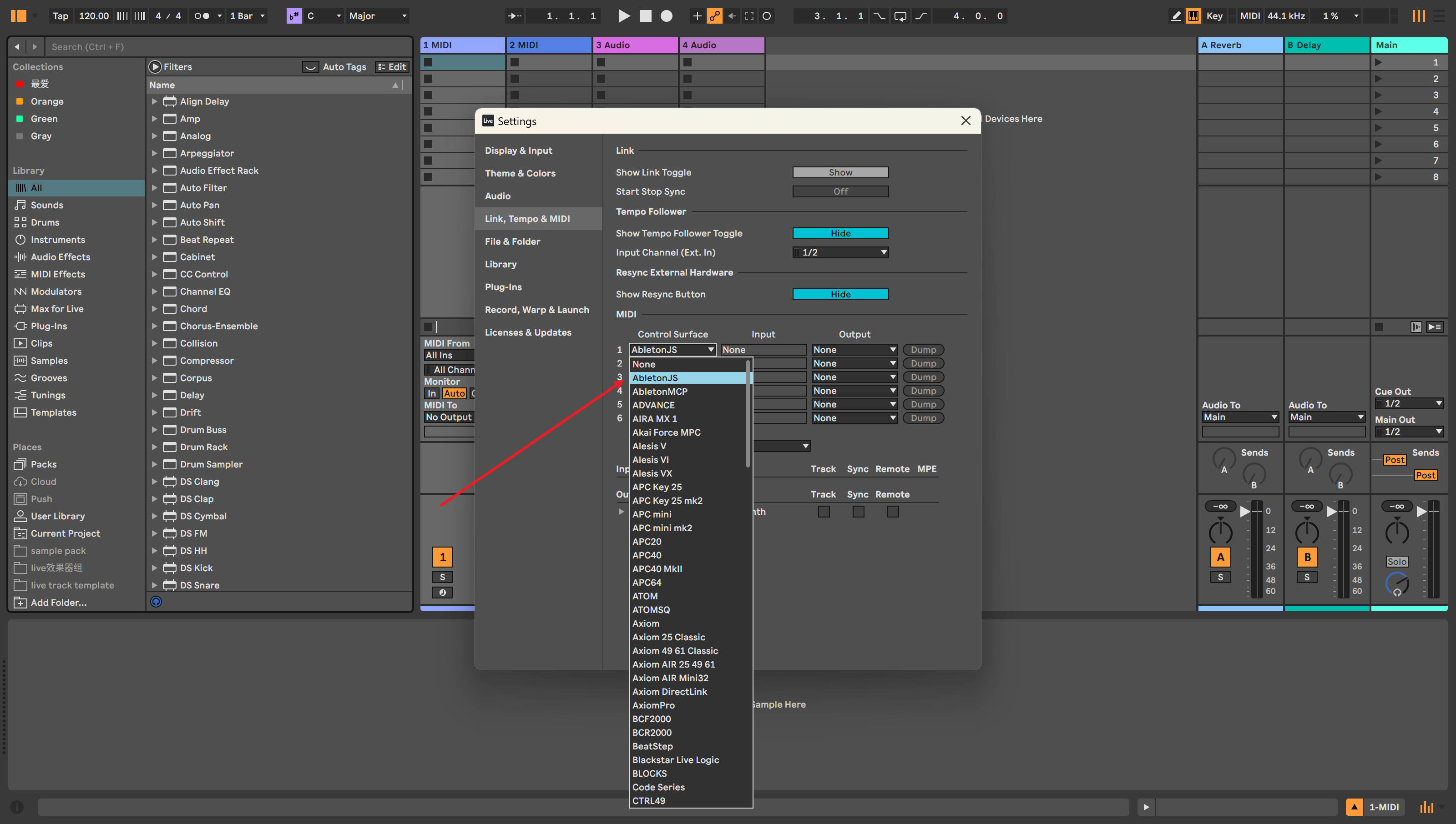
Figure 1: Enabling AbletonJS Control Surface in Ableton Live Configuration
- Open Ableton Live Preferences:
-
Connect using an MCP client
The following clients can be used as MCP endpoints:
- Cursor
- Cherry Studio
- Claude Desktop
- Other MCP clients
Client Configuration
Cursor Configuration Example
Add the following configuration to your Cursor settings:
"ableton-js-mcp": {
    "command": "npx",
    "args": [
        "-y",
        "@xiaolaa2/ableton-copilot-mcp"
    ]
}
For the latest version:
"ableton-js-mcp": {
    "command": "npx",
    "args": [
        "-y",
        "@xiaolaa2/ableton-copilot-mcp@latest"
    ]
}
Custom Storage Path (Optional)
You can specify a custom data storage location using the BASE_PATH environment variable:
"ableton-js-mcp": {
    "command": "npx",
    "args": [
        "-y",
        "@xiaolaa2/ableton-copilot-mcp"
    ],
    "env": {
        "BASE_PATH": "D:\\ableton_copilot_mcp"
    }
}
💡 Tip: The storage path is used to save log files, operation history, and state snapshots
✅ Compatibility Testing
Compatibility primarily depends on the version support of the ableton-js library.
| Ableton Live Version | Test Status |
|---|---|
| 12.1.10 | ✅ Tested and working |
| 11.x | ⚠️ Not tested yet |
| 10.x | ⚠️ Not tested yet |
🤝 Contributing
Issues and contributions are welcome. Please submit issues or suggestions through GitHub Issues.
📄 License
This project is licensed under the MIT License.
⚠️ Disclaimer
This is a third-party integration and not made by Ableton.
相關資源

Ableton MCP
MCP让 agent 连接 Ableton Live 做音乐制作:创建 MIDI 与音频轨、写入音符、加载乐器和效果器、编排整首歌并控制播放。需在 Live 中安装配套 Remote Script,默认开启匿名遥测。
ahujasid/ableton-mcp3.4k
Ableton MCP Extended
MCP用自然语言操控 Ableton Live:建轨、写 MIDI 音符、加载乐器和效果器、调设备参数与场景;另配 ElevenLabs MCP(需其 API Key)可生成人声导入工程。需 Ableton Live 11 以上与 Python 3.10 以上,从源码安装并在 Live 中装配套 Remote Script。
uisato/ableton-mcp-extended288
live-coding-music-mcp
MCP让 Claude 驱动 Strudel.cc 做实时编程音乐:生成鼓点、贝斯与旋律并播放,附带乐理辅助、音频分析和 MIDI 导入导出,适合零基础体验算法作曲。需 Node.js 22 与 Playwright 浏览器,可选的 AI 伴奏需 Gemini API Key 或已登录的 Claude / Codex 命令行。非官方项目。
williamzujkowski/live-coding-music-mcp250
REAPER MCP Server
MCP让 agent 操控 REAPER 完成编曲、混音到母带:建轨与总线、写 MIDI、加载效果器、做自动化、渲染分轨,并能分析响度、频谱与削波。需安装并打开 REAPER、Python 3.10 以上,并在 REAPER 里运行脚本开启 reapy 远程接口;项目处于 Alpha 阶段。
bonfire-systems/reaper-mcp194
flstudio-mcp
MCP让 Claude 在 FL Studio 里做混音诊断与作曲:扫描整首混音找出削波、电平失衡等问题并经确认逐项修复,调 EQ、压缩与混响,按指定调式写旋律并导出 MIDI,改动可回滚。需 Windows 或 macOS、FL Studio 2025 以上、Python 3.10 以上和两个虚拟 MIDI 端口,从源码运行安装脚本。
rosasynthesiz/flstudio-mcp153
ReaperMCP
MCP把 REAPER 交给 agent 做完整音乐制作:作曲与 MIDI 编辑、人声切片、按 35 种风格自动混音与母带、响度与静音质检,全部在本机运行,工程不上传。需安装 REAPER 7 以上与 Python 3.10 以上,并在 REAPER 中加载仓库里的 Lua 脚本。
xDarkzx/Reaper-MCP135