
Jotform MCP Server
MCPJotform's official hosted MCP: lets agents create and edit forms, list forms, and query or add submissions by criteria, handy for event sign-ups, surveys, permission slips and feedback. Nothing to install; OAuth sign-in (only workspace admins can install). Free accounts are rate-limited.
Jotform MCP
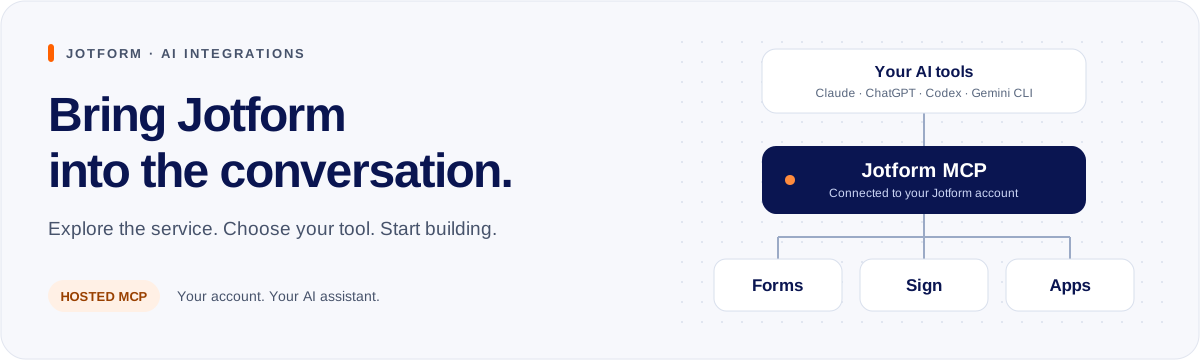
Use Jotform from your AI assistant. Create forms, read responses, prepare documents for signature, and build apps.
Start here
There are four ways to connect. Pick the one that matches your AI tool.
| How you connect | AI tools | What you get | Guide |
|---|---|---|---|
| Install a plugin | Claude Code, claude.ai, Cowork | Forms, Sign, and Apps | Claude plugins |
| Install an extension | Gemini CLI | Forms | Gemini extension |
| Connect from the app directory | ChatGPT, claude.ai | Forms | App directory |
| Add the server address | Codex, Cursor, VS Code, any MCP tool | Forms | Server address |
"Forms" means your forms and their responses.
Claude plugins
There is one plugin for each product. Install only the ones you need.
| Plugin | What it does | Install ID |
|---|---|---|
| Form Creator | Forms and responses | form-creator@jotform-plugins |
| Jotform Sign | Documents for signature | jotform-sign@jotform-plugins |
| Jotform Apps | Client portals and event apps | jotform-apps@jotform-plugins |
Quick install
Claude Code
claude plugin marketplace add jotform/mcp-server
claude plugin install form-creator@jotform-plugins
claude plugin install jotform-sign@jotform-plugins
claude plugin install jotform-apps@jotform-plugins
Gemini CLI
gemini extensions install https://github.com/jotform/mcp-server
Any MCP tool
https://mcp.jotform.com
Sign in to Jotform when your AI tool asks. Then ask:
Find my forms.
Things to try
- "Create a customer feedback form with a rating and a comment."
- "Summarize this week's responses to my feedback form."
- "Prepare a service agreement draft from these terms." (Jotform Sign plugin)
- "Create a client portal with my contact form and a welcome page." (Jotform Apps plugin)
Learn more
Get help
- Using Jotform: Jotform Support or support@jotform.com. Copy mcp@jotform.com and say which AI tool you use.
- A problem in this repository: open an issue.
- Changing this repository: read CONTRIBUTING.md.
Privacy · Terms · MIT license
Related resources

gws-forms
SkillBuilt-in gws CLI skill: lets agents create Google Forms, add or edit questions in bulk, publish and read responses, handy for sign-ups, surveys and class feedback. Needs gws with a Google account authorized via your own Google Cloud project; not an officially supported Google product.
googleworkspace/cli31.8k
Microsoft Clarity MCP Server
MCPMicrosoft's official MCP: query Clarity traffic, behavior metrics and session recordings in plain language, filtered by device, browser, country and more, to dig into landing page conversion. Needs Clarity installed on your site, a data export API token and Node.js.
microsoft/clarity-mcp-server129
Excel MCP Server
MCPCreate, read and modify xlsx workbooks without Microsoft Excel installed: formulas, formatting and conditional formatting, charts, pivot tables and tables. Runs locally over stdio or as a remote HTTP service.
haris-musa/excel-mcp-server4.3k
MATLAB MCP Server
MCPMathWorks' official server that lets agents start your local MATLAB, write and run scripts and unit tests, and check code style and potential errors, for computing, simulation and data analysis. Needs a licensed MATLAB R2021a+ and the downloaded server binary.
matlab/matlab-mcp-server1.7k
mcp-google-sheets
MCPLets agents read and write Google Sheets: list and search spreadsheets, read and batch-update cells, insert rows and columns, create and share sheets and build charts, with the option to enable only some tools to save context. Needs a Google Cloud service account or OAuth credentials.
xing5/mcp-google-sheets1k
Reddit MCP Buddy
MCPLets agents browse subreddits, search posts, read comments and analyze user activity, useful for customer sentiment, competitor feedback and market research. Browsing needs no account; search and comments need free Reddit app credentials. Requires Node.js.
karanb192/reddit-mcp-buddy863