
Bruno CLI
CLI开源 API 客户端 Bruno 的官方命令行 bru:批量运行以纯文本存放在仓库里的接口集合,可切换环境、输出 JSON 结果,并能从 OpenAPI 导入集合,便于在 CI 中跑接口测试。
Bruno CLI
With Bruno CLI, you can now run your API collections with ease using simple command line commands.
This makes it easier to test your APIs in different environments, automate your testing process, and integrate your API tests with your continuous integration and deployment workflows.
For detailed documentation, visit Bruno CLI Documentation.
Installation
To install the Bruno CLI, use the node package manager of your choice, such as NPM:
npm install -g @usebruno/cli
Getting started
Navigate to the directory where your API collection resides, and then run:
bru run
This command will run all the requests in your collection. You can also run a single request by specifying its filename:
bru run request.bru
Or run all requests in a collection's subfolder:
bru run folder
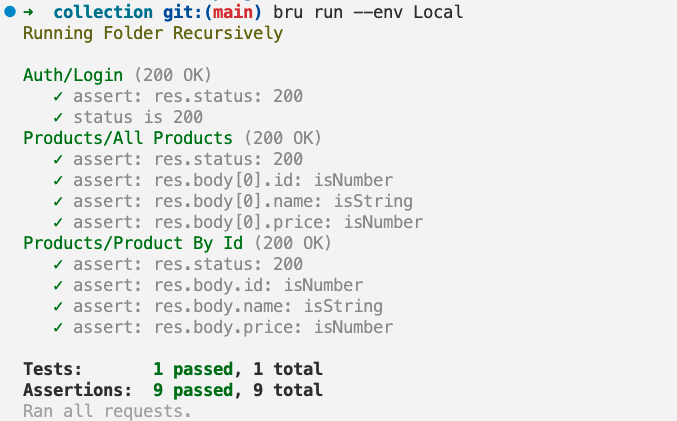
If you need to use an environment, you can specify it with the --env option:
bru run folder --env Local
If you need to collect the results of your API tests, you can specify the --output option:
bru run folder --output results.json
If you need to run a set of requests that connect to peers with both publicly and privately signed certificates respectively, you can add private CA certificates via the --cacert option. By default, these certificates will be used in addition to the default truststore:
bru run folder --cacert myCustomCA.pem
If you need to limit the trusted CA to a specified set when validating the request peer, provide them via --cacert and in addition use --ignore-truststore to disable the default truststore:
bru run request.bru --cacert myCustomCA.pem --ignore-truststore
Importing Collections
You can import collections from other formats, such as OpenAPI, using the import command:
bru import openapi --source api.yml --output ~/Desktop/my-collection --collection-name "My API"
You can also use the shorter form with aliases:
bru import openapi -s api.yml -o ~/Desktop/my-collection -n "My API"
This creates a Bruno collection directory that can be opened in Bruno.
You can also import directly from a URL:
bru import openapi --source https://example.com/api-spec.json --output ~/Desktop --collection-name "Remote API"
You can also export the collection as a JSON file:
bru import openapi --source api.yml --output-file ~/Desktop/my-collection.json --collection-name "My API"
Import Options:
| Option | Details |
|---|---|
| --source, -s | Path to the source file or URL (required) |
| --output, -o | Path to the output directory |
| --output-file, -f | Path to the output JSON file |
| --collection-name, -n | Name for the imported collection |
| --insecure | Skip SSL certificate validation when fetching from URLs |
Command Line Options
| Option | Details |
|---|---|
| -h, --help | Show help |
| --version | Show version number |
| -r | Indicates a recursive run (default: false) |
| --cacert [string] | CA certificate to verify peer against |
| --env [string] | Specify environment to run with |
| --env-var [string] | Overwrite a single environment variable, multiple usages possible |
| -o, --output [string] | Path to write file results to |
| -f, --format [string] | Format of the file results; available formats are "json" (default) or "junit" |
| --reporter-json [string] | Path to generate a JSON report |
| --reporter-junit [string] | Path to generate a JUnit report |
| --reporter-html [string] | Path to generate an HTML report |
| --insecure | Allow insecure server connections |
| --tests-only | Only run requests that have tests |
| --bail | Stop execution after a failure of a request, test, or assertion |
| --csv-file-path | CSV file to run the collection with |
| --reporter--skip-all-headers | Skip all headers in the report |
| --reporter-skip-headers | Skip specific headers in the report |
| --client-cert-config | Client certificate configuration by passing a JSON file |
| --delay [number] | Add delay to each request |
Scripting
Bruno cli returns the following exit status codes:
0-- execution successful1-- an assertion, test, or request in the executed collection failed2-- the specified output directory does not exist3-- the request chain seems to loop endlessly4-- bru was called outside of a collection root directory5-- the specified input file does not exist6-- the specified environment does not exist7-- the environment override was not a string or object8-- an environment override is malformed9-- an invalid output format was requested255-- another error occurred
Demo
Support
If you encounter any issues or have any feedback or suggestions, please raise them on our GitHub repository
Thank you for using Bruno CLI!
Changelog
See https://github.com/usebruno/bruno/releases
License
相关资源

Hurl
CLI用纯文本文件定义并运行 HTTP 请求链,可捕获变量,对状态码、响应头与 JSONPath / XPath 结果做断言,既能取数也能做接口测试并接入 CI。Orange 开源。
Orange-OpenSource/hurl19.3k
Postman Plugin for Claude Code
PluginPostman 官方插件:自动配置 Postman MCP 服务,在 Claude Code 里同步集合、运行 API 测试并诊断失败、生成客户端代码、创建 Mock 与文档,做 OWASP API 安全检查。需 Postman 账号。
Postman-Devrel/postman-claude-code-plugin41
curl
CLI通过 URL 收发数据的命令行工具,支持 HTTP(S)、FTP、SFTP、WebSocket、MQTT 等二十多种协议,是 agent 调用接口、下载文件的常用工具;macOS 与多数 Linux 已预装。
curl/curl43.1k
MCP Inspector
CLIMCP 官方调试工具:通过网页、命令行或终端界面连接任意 MCP 服务器,列出并调用其工具、资源与提示词;CLI 模式可输出 JSON,适合脚本与 CI 冒烟测试。
modelcontextprotocol/inspector11.1k
xh
CLI重新实现 HTTPie 语法的 HTTP 请求命令行,Rust 编写、注重性能;命令行里的键值对默认序列化为 JSON 发送,适合快速调试 REST 接口。
ducaale/xh8.1k
Postman MCP Server
MCPPostman 官方 MCP 服务器:让 agent 管理工作区、集合、环境与 API 规范,辅助接口测试,并按 API 定义生成客户端代码。远程版用 OAuth 登录,本地版需要 Postman API Key。
postmanlabs/postman-mcp-server321