
RapidOCR
CLI把 PaddleOCR 模型转成 ONNX 的轻量 OCR,默认识别中英文,纯 CPU 即可运行;命令行 rapidocr 能识别截图、拍照件和扫描页图片中的文字,适合把纸质材料、票据图片转成文本。需 Python 环境,首次运行联网下载模型,之后可离线使用;PDF 需先转成图片。










📝 Introduction
RapidOCR is a completely open-source, free OCR tool that supports multi-platform, multi-language operation and rapid offline deployment. Its core advantages lie in extreme speed and extensive compatibility.
Supported Languages: Default support for Chinese and English recognition. For other supported languages, please refer to the documentation: Model List.
Project Origin: Considering that PaddleOCR still has room for optimization in engineering aspects, we innovatively converted the models in PaddleOCR into the highly compatible ONNX format to simplify and accelerate the inference deployment of OCR models on various terminal devices. Furthermore, we achieved seamless cross-platform porting based on multiple programming languages such as Python, C++, Java, and C#, enabling developers to get started easily and integrate efficiently.
Name Implication: The name "RapidOCR" embodies our core expectations for the product: Rapid (simple operation, fast response), Good & Economical (low resource consumption, high cost-effectiveness), and Intelligent (achieving accurate and efficient recognition relying on deep learning technology). We focus on leveraging the advantages of artificial intelligence to create compact yet powerful models, relentlessly pursuing speed while ensuring excellent recognition results.
User Guide:
- Direct Deployment: If the models provided in this repository meet your needs, simply refer to the Official Documentation to quickly complete the deployment and usage of RapidOCR.
- Custom Fine-tuning: If the existing models cannot meet specific scenario requirements, you can fine-tune them using your own data based on PaddleOCR, and then apply the optimized models to the RapidOCR deployment process to achieve personalized customization.
If you find this project helpful for your work or study, we kindly ask you to give us a ⭐ Star to provide valuable support and encouragement!
🎥 Visualization

🛠️ Installation
pip install rapidocr onnxruntime
📋 Usage
from rapidocr import RapidOCR

engine = RapidOCR()

img_url = "https://www.modelscope.cn/models/RapidAI/RapidOCR/resolve/master/resources/test_files/ch_en_num.jpg"
result = engine(img_url)
print(result)

result.vis("vis_result.jpg")
🐳 Docker
Docker development environments are available for all supported inference engines:
# Build and test with ONNX Runtime (CPU)
make build-onnxruntime-cpu
make test-onnxruntime-cpu

# Or use any engine: onnxruntime-gpu, tensorrt, paddle, openvino, pytorch, mnn
make build-tensorrt
make shell-tensorrt
See docker/README.md for full setup instructions, GPU configuration, and troubleshooting.
📚 Documentation
Full documentation can be found on docs, in Chinese.
👥 Who use? (more)
- Docling
- CnOCR
- api-for-open-llm
- arknights-mower
- pensieve
- genshin_artifact_auxiliary
- ChatLLM
- langchain
- Langchain-Chatchat
- JamAIBase
- PAI-RAG
- ChatAgent_RAG
- OpenAdapt
- Umi-OCR
For more projects that use RapidOCR, you are welcome to register at the registration address. Registration is solely for product promotion.
🙏 Acknowledgements
- Many thanks to PaddleOCR for everything.
- Many thanks to PaddleOCR2Pytorch for providing the converted PyTorch format models.
- Many thanks to PaddleX for providing the document models.
- Many thanks to DeliciaLaniD for fixing the misplaced start position of scan animation in ocrweb.
- Many thanks to zhsunlight for the suggestion about parameterized call GPU reasoning and the careful and thoughtful testing.
- Many thanks to lzh111222334 for fixing some bugs of rec preprocessing under python version.
- Many thanks to AutumnSun1996 for the suggestion in the #42.
- Many thanks to DeadWood8 for providing the document which packages rapidocr_web to exe by Nuitka.
- Many thanks to Loovelj for fixing the bug of sorting the text boxes. For details see issue 75.
🤝 Contribution Guide
This repository contains the Python component of RapidOCR. Components for other languages have been migrated to separate repositories.
For the complete workflow on contributing to Python development, please refer to: Python CONTRIBUTING.
🎖 Code Contributors
🌟 Sponsors & Backers
RapidOCR is an Apache2.0-licensed open source project with its ongoing development made possible entirely by the support of these awesome backers. If you'd like to join them, please consider sponsoring RapidOCR's development.
Sponsors
| Sponsors | Application | Introduction |
|---|---|---|
 | Quicker | Your fingertip toolbox |
Backers

@zg-young |

@Eunsolfs |

@youzzhang |

@heyq02 |
Lucky-Li-le |
📜 Citation
If you find this project useful in your research, please consider cite:
@misc{RapidOCR 2021,
    title={{Rapid OCR}: OCR Toolbox},
    author={RapidAI Team},
    howpublished = {\url{https://github.com/RapidAI/RapidOCR}},
    year={2021}
}
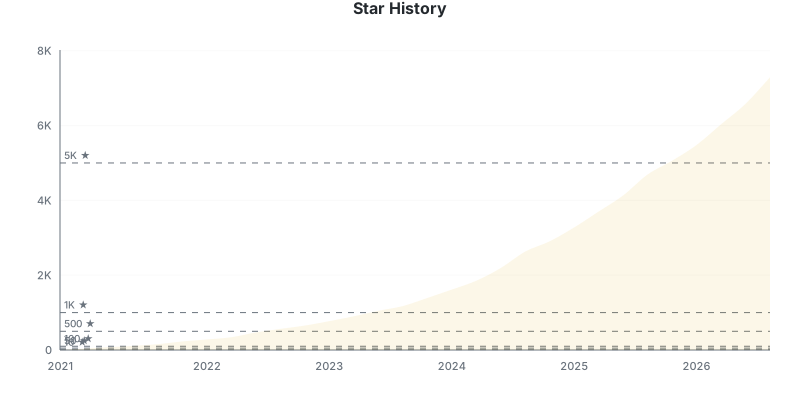
⭐️ Stargazers over time
⚖️ License
License
Source code
RapidOCR source code and engineering components are copyright RapidOCR Authors and licensed under the Apache License, Version 2.0. See LICENSE.
Models
The bundled and hosted OCR model files are derived from official PaddleOCR models. Copyright in the upstream model weights is held by Baidu and/or the respective PaddleOCR rights holders.
The applicable upstream models are distributed under the Apache License, Version 2.0. Converted model artifacts, including ONNX representations produced by RapidOCR, are redistributed under the same license terms.
RapidOCR does not claim ownership of the upstream model weights. Model-specific sources, hashes, attribution, and conversion information are documented in MODEL_LICENSES.md.
相关资源

OCRmyPDF
CLI给扫描版 PDF 加上可搜索、可复制的文字层,可自动纠偏、旋转并优化体积,默认输出 PDF/A。基于 Tesseract,支持 100 多种语言,完全本地运行。
ocrmypdf/OCRmyPDF34.9k
PDF
Skill读取与提取 PDF 文本和表格,合并、拆分、旋转页面,加水印、填写表单,并能对扫描件做 OCR。驱动 Claude 文档能力的 Anthropic 官方技能,源码可见但非开源。
anthropics/skills182k
PaddleOCR MCP Server
MCP飞桨 PaddleOCR 官方 MCP:对图片和 PDF 做文字识别与版面解析(PP-OCR、PP-StructureV3、PaddleOCR-VL),输出文本或 Markdown;可本地推理,也可调用官方 API、千帆或自建服务。
PaddlePaddle/PaddleOCR91.2k
invoice2data
CLI从 PDF 发票中按 YAML/JSON 模板抽取开票方、金额、日期、票号等字段,导出 CSV、JSON 或 XML;内置多种文本抽取后端,支持扫描件 OCR 与可选的 AI 兜底。
invoice-x/invoice2data2.2k
Rembg
CLI一条命令去除图片背景:支持单张、整个文件夹批处理和监听目录,可只输出蒙版、切换 U2Net、SAM 等模型,也能启动 HTTP 服务或配合 FFmpeg 处理视频帧。默认模型在本地推理。
danielgatis/rembg24.9k
Docling MCP
MCPDocling 项目官方 MCP:把 PDF、Word、PPT 等文件转成结构化文档,识别版面与表格、对扫描件做 OCR,也能让 agent 逐段生成新文档并导出 Markdown。本地模式需 Python 与 uv,首次运行会下载版面识别模型;也可改连自建的 Docling Serve 服务。
docling-project/docling-mcp773