
resvg
CLI高保真 SVG 渲染库与命令行工具,可把 SVG 图标、插画按指定尺寸导出为 PNG,适合批量切图;不依赖系统库,各平台渲染结果逐像素一致。不支持 SVG 动画,安装需要 Rust 环境(cargo),也可从 Releases 下载 macOS 预编译版。
resvg




resvg is an SVG rendering library.
It can be used as a Rust library, as a C library, and as a CLI application to render static SVG files.
The core idea is to make a fast, small, portable SVG library with the goal to support the whole SVG spec.
Features
Designed for edge-cases
SVG is a very complicated format with a large specification (SVG 1.1 is almost 900 pages).
You basically need a web browser to handle all of it. But the truth is that even browsers
fail at this (see SVG support).
Yes, unlike resvg, browsers do support dynamic SVG features like animations and scripting.
But using a browser to render SVG correctly is sadly not an option.
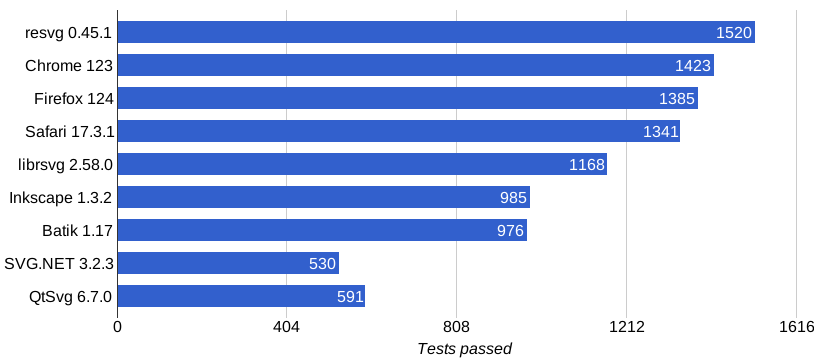
To prove its correctness, resvg has a vast test suite that includes around 1600 tests.
And those are only SVG-to-PNG regression tests. This doesn't include tests in resvg dependencies.
And the best thing is that resvg test suite is available to everyone. It's not tied to resvg
in any way. Which should help people who plan to develop their own SVG libraries.
Safety
It's hard not to mention safety when we talk about Rust and processing of a random input. And we're talking not only about SVG/XML, but also about CSS, TTF, PNG, JPEG, GIF, and GZIP.
While resvg is not the only SVG library written in Rust, it's the only one that
is written completely in Rust. There is no non-Rust code in the final binary.
Moreover, there is almost no unsafe code either. Still, some dependencies have some unsafe code
and font memory-mapping is inherently unsafe, but it's best you can get in terms of memory safety.
However, this doesn't stop at memory safety. resvg has extensive checks to prevent endless loops (freezes)
and stack overflows (via recursion).
Zero bloat
Right now, the resvg CLI application is less than 5MB in size and doesn't require any external dependencies.
The binary contains nothing that isn't needed for rendering SVG files.
Portable
resvg is guaranteed to work everywhere where you can compile the Rust itself,
including WASM. There are some rough edges with obscure CPU architectures and
mobile OSs (mainly system fonts loading), but it should be pretty painless otherwise.
SVG preprocessing
Another major difference from other SVG rendering libraries is that in resvg
SVG parsing and rendering are two completely separate steps.
Those steps are also split into two separate libraries: resvg and usvg.
Meaning you can easily write your own renderer on top of usvg using any 2D library of your liking.
Performance
Comparing performance between different SVG rendering libraries is like comparing apples and oranges.
Everyone has a very different set of supported features, languages, build flags, etc...
Anyhow, as resvg is written in Rust and uses tiny-skia for rendering - it's pretty fast.
There should also still be quite a lot of room for improvement.
Reproducibility
Since resvg doesn't rely on any system libraries it allows us to have reproducible results
on all supported platforms. Meaning if you render an SVG file on x86 Windows and then render it
on ARM macOS - the produced image will be identical. Each pixel would have the same value.
Limitations
- No animations
There are no plans on implementing them either. - No native text rendering
resvgdoesn't rely on any system libraries, which implies that we cannot use native text rendering. Nevertheless, native text rendering is optimized for small horizontal text, which is not that common in SVG. - Unicode-only
It's the 21st century. Text files that aren't UTF-8 encoded are no longer relevant.
SVG support
resvg aims to only support the static
SVG subset; i.e. no a, script, view or cursor elements, no events and no animations.
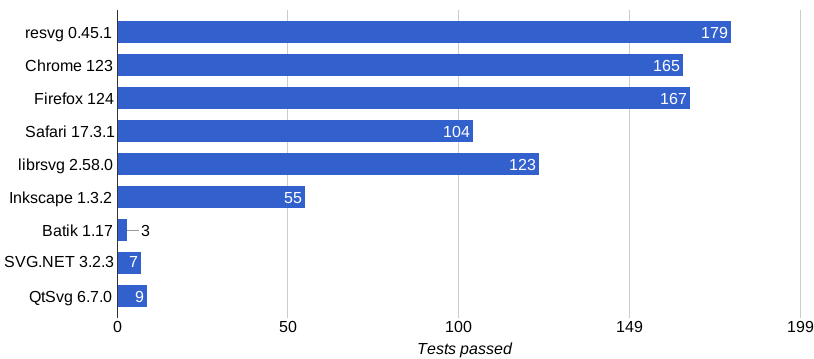
SVG 2 support is being worked on. You can search for relevant issues with the svg2 tag or our SVG 2 changelog.
SVG Tiny 1.2 is not supported and support is also not planned.
Results of the resvg test suite:
SVG 2 only results:
You can find a complete table of supported features here. It also includes some alternative libraries.
We're not testing against all SVG libraries since many of them are pretty bad. Some libraries are not on the list because they don't pass the 25% mark. Such libraries are: wxSvg, LunaSVG and nanosvg.
License
Licensed under either of
- Apache License, Version 2.0 (LICENSE-APACHE or http://www.apache.org/licenses/LICENSE-2.0)
- MIT license (LICENSE-MIT or http://opensource.org/licenses/MIT)
at your option.
Contribution
Contributions are welcome by pull request. The Rust code of conduct applies.
Unless you explicitly state otherwise, any contribution intentionally submitted for inclusion in the work by you, as defined in the Apache-2.0 license, shall be licensed as above, without any additional terms or conditions.
相关资源

VTracer
CLI把 JPG、PNG 等位图转成 SVG 矢量图的命令行工具,支持彩色描摹、黑白线稿和光照不均的扫描件,适合把 logo、插画和扫描的旧图纸矢量化。命令行版目前是 1.0 预览版,用 cargo 安装,需要 Rust 环境;也提供桌面版。
visioncortex/vtracer7.3k
gifski
CLI基于 pngquant 的高质量 GIF 编码器:把视频帧或 PNG 序列转成动图,跨帧调色板与时间抖动让每帧可用数千种颜色;可通过管道直接接收 ffmpeg 输出的视频。
ImageOptim/gifski5.7k
SVGO
CLISVG 优化命令行工具与 Node.js 库:删除编辑器元数据、注释、隐藏元素和冗余属性来压缩 SVG,可递归处理整个目录,并通过插件配置精细控制优化规则。
svg/svgo22.7k
ImageMagick
CLI老牌图像处理命令行套件,支持 JPEG、PNG、GIF、TIFF、PDF 等众多格式的转换、缩放、裁剪、合成与批量处理,适合 agent 在脚本里处理图片。
ImageMagick/ImageMagick17.7k
pastel
CLI命令行配色工具:生成、混合、调亮调暗颜色,在 HEX、RGB、HSL、Lab 等格式间转换,生成渐变和多种区分度高的颜色,按背景挑选易读的文字颜色并模拟色盲效果,适合让 agent 帮设计师出配色方案。用 Homebrew 安装即可,无需账号或 API Key。
sharkdp/pastel6.5k
Oxipng
CLI多线程的无损 PNG 压缩工具,批量缩小截图、切图和图标的体积而不损画质,还能去掉无用的元数据,适合设计师交付切图或网页上线前压缩图片。macOS 可用 Homebrew 安装。
oxipng/oxipng4.3k