
Subaligner
CLI用神经网络把字幕与音视频自动对齐,还能用 Whisper 转写生成字幕、用本地模型翻译字幕,支持 SRT、TTML、SCC 等十多种格式。需 Python 3.9–3.12 与 FFmpeg,转写和翻译要另装 llm 扩展。








Supported Formats
Subtitle: SubRip, TTML, WebVTT, (Advanced) SubStation Alpha, MicroDVD, MPL2, TMP, EBU STL, SAMI, SCC and SBV.
Video/Audio: MP4, WebM, Ogg, 3GP, FLV, MOV, Matroska, MPEG TS, WAV, MP3, AAC, FLAC, etc.
:information_source: Subaligner relies on file extensions as default hints to process a wide range of audiovisual or subtitle formats. It is recommended to use extensions widely acceppted by the community to ensure compatibility.
Dependant package
Required by the basic installation: FFmpeg
Install FFmpeg
apt-get install ffmpegbrew install ffmpegBasic Installation
Install from PyPI
pip install -U pip && pip install wheelpip install subalignerInstall from source
git clone git@github.com:baxtree/subaligner.git && cd subalignerpip install -U pippip install .Installation with Optional Packages Supporting Additional Features
Install dependencies for enabling translation and transcription
pip install 'subaligner[llm]'Install dependencies for enabling forced alignment
pip install --no-build-isolation 'subaligner[stretch]'Install dependencies for setting up the development environment
pip install --no-build-isolation 'subaligner[dev]'Install all extra dependencies
pip install --no-build-isolation 'subaligner[harmony]'Note that subaligner[stretch], subaligner[dev] and subaligner[harmony] require eSpeak to be pre-installed:
Install eSpeak
apt-get install espeak libespeak1 libespeak-dev espeak-databrew install espeakInstall patched aeneas
pip install --no-build-isolation -r requirements-py312-patched.txtContainer Support
If you prefer using a containerised environment over installing everything locally:
Run subaligner with a container
docker run -v `pwd`:`pwd` -w `pwd` -it baxtree/subaligner bashFor Windows users, you can use Windows Subsystem for Linux (WSL) to install Subaligner.
Alternatively, you can use Docker Desktop to pull and run the image.
Assuming your media assets are stored under d:\media, open built-in command prompt, PowerShell, or Windows Terminal:
Run the subaligner container on Windows
docker pull baxtree/subalignerdocker run -v "/d/media":/media -w "/media" -it baxtree/subaligner bashUsage
Single-stage alignment (high-level shift with lower latency)
subaligner -m single -v video.mp4 -s subtitle.srtsubaligner -m single -v https://example.com/video.mp4 -s https://example.com/subtitle.srt -o subtitle_aligned.srtDual-stage alignment (low-level shift with higher latency)
subaligner -m dual -v video.mp4 -s subtitle.srtsubaligner -m dual -v https://example.com/video.mp4 -s https://example.com/subtitle.srt -o subtitle_aligned.srtGenerate subtitles by transcribing audiovisual files
subaligner -m transcribe -v video.mp4 -ml eng -mr whisper -mf small -o subtitle_aligned.srtsubaligner -m transcribe -v video.mp4 -ml zho -mr whisper -mf medium -o subtitle_aligned.srtPass in a global prompt for the entire audio transcription
subaligner -m transcribe -v video.mp4 -ml eng -mr whisper -mf turbo -ip "your initial prompt" -o subtitle_aligned.srtUse the full subtitle content as a prompt
subaligner -m transcribe -v video.mp4 -s subtitle.srt -ml eng -mr whisper -mf turbo -o subtitle_aligned.srtUse the previous subtitle segment as the prompt when transcribing the following segment
subaligner -m transcribe -v video.mp4 -s subtitle.srt --use_prior_prompting -ml eng -mr whisper -mf turbo -o subtitle_aligned.srt(For details on the prompt crafting for transcription, please refer to Whisper prompting guide.)
Alignment on segmented plain texts (double newlines as the delimiter)
subaligner -m script -v video.mp4 -s subtitle.txt -o subtitle_aligned.srtsubaligner -m script -v https://example.com/video.mp4 -s https://example.com/subtitle.txt -o subtitle_aligned.srtGenerate JSON raw subtitle with per-word timings
subaligner -m transcribe -v video.mp4 -ml eng -mr whisper -mf turbo -ip "your initial prompt" --word_time_codes -o raw_subtitle.jsonsubaligner -m script -v video.mp4 -s subtitle.txt --word_time_codes -o raw_subtitle.jsonAlignment on multiple subtitles against the single media file
subaligner -m script -v video.mp4 -s subtitle_lang_1.txt -s subtitle_lang_2.txtsubaligner -m script -v video.mp4 -s subtitle_lang_1.txt subtitle_lang_2.txtAlignment on embedded subtitles
subaligner -m single -v video.mkv -s embedded:stream_index=0 -o subtitle_aligned.srtsubaligner -m dual -v video.mkv -s embedded:stream_index=0 -o subtitle_aligned.srtTranslative alignment with the ISO 639-3 language code pair (src,tgt)
subaligner --languagessubaligner -m single -v video.mp4 -s subtitle.srt -t src,tgtsubaligner -m dual -v video.mp4 -s subtitle.srt -t src,tgtsubaligner -m script -v video.mp4 -s subtitle.txt -o subtitle_aligned.srt -t src,tgtsubaligner -m dual -v video.mp4 -s subtitle.srt -tr helsinki-nlp -o subtitle_aligned.srt -t src,tgtsubaligner -m dual -v video.mp4 -s subtitle.srt -tr facebook-mbart -tf large -o subtitle_aligned.srt -t src,tgtsubaligner -m dual -v video.mp4 -s subtitle.srt -tr facebook-m2m100 -tf small -o subtitle_aligned.srt -t src,tgtsubaligner -m dual -v video.mp4 -s subtitle.srt -tr whisper -tf small -o subtitle_aligned.srt -t src,tgtTranscribe audiovisual files and generate translated subtitles
subaligner -m transcribe -v video.mp4 -ml src -mr whisper -mf small -tr helsinki-nlp -o subtitle_aligned.srt -t src,tgtShift subtitle manually by offset in seconds
subaligner -m shift --subtitle_path subtitle.srt -os 5.5subaligner -m shift --subtitle_path subtitle.srt -os -5.5 -o subtitle_shifted.srtRun batch alignment against directories
subaligner_batch -m single -vd videos/ -sd subtitles/ -od aligned_subtitles/subaligner_batch -m dual -vd videos/ -sd subtitles/ -od aligned_subtitles/subaligner_batch -m dual -vd videos/ -sd subtitles/ -od aligned_subtitles/ -of ttmlRun alignments with pipx
pipx run subaligner -m single -v video.mp4 -s subtitle.srtpipx run subaligner -m dual -v video.mp4 -s subtitle.srtRun the module as a script
python -m subaligner -m single -v video.mp4 -s subtitle.srtpython -m subaligner -m dual -v video.mp4 -s subtitle.srtRun alignments with the docker image
docker pull baxtree/subalignerdocker run -v `pwd`:`pwd` -w `pwd` -it baxtree/subaligner subaligner -m single -v video.mp4 -s subtitle.srtdocker run -v `pwd`:`pwd` -w `pwd` -it baxtree/subaligner subaligner -m dual -v video.mp4 -s subtitle.srtdocker run -it baxtree/subaligner subaligner -m single -v https://example.com/video.mp4 -s https://example.com/subtitle.srt -o subtitle_aligned.srtdocker run -it baxtree/subaligner subaligner -m dual -v https://example.com/video.mp4 -s https://example.com/subtitle.srt -o subtitle_aligned.srt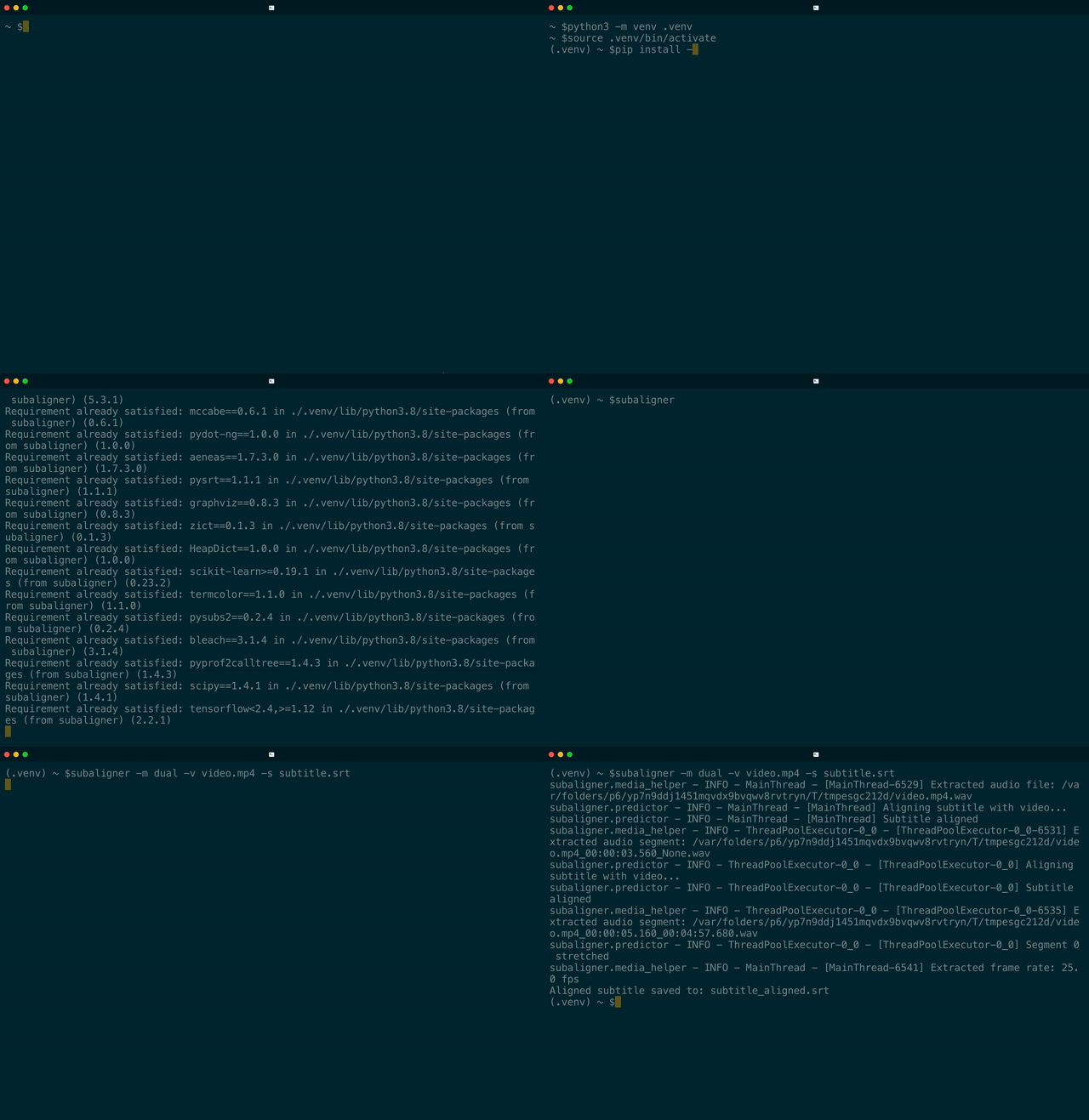
The aligned subtitle will be saved at subtitle_aligned.srt. To obtain the subtitle in raw JSON format for downstream
processing, replace the output file extension with .json. For details on CLIs, run subaligner -h or subaligner_batch -h,
subaligner_convert -h, subaligner_train -h and subaligner_tune -h for additional utilities. subaligner_1pass and subaligner_2pass are shortcuts for running subaligner with -m single and -m dual options, respectively.
Advanced Usage
You can train a new model with your own audiovisual files and subtitle files,
Train a custom model
subaligner_train -vd VIDEO_DIRECTORY -sd SUBTITLE_DIRECTORY -tod TRAINING_OUTPUT_DIRECTORYThen you can apply it to your subtitle synchronisation with the aforementioned commands. For more details on how to train and tune your own model, please refer to Subaligner Docs.
For larger media files taking longer to process, you can reconfigure various timeouts using the following:
Options for tuning timeouts
-mpt[Maximum waiting time in seconds when processing media files]-sat[Maximum waiting time in seconds when aligning each segment]-fet[Maximum waiting time in seconds when embedding features for training]
Anatomy
Subtitles can be out of sync with their companion audiovisual media files for a variety of causes including latency introduced by Speech-To-Text on live streams or calibration and rectification involving human intervention during post-production.
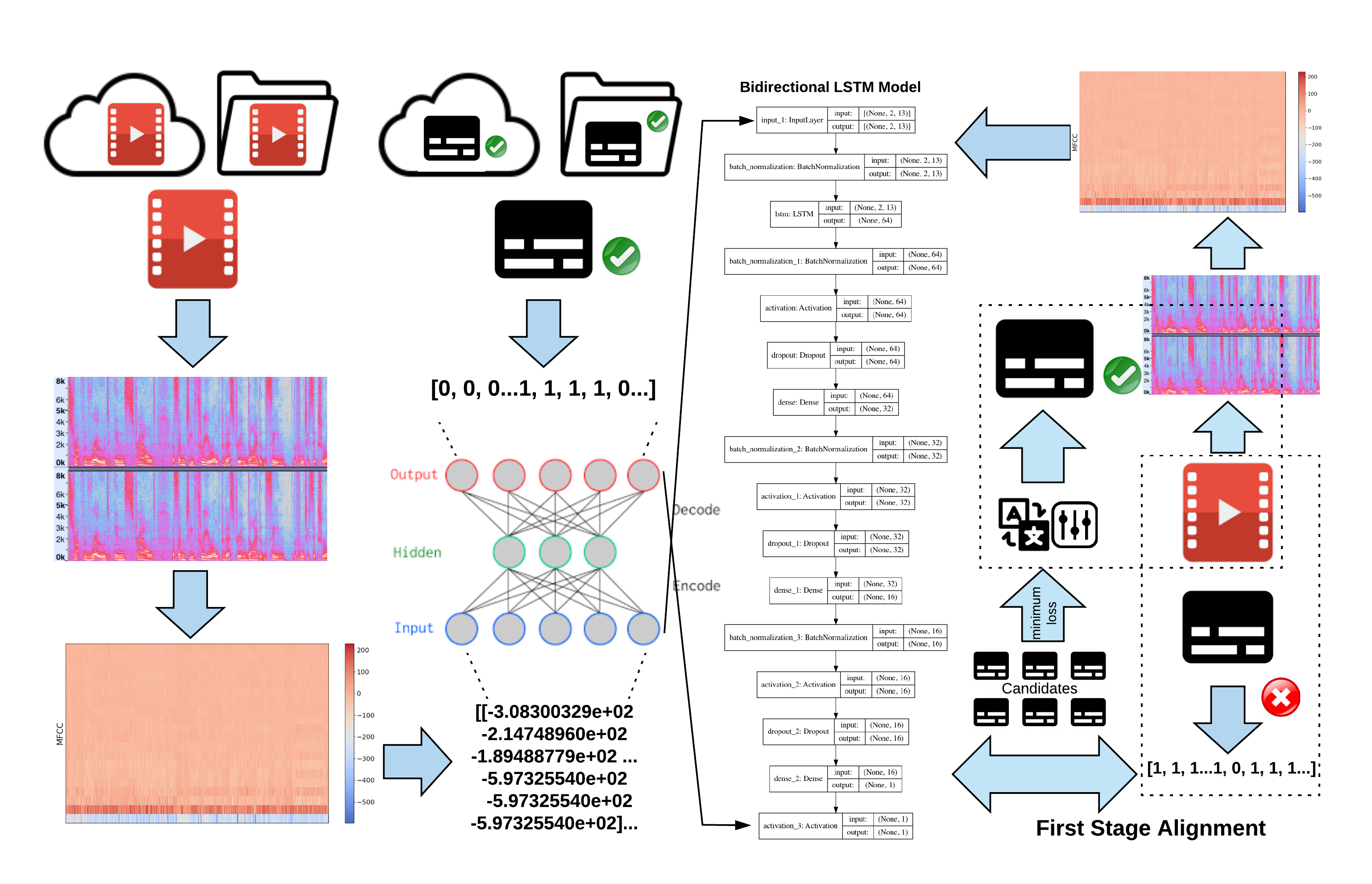
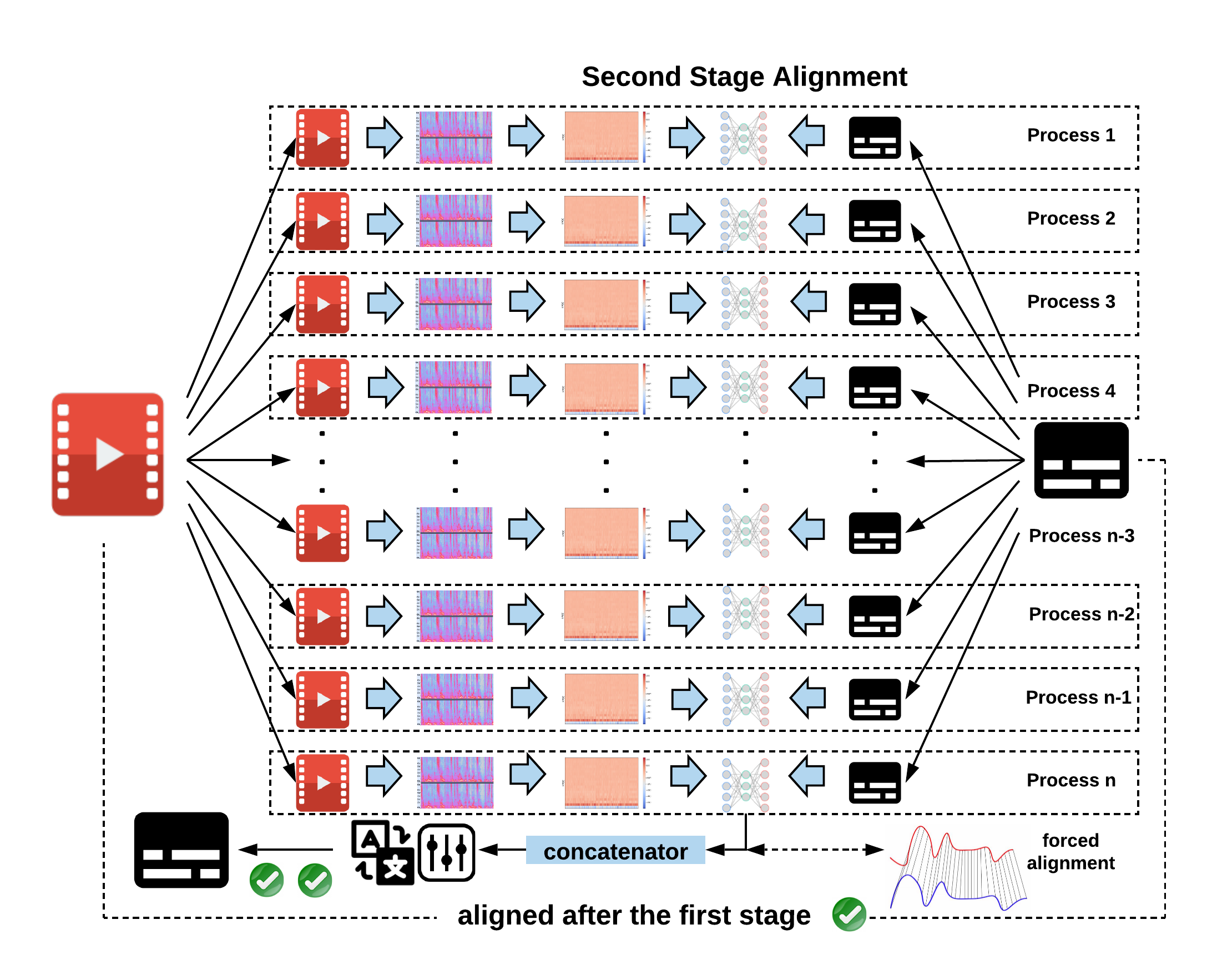
A model has been trained with synchronised video and subtitle pairs and later used for predicating shifting offsets and directions under the guidance of a dual-stage aligning approach.
First Stage (Global Alignment):
Second Stage (Parallelised Individual Alignment):
Acknowledgement
This tool wouldn't be possible without the following packages: librosa tensorflow scikit-learn pycaption pysrt pysubs2 aeneas transformers whisper.
Thanks to Alan Robinson and Nigel Megitt for their invaluable feedback.
相关资源

pyVideoTrans
CLI视频翻译与配音一站式工具:串起语音识别、字幕翻译、多角色 AI 配音与音画合成,可接 Faster-Whisper、DeepSeek、Edge-TTS 等本地或在线模型;cli.py 支持无界面批处理。需要 FFmpeg。
jianchang512/pyvideotrans19.4k
VideoCaptioner
CLI卡卡字幕助手的命令行版:把课程、讲座、访谈视频转成字幕,再用大模型断句校对、翻译并烧录回视频。必剪识别与必应翻译免费可用,大模型优化需自备 API Key,需 Python 3.10–3.12。
WEIFENG2333/VideoCaptioner16.3k
Auto Synced & Translated Dubs
CLI根据已有 SRT 字幕把视频台词译成多种语言,再用 AI 语音逐句合成并按时间轴对齐,输出译文字幕和配音音轨,适合做多语种讲解视频。需要 Python、FFmpeg 及 Google Cloud、Azure、DeepL 或 ElevenLabs 的 API Key;在 ini 配置文件里填好路径与语言后运行 python main.py。
ThioJoe/Auto-Synced-Translated-Dubs1.8k
Violin
Skill开源视频翻译配音工具:把讲座、课程等视频转写并翻译成 33 种语言之一,合成配音后对齐回画面,可导出 SRT 字幕。需 Python 3.10+、FFmpeg 和 violin 命令行工具,并准备按量计费的 Together AI API Key。
shang-zhu/violin1.1k
BaoCut Agent Skill
Skill宝玉开发的视频字幕工具 BaoCut 的官方技能:用自然语言让 Claude Code 或 Codex 转写音视频、生成并翻译字幕、校对说话人、调整时间线并导出 SRT 字幕与成片。需在 Apple 芯片的 Mac(macOS 14 及以上)安装 BaoCut 应用,Windows 可由技能自动下载预览版命令行。
JimLiu/baocut1k
Perso Dubbing Plugin
PluginPerso AI 官方插件:一句话把视频配成多种语言并对口型,还能语音转 SRT 字幕、翻译字幕(保留时间轴并质检)、烧录字幕、切竖版短片。需 Node.js 18+;字幕翻译、烧录、剪片本地免费,配音、口型和语音转字幕按秒计费,需 Perso 账号。
perso-ai/perso-dubbing-plugin39