
textlint
CLI可插拔的自然语言检查工具,像检查代码一样按规则检查 Markdown 与纯文本稿件的用词、标点和术语一致性并自动修正,也能作为 MCP 服务运行。规则需另装,生态以日语、英语规则为主;需要 Node.js 20 以上。
textlint

The pluggable linting tool for natural language.
textlint is similar to ESLint, but it's for use with natural language.

Website
- Online demo
- Searchable documents
- Release blog
Visit https://textlint.org/.
Features
- No bundled rules.
- To use a rule, install a textlint rule via npm.
npm install textlint-rule-xxx.- See collection of textlint rules
- Markdown and plain text are supported by default. Support is available for HTML and other file formats via plugins.
- Supports the use of custom formatters and formatter bundles formatter(reporter)
Quick Tour
For a quick tour of textlint, checkout our Getting Started guide :squirrel:
Installation
You can install the textlint command using npm:
$ npm install textlint --save-dev
Requirements:
- Node.js 20+
If you're not sure what version of Node you're running, you can run node -v in your console to find out.
:warning: Warning:
- If you have installed
textlintglobally you must install each reference rule globally as well. - If you have installed
textlintlocally you must install each rule locally as well.
We recommend installing textlint locally.
For Node.js beginners
If you've never used Node.js and npm, please see the following:
Usage

textlint has no default rules!!
You can run textlint with .textlintrc.json config file.
# Install textlint and rules into local directory
npm install --save-dev textlint textlint-rule-no-todo
npx textlint --init command creates .textlintrc.json file from installed rules.
npx textlint --init
.textlintrc.json will be created like this:
{
    "rules": {
        "no-todo": true
    }
}
Lint files via textlint:
npx textlint ./README.md
textlint load .textlintrc.json from current directory and lint README.md.
CLI
Run npx textlint -h for information on how to use the CLI.
$ textlint [options] file.md [file|dir|glob*]

Options:
  -h, --help                  Show help.
  -c, --config path::String   Use configuration from this file or sharable config.
  --ignore-path path::String  Specify path to a file containing patterns that describes files to ignore. - default: .textlintignore
  --init                      Create the config file if not existed. - default: false
  --fix                       Automatically fix problems
  --dry-run                   Enable dry-run mode for --fix. Only show result, don't change the file.
  --debug                     Outputs debugging information
  --print-config              Print the config object to stdout
  -v, --version               Outputs the version number.

Using stdin:
  --stdin                     Lint text provided on <STDIN>. - default: false
  --stdin-filename String     Specify filename to process STDIN as

Output:
  -o, --output-file path::String  Enable report to be written to a file.
  -f, --format String         Use a specific output format.

                              Available formatter          : checkstyle, compact, github, jslint-xml, json, junit, pretty-error, stylish, table, tap, unix

                              Available formatter for --fix: compats, diff, fixed-result, json, stylish - default: stylish
  --no-color                  Disable color in piped output.
  --quiet                     Report errors only. - default: false

Specifying rules and plugins:
  --no-textlintrc             Disable .textlintrc
  --plugin [String]           Set plugin package name
  --rule [String]             Set rule package name
  --preset [String]           Set preset package name and load rules from preset package.
  --rulesdir [path::String]   Use additional rules from this directory

Caching:
  --cache                     Only check changed files - default: false
  --cache-location path::String  Path to the cache file or directory - default: .textlintcache
  --cache-strategy String     Strategy for detecting changed files - either: metadata or content - default: metadata

Experimental:
  --experimental              Enable experimental flag.Some feature use on experimental.
  --rules-base-directory path::String  Set module base directory. textlint load modules(rules/presets/plugins) from the base directory.
  --mcp                       Start textlint as the Model Context Protocol (MCP) server.
When running textlint, you can target files to lint using the glob patterns. Make sure that you enclose any glob parameter you pass in quotes.
$ npx textlint "docs/**"
For more details, see CLI documentation.
- Documentation: CLI
Example:
- :information_source: See examples/cli
.textlintrc
.textlintrc is config file that is loaded as JSON, YAML or JS via azu/rc-config-loader.
Running textlint with the following arguments
$ npx textlint --rule no-todo --rule very-nice-rule README.md
is equivalent to running textlint README.md in a directory with a .textlintrc.json containing the following json
{
  "rules": {
    "no-todo": true,
    "very-nice-rule": true
  }
}
You can also configure options for specific rules in your .textlintrc.json file.
{
  "rules": {
    "no-todo": false, // disable
    "very-nice-rule": {
        "key": "value"
    }
  }
}
For example here we pass the options ("key": "value") to very-nice-rule.
Options can be specified in your .textlintrc.json file as follows:
{
  // Allow to comment in JSON
  "rules": {
    "<rule-name>": true | false | object
  }
}
:information_source: for more details see
Plugin
A textlint plugin is a set of rules and rulesConfig or customize parser.
To enable plugin, put the "plugin-name" into .textlintrc.json.
// `.textlintrc.json`
{
    "plugins": [
        "plugin-name"
    ],
    // overwrite-plugins rules config
    // <plugin>/<rule>
    "rules": {
        "plugin-name/rule-name" : false
    }
}
:information_source: See docs/plugin.md
Supported file formats
textlint supports Markdown and plain text by default.
Install Processor Plugin and add new file format support.
For example, if you want to lint HTML, use textlint-plugin-html as a plugin.
npm install textlint-plugin-html --save-dev
Add "html" to .textlintrc.json
{
    "plugins": [
        "html"
    ]
}
Run textlint on .html files:
textlint index.html
- Example: examples/html-plugin
- Documentation: docs/plugin.md
Optional supported file types:
- HTML: textlint-plugin-html
- reStructuredText: textlint-plugin-rst
- AsciiDoc/Asciidoctor: textlint-plugin-asciidoc-loose
- Re:VIEW: textlint-plugin-review
- Org-mode: textlint-plugin-org
See Processor Plugin List for details.
Rules list :green_heart:
textlint has no built-in rules, but there are 100+ pluggable rules:
See A Collection of textlint rule · textlint/textlint Wiki for more details.
If you create a new rule, please add it to the wiki :)
Fixable

Some rules are fixable using the --fix command line flag.
$ npx textlint --fix README.md
# If possible, textlint will fix the content.
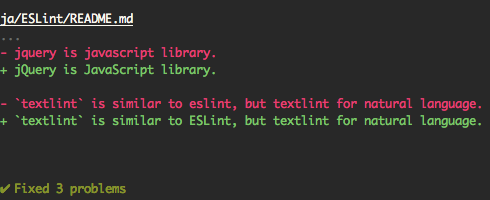
Also, support dry run mode.
$ npx textlint --fix --dry-run --format diff README.md
# show the difference between fixed content and original content.
You can copy and paste to your README.
[](https://textlint.org/)
Built-in formatters
Use the following formatters:
- stylish (defaults)
- compact
- checkstyle
- github
- jslint-xml
- junit
- tap
- table
- pretty-error
- json
- unix
e.g. use pretty-error formatter:
$ npx textlint -f pretty-error file.md
More details in @textlint/linter-formatter.
Use as node module
You can use textlint as node module.
$ npm install textlint --save-dev
Minimal usage:
import { createLinter, loadTextlintrc, loadLinterFormatter } from "textlint";
const descriptor = await loadTextlintrc();
const linter = createLinter({ descriptor });
const results = await linter.lintFiles(["*.md"]);
// textlint has two types formatter sets for linter and fixer
const formatter = await loadLinterFormatter({ formatterName: "stylish" });
const output = formatter.format(results);
console.log(output);
For more details, please read the following documents:
@textlint/kernel is a low level API for textlint. It is useful for the browser or non-Node.js environments.
import assert from "node:assert";
import { createRequire } from "node:module";
import { TextlintKernel } from "@textlint/kernel";
import markdownPlugin from "@textlint/textlint-plugin-markdown";

const require = createRequire(import.meta.url);
const kernel = new TextlintKernel();
const options = {
    filePath: "/path/to/file.md",
    ext: ".md",
    plugins: [
        {
            pluginId: "markdown",
            plugin: markdownPlugin
        }
    ],
    rules: [
        {
            ruleId: "no-todo",
            rule: require("textlint-rule-no-todo").default
        }
    ]
};
const result = await kernel.lintText("TODO: text", options);
assert.ok(typeof result.filePath === "string");
assert.ok(result.messages.length === 1);
Conclusion
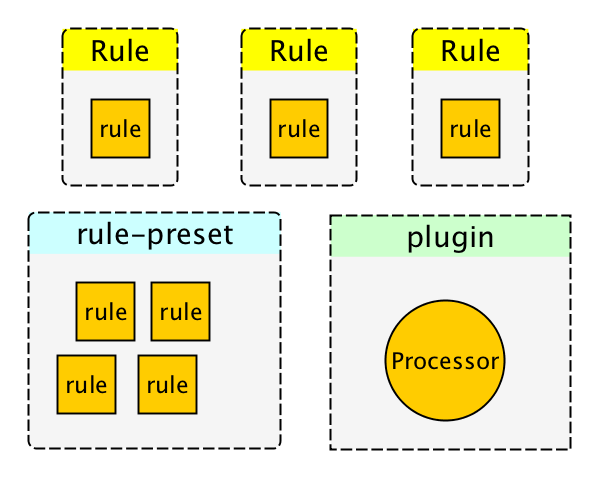
textlint has four extensible points:
- rule
- rule is a rule for linting.
- filter rule
- filter rule is a rule for filtering result of errors.
- rule-preset
- rule-preset contains rules.
- plugin
- plugin contains a processor.
FAQ: How to create rules?
Please see docs/
- docs/txtnode.md
- What is TxtNode?
- docs/rule.md
- How to create rules?
- Tutorial: creating
no-todorule.
- docs/rule-advanced.md
- Advanced tutorial for creating rule.
FAQ: How to suppress error by comments like <!-- textlint-disable -->?
You can use filter rule like textlint-filter-rule-comments.
Please see Ignoring Text · textlint for more details.
Integrations
For more details, see integrations document.
AI Assistants (MCP)
textlint can be used as a Model Context Protocol (MCP) server, enabling AI assistants to interact with textlint directly:
npx textlint --mcp
Supported editors:
- VS Code with GitHub Copilot
- Cursor
- Windsurf
- etc.
For setup instructions, see MCP Setup Guide.
App
- textlint-app
- Standalone cross platform app. No need Node.js environment.
Build Systems
- gulp plugin
- Grunt plugin
Editors
- Atom Editor
- SublimeText
- Vim
- VS Code
- micro
- NetBeans
Browser
- Chrome Extension
Other
Who's using textlint?
- survivejs/webpack-book
- hoodiehq/hoodie
- asciidwango/js-primer
- vuejs-jp/vuejs.org
- cypress-io/cypress-documentation
Packages
This repository is a monorepo that we manage using Lerna. That means that we actually publish several packages to npm from the same codebase, including:
Core
These modules are parts of textlint.
| Package | Version | Description |
|---|---|---|
textlint |  | textlint command line tool itself |
@textlint/kernel |  | textlint main logic module. It is universal JavaScript. |
@textlint/linter-formatter |  | textlint output formatter |
@textlint/fixer-formatter |  | textlint output formatter for fixer |
@textlint/textlint-plugin-markdown |  | markdown support for textlint |
@textlint/textlint-plugin-text |  | plain text support for textlint |
@textlint/ast-tester |  | Compliance tests for textlint's AST |
@textlint/markdown-to-ast |  | markdown parser |
@textlint/ast-traverse |  | TxtNode traverse library |
@textlint/text-to-ast |  | plain text parser |
@textlint/config-loader |  | Load .textlintrc config file |
Rule/Plugin helper
These modules are useful for textlint rule/plugin author.
| Package | Version | Description |
|---|---|---|
@textlint/ast-node-types |  | textlint AST(Abstract Syntax Tree) type definition |
textlint-tester |  | textlint rule testing tools |
textlint-scripts |  | textlint rule npm run-scripts |
create-textlint-rule |  | create textlint rule with no build configuration |
Integrations
These modules are useful integration with textlint.
| Package | Version | Description |
|---|---|---|
gulp-textlint |  | gulp plugin for textlint |
Internal
These modules are internal usage in the monorepo.
| Package | Version | Description |
|---|---|---|
@textlint/feature-flag |  | feature flag manager |
Semantic Versioning Policy
textlint project follow Semantic Versioning. However, textlint is not different from most semver project.
- Patch release (intended to not break your lint build)
- A bug fix to the CLI or core (including formatters).
- Improvements to documentation.
- Non-user-facing changes such as refactoring.
- Re-releasing after a failed release (i.e., publishing a release that doesn't work for anyone).
- Minor release (might break your lint build)
- A new option.
- An existing rule is deprecated.
- A new CLI capability is created.
- New public API are added (new classes, new methods, new arguments to existing methods, etc.).
- It might break type interface(
.d.ts)
- It might break type interface(
- A new formatter is created.
- Major release (break your lint build)
- A new option to an existing rule that results in textlint reporting more errors by default.
- An existing formatter is removed.
- Part of the public API is removed or changed in an incompatible way.
Contributing
For bugs and feature requests, please create an issue.
Pull requests are always welcome.
For more details, see Contributing Guide.
License
MIT © azu
Copy some code from ESLint.
ESLint
Copyright (c) 2013 Nicholas C. Zakas. All rights reserved.
https://github.com/eslint/eslint/blob/master/LICENSE
Logos & Icons
Download from textlint/media.
Related Work
Acknowledgements
Thanks to ESLint.


相关资源

lint-md
CLI检查并自动修复中文 Markdown 的排版问题,如中英文之间缺空格、中文语境误用半角标点、空链接等,适合写博客、知识库和技术文档时统一格式。命令行版 @lint-md/cli 由同一团队在 lint-md/cli 仓库维护,需要本机装有 Node.js。
lint-md/lint-md958
Hugo
CLI用 Go 编写的静态站点生成器,把 Markdown 内容在数秒内构建成文档站、博客或落地页,自带本地预览服务器以及图片、CSS 与 JS 处理管线。
gohugoio/hugo90.1k
mdBook
CLI把一组 Markdown 章节编译成带目录、全文搜索和主题切换的在线书籍,适合写作者连载手册、老师整理讲义和课程教材;agent 可直接改章节文件再构建预览。Rust 官方团队维护,可下载预编译程序,或装好 Rust 工具链后用 cargo 安装。
rust-lang/mdBook22.2k
Vale
CLI按风格指南检查文档用语的写作 linter:可套用 Microsoft、Google 等现成规则包或自写 YAML 规则,解析 Markdown、AsciiDoc 等格式后再检查,完全离线,可接入编辑器与 CI。
vale-cli/vale6.2k
Simple English
Skill按 ASD-STE100 简化技术英语的规则写作或改写英文文档:短句、主动语态、条件在前、一词一义、术语首次出现即定义,并去掉 AI 腔。默认用 Plain 模式,提到 STE 或合规时切换到严格词汇的 Strict 模式,也可逐条检查文本违反了哪条规则。适用于 README、操作手册、错误信息、发布说明与界面文案。
AminBlg/SimpleEnglish4ktextlint MCP Server
MCP文本校对工具 textlint 内置的 MCP 服务:让 agent 按你配置的规则检查 Markdown、纯文本等文稿的用词、标点和格式问题,并给出自动修正后的文本。需要 Node.js,且要先在项目里建好 .textlintrc 配置并安装规则包,textlint 本身不带默认规则。
textlint/textlint3.2k