
Video2X
CLI基于机器学习的视频超分与补帧工具,用 Real-ESRGAN、Real-CUGAN、RIFE 等模型把低清老视频放大到高清或提高帧率;video2x 命令一次处理一个视频,可脚本批量调用。需要支持 Vulkan 的显卡,提供 Windows 安装包、Linux 软件包与 Docker 镜像,无 macOS 原生版。





🌟 Version 6.0.0
Video2X 6.0.0 highlights:
- Complete rewrite of the Video2X project in C/C++.
- Faster and more efficient architecture.
- Cross-platform support for Windows and Linux.
- Vastly improved output quality.
- New GUI and installer for easy setup on Windows.
Click to see more details
Version 6.0.0 is a complete rewrite of this project in C/C++. It:
- genuinely works this time, with much less hassle compared to the 5.0.0 beta;
- is blazing fast, thanks to the new optimized pipeline and the efficiency of C/C++;
- is cross-platform, available now for both Windows and Linux;
- offers significantly better output quality with Anime4K v4, Real-ESRGAN, Real-CUGAN, and RIFE;
- supports two modes: filtering (upscaling) and frame interpolation;
- supports Anime4K v4 and all custom MPV-compatible GLSL shaders;
- supports Real-ESRGAN, Real-CUGAN, and RIFE (all models) via ncnn and Vulkan;
- requires zero additional disk space during processing, just space for the final output.
🖥️ Hardware Requirements
Your system must meet the minimum hardware requirements below to run Video2X.
- CPU
- The precompiled binaries require CPUs with AVX2 support.
- Intel: Haswell (Q2 2013) or newer
- AMD: Excavator (Q2 2015) or newer
- GPU
- The GPU must support Vulkan.
- NVIDIA: Kepler (GTX 600 series, Q2 2012) or newer
- AMD: GCN 1.0 (Radeon HD 7000 series, Q1 2012) or newer
- Intel: HD Graphics 4000 (Q2 2012) or newer
🪟 Install on Windows
Download the Latest Windows Installer Executable (6.4.0)
You can download the latest Windows release on the releases page. For basic GUI usage, refer to the documentation. If you're unable to download directly from GitHub, try the mirror site. The GUI currently supports the following languages:
- English (United States)
- 简体中文(中国)
- 日本語(日本)
- Português (Portugal)
- Français (France)
- Deutsch (Deutschland)
🐧 Install on Linux
Video2X packages are available for the Linux distros listed below. A universal AppImage is also available for other distros. If you'd like to build it from source code, refer to the PKGBUILD file for a general overview of the required dependencies and commands.
- Arch Linux: AUR packages, maintained by @K4YT3X.
- Arch Linux (Chinese Mainland): archlinuxcn packages, maintained by @Integral-Tech.
- Other distros:
Video2X-x86_64.AppImageon the releases page.
📦 Container Image
Video2X container images are available on the GitHub Container Registry for easy deployment on Linux and macOS. If you already have Docker/Podman installed, only one command is needed to start upscaling a video. For more information on how to use Video2X's Docker image, please refer to the documentation.
📔 Google Colab
You can use Video2X on Google Colab for free if you don't have a powerful GPU of your own. You can borrow a powerful GPU (NVIDIA T4, L4, or A100) on Google's server for free for a maximum of 12 hours per session. Please use the free resource fairly and do not create sessions back-to-back and run upscaling 24/7. This might result in you getting banned. You can get Colab Pro/Pro+ if you'd like to use better GPUs and get longer runtimes. Usage instructions are embedded in the Colab Notebook.
💬 Telegram Discussion Group
Join our Telegram discussion group to ask any questions you have about Video2X, chat directly with the developers, or discuss super resolution, frame interpolation technologies, or the future of Video2X in general.
📖 Documentation
Comprehensive documentation for Video2X is available at https://docs.video2x.org/. It offers detailed instructions on how to build, install, use, and develop with this program.
📽️ Video Demos (Outdated)
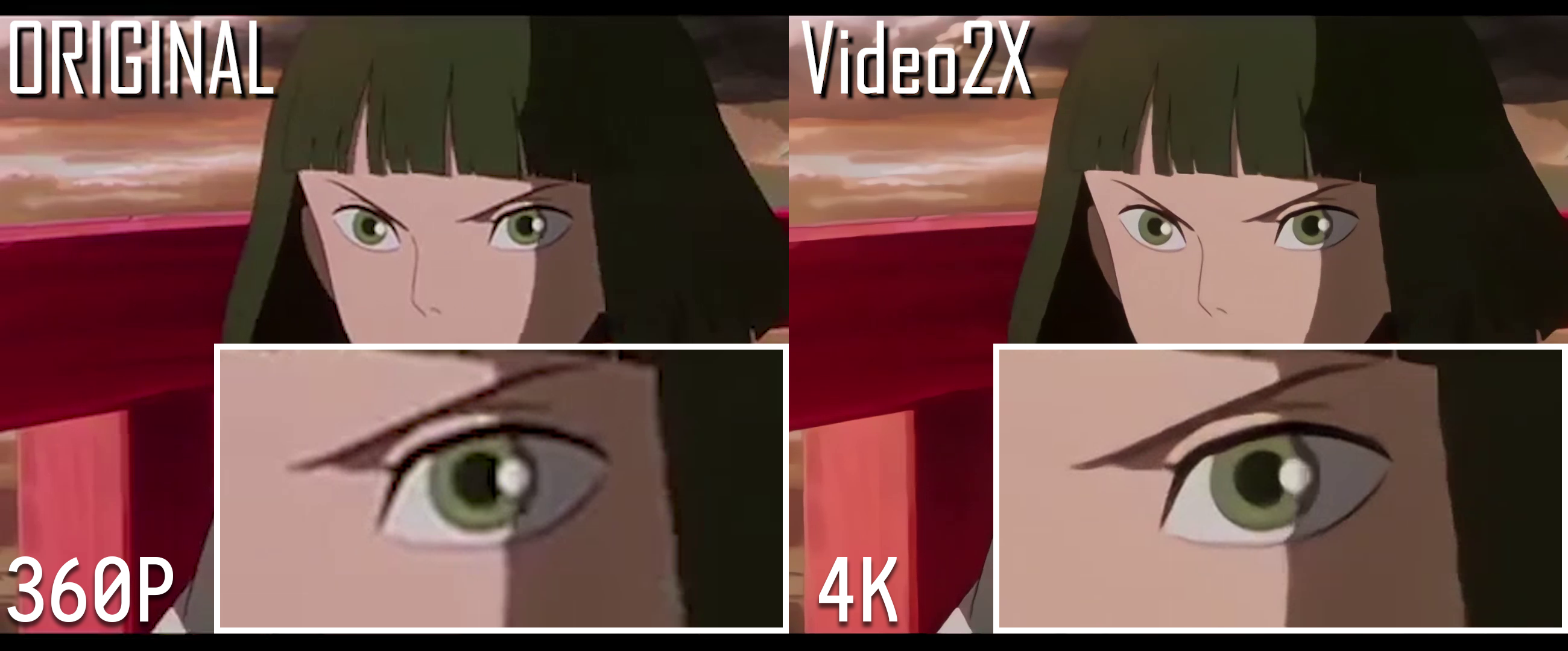
Upscale demo: Spirited Away's movie trailer
- Spirited Away: YouTube | Bilibili
- 360P to 4K
- The original video's copyright belongs to 株式会社スタジオジブリ
- Bad Apple!!: YouTube | Bilibili
- 384P 30 FPS to 4K 120 FPS with waifu2x and DAIN
- The original video's copyright belongs to あにら
- The Pet Girl of Sakurasou: YouTube | Bilibili
- 240P 29.97 to 1080P 60 FPS with waifu2x and DAIN
- The original video's copyright belongs to ASCII Media Works
Standard Test Clip
The following clip can be used to test if your setup works properly. This is also the standard clip used for running performance benchmarks.
- Standard Test Clip (240P) 4.54 MiB
- Real-CUGAN Upscaled Sample (1704P) 3.5 MiB
- Real-ESRGAN Upscaled Sample (1704P) 3.1 MiB
- waifu2x Upscaled Sample (1080P) 4.54 MiB
- Ground Truth (1080P) 22.2 MiB
The original clip came from the anime "さくら荘のペットな彼女."
Copyright of this clip belongs to 株式会社アニプレックス.
⚖️ License
This project is licensed under GNU AGPL version 3.
Copyright (C) 2018-2025 K4YT3X and contributors.

This project includes or depends on these following projects:
| Project | License |
|---|---|
| FFmpeg/FFmpeg | LGPLv2.1, GPLv2 |
| Tencent/ncnn | BSD 3-Clause |
| bloc97/Anime4K | MIT License |
| nihui/realcugan-ncnn-vulkan | MIT License |
| nihui/rife-ncnn-vulkan | MIT License |
| xinntao/Real-ESRGAN-ncnn-vulkan | MIT License |
More licensing information can be found in the NOTICE file.
🌺 Special Thanks
Special thanks to the following individuals for their significant contributions to the project, listed in alphabetical order.
相关资源

BackgroundRemover
CLI用 AI 一条命令去除图片和视频的背景:支持整个文件夹批处理、人像专用模型、边缘精修和换纯色底,视频可输出透明底 MOV 或叠加到新背景上,适合处理商品图、证件照和短视频素材。模型在本地运行,需先安装 PyTorch 与 ffmpeg,首次运行会自动下载模型。
nadermx/backgroundremover8.1k
Adobe (Codex)
PluginAdobe 官方 Codex 插件,收录于 OpenAI 官方插件市场。用对话批量修图、人像精修、套用 Express 模板做社媒图、把横版视频改成竖版短视频,并检索 Creative Cloud 素材;可先以访客身份试用,登录 Adobe 账号功能更全。
openai/plugins7.5k
adb-mcp
MCP通过 UXP/CEP 插件与本地代理,让 agent 操作 Photoshop、Premiere、InDesign、Illustrator、After Effects:处理图层、排版、剪辑时间线。概念验证项目,非 Adobe 官方,需从源码安装。
mikechambers/adb-mcp726
Adobe for Creativity
PluginAdobe 官方插件:通过远程 MCP 调用 Creative Cloud,批量修图、套模板做海报与社媒图、按平台尺寸裁切、剪精彩片段,用 InDesign 数据合并批量出 PDF。Adobe 注明仅适用于 Claude 桌面应用,需要 Adobe 账号。
adobe/skills199
CoDesign
MCPIMG.LY 官方出品,把 CE.SDK 设计引擎交给 agent:用对话生成可编辑的海报、传单、社媒图和视频,一键改成多平台尺寸,可导入 PSD、InDesign、PDF,导出带 CMYK 与出血的印刷 PDF。需 Node.js 22.15+,Windows 需在 WSL 中运行,引擎可在本地免费使用。
imgly/codesign42
Cloudinary MCP Servers
MCPCloudinary 官方 MCP 合集:用对话上传、搜索和变换图片与视频,管理上传预设与结构化元数据,做 AI 内容分析、审核和自动打标签,适合维护设计与营销素材库。需 Cloudinary 账号,部分功能要付费套餐;下面的命令只接入素材管理服务器,其余服务器可按同样方式添加。
cloudinary/mcp-servers10