
mcptools
MCPPosit 官方 R 包,把 R 接入 Claude Code 等 agent:可把你写好的统计、绘图 R 函数注册成工具,并在你已打开的 R 会话里执行、直接用会话中的数据。默认只带会话切换工具,搭配 btw 包可获得查文档、看数据对象等现成工具。需本机装 R 并先安装 mcptools。
mcptools 


mcptools implements the Model Context Protocol in R. There are two sides to mcptools:
R as an MCP server:
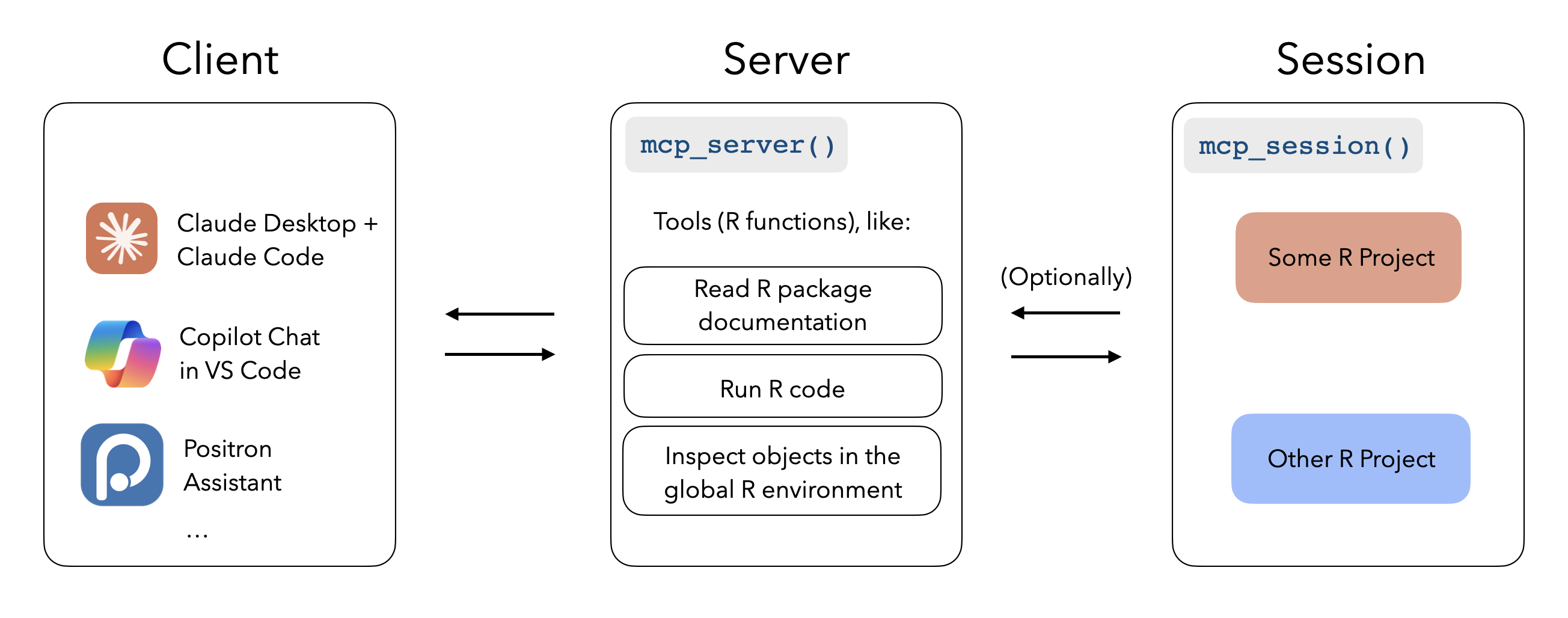
When configured with mcptools, MCP-enabled tools like Claude Desktop, Claude Code, and VS Code GitHub Copilot can run R code in the sessions you have running to answer your questions. While the package supports configuring arbitrary R functions, you may be interested in the btw package’s integrated support for mcptools, which provides a default set of tools to to peruse the documentation of packages you have installed, check out the objects in your global environment, and retrieve metadata about your session and platform.
R as an MCP client:
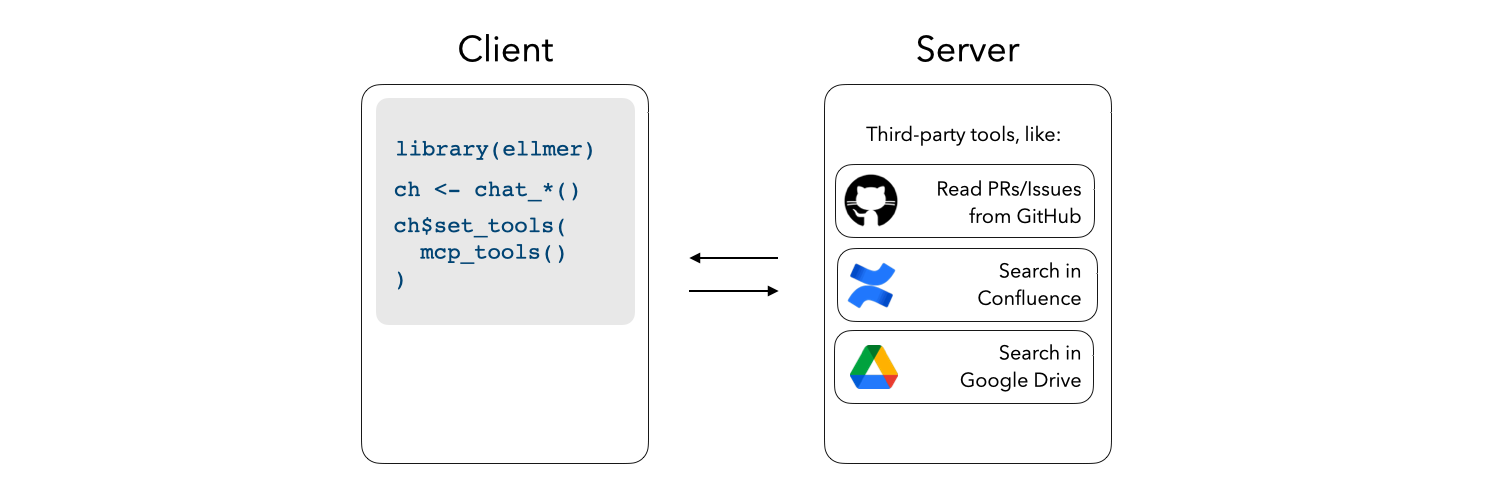
Register third-party MCP servers with ellmer chats to integrate additional context into e.g. shinychat and querychat apps.
Installation
Install mcptools from CRAN with:
install.packages("mcptools")
You can install the development version of mcptools like so:
pak::pak("posit-dev/mcptools")
R as an MCP server
mcptools can be hooked up to any application that supports MCP. For
example, to use with Claude Desktop, you might paste the following in
your Claude Desktop configuration (on macOS, at
~/Library/Application Support/Claude/claude_desktop_config.json):
{
  "mcpServers": {
    "r-mcptools": {
      "command": "Rscript",
      "args": ["-e", "mcptools::mcp_server()"]
    }
  }
}
Or, to use with Claude Code, you might type in a terminal:
claude mcp add -s "user" r-mcptools -- Rscript -e "mcptools::mcp_server()"
Then, if you’d like models to access variables in specific R sessions,
call mcptools::mcp_session() in those sessions. (You might include a
call to this function in your .Rprofile, perhaps using
usethis::edit_r_profile(), to automatically register every session you
start up.)
To deploy an HTTP MCP server to Posit Connect, add a _server.yml file
with engine: mcptools and a tools file:
engine: mcptools
tools: tools.R
Deploy the directory as an R API and mark it as MCP content:
rsconnect::deployAPI(".", contentCategory = "mcp")
If the content URL is https://connect.example.com/content/abc123/, use
https://connect.example.com/content/abc123/mcp as the MCP endpoint.
If you cannot set contentCategory = "mcp" during deployment, set the
MCP category in Connect after deploying and set minimum processes to at
least 1.
R as an MCP client
mcptools uses the Claude Desktop configuration file format to register third-party MCP servers, as most MCP servers provide setup instructions for Claude Desktop in their documentation. For example, here’s what the official GitHub MCP server configuration would look like:
{
  "mcpServers": {
    "github": {
      "command": "docker",
      "args": [
        "run",
        "-i",
        "--rm",
        "-e",
        "GITHUB_PERSONAL_ACCESS_TOKEN",
        "ghcr.io/github/github-mcp-server"
      ],
      "env": {
        "GITHUB_PERSONAL_ACCESS_TOKEN": "<YOUR_TOKEN>"
      }
    }
  }
}
Once the configuration file has been created (by default, mcptools will
look to file.path("~", ".config", "mcptools", "config.json")),
mcp_tools() will return a list of ellmer tools which you can pass
directly to the $set_tools() method from ellmer:
ch <- ellmer::chat_anthropic()
ch$set_tools(mcp_tools())

ch$chat("What issues are open on posit-dev/mcptools?")
Example
In Claude Desktop, I’ll write the following:
“From what year is the earliest recorded sample in the
foresteddata in my Positron session?”
Without mcptools, Claude couldn’t get far here; by default, it can’t run R code and doesn’t have any way to “speak to” my interactive R sessions.
Using the package, the model asks to describe the data frame using a structure that will show summary statistics from the data. mcptools will appropriately route the request to the open Positron session, forwarding the results back to the model for it to situate in a response.
相关资源

MATLAB MCP Server
MCPMathWorks 官方出品,让 agent 启动本机 MATLAB,编写并运行脚本和单元测试、检查代码风格与潜在错误,适合用 MATLAB 做数值计算、仿真和数据分析的工程师、科研人员与学生。需本机安装已授权的 MATLAB R2021a 以上,并下载服务器程序。
matlab/matlab-mcp-server1.7k
Stata MCP
MCP把 Stata 接入 VS Code / Cursor 并开放本地 MCP 接口,让 Claude Code、Codex 帮你编写并运行 do 文件、读取回归等运行输出,图表在编辑器里显示,适合经济学与社会科学实证研究。需要已购授权的 Stata 17 及以上版本,先装扩展,使用时保持编辑器打开。
hanlulong/stata-mcp511
Wolfram AgentTools
MCPWolfram 官方出品,让 agent 调用 Wolfram 语言和 Wolfram|Alpha 做符号与数值计算、查询科学与统计数据,适合理科老师出题验算和科研计算。下面的命令用官方 Docker 镜像,需装 Docker 并用 Wolfram 账号激活免费开发者许可;已装 Wolfram 15 以上也可直接在软件内安装。
WolframResearch/AgentTools95
Jupyter Notebooks
Skill创建、修改与校验可复现的 Python / SQL Jupyter Notebook:按分析报告或教程结构组织单元格,结论对照实际输出,交付前从头到尾执行一遍。OpenAI 官方维护,属于 openai/plugins 的 Data Analytics 插件。
openai/plugins7.5k
Math Modeling Skills
Skill国赛 CUMCM 与美赛 MCM/ICM 备赛两件套:solver 拆题、按 95+ 场景决策矩阵选模型并给出 Python/MATLAB 代码模板;paper 按获奖论文规律指导摘要、模型检验与排版自查。适合备赛学生和指导老师,运行代码需本地 Python 或 MATLAB。
Lupynow/math-modeling-skills423
Jupyter MCP Server
MCP让 agent 实时连接 Jupyter Notebook:读写、插入与执行单元格,并读取图表等多模态输出,适合交互式数据分析。需自备 JupyterLab 或 JupyterHub,Datalayer 开源维护。
datalayer/jupyter-mcp-server1.3k