
visual-explainer
Skill把架构说明、diff 评审、计划审查、数据对比等内容生成自包含的 HTML 页面或幻灯片,支持 Mermaid 图与深浅色主题,替代终端里的 ASCII 图表。
visual-explainer
An agent skill that turns complex terminal output into styled HTML pages you actually want to read.

Ask your agent to explain a system architecture, review a diff, or compare requirements against a plan. Instead of ASCII art and box-drawing tables, it generates a self-contained HTML page and opens it in your browser.
> draw a diagram of our authentication flow
> /diff-review
> /plan-review ~/docs/refactor-plan.md
https://github.com/user-attachments/assets/55ebc81b-8732-40f6-a4b1-7c3781aa96ec
Why
Every coding agent defaults to ASCII art when you ask for a diagram. Box-drawing characters, monospace alignment hacks, text arrows. It works for trivial cases, but anything beyond a 3-box flowchart turns into an unreadable mess.
Tables are worse. Ask the agent to compare 15 requirements against a plan and you get a wall of pipes and dashes that wraps and breaks in the terminal. The data is there but it's painful to read.
This skill fixes that. Real typography, dark/light themes, hand-drawn diagrams that animate and respond to the reader. Normal skill use has no build step and no dependency beyond a browser; optional MCP and PPTX utilities use small Node dependencies.
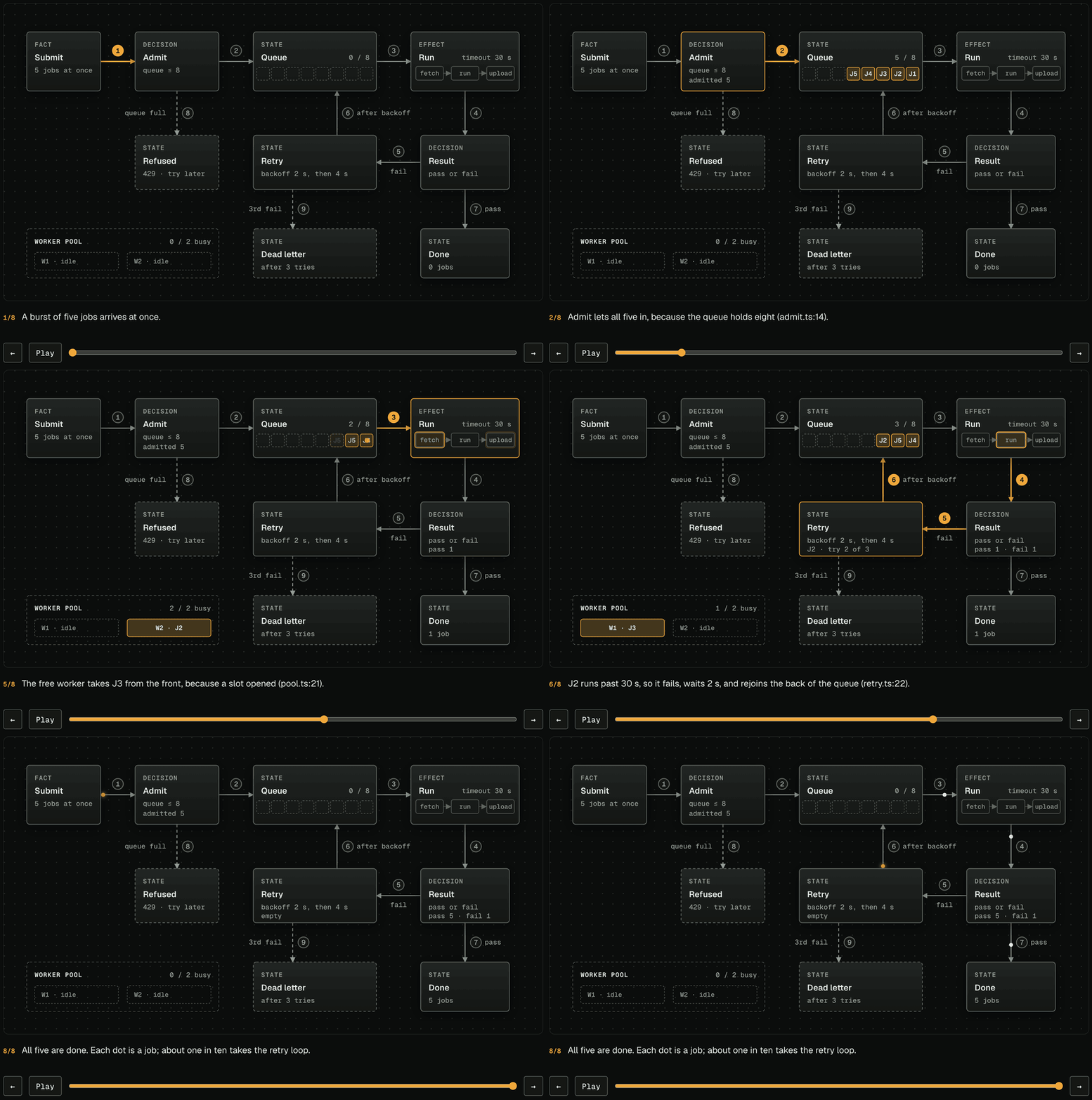
Step through a state machine one event at a time: the route each event took lights up, jobs pile into queues and drain, and each step says why it happened (example).
Install
| Harness | Support | Install path / behavior |
|---|---|---|
| Claude Code | Marketplace plugin | Preserved marketplace shape with source at plugins/visual-explainer/ |
| Pi | Package metadata plus installer | package.json advertises the skill, prompts, and native visual_explainer tool with prepare and render actions; install-pi.sh installs copied skill/prompt resources for legacy manual installs |
| MCP hosts | Local stdio MCP server | visual-explainer-mcp exposes render tools, prompt templates, and read-only skill resources without starting an HTTP server |
| PPTX export | Best-effort static utility | visual-explainer-pptx converts simple HTML slide decks to .pptx; HTML remains the source of truth |
| Video export | Local renderer (needs ffmpeg, Chrome, and playwright-core, installed separately) | /generate-video writes a video deck and visual-explainer-video records it to a 1080p MP4, frame by frame, narrated when a speech API key is set and captioned otherwise |
| Antigravity CLI | Native Agent Skills path | Copy plugins/visual-explainer/ to ~/.gemini/antigravity-cli/skills/visual-explainer for global use or .agents/skills/visual-explainer for one workspace |
| Codex CLI | Native skill path plus optional prompts | Copy to ~/.codex/skills/visual-explainer; optional prompts go in ~/.codex/prompts/ if your Codex build supports them |
| OpenCode/opencode | Observed skill/command paths | Copy to ~/.config/opencode/skill/visual-explainer; optional commands go in ~/.config/opencode/command/ |
| Cursor | Native Agent Skills path | Copy plugins/visual-explainer/ to ~/.cursor/skills/visual-explainer globally or .cursor/skills/visual-explainer per workspace; optional legacy rule in configs/cursor/ |
| Agent Plugins clients | Agent Plugins 1.0.0 plugin | The repository root is the plugin: plugin.json plus skills/visual-explainer, a link to plugins/visual-explainer/. On Windows, clone with git -c core.symlinks=true so the link resolves |
| OpenClaw | Lightweight AGENTS/rules guidance | Use the supplied AGENTS guidance with the canonical skill directory |
| VS Code Copilot / Copilot CLI | Custom instructions or rules guidance | Add the supplied AGENTS guidance to your supported workspace instruction or rules setup |
Claude Code (marketplace):
/plugin marketplace add nicobailon/visual-explainer
/plugin install visual-explainer@visual-explainer-marketplace
Note: Claude Code plugins namespace commands as /visual-explainer:command-name.
Pi:
pi install git:github.com/nicobailon/visual-explainer
Or from a local checkout:
git clone --depth 1 https://github.com/nicobailon/visual-explainer.git
pi install ./visual-explainer
The package manifest advertises the canonical skill, command templates, and Pi tool:
"pi": {
  "extensions": ["./plugins/visual-explainer/extension.ts"],
  "skills": ["./plugins/visual-explainer"],
  "prompts": ["./plugins/visual-explainer/commands"],
  "image": "./banner.png"
}
The Pi extension registers one native visual_explainer tool. Use action: "prepare" to plan a visual explanation after generating or reviewing a substantial plan, architecture, diff, or implementation, and action: "render" to write complete HTML pages to ~/.agent/diagrams/, or to VISUAL_EXPLAINER_OUTPUT_DIR when set, with the same output jail as the MCP server. The opt-in action: "render_quick" validates a compact JSON spec and renders it with the bundled local renderer. Render actions can open with viewer: "browser" by default, viewer: "glimpse" when glimpseui is installed, or viewer: "auto" to try Glimpse and fall back to the browser. /generate-web-diagram remains the bundled prompt template command.
If you previously used the old curl/manual installer, remove those copied files before using pi install; otherwise Pi will report skill and prompt conflicts because the user-level copies shadow the package resources:
rm -rf ~/.pi/agent/skills/visual-explainer
rm -f ~/.pi/agent/prompts/{diff-review,fact-check,generate-slides,generate-visual-plan,generate-web-diagram,plan-review,project-recap}.md
rm -f ~/.pi/agent/prompts/s[h]are*.md
The legacy installer still works if you prefer copied skill and prompt files over package management, but it does not install the native Pi tool:
curl -fsSL https://raw.githubusercontent.com/nicobailon/visual-explainer/main/install-pi.sh | bash
MCP:
Use visual-explainer-mcp from a package install, or run npm install --no-package-lock before pointing your host at plugins/visual-explainer/mcp/server.mjs from a checkout. Some hosts need an absolute path to the binary. The MCP server is local stdio only. It does not call an LLM, start an HTTP listener, handle credentials, or write outside its configured output directory (default ~/.agent/diagrams/). Set VISUAL_EXPLAINER_OUTPUT_DIR to move that jail to another directory on the same machine; unset keeps the default path byte-identical. A configured jail must resolve to itself, so symlinked jail paths, including macOS /tmp, are rejected before anything is created. The default directory follows a symlinked ~/.agent. Render targets reject existing symlinks and are written through a temporary file rename. Point the jail at a directory only your user can write; avoid world-writable or group-writable shared folders so another local user cannot replace render targets between validation and write.
Example package configuration:
{
  "mcpServers": {
    "visual-explainer": {
      "command": "visual-explainer-mcp"
    }
  }
}
Example checkout configuration:
{
  "mcpServers": {
    "visual-explainer": {
      "command": "node",
      "args": ["/absolute/path/to/visual-explainer/plugins/visual-explainer/mcp/server.mjs"]
    }
  }
}
The server exposes three tools: visual_explainer_prepare, visual_explainer_render_html, and visual_explainer_render_quick. Render tools default to open: false; set open: true only when you want the server to request a browser or Glimpse window. It also exposes the bundled command templates as MCP prompts and the canonical SKILL.md, command markdown, quick README, and quick schema as read-only resources.
Antigravity CLI:
Antigravity CLI is the supported Google successor path for consumer Gemini CLI workflows. It loads Agent Skills from .agents/skills/ at the workspace level or ~/.gemini/antigravity-cli/skills/ globally.
Global install:
git clone --depth 1 https://github.com/nicobailon/visual-explainer.git /tmp/visual-explainer

mkdir -p ~/.gemini/antigravity-cli/skills
cp -R /tmp/visual-explainer/plugins/visual-explainer ~/.gemini/antigravity-cli/skills/visual-explainer

rm -rf /tmp/visual-explainer
PowerShell (global):
$ErrorActionPreference = 'Stop'
$tmp = Join-Path $env:TEMP ("visual-explainer-" + [guid]::NewGuid().ToString())
$dest = Join-Path $env:USERPROFILE ".gemini\antigravity-cli\skills\visual-explainer"
$parent = Split-Path -Parent $dest
$run = $null
$staging = $null
$backup = $null
$moved = $false
$attempted = $false
$installed = $false
New-Item -ItemType Directory -Force -Path $tmp | Out-Null
try {
  $repo = Join-Path $tmp 'repo'
  git clone --depth 1 https://github.com/nicobailon/visual-explainer.git $repo
  if ($LASTEXITCODE -ne 0) { throw "git clone failed with exit code $LASTEXITCODE" }
  New-Item -ItemType Directory -Force -Path $parent | Out-Null
  $run = Join-Path $parent (".visual-explainer-install-" + [guid]::NewGuid().ToString())
  $staging = Join-Path $run 'staging'
  $backup = Join-Path $run 'backup'
  New-Item -ItemType Directory -Force -Path $run | Out-Null
  Copy-Item -LiteralPath (Join-Path $repo 'plugins\visual-explainer') -Destination $staging -Recurse -Force
  if (-not (Test-Path -LiteralPath (Join-Path $staging 'SKILL.md') -PathType Leaf)) { throw 'staged skill is incomplete' }
  if (Test-Path -LiteralPath $dest) { Move-Item -LiteralPath $dest -Destination $backup; $moved = $true }
  $attempted = $true
  Move-Item -LiteralPath $staging -Destination $dest
  $installed = $true
} finally {
  if (-not $installed -and $attempted) {
    if (Test-Path -LiteralPath $dest) { Move-Item -LiteralPath $dest -Destination (Join-Path $run 'failed') -ErrorAction SilentlyContinue }
    if ($moved -and (Test-Path -LiteralPath $backup) -and -not (Test-Path -LiteralPath $dest)) { Move-Item -LiteralPath $backup -Destination $dest -ErrorAction SilentlyContinue }
  }
  if ($run -and ((-not (Test-Path -LiteralPath $backup)) -or $installed)) { Remove-Item -LiteralPath $run -Recurse -Force -ErrorAction SilentlyContinue }
  Remove-Item -LiteralPath $tmp -Recurse -Force -ErrorAction SilentlyContinue
}
Workspace install:
git clone --depth 1 https://github.com/nicobailon/visual-explainer.git /tmp/visual-explainer

mkdir -p .agents/skills
cp -R /tmp/visual-explainer/plugins/visual-explainer .agents/skills/visual-explainer

rm -rf /tmp/visual-explainer
PowerShell (workspace):
$ErrorActionPreference = 'Stop'
$tmp = Join-Path $env:TEMP ("visual-explainer-" + [guid]::NewGuid().ToString())
$dest = ".agents\skills\visual-explainer"
$parent = Split-Path -Parent $dest
$run = $null
$staging = $null
$backup = $null
$moved = $false
$attempted = $false
$installed = $false
New-Item -ItemType Directory -Force -Path $tmp | Out-Null
try {
  $repo = Join-Path $tmp 'repo'
  git clone --depth 1 https://github.com/nicobailon/visual-explainer.git $repo
  if ($LASTEXITCODE -ne 0) { throw "git clone failed with exit code $LASTEXITCODE" }
  New-Item -ItemType Directory -Force -Path $parent | Out-Null
  $run = Join-Path $parent (".visual-explainer-install-" + [guid]::NewGuid().ToString())
  $staging = Join-Path $run 'staging'
  $backup = Join-Path $run 'backup'
  New-Item -ItemType Directory -Force -Path $run | Out-Null
  Copy-Item -LiteralPath (Join-Path $repo 'plugins\visual-explainer') -Destination $staging -Recurse -Force
  if (-not (Test-Path -LiteralPath (Join-Path $staging 'SKILL.md') -PathType Leaf)) { throw 'staged skill is incomplete' }
  if (Test-Path -LiteralPath $dest) { Move-Item -LiteralPath $dest -Destination $backup; $moved = $true }
  $attempted = $true
  Move-Item -LiteralPath $staging -Destination $dest
  $installed = $true
} finally {
  if (-not $installed -and $attempted) {
    if (Test-Path -LiteralPath $dest) { Move-Item -LiteralPath $dest -Destination (Join-Path $run 'failed') -ErrorAction SilentlyContinue }
    if ($moved -and (Test-Path -LiteralPath $backup) -and -not (Test-Path -LiteralPath $dest)) { Move-Item -LiteralPath $backup -Destination $dest -ErrorAction SilentlyContinue }
  }
  if ($run -and ((-not (Test-Path -LiteralPath $backup)) -or $installed)) { Remove-Item -LiteralPath $run -Recurse -Force -ErrorAction SilentlyContinue }
  Remove-Item -LiteralPath $tmp -Recurse -Force -ErrorAction SilentlyContinue
}
Launch agy in the project and use /skills to confirm visual-explainer is discovered. Ask Antigravity to use the visual-explainer skill for diagrams, visual reviews, slide decks, and complex tables. Antigravity SDK projects can reuse the same SKILL.md content as an Agent Skill resource, but this repo does not ship a separate SDK wrapper. The bundled prompt templates remain reference markdown under plugins/visual-explainer/commands/; no separate Antigravity plugin adapter is included.
Codex CLI:
git clone --depth 1 https://github.com/nicobailon/visual-explainer.git /tmp/visual-explainer

mkdir -p ~/.codex/skills ~/.codex/prompts
cp -R /tmp/visual-explainer/plugins/visual-explainer ~/.codex/skills/visual-explainer

# Optional, only if your Codex build supports prompt templates:
cp /tmp/visual-explainer/plugins/visual-explainer/commands/*.md ~/.codex/prompts/

rm -rf /tmp/visual-explainer
PowerShell:
$ErrorActionPreference = 'Stop'
$tmp = Join-Path $env:TEMP ("visual-explainer-" + [guid]::NewGuid().ToString())
$dest = Join-Path $env:USERPROFILE ".codex\skills\visual-explainer"
$parent = Split-Path -Parent $dest
$promptDir = Join-Path $env:USERPROFILE ".codex\prompts"
$run = $null
$staging = $null
$backup = $null
$moved = $false
$attempted = $false
$installed = $false
New-Item -ItemType Directory -Force -Path $tmp | Out-Null
try {
  $repo = Join-Path $tmp 'repo'
  git clone --depth 1 https://github.com/nicobailon/visual-explainer.git $repo
  if ($LASTEXITCODE -ne 0) { throw "git clone failed with exit code $LASTEXITCODE" }
  New-Item -ItemType Directory -Force -Path $parent, $promptDir | Out-Null
  $run = Join-Path $parent (".visual-explainer-install-" + [guid]::NewGuid().ToString())
  $staging = Join-Path $run 'staging'
  $backup = Join-Path $run 'backup'
  New-Item -ItemType Directory -Force -Path $run | Out-Null
  Copy-Item -LiteralPath (Join-Path $repo 'plugins\visual-explainer') -Destination $staging -Recurse -Force
  if (-not (Test-Path -LiteralPath (Join-Path $staging 'SKILL.md') -PathType Leaf)) { throw 'staged skill is incomplete' }
  # Optional, only if your Codex build supports prompt templates:
  Copy-Item -Path (Join-Path $staging 'commands\*.md') -Destination $promptDir -Force
  if (Test-Path -LiteralPath $dest) { Move-Item -LiteralPath $dest -Destination $backup; $moved = $true }
  $attempted = $true
  Move-Item -LiteralPath $staging -Destination $dest
  $installed = $true
} finally {
  if (-not $installed -and $attempted) {
    if (Test-Path -LiteralPath $dest) { Move-Item -LiteralPath $dest -Destination (Join-Path $run 'failed') -ErrorAction SilentlyContinue }
    if ($moved -and (Test-Path -LiteralPath $backup) -and -not (Test-Path -LiteralPath $dest)) { Move-Item -LiteralPath $backup -Destination $dest -ErrorAction SilentlyContinue }
  }
  if ($run -and ((-not (Test-Path -LiteralPath $backup)) -or $installed)) { Remove-Item -LiteralPath $run -Recurse -Force -ErrorAction SilentlyContinue }
  Remove-Item -LiteralPath $tmp -Recurse -Force -ErrorAction SilentlyContinue
}
Invoke with $visual-explainer or ask Codex to use the visual-explainer skill. If prompts are installed and supported, use /prompts:diff-review, /prompts:plan-review, etc.
OpenCode/opencode:
git clone --depth 1 https://github.com/nicobailon/visual-explainer.git /tmp/visual-explainer

mkdir -p ~/.config/opencode/skill ~/.config/opencode/command
cp -R /tmp/visual-explainer/plugins/visual-explainer ~/.config/opencode/skill/visual-explainer

# Optional command templates:
cp /tmp/visual-explainer/plugins/visual-explainer/commands/*.md ~/.config/opencode/command/

rm -rf /tmp/visual-explainer
PowerShell:
$ErrorActionPreference = 'Stop'
$tmp = Join-Path $env:TEMP ("visual-explainer-" + [guid]::NewGuid().ToString())
$dest = Join-Path $env:USERPROFILE ".config\opencode\skill\visual-explainer"
$parent = Split-Path -Parent $dest
$promptDir = Join-Path $env:USERPROFILE ".config\opencode\command"
$run = $null
$staging = $null
$backup = $null
$moved = $false
$attempted = $false
$installed = $false
New-Item -ItemType Directory -Force -Path $tmp | Out-Null
try {
  $repo = Join-Path $tmp 'repo'
  git clone --depth 1 https://github.com/nicobailon/visual-explainer.git $repo
  if ($LASTEXITCODE -ne 0) { throw "git clone failed with exit code $LASTEXITCODE" }
  New-Item -ItemType Directory -Force -Path $parent, $promptDir | Out-Null
  $run = Join-Path $parent (".visual-explainer-install-" + [guid]::NewGuid().ToString())
  $staging = Join-Path $run 'staging'
  $backup = Join-Path $run 'backup'
  New-Item -ItemType Directory -Force -Path $run | Out-Null
  Copy-Item -LiteralPath (Join-Path $repo 'plugins\visual-explainer') -Destination $staging -Recurse -Force
  if (-not (Test-Path -LiteralPath (Join-Path $staging 'SKILL.md') -PathType Leaf)) { throw 'staged skill is incomplete' }
  # Optional command templates:
  Copy-Item -Path (Join-Path $staging 'commands\*.md') -Destination $promptDir -Force
  if (Test-Path -LiteralPath $dest) { Move-Item -LiteralPath $dest -Destination $backup; $moved = $true }
  $attempted = $true
  Move-Item -LiteralPath $staging -Destination $dest
  $installed = $true
} finally {
  if (-not $installed -and $attempted) {
    if (Test-Path -LiteralPath $dest) { Move-Item -LiteralPath $dest -Destination (Join-Path $run 'failed') -ErrorAction SilentlyContinue }
    if ($moved -and (Test-Path -LiteralPath $backup) -and -not (Test-Path -LiteralPath $dest)) { Move-Item -LiteralPath $backup -Destination $dest -ErrorAction SilentlyContinue }
  }
  if ($run -and ((-not (Test-Path -LiteralPath $backup)) -or $installed)) { Remove-Item -LiteralPath $run -Recurse -Force -ErrorAction SilentlyContinue }
  Remove-Item -LiteralPath $tmp -Recurse -Force -ErrorAction SilentlyContinue
}
Activate it by asking OpenCode to use the visual-explainer skill. Command-template behavior depends on the installed OpenCode/opencode build.
Cursor:
Cursor loads Agent Skills from ~/.cursor/skills/ globally and .cursor/skills/ at the workspace level. Copy the canonical skill directory there and Cursor discovers it from the name: field in SKILL.md.
Global install:
set -euo pipefail
tmp="$(mktemp -d "${TMPDIR:-/tmp}/visual-explainer.XXXXXX")"
dest="$HOME/.cursor/skills/visual-explainer"
parent="$(dirname "$dest")"
run=''
stage=''
backup=''
moved=0
installed=0
cleanup() {
  status=$?
  if [ "$status" -ne 0 ] && [ "$moved" -eq 1 ] && [ "$installed" -eq 0 ]; then
    if [ -e "$dest" ]; then mv -- "$dest" "$run/failed" || true; fi
    if [ -e "$backup" ]; then mv -- "$backup" "$dest" || true; fi
  fi
  if [ -n "$run" ] && { [ "$installed" -eq 1 ] || [ ! -e "$backup" ]; }; then
    rm -rf -- "$run" || true
  fi
  rm -rf -- "$tmp" || true
}
trap cleanup EXIT
if git clone --depth 1 https://github.com/nicobailon/visual-explainer.git "$tmp/repo"; then :; else
  status=$?
  echo "git clone failed with exit code $status" >&2
  exit "$status"
fi
mkdir -p "$parent"
run="$(mktemp -d "$parent/.visual-explainer-install.XXXXXX")"
stage="$run/staging"
backup="$run/backup"
cp -R "$tmp/repo/plugins/visual-explainer" "$stage"
test -f "$stage/SKILL.md"
if [ -e "$dest" ]; then mv -- "$dest" "$backup"; moved=1; fi
mv -- "$stage" "$dest"
installed=1
Workspace install:
set -euo pipefail
tmp="$(mktemp -d "${TMPDIR:-/tmp}/visual-explainer.XXXXXX")"
dest=".cursor/skills/visual-explainer"
parent="$(dirname "$dest")"
run=''
stage=''
backup=''
moved=0
installed=0
cleanup() {
  status=$?
  if [ "$status" -ne 0 ] && [ "$moved" -eq 1 ] && [ "$installed" -eq 0 ]; then
    if [ -e "$dest" ]; then mv -- "$dest" "$run/failed" || true; fi
    if [ -e "$backup" ]; then mv -- "$backup" "$dest" || true; fi
  fi
  if [ -n "$run" ] && { [ "$installed" -eq 1 ] || [ ! -e "$backup" ]; }; then
    rm -rf -- "$run" || true
  fi
  rm -rf -- "$tmp" || true
}
trap cleanup EXIT
if git clone --depth 1 https://github.com/nicobailon/visual-explainer.git "$tmp/repo"; then :; else
  status=$?
  echo "git clone failed with exit code $status" >&2
  exit "$status"
fi
mkdir -p "$parent"
run="$(mktemp -d "$parent/.visual-explainer-install.XXXXXX")"
stage="$run/staging"
backup="$run/backup"
cp -R "$tmp/repo/plugins/visual-explainer" "$stage"
test -f "$stage/SKILL.md"
if [ -e "$dest" ]; then mv -- "$dest" "$backup"; moved=1; fi
mv -- "$stage" "$dest"
installed=1
Ask Cursor to use the visual-explainer skill for diagrams, visual reviews, slide decks, and complex tables.
Optional legacy rule: add configs/cursor/visual-explainer.mdc to your Cursor rules if you prefer rules-based guidance over relying on skill discovery alone.
OpenClaw:
Use configs/openclaw/AGENTS.md as lightweight project guidance and copy or reference plugins/visual-explainer/ as the canonical skill source. No native OpenClaw plugin adapter is included.
VS Code Copilot / Copilot CLI:
Use configs/copilot/AGENTS.md as custom instructions or rules guidance. For VS Code, copy it into a supported workspace custom-instructions file, such as .github/copilot-instructions.md. For Copilot CLI, add it through the workspace instruction or rules setup supported by your installed version. Both read the canonical skill from plugins/visual-explainer/; this repository does not provide native Agent Skills support, a Copilot package, or a tested Copilot plugin adapter.
Commands
| Command | What it does |
|---|---|
/generate-web-diagram | Generate an HTML diagram for any topic |
/generate-visual-plan | An implementation plan you answer in the page: the change drawn, a short tree of claims, decisions with suggested defaults, then one response to paste back. After the build, the same page shows what was built |
/generate-slides | Generate a magazine-quality slide deck |
/generate-video | Generate a narrated MP4 explainer, or record a walkthrough of a live web app |
/diff-review | Visual diff review with architecture comparison and code review |
/plan-review | Check a plan against the codebase: each finding shows its evidence and a fix you accept or reject in the page |
/project-recap | Mental model snapshot for context-switching back to a project |
/fact-check | Verify accuracy of a document against actual code |
The agent also kicks in automatically when it's about to dump a complex table in the terminal (4+ rows or 3+ columns) — it renders HTML instead.
Quick Mode
Add --quick to /generate-web-diagram, /diff-review, /plan-review, or /project-recap to ask the agent for a compact JSON spec. The bundled renderer validates the spec, escapes its content, and creates a complete self-contained HTML page. Pi uses the existing visual_explainer tool with action: "render_quick". Other harnesses can run plugins/visual-explainer/quick/render.mjs locally.
Quick mode is opt-in. Commands without --quick keep the full custom HTML workflow. The agent also falls back to full mode when the content does not fit the quick schema or when validation or rendering fails.
/generate-web-diagram --quick authentication request flow
/diff-review --quick main..HEAD
Slide Deck Mode
Any command that produces a scrollable page supports --slides to generate a slide deck instead:
/diff-review --slides
/project-recap --slides 2w
For a portable presentation file, add --pptx to /generate-slides or run the exporter after generating an HTML deck:
visual-explainer-pptx ~/.agent/diagrams/my-deck.html ~/.agent/diagrams/my-deck.pptx
PPTX export is best-effort and static. It extracts titles, text, bullets, simple tables, code blocks, and Mermaid source placeholders from <section class="slide"> elements. It does not preserve animations, reader navigation, responsive layout, custom fonts, live Mermaid/Chart.js/SVG/canvas rendering, or JavaScript behavior. Use the HTML deck for final fidelity.
https://github.com/user-attachments/assets/342d3558-5fcf-4fb2-bc03-f0dd5b9e35dc
Themes
Ask for switchable themes, or name a palette, and the page gets a picker — colored dots for the palette and Aa chips for the font pair, both swapping live:
"explain this pipeline, use Gruvbox"
"diagram the auth flow, let me switch themes"
Eleven palettes ship with it: Dracula, Nord, One Dark, Catppuccin Mocha, Tokyo Night, Gruvbox Dark, Synthwave '84 (dark) and Solarized Light, GitHub Light, Catppuccin Latte, Gruvbox Light. The font chips offer the pairs the skill already recommends. Diagrams draw with the page tokens, so they always match the active selection. Set theme: or font: in visual-explainer.config.md to choose what loads first. Claude Code users can keep personal overrides in .claude/visual-explainer.local.md; shared project defaults should use the harness-neutral file.
The picker is opt-in. Pages that don't ask for one still get a single palette and font pair chosen to fit the content.
How It Works
.claude-plugin/
├── plugin.json           ← marketplace identity
└── marketplace.json      ← plugin catalog
plugins/
└── visual-explainer/
    ├── .claude-plugin/
    │   └── plugin.json   ← plugin manifest
    ├── SKILL.md           ← workflow + design principles
    ├── extension.ts       ← Pi native tool
    ├── commands/          ← slash commands
    ├── quick/             ← JSON schema + deterministic local renderer
    ├── mcp/               ← local stdio MCP server
    ├── pptx/              ← best-effort static PPTX exporter
    ├── video/             ← MP4 renderer for video decks
    ├── references/        ← read on demand
    │   ├── style-guide.md (four registers, tokens, scale, components, polish pass)
    │   ├── diagrams.md    (hand-drawn SVG kit, linked highlighting, stepper/scene player)
    │   ├── slides.md      (deck budget, engine contract, delivery check)
    │   ├── video.md       (video deck contract, script and look rules, voice clips, tutorials)
    │   └── themes.md      (11 palettes + runtime theme/font picker)
    └── templates/
        ├── page.html      (figure-first reference page, Instrument register)
        └── slide-deck.html (slide engine + reference deck)
Output: ~/.agent/diagrams/filename.html → opens in browser. When you explicitly request AI-readable output or a source brief, the agent can also write ~/.agent/diagrams/filename.md as a concise companion. It asks before replacing an existing companion. HTML remains the final visual output; the Markdown companion is not its source. In Pi package installs, agents can offer visual_explainer with action: "prepare" after generating or reviewing a substantial plan, architecture, diff, or implementation when a visual explanation would help, then call it with action: "render" as the final write/open step. MCP hosts use the separate visual-explainer-mcp stdio server and default render tools to open: false.
Pages are figure-first: the first screen shows the answer as a picture and one sentence. Each page uses one of four registers (Instrument for reviews and metrics, Blueprint for architecture, Paper for concepts, Editorial for recaps and decks), each with fixed fonts, a contrast-checked palette, and one shared spacing and type scale. Terms in the text and parts of the figure light up together on hover. Diagrams are hand-drawn inline SVG, so they match the page and can step through a process. Mermaid is used only when you ask for it. Tables carry status chips, metrics get bars and sparklines, and prose follows a Simplified Technical English style.
Limitations
- Generated HTML is portable and self-contained, but auto-opening depends on the harness, browser access, and sandbox rules.
- PPTX export is a static best-effort handoff. The HTML deck remains the source of truth for full visual fidelity.
- All harnesses write visual output to
~/.agent/diagrams/unless the user asks for a different path. The Pi tool and the MCP server write toVISUAL_EXPLAINER_OUTPUT_DIRinstead when it is set. - Results vary by model capability.
Credits
Borrows ideas from Anthropic's frontend-design skill and interface-design.
License
MIT
相关资源

Archify
Skill把自然语言描述、Mermaid 或真实代码仓库转成可交互的单文件 HTML 图表,覆盖架构图、流程图、时序图、数据流与状态机,生成后自动校验,可导出 PNG/SVG。
tt-a1i/archify84.4k
Diagram Design
Skill生成自包含 HTML+SVG 的杂志风图表:架构图、流程图、时序图、泳道图、甘特图等数十种类型,可读取网站配色匹配品牌,支持导入 Mermaid、draw.io 与 Excalidraw 源文件重绘。
cathrynlavery/diagram-design56.4k
Excalidraw MCP Server
MCP给 agent 一块本地实时 Excalidraw 画布:按元素增删改绘制架构图与流程图,能截图自查、转换 Mermaid、导出 .excalidraw 文件。本地运行无需 API Key,同时提供 CLI 与 Agent Skill。
yctimlin/mcp_excalidraw2.5kvisual-explainer
Plugin把架构说明、diff 评审、计划对照等终端输出生成自带样式的 HTML 页面或幻灯片,支持可缩放的 Mermaid 交互图,替代难读的 ASCII 图表与表格。无需构建,浏览器直接打开。
nicobailon/visual-explainer10.5k
drawio-skill
Skill用自然语言或 Terraform、SQL DDL、OpenAPI、代码仓库生成可编辑的 draw.io 架构图、ER 图、UML 与 BPMN 流程图,支持增量同步与多格式导出;原生导出需安装 draw.io 桌面版。
Agents365-ai/drawio-skill10.2k
Mermaid CLI
CLIMermaid 官方命令行工具 mmdc:把流程图、时序图等 Mermaid 定义渲染成 SVG、PNG 或 PDF,也能把 Markdown 里的 mermaid 代码块批量转成图片。需要 Node.js。
mermaid-js/mermaid-cli5.1k