
CLI for Microsoft 365
CLI用一条 m365 命令管理 Microsoft 365 租户:SharePoint、Teams、OneDrive、Outlook、Planner、Power Platform 等,支持 JSON 输出与 JMESPath 过滤。PnP 社区开源项目(非微软官方支持),登录前需注册 Entra 应用。

CLI for Microsoft 365
One CLI for Microsoft 365






CLI for Microsoft 365 helps you manage your Microsoft 365 tenant and SharePoint Framework projects.
Website | Features | Install | Usage | Build | Contribute
Code of Conduct | Need help? | Disclaimer
Microsoft 365 & Power Platform Community
Features
- Run on any OS
- Linux
- MacOS
- Windows
- Run on any shell
- Azure Cloud Shell
- bash
- cmder
- PowerShell
- zsh
- Unified login
- Access all your Microsoft 365 workloads
- Supported workloads
- Bookings
- Microsoft Entra ID
- Microsoft Teams
- Microsoft To Do
- Microsoft Viva
- OneDrive
- OneNote
- Outlook
- Planner
- Power Automate
- Power Apps
- Power Platform
- Purview
- SharePoint Embedded
- SharePoint Online
- SharePoint Premium
- To Do
- Supported authentication methods
- Azure Managed Identity
- Certificate
- Client Secret
- Device Code
- Federated identity
- Username and Password
- Manage your SharePoint Framework projects
- Upgrade your projects
- Check your environment compatibility
Follow our Bluesky, or X account to keep yourself updated about new features, improvements, and bug fixes.
Install
To use the CLI for Microsoft 365 you need Node.js. The CLI has been tested with Node.js versions 20 and higher, but we recommend you to use the Node.js LTS version available at the moment.
npm install -g @pnp/cli-microsoft365
Install beta version β
npm install -g @pnp/cli-microsoft365@next
Alternate package managers 🧶
yarn
yarn global add @pnp/cli-microsoft365
npx
npx @pnp/cli-microsoft365
Run CLI for Microsoft 365 in a Docker container 🐳
docker run --rm -it m365pnp/cli-microsoft365:latest
Checkout our guide to learn more about how to run CLI for Microsoft 365 using Docker
Usage
Before logging in, you should create a custom Microsoft Entra application registration. Use the
m365 setupcommand or refer to the Using your own Microsoft Entra identity guide.
Use the login command to start the Device Code login flow to authenticate with your Microsoft 365 tenant.
m365 login
For alternative authentication methods and usage, refer to the login command documentation
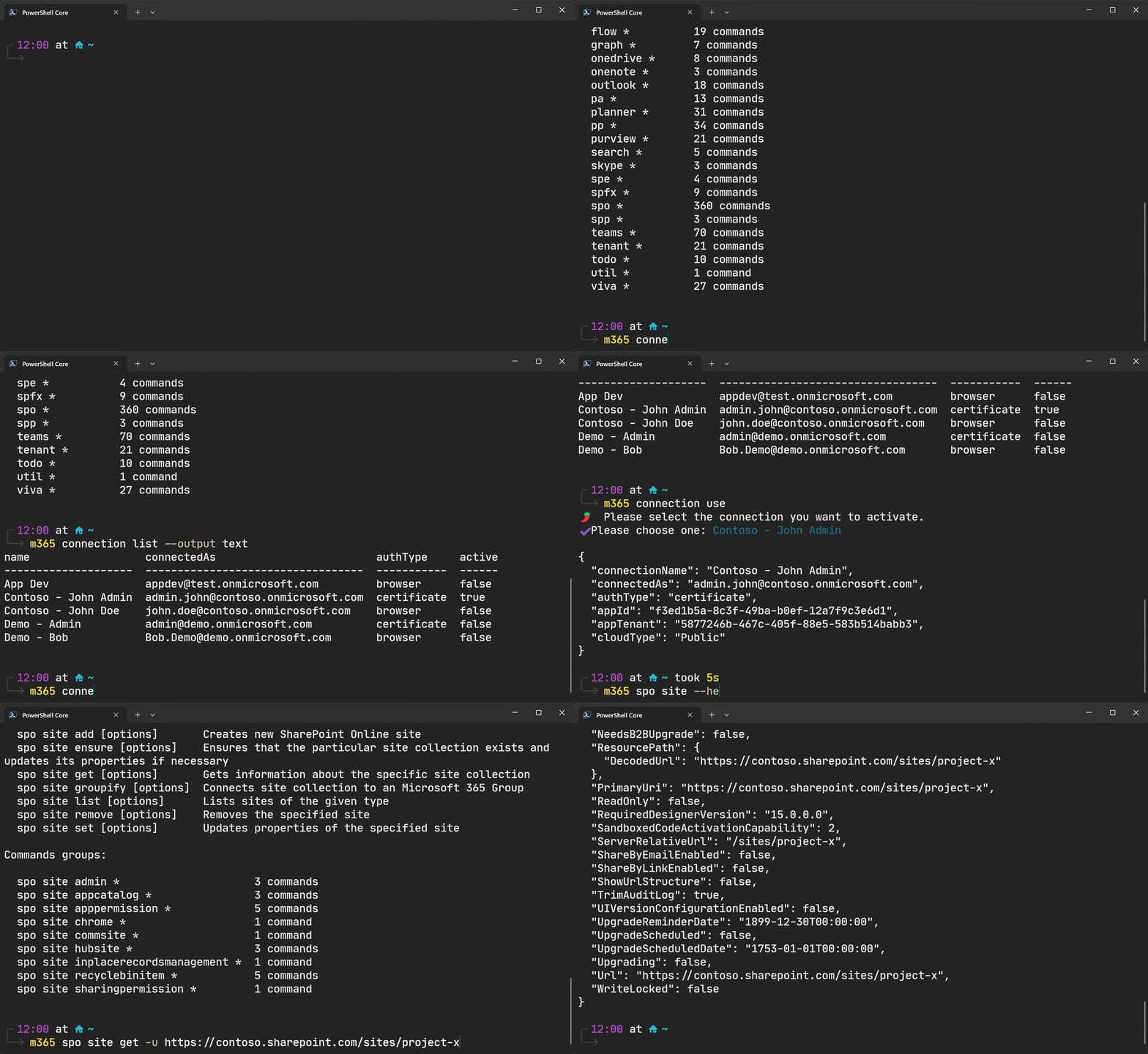
List all commands using the global --help option.
m365 --help
Get command information and example usage using the global --help option.
m365 spo site get --help
Execute a command and output response as JSON.
m365 spo site get --url https://contoso.sharepoint.com
Filter responses and return custom objects using JMESPath queries using the global --query option.
m365 spo site list --query '[?Template==`GROUP#0`].{Title:Title, Url:Url}'
Execute a command and output response as text using the global --output option.
m365 spo site get --url https://contoso.sharepoint.com --output text
For more examples and usage, refer to the command and sample scripts documentation.
Build
To build and run this CLI locally, you will need node >= 24.0.0 installed.
# Clone this repository
$ git clone https://github.com/pnp/cli-microsoft365

# Go into the repository
$ cd cli-microsoft365

# Install dependencies
$ npm install

# Build the CLI
$ npm run build

# Symlink your local CLI build
$ npm link
When you execute any m365 command from the terminal, it will now use your local clone of the CLI.
Contribute
We love to accept contributions.
If you want to get involved with helping us grow the CLI, whether that is suggesting or adding a new command, extending an existing command, or updating our documentation, we would love to hear from you.
Check out our Contributing Guide for detailed information on how to contribute to this project.
Need Help?
Join our community

Microsoft 365 & Power Platform Community
CLI for Microsoft 365 is a Microsoft 365 & Power Platform Community (PnP) project. Microsoft 365 & Power Platform Community is a virtual team consisting of Microsoft employees and community members focused on helping the community make the best use of Microsoft products. CLI for Microsoft 365 is an open-source project not affiliated with Microsoft and not covered by Microsoft support. If you experience any issues using the CLI, please submit an issue in the issues list.
Disclaimer
THIS CODE IS PROVIDED AS IS WITHOUT WARRANTY OF ANY KIND, EITHER EXPRESS OR IMPLIED, INCLUDING ANY IMPLIED WARRANTIES OF FITNESS FOR A PARTICULAR PURPOSE, MERCHANTABILITY, OR NON-INFRINGEMENT.
相關資源

Microsoft Work IQ
MCP微软官方 Microsoft 365 MCP:用自然语言查询自己的邮件、会议日程、OneDrive 与 SharePoint 文档、Teams 消息和同事信息,如「明天有哪些会」「汇总某人关于预算的邮件」。需要 Microsoft 365 Copilot 许可证并经租户管理员授权,本机需 Node.js 18+,目前为公开预览版。
microsoft/work-iq1k
wecom-cli(企业微信 CLI)
CLI企业微信官方命令行,覆盖消息、邮件、文档、在线表格与智能表格、待办、日程、会议纪要、微盘与通讯录,配套 Agent Skills;需 Node.js 18+ 与企业微信账号扫码授权。
WecomTeam/wecom-cli3.2k
persona-hr-coordinator
Skillgws CLI 自带的 HR 协调员技能:用日历排入职培训,把入职资料传到共享云端硬盘,在 Chat 发新人公告,把邮件请求转成待办并群发通知;需安装 gws 并用 Google Cloud 项目配置 OAuth 登录,项目声明非 Google 官方支持。
googleworkspace/cli31.6k
Microsoft Teams
PluginOpenAI 官方 Codex 插件:通过 Teams 连接器汇总群聊与频道消息、提取待办,并起草频道回复或会后跟进,适合用 Teams 办公或上课的行政人员与老师。需用 ChatGPT 账号登录 Codex 并授权 Microsoft 账号。
openai/plugins7.5kSharePoint
PluginOpenAI 官方 Codex 插件:通过 SharePoint 连接器汇总单位站点、页面与文件,找出文档负责人与进展,规划文档、表格或演示文稿的更新,适合在内网查制度、汇总资料。需用 ChatGPT 账号登录 Codex 并有单位 Microsoft 365 账号。
openai/plugins7.5kWeCom CLI Skills
Skill企业微信官方 wecom-cli 配套的 14 个技能,覆盖消息、通讯录、日程、在线会议(含纪要与转写)、待办、邮件、微盘、在线文档、在线表格与智能表格;需先安装 wecom-cli 并授权企业微信账号(默认扫码)。
WecomTeam/wecom-cli3.2k