
Container Use
CLIDagger 官方出品:给每个编码 agent 分配独立的容器和 git 分支,多个 agent 可以并行工作、互不干扰,还能查看命令日志、随时接管终端。以 MCP 方式接入,需要 Docker 与 Git,目前仍处于实验阶段。
container-use
Containerized environments for coding agents. (📦🤖) (📦🤖) (📦🤖)




Container Use lets coding agents do their work in parallel environments without getting in your way. Go from babysitting one agent at a time to enabling multiple agents to work safely and independently with your preferred stack. See the full documentation.
It's an open-source MCP server that works as a CLI tool with Claude Code, Cursor, and other MCP-compatible agents. Powered by Dagger.
- 📦 Isolated Environments: Each agent gets a fresh container in its own git branch - run multiple agents without conflicts, experiment safely, discard failures instantly.
- 👀 Real-time Visibility: See complete command history and logs of what agents actually did, not just what they claim.
- 🚁 Direct Intervention: Drop into any agent's terminal to see their state and take control when they get stuck.
- 🎮 Environment Control: Standard git workflow - just
git checkout <branch_name>to review any agent's work. - 🌎 Universal Compatibility: Works with any agent, model, or infrastructure - no vendor lock-in.
🦺 This project is in early development and actively evolving. Submit issues and/or reach out to us on Discord in the #container-use channel.
Quick Start
Install
# macOS (recommended)
brew install dagger/tap/container-use

# All platforms
curl -fsSL https://raw.githubusercontent.com/dagger/container-use/main/install.sh | bash
Setup with Your Agent
Container Use works with any MCP-compatible agent. The setup is always the same: add container-use stdio as an MCP server.
👉 Complete setup guide for all agents (Cursor, Goose, VSCode, etc.)
Example with Claude Code:
# Add Container Use MCP server
cd /path/to/repository
claude mcp add container-use -- container-use stdio

# Add agent rules (optional)
curl https://raw.githubusercontent.com/dagger/container-use/main/rules/agent.md >> CLAUDE.md
💡 Command Shortcut
The container-use command is also available as cu for convenience. Both commands work identically:
container-use stdio(used in documentation)cu stdio(shortcut)
Try It
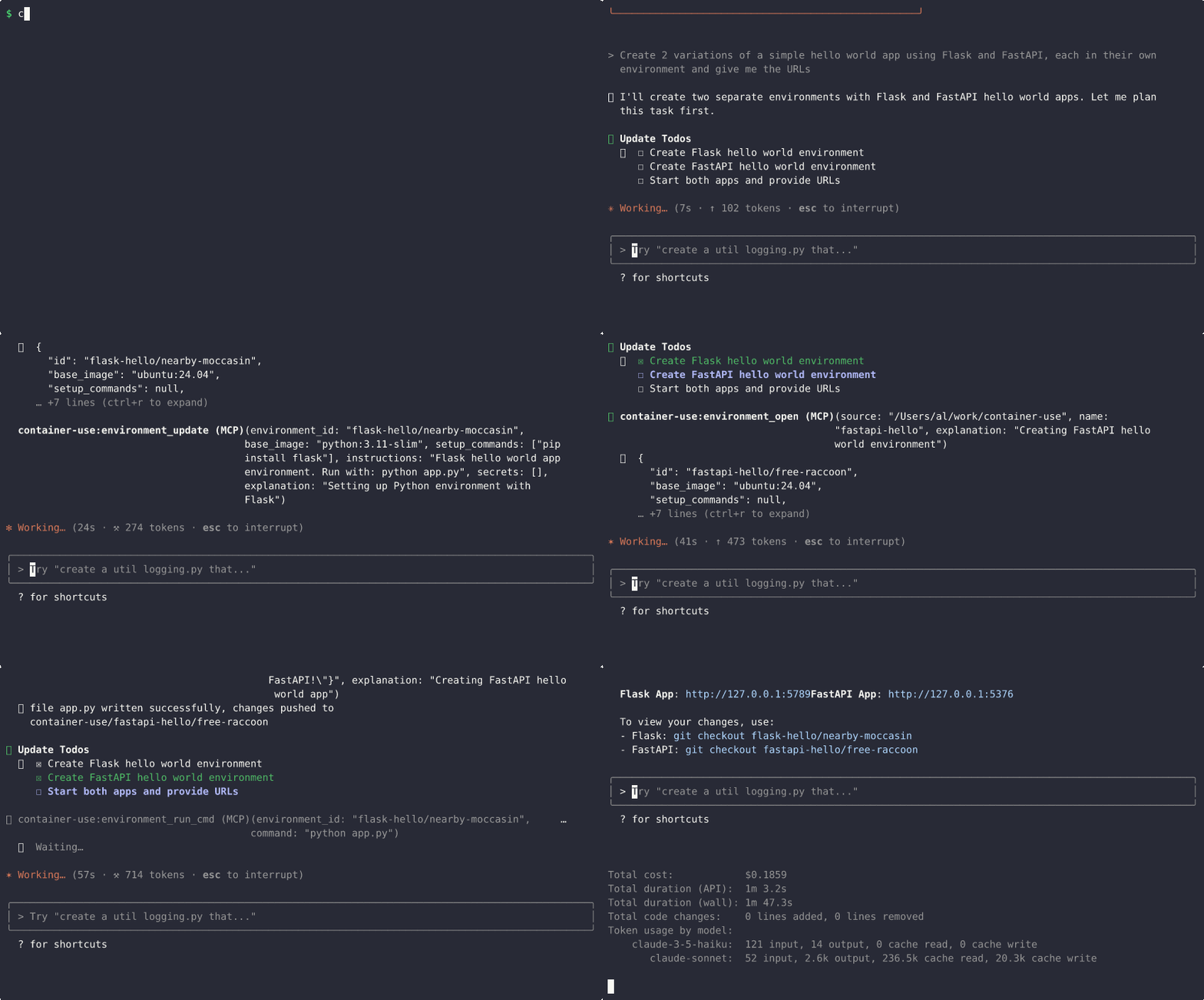
Ask your agent to create something:
Create a hello world app in python using flask
Your agent will work in an isolated environment and give you URLs to view the app and explore the code!
相關資源
Dagger
CLI可编程的软件交付引擎:用 Go、Python、TypeScript 等 8 种语言的 SDK 编写构建、测试与发布流程,全部在容器中运行,本地与 CI 行为一致,自带 OpenTelemetry 追踪。需要 Docker 等容器运行时。
dagger/dagger16.3kContainer Use
MCPDagger 出品:给每个编码 agent 分配独立容器和 Git 分支,多个 agent 并行工作互不干扰,可随时查看命令日志、接管终端或丢弃结果。需本机装有 Docker 与 Git,项目仍处于实验阶段。
dagger/container-use4.1k
Docker MCP Gateway
MCPDocker 官方的 MCP 网关(docker mcp CLI 插件):从 Docker MCP 目录挑选服务器放进隔离容器运行,统一管理密钥、OAuth 与工具开关,多个客户端共用一个入口。Docker Desktop 4.59+ 已内置,Docker CE 等环境需自行编译插件。
docker/mcp-gateway1.6kDocker Skills
SkillDocker 官方技能合集:项目容器化、Dockerfile 构建优化与加固、Compose 编排、Docker Sandboxes 与 Docker Agent 用法,并对删除等破坏性操作加确认护栏。
docker/skills569
Trivy
CLI一站式安全扫描器:检查容器镜像、文件系统、Git 仓库与 Kubernetes 集群中的已知漏洞、IaC 错误配置、泄露密钥与软件许可证,并能生成 SBOM。Aqua Security 开源维护。
aquasecurity/trivy38.5kDocker Compose
CLI用 compose.yaml 定义多容器应用,一条 docker compose up 拉起服务、数据库、缓存等整套环境,适合 agent 搭建本地开发与测试依赖。Docker 官方维护,macOS 随 Docker Desktop 附带。
docker/compose38.4k