
dasel
CLI用同一套选择器语法查询、修改和转换 JSON、YAML、TOML、XML、CSV、HCL、INI 等格式的数据,可以直接改写配置文件,也能在格式之间互转,适合 agent 在脚本里处理结构化数据。单个无运行时依赖的二进制文件,用法类似 jq / yq。











Dasel
Dasel (short for Data-Select) is a command-line tool and library for querying, modifying, and transforming data structures such as JSON, YAML, TOML, XML, CSV, and KDL.
It provides a consistent, powerful syntax to traverse and update data — making it useful for developers, DevOps, and data wrangling tasks.
Features
- Multi-format support: JSON, YAML, TOML, XML, CSV, HCL, INI, KDL.
- Unified query syntax: Access data in any format with the same selectors.
- Query & search: Extract values, lists, or structures with intuitive syntax.
- Modify in place: Update, insert, or delete values directly in structured files.
- Convert between formats: Seamlessly transform data from JSON → YAML, TOML → JSON, etc.
- Script-friendly: Simple CLI integration for shell scripts and pipelines.
- Library support: Import and use in Go projects.
Installation
Homebrew (macOS/Linux)
brew install dasel
Go Install
go install github.com/tomwright/dasel/v3/cmd/dasel@master
Prebuilt Binaries
Prebuilt binaries are available on the Releases page for Linux, macOS, and Windows.
None of the above?
See the installation docs for more options.
Shell Completion
Dasel supports tab-completion for Bash, Zsh, Fish, and PowerShell. Generate and load the completion script for your shell:
# Bash
source <(dasel completion bash)

# Zsh
source <(dasel completion zsh)

# Fish
dasel completion fish | source

# PowerShell
dasel completion powershell | Out-String | Invoke-Expression
See the shell completion docs for permanent installation instructions.
Man Page
Generate and view the man page:
dasel man | man -l -
Basic Usage
Selecting Values
By default, Dasel evaluates the final selector and prints the result.
echo '{"foo": {"bar": "baz"}}' | dasel -i json 'foo.bar'
# Output: "baz"
Modifying Values
Update values inline:
echo '{"foo": {"bar": "baz"}}' | dasel -i json 'foo.bar = "bong"'
# Output: "bong"
Use --root to output the full document after modification:
echo '{"foo": {"bar": "baz"}}' | dasel -i json --root 'foo.bar = "bong"'
# Output:
{
  "foo": {
    "bar": "bong"
  }
}
Update values based on previous value:
echo '[1,2,3,4,5]' | dasel -i json --root 'each($this = $this*2)'
# Output:
[
    2,
    4,
    6,
    8,
    10
]
Format Conversion
cat data.json | dasel -i json -o yaml
Recursive Descent (..)
Searches all nested objects and arrays for a matching key or index.
echo '{"foo": {"bar": "baz"}}' | dasel -i json '..bar'
# Output:
[
    "baz"
]
Search (search)
Finds all values matching a condition anywhere in the structure.
echo '{"foo": {"bar": "baz"}}' | dasel -i json 'search(bar == "baz")'
# Output:
[
    {
        "bar": "baz"
    }
]
Documentation
Full documentation is available at daseldocs.tomwright.me.
Contributing
Contributions are welcome! Please see the CONTRIBUTING.md for details.
License
MIT License. See LICENSE for details.
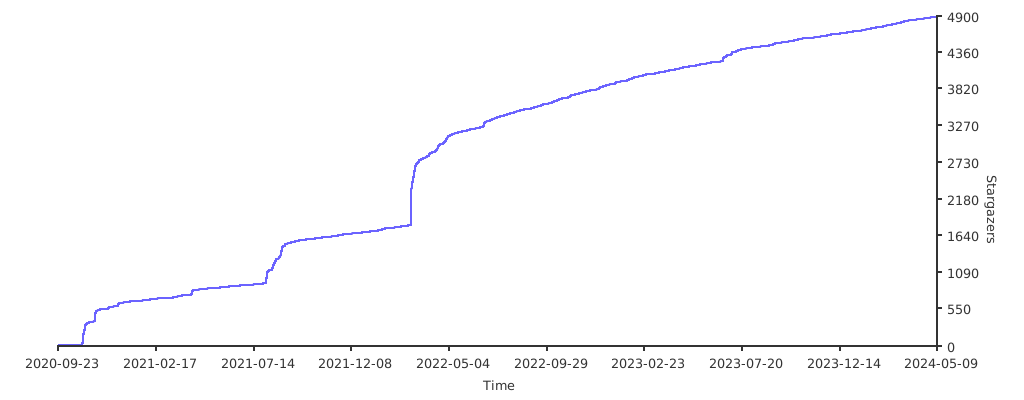
Stargazers over time
相關資源

jq
CLI轻量的命令行 JSON 处理器,用简洁的过滤表达式切片、筛选、映射与转换 JSON,零运行时依赖,是 agent 解析接口返回与日志的常用工具。
jqlang/jq35.8k
yq
CLI类 jq 语法的轻量命令行处理器,可读取、修改和转换 YAML、JSON、XML、INI、CSV 等格式,支持原地编辑配置文件,单一 Go 二进制无依赖。
mikefarah/yq16.1k
Miller
CLI像 awk、sed、cut、join、sort 一样处理 CSV、TSV、JSON 等结构化数据,按字段名操作,支持清洗、聚合统计、格式转换与美化输出。命令为 mlr,Go 编写零运行时依赖。
johnkerl/miller10k
jc
CLI把 dig、ps、ls、ifconfig 等上百种命令的输出及常见文件格式转换成 JSON,便于 agent 用 jq 或脚本可靠解析;也可作为 Python 库使用。
kellyjonbrazil/jc8.7k
croc
CLI一条命令在任意两台电脑之间收发文件和文件夹:端到端加密(PAKE),点对点直连、不通时走中继,支持断点续传与代理,不需要自建服务器或端口转发。
schollz/croc40.6k
fzf
CLI通用命令行模糊查找器,可对文件列表、命令历史、进程等任意文本输入做模糊筛选;除交互界面外还有 --filter 非交互过滤模式,并提供 Shell 快捷键与补全集成。
junegunn/fzf83.6k