
Datasette
CLI把 SQLite 数据库发布成可以浏览、可以查询的网页和 JSON API,支持 SQL 查询、元数据和插件扩展,也能用 datasette publish 部署到 Cloud Run 等平台。适合数据探索和数据新闻,需要 Python 3.10 及以上版本。








An open source multi-tool for exploring and publishing data
Datasette is a tool for exploring and publishing data. It helps people take data of any shape or size and publish that as an interactive, explorable website and accompanying API.
Datasette is aimed at data journalists, museum curators, archivists, local governments, scientists, researchers and anyone else who has data that they wish to share with the world.
Explore a demo, watch a video about the project or try it out on GitHub Codespaces.
- datasette.io is the official project website
- Latest Datasette News
- Comprehensive documentation: https://docs.datasette.io/
- Examples: https://datasette.io/examples
- Live demo of current
mainbranch: https://latest.datasette.io/ - Questions, feedback or want to talk about the project? Join our Discord
Want to stay up-to-date with the project? Subscribe to the Datasette newsletter for tips, tricks and news on what's new in the Datasette ecosystem.
Installation
If you are on a Mac, Homebrew is the easiest way to install Datasette:
brew install datasette
You can also install it using pip or pipx:
pip install datasette
Datasette requires Python 3.11 or higher. We also have detailed installation instructions covering other options such as Docker.
Basic usage
datasette serve path/to/database.db
This will start a web server on port 8001 - visit http://localhost:8001/ to access the web interface.
serve is the default subcommand, you can omit it if you like.
Use Chrome on OS X? You can run datasette against your browser history like so:
datasette ~/Library/Application\ Support/Google/Chrome/Default/History --nolock
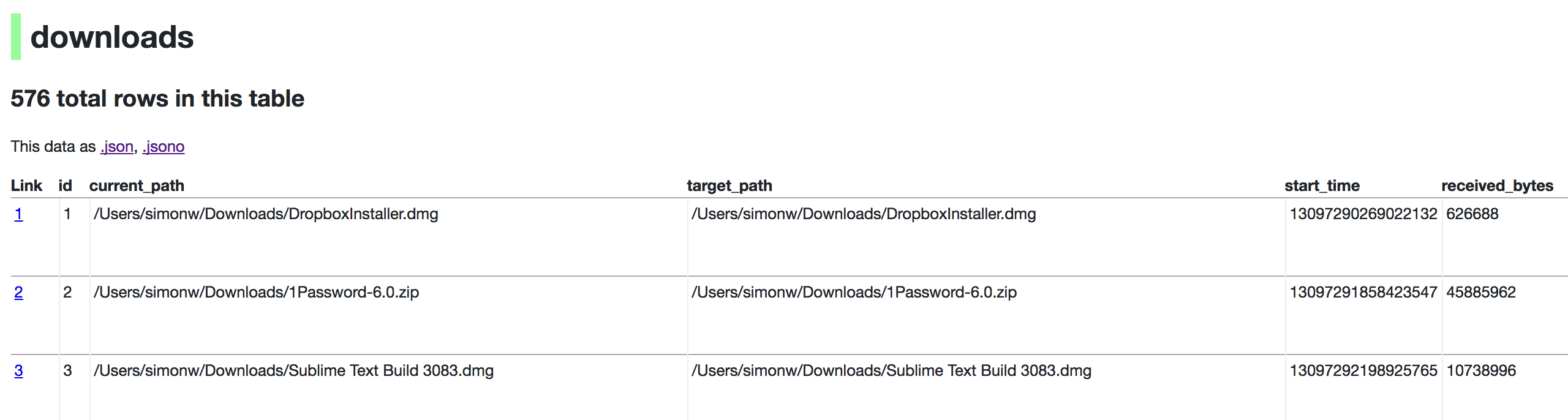
Now visiting http://localhost:8001/History/downloads will show you a web interface to browse your downloads data:
metadata.json
If you want to include licensing and source information in the generated datasette website you can do so using a JSON file that looks something like this:
{
    "title": "Five Thirty Eight",
    "license": "CC Attribution 4.0 License",
    "license_url": "http://creativecommons.org/licenses/by/4.0/",
    "source": "fivethirtyeight/data on GitHub",
    "source_url": "https://github.com/fivethirtyeight/data"
}
Save this in metadata.json and run Datasette like so:
datasette serve fivethirtyeight.db -m metadata.json
The license and source information will be displayed on the index page and in the footer. They will also be included in the JSON produced by the API.
datasette publish
If you have Heroku or Google Cloud Run configured, Datasette can deploy one or more SQLite databases to the internet with a single command:
datasette publish heroku database.db
Or:
datasette publish cloudrun database.db
This will create a docker image containing both the datasette application and the specified SQLite database files. It will then deploy that image to Heroku or Cloud Run and give you a URL to access the resulting website and API.
See Publishing data in the documentation for more details.
Datasette Lite
Datasette Lite is Datasette packaged using WebAssembly so that it runs entirely in your browser, no Python web application server required. Read more about that in the Datasette Lite documentation.
相關資源
sqlite-utils
CLISimon Willison 出品的命令行工具与 Python 库:把 JSON、CSV 直接导入 SQLite 并自动建表,对文件跑内存 SQL 查询,还支持全文检索与表结构变换。
simonw/sqlite-utils2.2k
Apache Doris MCP Server
MCPApache Doris 官方 MCP:以只读方式让 agent 探查库表元数据、执行与解释 SQL、诊断慢查询,并查看集群状态、导入任务与数据治理信息。需 Python 3.12+ 与 Doris 2.0 以上。
apache/doris-mcp-server351
DuckDB
CLI进程内分析型 SQL 数据库,命令行可直接用 SQL 查询 CSV、Parquet、JSON 文件,无需导入或启动服务,适合 agent 抽样与聚合大文件。官方维护。
duckdb/duckdb42.2k
mycli
CLI带智能补全与语法高亮的 MySQL 终端客户端,兼容 MariaDB、TiDB 等;支持 --execute 与批处理模式,可按 CSV 或表格格式输出查询结果,便于 agent 直接执行 SQL。
dbcli/mycli12k
SQL Queries
SkillAnthropic 官方数据技能,指导 agent 在 Snowflake、BigQuery、Databricks、PostgreSQL 等主流数仓方言下编写、翻译和优化 SQL,涵盖 CTE、窗口函数与聚合分析查询。
anthropics/knowledge-work-plugins29.9k
BigQuery Basics
Skill用 bq 与 gcloud 命令行管理 BigQuery 的数据集、表与作业,运行 SQL 查询并导入数据,附客户端库、MCP 与 Terraform 参考。Google 官方技能,需要 Google Cloud 项目。
google/skills21.4k