
Freqtrade
CLI开源加密货币量化交易框架:命令行下载行情、回测策略、优化参数并以模拟盘运行,agent 可代跑策略迭代。推荐用 Docker 运行,初始化配置需按提示作答,写策略需懂 Python,实盘要交易所 API Key;回测不代表实际收益,交易决策需自行评估风险并请专业人士复核。





Freqtrade is a free and open source crypto trading bot written in Python. It is designed to support all major exchanges and be controlled via Telegram or webUI. It contains backtesting, plotting and money management tools as well as strategy optimization by machine learning.
Disclaimer
This software is for educational purposes only. Do not risk money which you are afraid to lose. USE THE SOFTWARE AT YOUR OWN RISK. THE AUTHORS AND ALL AFFILIATES ASSUME NO RESPONSIBILITY FOR YOUR TRADING RESULTS.
Always start by running a trading bot in Dry-Run and do not engage money before you understand how it works and what profit/loss you should expect.
We strongly recommend you to have coding and Python knowledge. Do not hesitate to read the source code and understand the mechanism of this bot.
Supported Exchange marketplaces
Please read the exchange-specific notes to learn about special configurations that maybe needed for each exchange.
Supported Spot Exchanges
- Binance
- BingX
- Bitget
- Bybit EU
- Bybit
- Gate EU
- Gate
- HTX
- Hyperliquid (A decentralized exchange, or DEX)
- Kraken
- MyOKX (OKX EEA)
- OKX
- potentially many others. (We cannot guarantee they will work)
Supported Futures Exchanges
Please make sure to read the exchange specific notes, as well as the trading with leverage documentation before diving in.
Community tested
Exchanges confirmed working by the community:
Documentation
We invite you to read the bot documentation to ensure you understand how the bot is working.
Please find the complete documentation on the freqtrade website.
Features
- Based on Python 3.12+: For botting on any operating system - Windows, macOS and Linux.
- Persistence: Persistence is achieved through sqlite.
- Dry-run: Run the bot without paying money.
- Backtesting: Run a simulation of your buy/sell strategy.
- Strategy Optimization by machine learning: Use machine learning to optimize your buy/sell strategy parameters with real exchange data.
- Adaptive prediction modeling: Build a smart strategy with FreqAI that self-trains to the market via adaptive machine learning methods. Learn more
- Whitelist crypto-currencies: Select which crypto-currency you want to trade or use dynamic whitelists.
- Blacklist crypto-currencies: Select which crypto-currency you want to avoid.
- Builtin WebUI: Builtin web UI to manage your bot.
- Manageable via Telegram: Manage the bot with Telegram.
- Display profit/loss in fiat: Display your profit/loss in fiat currency.
- Performance status report: Provide a performance status of your current trades.
Quick start
Please refer to the Docker Quickstart documentation on how to get started quickly.
For further (native) installation methods, please refer to the Installation documentation page.
Basic Usage
Bot commands
usage: freqtrade [-h] [-V]
                 {trade,create-userdir,new-config,show-config,new-strategy,download-data,convert-data,convert-trade-data,trades-to-ohlcv,list-data,backtesting,backtesting-show,backtesting-analysis,edge,hyperopt,hyperopt-list,hyperopt-show,list-exchanges,list-markets,list-pairs,list-strategies,list-hyperoptloss,list-freqaimodels,list-timeframes,show-trades,test-pairlist,convert-db,install-ui,plot-dataframe,plot-profit,webserver,strategy-updater,lookahead-analysis,recursive-analysis}
                 ...

Free, open source crypto trading bot

positional arguments:
  {trade,create-userdir,new-config,show-config,new-strategy,download-data,convert-data,convert-trade-data,trades-to-ohlcv,list-data,backtesting,backtesting-show,backtesting-analysis,edge,hyperopt,hyperopt-list,hyperopt-show,list-exchanges,list-markets,list-pairs,list-strategies,list-hyperoptloss,list-freqaimodels,list-timeframes,show-trades,test-pairlist,convert-db,install-ui,plot-dataframe,plot-profit,webserver,strategy-updater,lookahead-analysis,recursive-analysis}
    trade               Trade module.
    create-userdir      Create user-data directory.
    new-config          Create new config
    show-config         Show resolved config
    new-strategy        Create new strategy
    download-data       Download backtesting data.
    convert-data        Convert candle (OHLCV) data from one format to
                        another.
    convert-trade-data  Convert trade data from one format to another.
    trades-to-ohlcv     Convert trade data to OHLCV data.
    list-data           List downloaded data.
    backtesting         Backtesting module.
    backtesting-show    Show past Backtest results
    backtesting-analysis
                        Backtest Analysis module.
    hyperopt            Hyperopt module.
    hyperopt-list       List Hyperopt results
    hyperopt-show       Show details of Hyperopt results
    list-exchanges      Print available exchanges.
    list-markets        Print markets on exchange.
    list-pairs          Print pairs on exchange.
    list-strategies     Print available strategies.
    list-hyperoptloss   Print available hyperopt loss functions.
    list-freqaimodels   Print available freqAI models.
    list-timeframes     Print available timeframes for the exchange.
    show-trades         Show trades.
    test-pairlist       Test your pairlist configuration.
    convert-db          Migrate database to different system
    install-ui          Install FreqUI
    plot-dataframe      Plot candles with indicators.
    plot-profit         Generate plot showing profits.
    webserver           Webserver module.
    strategy-updater    updates outdated strategy files to the current version
    lookahead-analysis  Check for potential look ahead bias.
    recursive-analysis  Check for potential recursive formula issue.

options:
  -h, --help            show this help message and exit
  -V, --version         show program's version number and exit
Telegram RPC commands
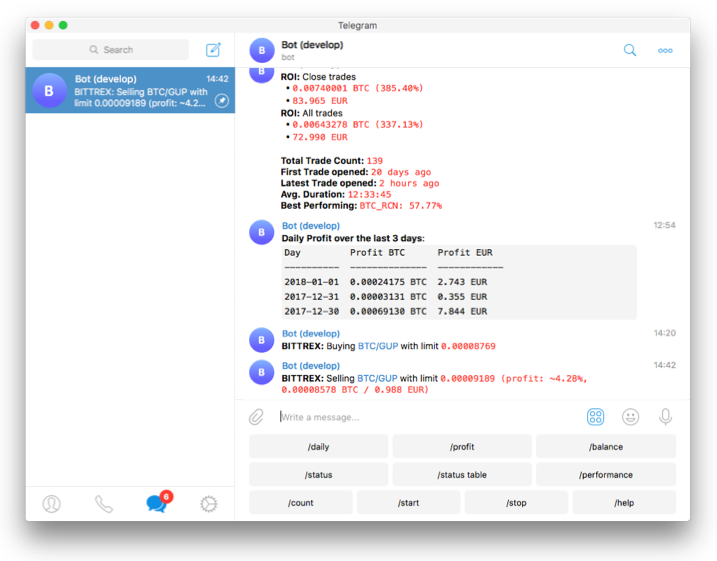
Telegram is not mandatory. However, this is a great way to control your bot. More details and the full command list on the documentation
/start: Starts the trader./stop: Stops the trader./stopentry: Stop entering new trades./status <trade_id>|[table]: Lists all or specific open trades./profit [<n>]: Lists cumulative profit from all finished trades, over the last n days./profit_long [<n>]: Lists cumulative profit from all finished long trades, over the last n days./profit_short [<n>]: Lists cumulative profit from all finished short trades, over the last n days./forceexit <trade_id>|all: Instantly exits the given trade (Ignoringminimum_roi)./fx <trade_id>|all: Alias to/forceexit/performance: Show performance of each finished trade grouped by pair/balance: Show account balance per currency./daily <n>: Shows profit or loss per day, over the last n days./help: Show help message./version: Show version.
Development branches
The project is currently setup in two main branches:
develop- This branch has often new features, but might also contain breaking changes. We try hard to keep this branch as stable as possible.stable- This branch contains the latest stable release. This branch is generally well tested.feat/*- These are feature branches, which are being worked on heavily. Please don't use these unless you want to test a specific feature.
Support
Help / Discord
For any questions not covered by the documentation or for further information about the bot, or to simply engage with like-minded individuals, we encourage you to join the Freqtrade discord server.
Bugs / Issues
If you discover a bug in the bot, please search the issue tracker first. If it hasn't been reported, please create a new issue and ensure you follow the template guide so that the team can assist you as quickly as possible.
For every issue created, kindly follow up and mark satisfaction or reminder to close issue when equilibrium ground is reached.
--Maintain github's community policy--
Feature Requests
Have you a great idea to improve the bot you want to share? Please, first search if this feature was not already discussed. If it hasn't been requested, please create a new request and ensure you follow the template guide so that it does not get lost in the bug reports.
Pull Requests
Feel like the bot is missing a feature? We welcome your pull requests!
Please read the Contributing document to understand the requirements before sending your pull-requests.
Coding is not a necessity to contribute - maybe start with improving the documentation? Issues labeled good first issue can be good first contributions, and will help get you familiar with the codebase.
Note before starting any major new feature work, please open an issue describing what you are planning to do or talk to us on discord (please use the #dev channel for this). This will ensure that interested parties can give valuable feedback on the feature, and let others know that you are working on it.
Important: Always create your PR against the develop branch, not stable.
Requirements
Up-to-date clock
The clock must be accurate, synchronized to a NTP server very frequently to avoid problems with communication to the exchanges.
Minimum hardware required
To run this bot we recommend you a cloud instance with a minimum of:
- Minimal (advised) system requirements: 2GB RAM, 1GB disk space, 2vCPU
Software requirements
- Python >= 3.12
- pip
- git
- TA-Lib
- virtualenv (Recommended)
- Docker (Recommended)
相關資源

Qlib
CLI微软开源的 AI 量化投资研究平台,qrun 命令按 YAML 配置一键完成数据集构建、模型训练、回测与评估,附带大量基准模型。官方数据集暂时停止提供,需先按 README 准备行情数据。
microsoft/qlib49.5k
Claude Trading Skills (AGIPro)
Skill68 个交易与量化技能,以加密货币和 DeFi 为主:行情与链上数据、技术指标、回测、仓位与风控、预测市场,以及成本计算、洗售识别等税务记账。多数需本机 Python 和数据平台的 API Key(多有免费档);结果需专业人员复核。
agiprolabs/claude-trading-skills422
Kraken CLI
CLIKraken 交易所官方命令行,查加密货币、代币化美股、外汇与期货行情并交易,内置 MCP 服务和模拟盘,查行情与模拟交易无需 API Key。官方标注为实验性软件;实盘需 Kraken 账户与 API Key、动用真实资金,请先确认所在地区是否允许并人工确认交易;结论需专业人员复核。
krakenfx/kraken-cli762
TradingAgents
CLI多智能体投研框架:基本面、情绪、新闻、技术分析师与多空研究员、交易员、风控分工辩论,对指定股票输出研报与评级,支持美股、港股与 A 股。需 Python 环境和任一大模型 API Key;不构成投资建议,结论需专业人员复核。
TauricResearch/TradingAgents112k
a-stock-data
Skill让 agent 写代码获取 A 股及相关市场数据:行情 K 线、研报、资金流、龙虎榜、公告、宏观利率、期货与可转债等,整合 34 个公开数据源,除 iwencai 外无需密钥;需要安装 Python 依赖。
simonlin1212/a-stock-data10.9k
TradingView MCP
MCP提供股票、加密货币、外汇与期货的实时行情、涨跌榜与放量筛选、多周期技术分析和策略回测。无需 TradingView 账号或 API Key;社区项目,与 TradingView 官方无关。
atilaahmettaner/tradingview-mcp5.1k