
Manim
CLI用 Python 代码制作数学与讲解类动画的引擎(社区版 ManimCE):写好场景后用 manim 命令渲染成视频,适合让 agent 生成教学、科普动画。macOS 需先装 cairo 与 pkg-config,渲染公式需 LaTeX。









An animation engine for explanatory math videos
Manim is an animation engine for explanatory math videos. It's used to create precise animations programmatically, as demonstrated in the videos of 3Blue1Brown.
[!NOTE] The community edition of Manim (ManimCE) is a version maintained and developed by the community. It was forked from 3b1b/manim, a tool originally created and open-sourced by Grant Sanderson, also creator of the 3Blue1Brown educational math videos. While Grant Sanderson continues to maintain his own repository, we recommend this version for its continued development, improved features, enhanced documentation, and more active community-driven maintenance. If you would like to study how Grant makes his videos, head over to his repository (3b1b/manim).
Table of Contents:
Installation
[!CAUTION] These instructions are for the community version only. Trying to use these instructions to install 3b1b/manim or instructions there to install this version will cause problems. Read this and decide which version you wish to install, then only follow the instructions for your desired version.
Manim requires a few dependencies that must be installed prior to using it. If you want to try it out first before installing it locally, you can do so in our online Jupyter environment.
For local installation, please visit the Documentation and follow the appropriate instructions for your operating system.
Usage
Manim is an extremely versatile package. The following is an example Scene you can construct:
from manim import *


class SquareToCircle(Scene):
    def construct(self):
        circle = Circle()
        square = Square()
        square.flip(RIGHT)
        square.rotate(-3 * TAU / 8)
        circle.set_fill(PINK, opacity=0.5)

        self.play(Create(square))
        self.play(Transform(square, circle))
        self.play(FadeOut(square))
In order to view the output of this scene, save the code in a file called example.py. Then, run the following in a terminal window:
manim -p -ql example.py SquareToCircle
You should see your native video player program pop up and play a simple scene in which a square is transformed into a circle. You may find some more simple examples within this GitHub repository. You can also visit the official gallery for more advanced examples.
Manim also ships with a %%manim IPython magic which allows to use it conveniently in JupyterLab (as well as classic Jupyter) notebooks. See the
corresponding documentation for some guidance and
try it out online.
Command line arguments
The general usage of Manim is as follows:
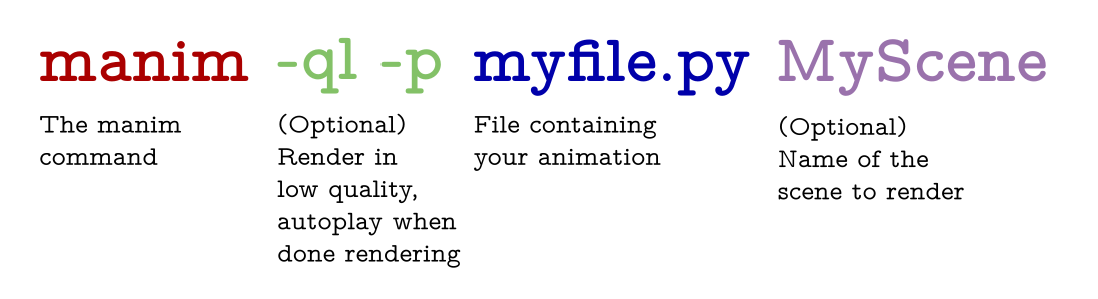
The -p flag in the command above is for previewing, meaning the video file will automatically open when it is done rendering. The -ql flag is for a faster rendering at a lower quality.
Some other useful flags include:
-sto skip to the end and just show the final frame.-n <number>to skip ahead to then'th animation of a scene.-fshow the file in the file browser.
For a thorough list of command line arguments, visit the documentation.
Documentation
Documentation is in progress at ReadTheDocs.
Docker
The community also maintains a docker image (manimcommunity/manim), which can be found on DockerHub.
Instructions on how to install and use it can be found in our documentation.
Help with Manim
If you need help installing or using Manim, feel free to reach out to our Discord Server or Reddit Community. If you would like to submit a bug report or feature request, please open an issue.
Contributing
Contributions to Manim are always welcome. In particular, there is a dire need for tests and documentation. For contribution guidelines, please see the documentation.
However, please note that Manim is currently undergoing a major refactor. In general, contributions implementing new features will not be accepted in this period. The contribution guide may become outdated quickly; we highly recommend joining our Discord server to discuss any potential contributions and keep up to date with the latest developments.
Most developers on the project use uv for management. You'll want to have uv installed and available in your environment.
Learn more about uv at its documentation and find out how to install manim with uv at the manim dev-installation guide in the manim documentation.
How to Cite Manim
We acknowledge the importance of good software to support research, and we note that research becomes more valuable when it is communicated effectively. To demonstrate the value of Manim, we ask that you cite Manim in your work. Currently, the best way to cite Manim is to go to our repository page (if you aren't already) and click the "cite this repository" button on the right sidebar. This will generate a citation in your preferred format, and will also integrate well with citation managers.
Code of Conduct
Our full code of conduct, and how we enforce it, can be read on our website.
License
The software is double-licensed under the MIT license, with copyright by 3blue1brown LLC (see LICENSE), and copyright by Manim Community Developers (see LICENSE.community).
相關資源

Manim Slides
CLI把 Manim 数学动画做成可逐页翻动的演示文稿:在场景代码里标出翻页点,渲染后用 manim-slides 放映,也能导出 HTML、PDF 或 PPTX,适合数理课堂与学术报告。场景要用 Python 编写(可让 agent 代写),需要 Python 与 Manim,排版公式还需 LaTeX。
jeertmans/manim-slides963
Pix2Text
CLI把含数学公式、表格的图片或整份 PDF(含扫描件)识别成 Markdown 与 LaTeX,中英文效果好,支持 80 多种语言,适合教师把试卷、讲义数字化,学生整理笔记。开源的 Mathpix 替代品,在本机运行,需要 Python 环境。
breezedeus/Pix2Text3.3k
Manim Skills
Skill先把模糊的讲解想法拆成逐场景分镜,再按 Manim 社区版或 3Blue1Brown 版 ManimGL 的最佳实践写动画代码,做数学、物理讲解动画,适合老师做课堂演示和科普视频。需要本地安装 Python、FFmpeg 与 LaTeX。
adithya-s-k/manim_skill1.2k
CLI-Anything MuseScore
CLICLI-Anything 里的 MuseScore 4 命令行封装:让 agent 给乐谱转调、提取分谱、增删乐器、查看乐谱信息,并导出 PDF、MIDI、MusicXML、MP3、盲文谱等格式,适合音乐老师批量准备教学乐谱。需先安装 MuseScore 4 桌面软件与 Python 3.10+。
HKUDS/CLI-Anything53.4k
notebooklm-py
CLI非官方 Python 库与 CLI,让 agent 操控 Google NotebookLM(现更名 Gemini Notebook):批量导入资料、基于来源带引用问答,生成播客、视频、幻灯片、测验与闪卡并批量下载,自带 agent skill。依赖未公开接口,需登录 Google 账号。
teng-lin/notebooklm-py19.8k
nbgrader
CLIJupyter 官方的 Notebook 作业工具:教师标注好题目与答案后,用命令行生成学生版作业、收集提交、自动评分并生成批改反馈,适合编程与数据类课程批量改作业。需要 Python 与 Jupyter 环境,题目须按 nbgrader 格式标注。
jupyter/nbgrader1.4k