
Nushell
CLI以结构化数据为核心的跨平台 shell:管道里传的是表格而不是纯文本,可以直接打开并查询 JSON、CSV、TOML 等文件;默认构建自带 nu --mcp 模式,可作为 MCP 服务给 agent 调用。
Nushell







A new type of shell.
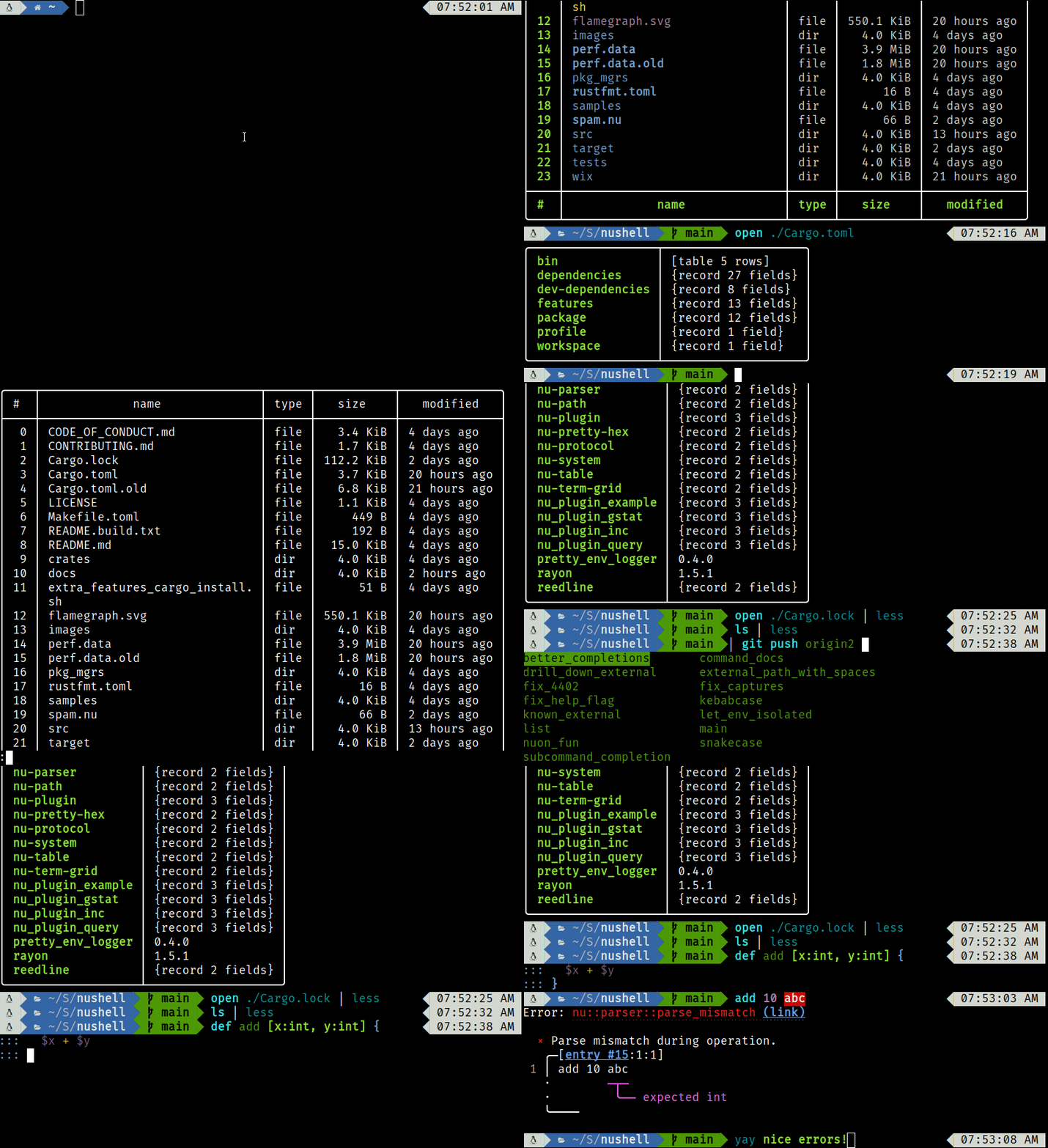
Table of Contents
- Status
- Learning About Nu
- Installation
- Configuration
- Philosophy
- Goals
- Officially Supported By
- Contributing
- License
Status
This project has reached a minimum-viable-product level of quality. Many people use it as their daily driver, but it may be unstable for some commands. Nu's design is subject to change as it matures.
Learning About Nu
The Nushell book is the primary source of Nushell documentation. You can find a full list of Nu commands in the book, and we have many examples of using Nu in our cookbook.
We're also active on Discord; come and chat with us!
Installation
To quickly install Nu:
# Linux and macOS
brew install nushell
# Windows
winget install nushell
To use Nu in GitHub Action, check setup-nu for more detail.
Detailed installation instructions can be found in the installation chapter of the book. Nu is available via many package managers:

For details about which platforms the Nushell team actively supports, see our platform support policy.
Configuration
The default configurations can be found at sample_config which are the configuration files one gets when they start up Nushell for the first time.
It sets all of the default configuration to run Nushell. From here one can then customize this file for their specific needs.
To see where config.nu is located on your system simply type this command.
$nu.config-path
Please see our book for all of the Nushell documentation.
Philosophy
Nu draws inspiration from projects like PowerShell, functional programming languages, and modern CLI tools. Rather than thinking of files and data as raw streams of text, Nu looks at each input as something with structure. For example, when you list the contents of a directory what you get back is a table of rows, where each row represents an item in that directory. These values can be piped through a series of steps, in a series of commands called a 'pipeline'.
Pipelines
In Unix, it's common to pipe between commands to split up a sophisticated command over multiple steps. Nu takes this a step further and builds heavily on the idea of pipelines. As in the Unix philosophy, Nu allows commands to output to stdout and read from stdin. Additionally, commands can output structured data (you can think of this as a third kind of stream). Commands that work in the pipeline fit into one of three categories:
- Commands that produce a stream (e.g.,
ls) - Commands that filter a stream (e.g.,
where type == "dir") - Commands that consume the output of the pipeline (e.g.,
table)
Commands are separated by the pipe symbol (|) to denote a pipeline flowing left to right.
ls | where type == "dir" | table
# => ╭────┬──────────┬──────┬─────────┬───────────────╮
# => │ #  │   name   │ type │  size   │   modified    │
# => ├────┼──────────┼──────┼─────────┼───────────────┤
# => │  0 │ .cargo   │ dir  │     0 B │ 9 minutes ago │
# => │  1 │ assets   │ dir  │     0 B │ 2 weeks ago   │
# => │  2 │ crates   │ dir  │ 4.0 KiB │ 2 weeks ago   │
# => │  3 │ docker   │ dir  │     0 B │ 2 weeks ago   │
# => │  4 │ docs     │ dir  │     0 B │ 2 weeks ago   │
# => │  5 │ images   │ dir  │     0 B │ 2 weeks ago   │
# => │  6 │ pkg_mgrs │ dir  │     0 B │ 2 weeks ago   │
# => │  7 │ samples  │ dir  │     0 B │ 2 weeks ago   │
# => │  8 │ src      │ dir  │ 4.0 KiB │ 2 weeks ago   │
# => │  9 │ target   │ dir  │     0 B │ a day ago     │
# => │ 10 │ tests    │ dir  │ 4.0 KiB │ 2 weeks ago   │
# => │ 11 │ wix      │ dir  │     0 B │ 2 weeks ago   │
# => ╰────┴──────────┴──────┴─────────┴───────────────╯
Because most of the time you'll want to see the output of a pipeline, table is assumed.
We could have also written the above:
ls | where type == "dir"
Being able to use the same commands and compose them differently is an important philosophy in Nu.
For example, we could use the built-in ps command to get a list of the running processes, using the same where as above.
ps | where cpu > 0
# => ╭───┬───────┬──────┬───────────┬──────┬─────────┬───────┬────────────┬──────────╮
# => │ # │  pid  │ ppid │   name    │ user │ status  │  cpu  │  cpu_time  │   mem    │
# => ├───┼───────┼──────┼───────────┼──────┼─────────┼───────┼────────────┼──────────┤
# => │ 0 │  2240 │ 9872 │ Slack.exe │ dev  │ Running │ 16.40 │ 1min 12sec │ 178.3 MB │
# => │ 1 │ 16948 │ 9872 │ Slack.exe │ dev  │ Running │ 16.32 │      48sec │ 205.0 MB │
# => │ 2 │ 17700 │ 4632 │ nu.exe    │ dev  │ Running │  3.77 │       2sec │  26.1 MB │
# => ╰───┴───────┴──────┴───────────┴──────┴─────────┴───────┴────────────┴──────────╯
Opening files
Nu can load file and URL contents as raw text or structured data (if it recognizes the format). For example, you can load a .toml file as structured data and explore it:
open Cargo.toml
# => ╭──────────────────┬────────────────────╮
# => │ bin              │ [table 1 row]      │
# => │ dependencies     │ {record 25 fields} │
# => │ dev-dependencies │ {record 8 fields}  │
# => │ features         │ {record 10 fields} │
# => │ package          │ {record 13 fields} │
# => │ patch            │ {record 1 field}   │
# => │ profile          │ {record 3 fields}  │
# => │ target           │ {record 3 fields}  │
# => │ workspace        │ {record 1 field}   │
# => ╰──────────────────┴────────────────────╯
We can pipe this into a command that gets the contents of one of the columns:
open Cargo.toml | get package
# => ╭───────────────┬────────────────────────────────────╮
# => │ authors       │ [list 1 item]                      │
# => │ default-run   │ nu                                 │
# => │ description   │ A new type of shell                │
# => │ documentation │ https://www.nushell.sh/book/       │
# => │ edition       │ 2018                               │
# => │ exclude       │ [list 1 item]                      │
# => │ homepage      │ https://www.nushell.sh             │
# => │ license       │ MIT                                │
# => │ metadata      │ {record 1 field}                   │
# => │ name          │ nu                                 │
# => │ repository    │ https://github.com/nushell/nushell │
# => │ rust-version  │ 1.60                               │
# => │ version       │ 0.72.0                             │
# => ╰───────────────┴────────────────────────────────────╯
And if needed we can drill down further:
open Cargo.toml | get package.version
# => 0.72.0
Plugins
Nu supports plugins that offer additional functionality to the shell and follow the same structured data model that built-in commands use. There are a few examples in the crates/nu_plugins_* directories.
Plugins are binaries that are available in your path and follow a nu_plugin_* naming convention.
These binaries interact with nu via a simple JSON-RPC protocol where the command identifies itself and passes along its configuration, making it available for use.
If the plugin is a filter, data streams to it one element at a time, and it can stream data back in return via stdin/stdout.
If the plugin is a sink, it is given the full vector of final data and is given free reign over stdin/stdout to use as it pleases.
The awesome-nu repo lists a variety of nu-plugins while the showcase repo shows off informative blog posts that have been written about Nushell along with videos that highlight technical topics that have been presented.
Goals
Nu adheres closely to a set of goals that make up its design philosophy. As features are added, they are checked against these goals.
-
First and foremost, Nu is cross-platform. Commands and techniques should work across platforms and Nu has first-class support for Windows, macOS, and Linux.
-
Nu ensures compatibility with existing platform-specific executables.
-
Nu's workflow and tools should have the usability expected of modern software in 2022 (and beyond).
-
Nu views data as either structured or unstructured. It is a structured shell like PowerShell.
-
Finally, Nu views data functionally. Rather than using mutation, pipelines act as a means to load, change, and save data without mutable state.
Officially Supported By
Please submit an issue or PR to be added to this list.
- zoxide
- starship
- oh-my-posh
- Couchbase Shell
- virtualenv
- atuin
- clap
- Dorothy
- Direnv
- x-cmd
- vfox
- Windmill
- Lacy
Contributing
See Contributing for details. Thanks to all the people who already contributed!
License
The project is made available under the MIT license. See the LICENSE file for more information.
相關資源

goose
CLI在本机运行的通用 AI Agent,提供桌面端、CLI 与 API,Rust 实现,可接入 15+ 家模型供应商并通过 MCP 连接 70+ 扩展;源自 Block,现属 Linux 基金会旗下 AAIF。
aaif-goose/goose55.3k
Codex CLI
CLIOpenAI 官方在本地运行的编码 Agent,Rust 实现,可读写代码、执行命令并在系统沙箱中运行;可用 ChatGPT 订阅登录,也可配置 API Key。
openai/codex130k
RTK (Rust Token Killer)
CLI在命令输出进入 agent 上下文之前做过滤和压缩的 Rust 命令行代理,覆盖 git、测试、grep、ls 等上百种命令,最多可减少约 90% 的 bash 输出;通过钩子自动改写 Claude Code、Codex 等 agent 执行的命令。
rtk-ai/rtk83.6k
Cline CLI
CLICline 官方命令行版,与 VS Code 插件共用 Agent 核心,支持 plan/act 模式、MCP、检查点与子代理;--yolo、--json 可无人值守跑在 CI 与脚本里。可登录 Cline、ChatGPT 订阅或自带 API Key。
cline/cline70.4k
ripgrep
CLI按正则递归搜索目录内容的高速文本搜索工具(命令名 rg),默认遵守 .gitignore 并自动跳过隐藏文件与二进制文件,支持按文件类型过滤,是编码 agent 检索代码库的常用命令。
BurntSushi/ripgrep69.2k
bat
CLI带语法高亮、行号与 Git 修改标记的 cat 替代品,支持用 --line-range 按行输出;在管道等非交互场景下自动退化为纯文本,也可配合 git diff、tail -f 查看代码与日志。
sharkdp/bat60.8k