
OSV-Scanner
CLIGoogle 官方的依赖漏洞扫描器:解析项目的 lockfile 与容器镜像,对照 OSV.dev 漏洞库找出受影响的依赖,并可给出升级修复建议(实验功能)。





Use OSV-Scanner to find existing vulnerabilities affecting your project's dependencies. OSV-Scanner provides an officially supported frontend to the OSV database and CLI interface to OSV-Scalibr that connects a project’s list of dependencies with the vulnerabilities that affect them.
OSV-Scanner supports a wide range of project types, package managers and features, including but not limited to:
- Languages: C/C++, Dart, Elixir, Go, Java, Javascript, PHP, Python, R, Ruby, Rust.
- Package Managers: npm, pip, yarn, maven, go modules, cargo, gem, composer, nuget and others.
- Operating Systems: Detects vulnerabilities in OS packages on Linux systems.
- Containers: Scans container images for vulnerabilities in their base images and included packages.
- Guided Remediation: Provides recommendations for package version upgrades based on criteria such as dependency depth, minimum severity, fix strategy, and return on investment.
OSV-Scanner uses the extensible OSV-Scalibr library under the hood to provide this functionality. If a language or package manager is not supported currently, please file a feature request.
Underlying database
The underlying database, OSV.dev has several benefits in comparison with closed source advisory databases and scanners:
- Covering most open source language and OS ecosystems (including Git), it’s comprehensive.
- Each advisory comes from an open and authoritative source (e.g. GitHub Security Advisories, RustSec Advisory Database, Ubuntu security notices)
- Anyone can suggest improvements to advisories, resulting in a very high quality database.
- The OSV format unambiguously stores information about affected versions in a machine-readable format that precisely maps onto a developer’s list of packages
The above all results in accurate and actionable vulnerability notifications, which reduces the time needed to resolve them. Check out OSV.dev for more details!
Basic installation
To install OSV-Scanner, please refer to the installation section of our documentation. OSV-Scanner releases can be found on the releases page of the GitHub repository. The recommended method is to download a prebuilt binary for your platform. Alternatively, you can use
go install github.com/google/osv-scanner/v2/cmd/osv-scanner@latest to build it from source.
Key Features
For more information, please read our detailed documentation to learn how to use OSV-Scanner. For detailed information about each feature, click their titles in this README.
Please note: These are the instructions for the latest OSV-Scanner V2 beta. If you are using V1, checkout the V1 README and documentation instead.
Scanning a source directory
$ osv-scanner scan source -r /path/to/your/dir
This command will recursively scan the specified directory for any supported package files, such as package.json, go.mod, pom.xml, etc. and output any discovered vulnerabilities.
OSV-Scanner has the option of using call analysis to determine if a vulnerable function is actually being used in the project, resulting in fewer false positives, and actionable alerts.
OSV-Scanner can also detect vendored C/C++ code for vulnerability scanning. See here for details.
Supported Lockfiles
OSV-Scanner supports 11+ language ecosystems and 19+ lockfile types. To check if your ecosystem is covered, please check out our detailed documentation.
Container Scanning
OSV-Scanner also supports comprehensive, layer-aware scanning for container images to detect vulnerabilities in the following operating system packages and language-specific dependencies.
| Distro Support | Language Artifacts Support |
|---|---|
| Alpine OS | Go |
| Debian | Java |
| Ubuntu | Node |
| Python |
See the full documentation for details on support.
Usage:
$ osv-scanner scan image my-image-name:tag
License Scanning
Check your dependencies' licenses using deps.dev data. For a summary:
osv-scanner --licenses path/to/repository
To check against an allowed license list (SPDX format):
osv-scanner --licenses="MIT,Apache-2.0" path/to/directory
Offline Scanning
Scan your project against a local OSV database. No network connection is required after the initial database download. The database can also be manually downloaded.
osv-scanner --offline --download-offline-databases ./path/to/your/dir
Guided Remediation (Experimental)
[!WARNING] Guided remediation (the
fixcommand) can be risky when run on untrusted projects. It may trigger the package manager to execute scripts or follow external registries specified in the project. Please ensure you trust the source code and artifacts before proceeding.
OSV-Scanner provides guided remediation, a feature that suggests package version upgrades based on criteria such as dependency depth, minimum severity, fix strategy, and return on investment. We currently support remediating vulnerabilities in the following files:
| Ecosystem | File Format (Type) | Supported Remediation Strategies |
|---|---|---|
| npm | package-lock.json (lockfile) | in-place |
| npm | package.json (manifest) | relock |
| Maven | pom.xml (manifest) | override |
This is available as a headless CLI command, as well as an interactive mode.
Example (for npm)
$ osv-scanner fix \
    --max-depth=3 \
    --min-severity=5 \
    --ignore-dev  \
    --strategy=in-place \
    -L path/to/package-lock.json
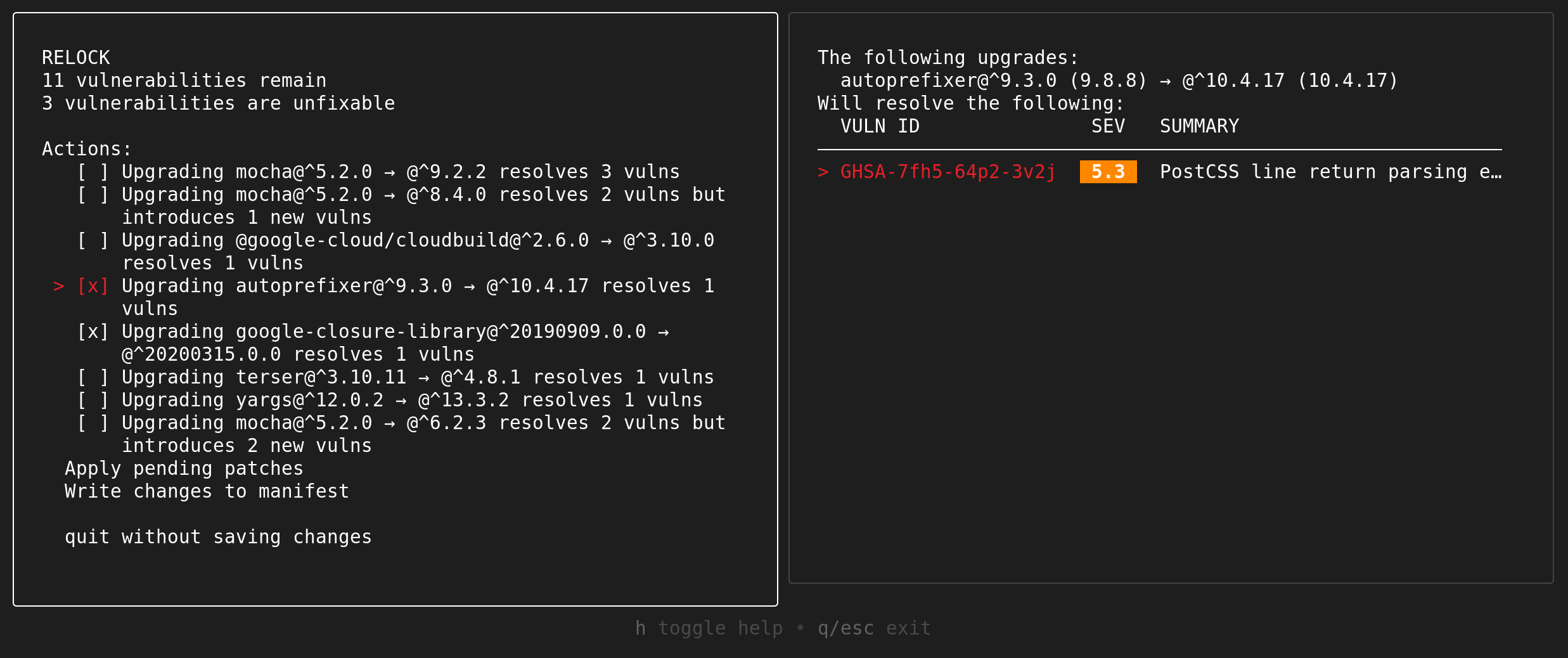
Interactive mode (for npm)
$ osv-scanner fix \
    -M path/to/package.json \
    -L path/to/package-lock.json
Data Sources and Privacy
OSV-Scanner communicates with the following external services during operation:
OSV.dev API
The primary data source for vulnerability information. OSV-Scanner queries this API to check packages for known vulnerabilities and to identify vendored C/C++ dependencies. Data sent includes package names, versions, ecosystems, and file hashes. Use --offline mode to disable network requests and scan against a local database instead.
deps.dev API
Used for supplementary package information:
- Dependency resolution: Resolves dependency graphs for vulnerability scanning and remediation
- Container image scanning: Queries container image metadata for vulnerability detection
- License scanning (
--licensesflag): Retrieves license information for packages - Package deprecation: Checks if packages are deprecated
Data sent includes package names, versions, and ecosystems. No source code is transmitted.
Package Registries
When using native registry for dependency resolution (instead of deps.dev), OSV-Scanner may query:
| Registry | URL | Used For |
|---|---|---|
| Maven Central | repo.maven.apache.org/maven2 | Maven package metadata and POM files |
| npm Registry | registry.npmjs.org | npm package metadata |
| PyPI | pypi.org | Python package metadata |
Contribute
Report Problems
If you have what looks like a bug, please use the GitHub issue tracking system. Before you file an issue, please search existing issues to see if your issue is already covered.
Contributing code to osv-scanner
See CONTRIBUTING.md for documentation on how to contribute code.
Star History
相關資源

Trivy
CLI一站式安全扫描器:检查容器镜像、文件系统、Git 仓库与 Kubernetes 集群中的已知漏洞、IaC 错误配置、泄露密钥与软件许可证,并能生成 SBOM。Aqua Security 开源维护。
aquasecurity/trivy38.5k
Grype
CLI扫描容器镜像、文件系统目录与 SBOM 中的已知漏洞,覆盖主流 Linux 发行版软件包和多种语言依赖,支持按 EPSS、KEV 排序风险,也支持用 OpenVEX 过滤结果,适合在 CI 中做漏洞门禁。由 Anchore 官方维护。
anchore/grype13k
Supply Chain Risk Auditor
SkillTrail of Bits 出品的技能:审计 npm、PyPI、Go 依赖的供应链风险——直接依赖与整棵锁文件树的已知漏洞公告、已弃用或归档的上游、npm 发布者集中度、安装期脚本执行。需要 uv,建议配置已登录的 gh。
trailofbits/skills7.6k
OSS Review Toolkit (ORT)
CLILinux 基金会旗下的开源合规工具链:分析软件项目的依赖,扫描许可证与版权信息并查询已知漏洞,按自定义策略标出违规项,生成 SBOM 与开源声明文件,便于法务和研发一起审查许可风险。需要 Java 25 或 Docker,建议 8GB 内存;许可证判定结果需法务人员复核。
oss-review-toolkit/ort2.1k
Semgrep
CLI语义化的多语言静态分析工具:用写法接近源码的规则查找漏洞与缺陷,支持 30 多种语言与自定义规则,默认在本地扫描、不上传代码。跨文件分析与 Pro 规则需登录。
semgrep/semgrep17.1k
Codex Security
CLIOpenAI 官方安全 CLI 与 TypeScript SDK:扫描代码库,发现、验证并修复安全漏洞,还能起草 SECURITY.md 安全策略。需要 Node.js 22.13+、Python 3.10+,并登录 ChatGPT 或配置 API Key。
openai/codex-security11.1k