
pastel
CLI命令行配色工具:生成、混合、调亮调暗颜色,在 HEX、RGB、HSL、Lab 等格式间转换,生成渐变和多种区分度高的颜色,按背景挑选易读的文字颜色并模拟色盲效果,适合让 agent 帮设计师出配色方案。用 Homebrew 安装即可,无需账号或 API Key。
pastel




pastel is a command-line tool to generate, analyze, convert and manipulate colors. It supports many different color formats and color spaces like RGB (sRGB), HSL, CIELAB, CIELCh as well as ANSI 8-bit and 24-bit representations.
In action
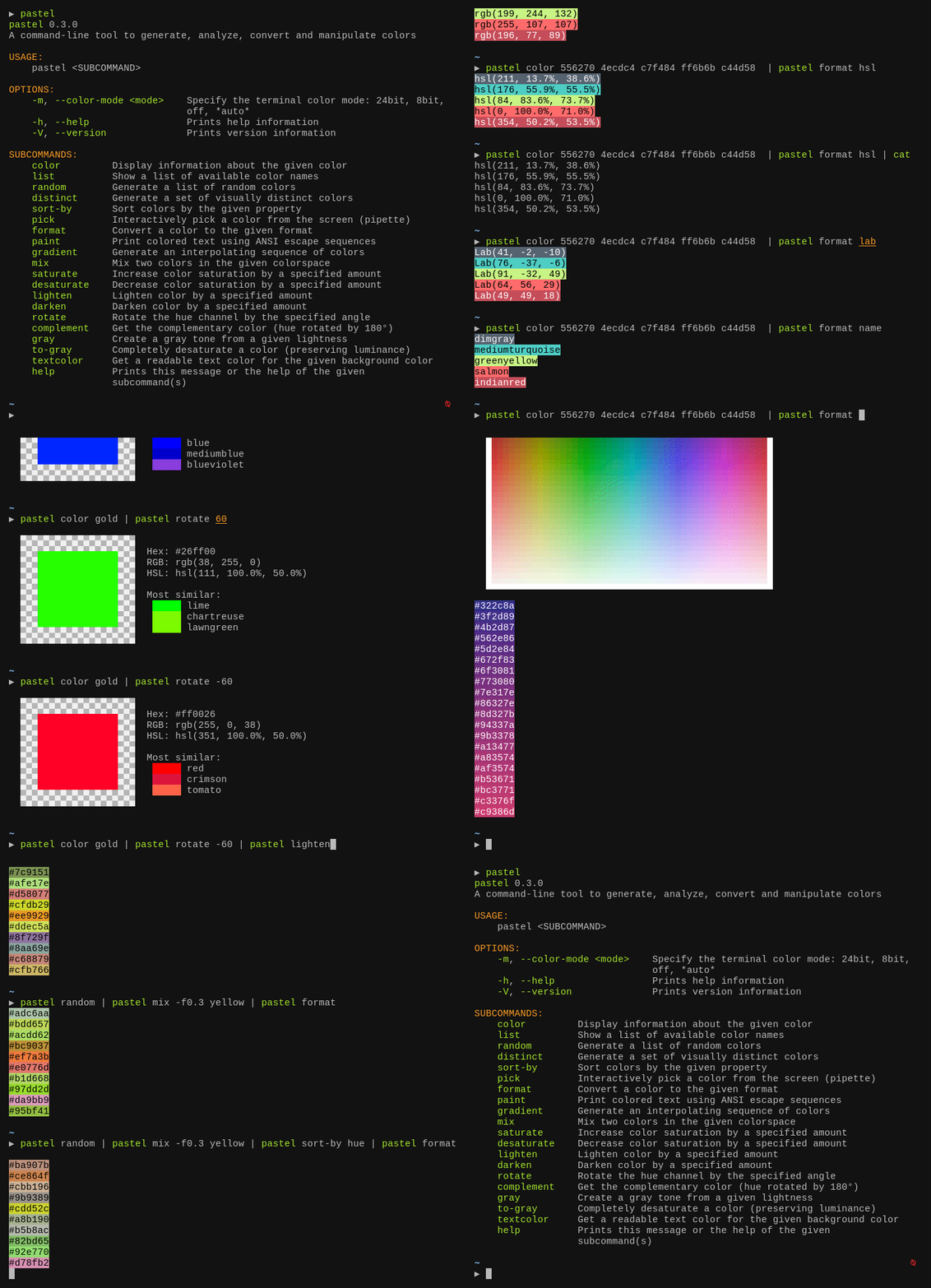
Tutorial
Getting help
pastel provides a number of commands like saturate, mix or paint. To see a complete list, you can simply run
pastel
To get more information about a specific subcommand (say mix), you can call pastel mix -h or pastel help mix.
Composition
Many pastel commands can be composed by piping the output of one command to another, for example:
pastel random | pastel mix red | pastel lighten 0.2 | pastel format hex
Specifying colors
Colors can be specified in many different formats:
lightslategray
'#778899'
778899
789
'rgb(119, 136, 153)'
'119,136,153'
'hsl(210, 14.3%, 53.3%)'
Colors can be passed as positional arguments, for example:
pastel lighten 0.2 orchid orange lawngreen
They can also be read from standard input. So this is equivalent:
printf "%s\n" orchid orange lawngreen | pastel lighten 0.2
You can also explicitly specify which colors you want to read from the input. For example, this mixes red (which is read from STDIN) with blue (which is passed on the command line):
pastel color red | pastel mix - blue
Use cases and demo
Converting colors from one format to another
pastel format hsl ff8000
Show and analyze colors on the terminal
pastel color "rgb(255,50,127)"

pastel color 556270 4ecdc4 c7f484 ff6b6b c44d58
Pick a color from somewhere on the screen
pastel pick
Generate a set of N visually distinct colors
pastel distinct 8
Get a list of all X11 / CSS color names
pastel list
Name a given color
pastel format name 44cc11
Print colorized text from a shell script
bg="hotpink"
fg="$(pastel textcolor "$bg")"

pastel paint "$fg" --on "$bg" "well readable text"
pastel paint -n black --on red --bold "   ERROR!   "
echo " A serious error"

pastel paint -n black --on yellow --bold "  WARNING!  "
echo " A warning message"

pastel paint -n black --on limegreen --bold "    INFO    "
echo -n " Informational message with a "
echo -n "highlighted" | pastel paint -n default --underline
echo " word"
Installation
On Debian-based systems
You can download the latest Debian package from the release page and install it via dpkg:
wget "https://github.com/sharkdp/pastel/releases/download/v0.12.0/pastel_0.12.0_amd64.deb"
sudo dpkg -i pastel_0.12.0_amd64.deb
Alternatively, pastel is available in the official Debian repositories (currently in testing and unstable):
sudo apt update
sudo apt install pastel
On Arch Linux
You can install pastel from the Extra repositories:
sudo pacman -S pastel
On Nix
You can install pastel from the Nix package:
nix-env --install pastel
On MacOS
You can install pastel via Homebrew
brew install pastel
On Windows
You can install pastel via Scoop
scoop install pastel
With Winget
You can install pastel via Winget:
winget install sharkdp.pastel
Via snap package
sudo snap install pastel
On NetBSD
Using the package manager:
pkgin install pastel
From source:
cd /usr/pkgsrc/graphics/pastel
make install
On other distributions
Check out the release page for binary builds.
Via cargo (source)
If you do not have cargo, install using rust's installation documentation.
If you have Rust 1.83 or higher, you can install pastel from source via cargo:
cargo install pastel
Alternatively, you can install pastel directly from this repository by using
git clone https://github.com/sharkdp/pastel
cargo install --path ./pastel
Resources
Interesting Wikipedia pages:
- Color difference
- CIE 1931 color space
- CIELAB color space
- Line of purples
- Impossible color
- sRGB
- Color theory
- Eigengrau
Color names:
- XKCD Color Survey Results
- Peachpuffs and Lemonchiffons - talk about named colors
- List of CSS color keywords
Maximally distinct colors:
- How to automatically generate N "distinct" colors?
- Publication on two algorithms to generate (maximally) distinct colors
Other articles and videos:
License
Licensed under either of
- Apache License, Version 2.0, (LICENSE-APACHE or http://www.apache.org/licenses/LICENSE-2.0)
- MIT license (LICENSE-MIT or http://opensource.org/licenses/MIT)
at your option.
相關資源

resvg
CLI高保真 SVG 渲染库与命令行工具,可把 SVG 图标、插画按指定尺寸导出为 PNG,适合批量切图;不依赖系统库,各平台渲染结果逐像素一致。不支持 SVG 动画,安装需要 Rust 环境(cargo),也可从 Releases 下载 macOS 预编译版。
linebender/resvg4.1k
Superdesign
Plugin让编码 agent 读取代码库、整理设计系统,再在 Superdesign 无限画布上生成 UI 设计稿、演示文稿和海报等营销图,并分支迭代。需要安装 @superdesign/cli 并登录账号,可免费起步。
superdesigndev/superdesign-skill830
Bencium Innovative UX Designer
Skill为品牌、活动、出版物、网页或产品建立独立的视觉语言:从主题本身的语境出发,不参考当下的设计作品,只用字体、颜色与留白做出 10 个相互独立的 HTML 排版方向,由人看过后明确选定一个,再进入第二轮做成可投产的设计系统与成品。不适合日常界面修补、小组件或套用现有设计系统。
bencium/bencium-marketplace456
Swiss Design
Skill用 Tailwind CSS 实现瑞士国际主义风格的设计系统:12 栏网格与 8px 基准间距、IBM Plex Sans 字体与细字重标题、stone 色板,用不透明度而不是换色区分层级,每个项目只用一种强调色,正文宽度不超过 60ch,移动端优先并支持深色模式。
zeke/swiss-design-skill157
Icons8 MCP Server
MCPIcons8 官方远程 MCP:在 42 万个图标、132 种风格里检索和预览,把图标直接放进网页或项目,也能整套替换现有图标风格。登录 Icons8 账号即可免费获取高清 PNG(需署名链接),SVG 需付费订阅。
icons8/icons8-mcp16
DESIGN.md
CLIGoogle Labs 推出的 DESIGN.md 格式与命令行:设计师把配色、字体、间距等视觉规范写成文件交给 agent,lint 检查引用错误与 WCAG 对比度,diff 对比版本,export 导出 Tailwind 等设计令牌。需要 Node.js,格式仍为 alpha。
google-labs-code/design.md28.4k