
Pulumi
CLI用 TypeScript、Python、Go 等通用编程语言定义云基础设施,pulumi up 即可预览并部署到 AWS、Azure、GCP、Kubernetes 等 300 多个提供方。Pulumi 官方维护,开源。








Infrastructure as Code for Humans and Agents

Pulumi Infrastructure as Code is the easiest way to build and deploy infrastructure, of any architecture and on any cloud, using programming languages that you already know and love. Code and ship infrastructure faster with your favorite languages and tools, and embed IaC anywhere with Automation API.
Simply write code in your favorite language and Pulumi automatically provisions and manages your resources on AWS, Azure, Google Cloud Platform, Kubernetes, and 300+ providers using an infrastructure-as-code approach. Skip the YAML, and use standard language features like loops, functions, classes, and package management that you already know and love.
For example, create three web servers:
import * as aws from "@pulumi/aws";

const ami = aws.ec2.getAmiOutput({
    mostRecent: true,
    owners: ["amazon"],
    filters: [{ name: "name", values: ["al2023-ami-*-x86_64"] }],
});

const sg = new aws.ec2.SecurityGroup("web-sg", {
    ingress: [{ protocol: "tcp", fromPort: 80, toPort: 80, cidrBlocks: ["0.0.0.0/0"] }],
});

for (const i of [0, 1, 2]) {
    new aws.ec2.Instance(`web-${i}`, {
        ami: ami.id,
        instanceType: "t3.micro",
        vpcSecurityGroupIds: [sg.id],
        userData: `#!/bin/bash
            echo "Hello, World!" > index.html
            nohup python3 -m http.server 80 &`,
    });
}
Or a simple serverless timer that archives Hacker News every day at 8:30AM:
import * as aws from "@pulumi/aws";
import { DynamoDBClient } from "@aws-sdk/client-dynamodb";
import { DynamoDBDocumentClient, PutCommand } from "@aws-sdk/lib-dynamodb";

const snapshots = new aws.dynamodb.Table("snapshots", {
    attributes: [{ name: "id", type: "S" }],
    hashKey: "id",
    billingMode: "PAY_PER_REQUEST",
});

aws.cloudwatch.onSchedule("daily-yc-snapshot", "cron(30 8 * * ? *)", async () => {
    const res = await fetch("https://news.ycombinator.com");
    const content = await res.text();

    const client = DynamoDBDocumentClient.from(new DynamoDBClient({}));
    await client.send(new PutCommand({
        TableName: snapshots.name.get(),
        Item: { id: `${Date.now()}`, content },
    }));
});
Many examples are available spanning containers, serverless, and infrastructure in pulumi/examples.
Pulumi is open source under the Apache 2.0 license, supports many languages and clouds, and is easy to extend. This
repo contains the pulumi CLI, language SDKs, and core Pulumi engine, and individual libraries are in their own repos.
Welcome
-
Get Started with Pulumi: Deploy a simple application in AWS, Azure, Google Cloud, or Kubernetes using Pulumi.
-
Learn: Follow Pulumi learning pathways to learn best practices and architectural patterns through authentic examples.
-
Examples: Browse several examples across many languages, clouds, and scenarios including containers, serverless, and infrastructure.
-
Docs: Learn about Pulumi concepts, follow user-guides, and consult the reference documentation.
-
Registry: Find the Pulumi Package with the resources you need. Install the package directly into your project, browse the API documentation, and start building.
-
Secrets Management: Tame secrets sprawl and configuration complexity securely across all your cloud infrastructure and applications with Pulumi ESC.
-
Community Slack: Join us in Pulumi Community Slack. All conversations and questions are welcome.
-
GitHub Discussions: Ask questions or share what you're building with Pulumi.
Getting Started

See the Get Started guide to quickly get started with Pulumi on your platform and cloud of choice.
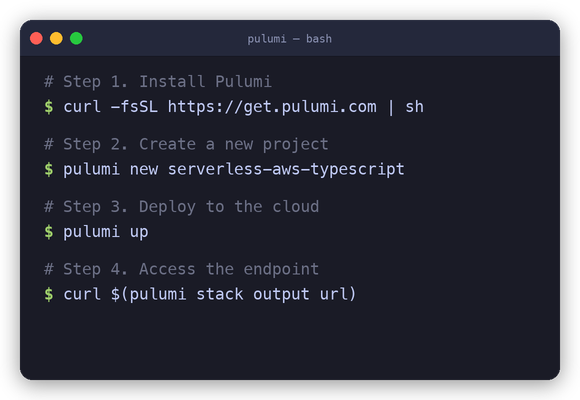
Otherwise, the following steps demonstrate how to deploy your first Pulumi program, using AWS Serverless Lambdas, in minutes:
-
Install:
To install the latest Pulumi release, run the following (see full installation instructions for additional installation options):
curl -fsSL https://get.pulumi.com/ | sh -
Create a Project:
After installing, you can get started with the
pulumi newcommand:mkdir pulumi-demo && cd pulumi-demo pulumi new serverless-aws-typescriptThe
newcommand offers templates for all languages and clouds. Run it without an argument and it'll prompt you with available projects. This command creates an AWS Serverless Lambda project written in TypeScript. -
Deploy to the Cloud:
Run
pulumi upto get your code to the cloud:pulumi upThis makes all cloud resources needed to run your code. Simply make edits to your project, and subsequent
pulumi ups will compute the minimal diff to deploy your changes. -
Use Your Program:
Now that your code is deployed, you can interact with it. In the above example, we can curl the endpoint:
curl $(pulumi stack output url) -
Access the Logs:
If you're using containers or functions, Pulumi's unified logging command will show all of your logs:
pulumi logs -f -
Destroy your Resources:
After you're done, you can remove all resources created by your program:
pulumi destroy -y
To learn more, head over to pulumi.com for much more information, including tutorials, examples, and details of the core Pulumi CLI and programming model concepts.
Platform
Languages
| Language | Status | Runtime | Versions | |
|---|---|---|---|---|
 | JavaScript | Stable | Node.js | Current, Active and Maintenance LTS versions |
 | TypeScript | Stable | Node.js | Current, Active and Maintenance LTS versions |
 | Python | Stable | Python | Supported versions |
 | Go | Stable | Go | Supported versions |
 | .NET (C#/F#/VB.NET) | Stable | .NET | Supported versions |
 | Java | Stable | JDK | 11+ |
 | YAML | Stable | n/a | n/a |
Clouds
Visit the Registry for the full list of supported cloud and infrastructure providers.
Contributing
Visit CONTRIBUTING.md for information on building Pulumi from source or contributing improvements.
相關資源

Agent Skills for AWS
SkillAWS 官方技能合集(Agent Toolkit for AWS):覆盖 IAM、CDK/CloudFormation、Serverless、容器、可观测性、成本管理与 Bedrock,另有按服务划分的专项技能。执行 AWS 操作需本地配置凭据。
aws/agent-toolkit-for-aws2.9k
Azure Skills
Skill微软官方 Azure 技能集:部署前准备与校验、部署、线上诊断、AKS、配额查询、合规审计、云迁移与 Foundry;插件版还接入 Azure MCP Server。需要 Azure 账号并用 az 登录。
microsoft/azure-skills1.6k
Agent Plugins for AWS
PluginAWS Labs 官方插件市场:含 deploy-on-aws(架构推荐、成本估算与 IaC 部署)、aws-serverless、aws-amplify、databases-on-aws、sagemaker-ai 等插件。AWS 建议新项目优先用 Agent Toolkit for AWS。
awslabs/agent-plugins924
render-deploy
Skill分析代码库后生成 render.yaml Blueprint,或经 Render MCP 直接创建服务,把应用部署到 Render 云平台。Render 官方维护,OpenAI 官方精选技能也收录了它;需要 Render 账号,代码须推送到 GitHub/GitLab/Bitbucket。
render-oss/skills88
Trivy
CLI一站式安全扫描器:检查容器镜像、文件系统、Git 仓库与 Kubernetes 集群中的已知漏洞、IaC 错误配置、泄露密钥与软件许可证,并能生成 SBOM。Aqua Security 开源维护。
aquasecurity/trivy38.5kAWS CLI
CLIAWS 官方统一命令行,用一套命令管理 EC2、S3、IAM 等各项 AWS 服务,支持 --query(JMESPath)过滤与 JSON 输出,便于 agent 查询和变更云资源。使用前需用 aws configure 配置访问凭证。
aws/aws-cli17.3k