
Ticker
CLI在终端实时查看股票与加密货币行情并跟踪持仓盈亏,数据来自 Yahoo Finance 与 Coinbase。主界面是交互式看板;ticker print 可按最新价把配置文件里的持仓导出为 JSON 或 CSV,供脚本与 agent 读取。


Ticker
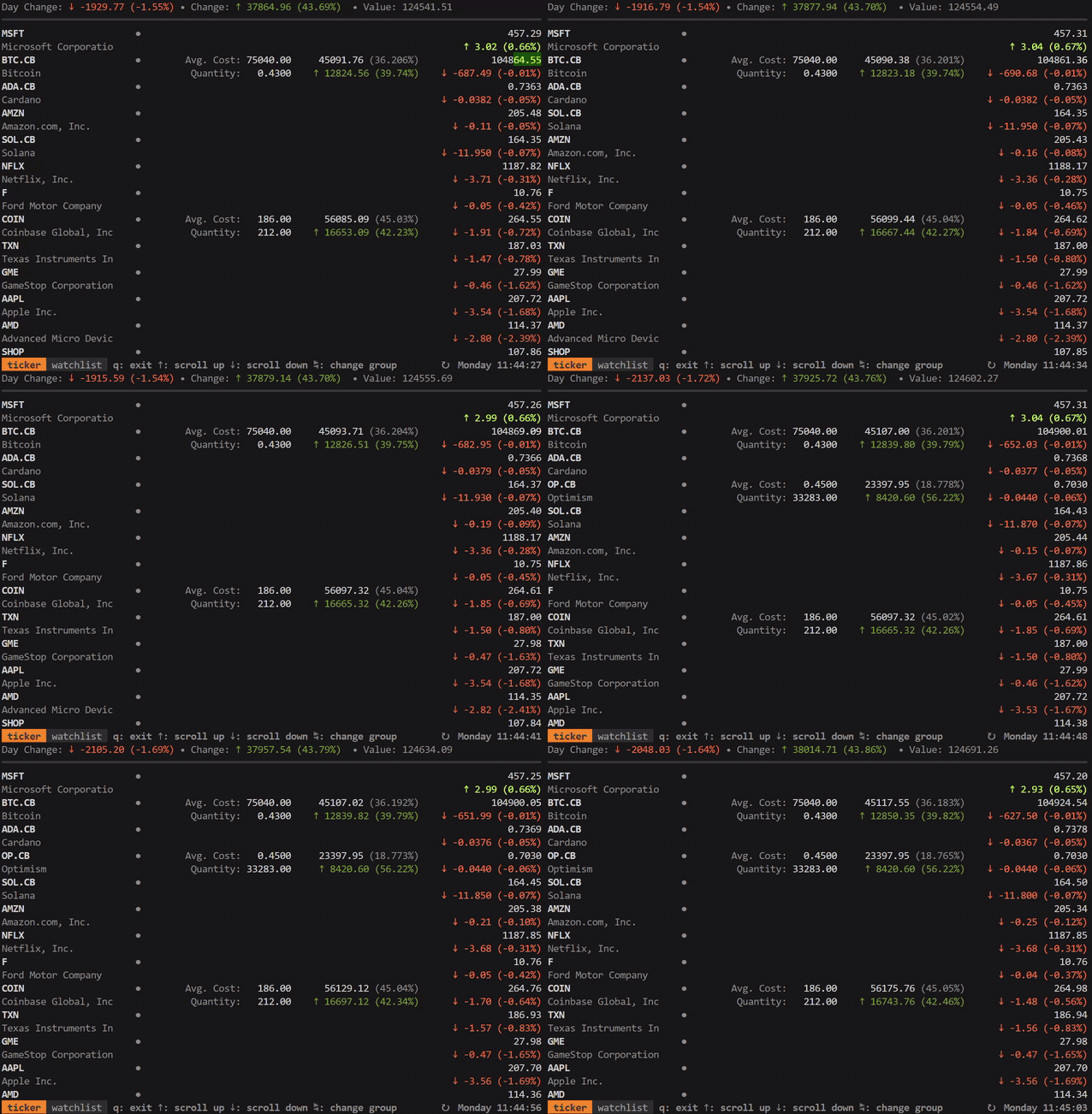
Terminal stock & crypto price watcher and position tracker
Features
- Live stock & crypto price quotes
- Track value of your stock positions
- Support for multiple cost basis lots
- Support for pre and post market price quotes
Install
Download the pre-compiled binaries from the releases page and copy to a location in PATH or see quick installs below
homebrew
brew install achannarasappa/tap/ticker
linux
curl -Ls https://api.github.com/repos/achannarasappa/ticker/releases/latest \
| grep -wo "https.*linux-amd64*.tar.gz" \
| wget -qi - \
&& tar -xvf ticker*.tar.gz ticker \
&& chmod +x ./ticker \
&& sudo mv ticker /usr/local/bin/
windows
winget install -e --id achannarasappa.ticker
docker
docker run -it --rm achannarasappa/ticker
Note: config file can be mounted from the host machine by using a bind mount with -v ~/.ticker.yaml:/.ticker.yaml
snap
sudo snap install ticker
sudo snap connect ticker:ticker-config
Note: config file will need to be set with --config $HOME/ticker.yaml since Snap does not allow access to dotfiles
Third-party repositories
These repositories are maintained by a third-party and may not have the latest versions available
MacPorts
sudo port selfupdate
sudo port install ticker
Quick Start
ticker -w NET,AAPL,TSLA
Usage
| Option Name | Alias | Flag | Default | Description |
|---|---|---|---|---|
| --config | ~/.ticker.yaml | config file location with watchlist and positions | ||
interval | -i | --interval | 5 | Refresh interval in seconds |
watchlist | -w | --watchlist | comma separated list of symbols to watch | |
show-tags | --show-tags | display currency, exchange name, and quote delay for each quote | ||
show-fundamentals | --show-fundamentals | display open price, previous close, and day range | ||
show-separator | --show-separator | layout with separators between each quote | ||
show-summary | --show-summary | show total day change, total value, and total value change | ||
show-positions | --show-positions | show positions including weight, average cost, and quantity | ||
sort | --sort | sort quotes on the UI - options are change percent (default), alpha, value, and user | ||
version | --version | print the current version number | ||
cache | --no-cache | true | cache data retrieved at startup | |
debug | --debug | enable debug logging to ./ticker-log-<date>.log |
Configuration
Configuration is not required to watch stock price but is helpful when always watching the same stocks. Configuration can also be used to set cost basis lots which will in turn be used to show total gain or loss on any position.
# ~/.ticker.yaml
show-summary: true
show-tags: true
show-fundamentals: true
show-separator: true
show-positions: true
interval: 5
currency: USD
currency-summary-only: false
watchlist:
  - NET
  - TEAM
  - ESTC
  - BTC-USD # Bitcoin price via Yahoo
  - SOL.X # Solana price via Coinbase
  - BIT-30MAY25-CDE.CB # Bitcoin futures contract price via Coinbase
lots:
  - symbol: "ABNB"
    quantity: 35.0
    unit_cost: 146.00
  - symbol: "ARKW"
    quantity: 20.0
    unit_cost: 152.25
  - symbol: "ARKW"
    quantity: 20.0
    unit_cost: 145.35
    fixed_cost: 7.00 # e.g. brokerage commission fee
groups:
  - name: crypto
    watchlist:
      - SHIB-USD
      - VGX-USD
    lots:
      - symbol: SOL1-USD
        quantity: 17
        unit_cost: 159.10
- All properties in
.ticker.yamlare optional - Symbols not on the watchlist that exists in
lotsare implicitly added to the watchlist - To add multiple cost basis lots (
quantity,unit_cost) for the samesymbol, include two or more entries - seeARKWexample above .ticker.yamlcan be set in user home directory, the current directory, or XDG config home- Quantities can be negative to represent closed positions (position netting), short positions, borrowed assets, and other concepts
Display Options
With --show-summary, --show-tags, --show-fundamentals, --show-positions, and --show-separator options set, the layout and information displayed expands:

Sorting
It's possible to set a custom sort order with the --sort flag or sort: config option with these options:
- Default - change percent with closed markets at the end
alphato sort alphabetically by symbolvalueto sort by position valueuserto sort by the order defined in configuration with positions on first then watched symbols
Groups
Watchlists and lots can be grouped in .ticker.yml under the groups property. While running ticker, press TAB to cycle forward through groups or SHIFT+TAB to cycle backward.
- If top level
watchlistorlotsproperties are defined in the configuration file, the entries there will be added to a group nameddefaultwhich will always be shown first - Ordering is defined by order in the configuration file
Data Sources & Symbols
ticker pulls market data from a few different sources with Yahoo Finance as the default. Symbols for non default data sources follow the format <symbol>.<source> where <symbol> is the canonical symbol within that data source and <source> is the data source specifier. Below is a list of the supported data sources and their specifiers:
- none - symbols with no suffix will default to Yahoo Finance as the data source
.X- symbols with this suffix are shorthand symbols that are specific to ticker and intended to provide more concise and familiar symbols for popular assets (e.g. usingSOL.Xrather thanSOLANA.CG)- The full list of ticker symbols can be found here. Initial values are populated with the top cryptocurrencies by volume on Coinbase at the time of update
.CB- symbols with this suffix will use Coinbase as the data source. The symbol can be found by searching for the asset on Coinbase and finding the symbol for the asset. (e.g. for Starknet check the market page to find the symbolSTRKand set the symbol toSTRK.CBin ticker).
Note: Coincap (.CC) and CoinGecko (.CG) are no longer supported after v5.0.0
Currency Conversion
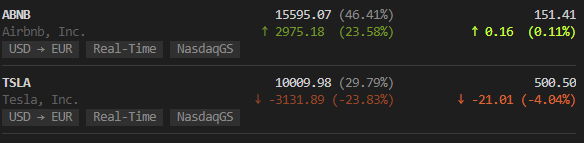
ticker supports converting from the exchange's currency to a local currency. This can be set by setting the currency property in .ticker.yaml to a ISO 4217 3-digit currency code.
- When a
currencyis defined, all values are converted including summary, quote, and position - Add cost basis lots in the currency of the exchange - these will be converted automatically when
currencyis defined - If a
currencyis not set (default behavior) and theshow-summaryoption is enabled, the summary will be calculated in USD regardless of the exchange currency to avoid mixing currencies - Currencies are retrieved only once at start time - currency exchange rates do fluctuate over time and thus converted values may vary depending on when ticker is started
- If the
currency-summary-onlyis set totrueand a value is set forcurrency, only the summary values will be converted - If
currency-disable-unit-cost-conversionflag totrue, currency conversion will not be done when calculating the cost basis. This can be useful for users that purchase a non-US asset and want to use the currency exchange rate at the time of purchase by inputting the unit cost in their local currency (set incurrency) rather than using the most recent currency exchange rate.
Minor currencies
ticker supports quotes returned in a currency's minor unit rather than its major unit (e.g. London Stock Exchange listings quoted in pence as GBp instead of pounds as GBP). Minor unit conversion to major unit behavior can be controlled similarly to the currency conversion feature.
These are the behaviors for a minor unit quote:
- No
currencyset (orcurrency-summary-only: true) - per-position values, quote price, and the cost basis are all displayed in the minor unit and cost basis should be set in the minor unit currencyis set - all displayed values are converted to the major unit. Cost basis should still be entered in the minor unitcurrencyis set withcurrency-disable-unit-cost-conversion- displayed values are converted to the major unit and cost basis should be set in the major unit
Cache
ticker caches reference data to single local file shared between sessions and instances of ticker to speed up startup. The cache can be disabled with --no-cache flag or cache: false in .ticker.yaml.
Custom Color Schemes
ticker supports setting custom color schemes from the config file. Colors are represented by a hex triplet. Below is an annotated example config block from .ticker.yaml where custom colors are set:
# ~/.ticker.yaml
watchlist:
  - NET
  - TEAM
  - ESTC
  - BTC-USD
colors:
  text: "#005fff"
  text-light: "#0087ff"
  text-label: "#00d7ff"
  text-line: "#00ffff"
  text-tag: "#005fff"
  background-tag: "#0087ff"
- Terminals supporting TrueColor will be able to represent the full color space and in other cases colors will be down sampled
- Any omitted or invalid colors will revert to default color scheme values
Printing Positions
ticker supports printing positions to the terminal as text by using ticker print. Output defaults to JSON but CSV output can also be generated by passing the --format=csv flag.
$ ticker --config=./.ticker.yaml print
[{"name":"Airbnb, Inc.","symbol":"ABNB","price":164.71,"value":16965.13,"cost":15038,"quantity":103,"weight":53.66651978212161},{"name":"Tesla, Inc.","symbol":"TSLA","price":732.35,"value":14647,"cost":15660,"quantity":20,"weight":46.33348021787839}]
- Ensure there is at least one lot in the configuration file in order to generate output
- A specific config file can be specified with the
--configflag
Notes
- Market data delay
- Yahoo Finance - Market data pulled from Yahoo finance will have some lag (<~30s) introduced by intermediary systems and certain exchanges will impose intentional delays on data. NYSE and NASDAQ offer real-time market data but other exchanges may not. Consult the help article on exchange delays to determine which exchanges you can expect delays for or use the
--show-tagsflag to include timeliness of data alongside quotes inticker. Yahoo Finance also relies on polling which introduces some delay (>=5s).intervaldetermines the polling frequency. - Coinbase - Market data for spot assets on Coinbase is directly streamed from the exchange through a WebSocket connection and is available in near real-time. Derivatives assets (i.e. symbols with
-CDEsuffix) are polling based however Basis is updated in near real-time based on spot market data changes
- Yahoo Finance - Market data pulled from Yahoo finance will have some lag (<~30s) introduced by intermediary systems and certain exchanges will impose intentional delays on data. NYSE and NASDAQ offer real-time market data but other exchanges may not. Consult the help article on exchange delays to determine which exchanges you can expect delays for or use the
- Non-US Symbols, Forex, ETFs - The names for there may differ from their common name/symbols. Try searching the native name in Yahoo finance to determine the symbol to use in
ticker - Terminal fonts - Font with support for the
HORIZONTAL LINE SEPARATORunicode character is required to properly render separators (--show-separatoroption)
Integrations
- alpaca-ticker-config - Pull alpaca.markets positions into
.ticker.yamlfrom the command line
Development
Running tests:
go tool ginkgo -cover ./...
Linting:
go tool golangci-lint run
Libraries ticker uses
- bubbletea - terminal UI framework
- termenv - color and styling for the terminal
- term-grid - grid layout library terminal UIs
Related Tools
相關資源

Dexter
CLI金融研究终端 Agent(金融研究版 Claude Code):把公司研究问题拆成步骤,自动拉取财报与行情数据并自我校验后作答。需安装 Bun,准备模型 API Key 与 Financial Datasets API Key;仅供学习研究,结论需专业人员复核。
virattt/dexter27.7k
TradingAgents
CLI多智能体投研框架:基本面、情绪、新闻、技术分析师与多空研究员、交易员、风控分工辩论,对指定股票输出研报与评级,支持美股、港股与 A 股。需 Python 环境和任一大模型 API Key;不构成投资建议,结论需专业人员复核。
TauricResearch/TradingAgents112kAI Hedge Fund
CLI模拟对冲基金的多 Agent 系统:巴菲特、芒格等投资风格 Agent 与量化、风控模块共同分析个股并可回测,适合金融课堂演示与学习投资框架。首次运行时填入 Financial Datasets 与模型 API Key;不做真实交易,结论需专业人员复核。
virattt/ai-hedge-fund64k
TradingAgents-Astock
CLITradingAgents 的 A 股特化版:接入通达信、东财、新浪等免费行情源,新增政策、游资、解禁分析师,按 T+1 与涨跌停规则输出中文研报。需 Python 环境与 DeepSeek 等模型 API Key;不构成投资建议,结论需专业人员复核。
simonlin1212/TradingAgents-astock3.7k
OpenBB Platform CLI
CLIOpenBB 开源投资研究平台的命令行版,在终端查询股票行情、财报、宏观经济等金融数据,可用 Routine 脚本批量自动取数。官方维护,部分数据源需自备 API Key。
OpenBB-finance/OpenBB74.3k
hithink-finance CLI(同花顺金融数据)
CLI同花顺官方金融数据命令行:查询 A 股行情、财务报表、估值、公募基金与期货期权数据,可把全市场历史行情同步到本地 DuckDB 用 SQL 分析。需要 Node.js 22+ 和在同花顺金融数据服务官网申请的 API Key;数据仅供研究,投资决策需专业人员复核。
HiThink-Tech/Financial-API3.9k