
VTracer
CLI把 JPG、PNG 等位图转成 SVG 矢量图的命令行工具,支持彩色描摹、黑白线稿和光照不均的扫描件,适合把 logo、插画和扫描的旧图纸矢量化。命令行版目前是 1.0 预览版,用 cargo 安装,需要 Rust 环境;也提供桌面版。



Introduction
visioncortex VTracer is an open source software to convert raster images (like jpg & png) into vector graphics (svg). It can vectorize graphics and photographs and trace the curves to output compact vector files.
Comparing to Potrace, VTracer has an image processing pipeline which can handle colored images. VTracer skips Potrace's expensive optimal-polygon search in favor of a fast, linear pipeline that stays faithful to high-resolution images.
Comparing to Adobe Illustrator's Image Trace, VTracer's output is much more compact as we adopt a stacking strategy and avoid producing shapes with holes.
VTracer is originally designed for processing high resolution scans of historic blueprints up to gigapixels. At the same time, VTracer can also handle low resolution pixel art, simulating image-rendering: pixelated for retro game artworks.
Technical descriptions of the tracing algorithm and clustering algorithm.
Desktop App
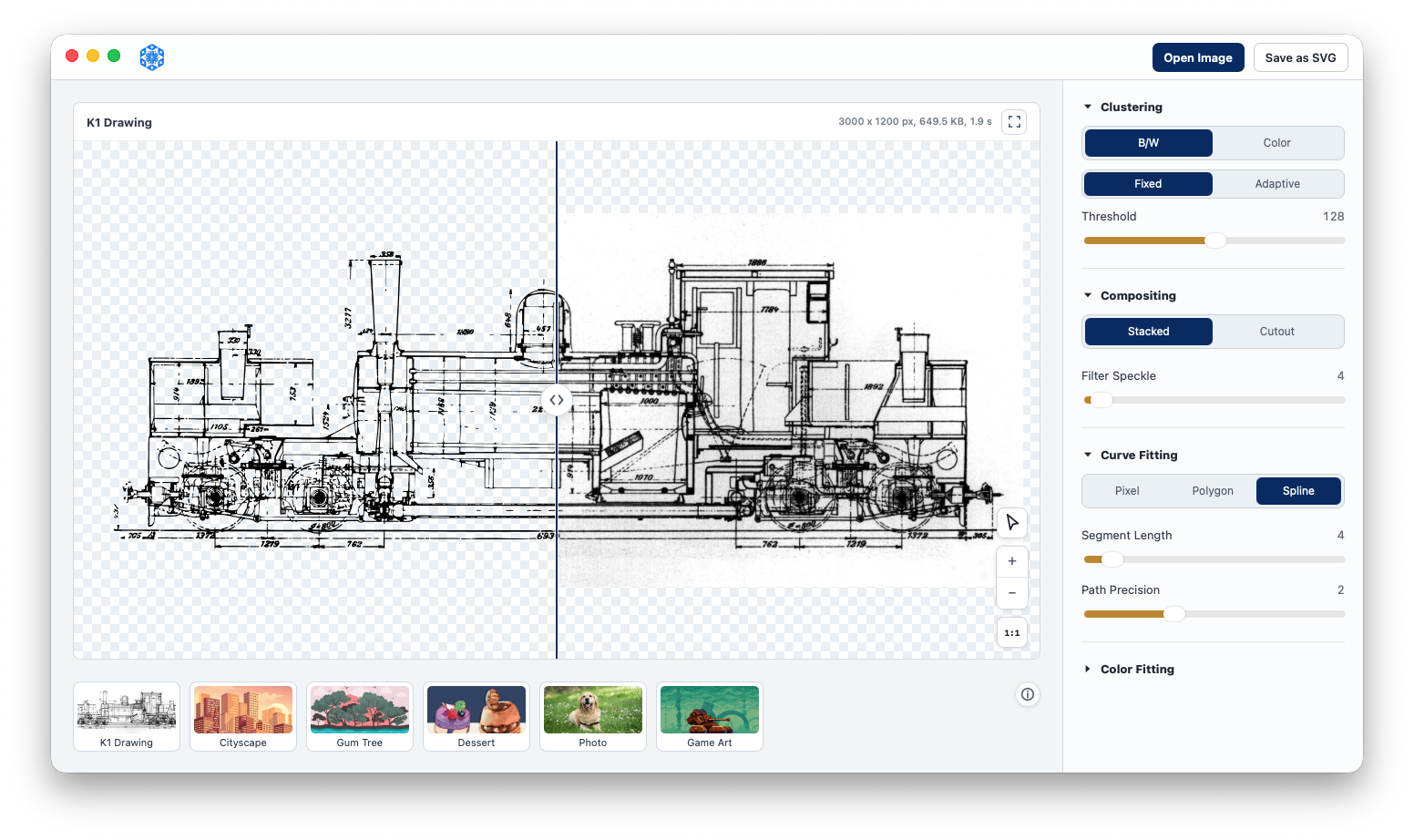
VTracer App powered by the 1.0 tracing engine:
- Native speed: faster conversions on large images
- A/B comparator: compare the trace against the original
- Curve inspector: inspect fitted curves up close
- Curve simplification: fewer nodes, often half the file size
- Seam-free cutout: gapless shapes with shared boundaries
- Watershed clustering: edge-aware regions for sharper image traces
- Adaptive B/W thresholding: cleaner traces from uneven scans and photos
- Fixed color palettes: snap output to your own colors
Console App
You can download pre-built binaries from Releases.
You can also install the program from source:
cargo install vtracer-cli
Usage
# simplest form
./vtracer input.jpg output.svg

# black & white line art
./vtracer input.jpg output.svg --preset bw

# scanned/photographed line art with uneven lighting
./vtracer scan.jpg output.svg --clustering bw --adaptive

# seam-free mosaic (gapless tessellation)
./vtracer input.jpg output.svg --hierarchical cutout

# watershed region forming, cut to taste
./vtracer photo.jpg output.svg --clustering watershed --watershed-detail 192

# constrain to a fixed palette
./vtracer input.jpg output.svg --palette '#1b1b1b,#e0c088,#5a7d3c,#8fb0d0'
Full options:
Usage: vtracer [OPTIONS] [INPUT] [OUTPUT]

Arguments:
  [INPUT]   Input raster image (positional; or use --input)
  [OUTPUT]  Output SVG (positional; or use --output)

Options:
  -i, --input <INPUT>                        Path to the input raster image
  -o, --output <OUTPUT>                      Path to the output SVG
      --preset <PRESET>                      Start from a preset: bw, poster, photo
      --clustering <CLUSTERING>              Region forming: `color-cluster` (default), `bw`, `watershed`
      --hierarchical <HIERARCHICAL>          Clustering: `stacked` (default) or `cutout` (seam-free mosaic)
  -m, --mode <MODE>                          Curve-fitting mode: `pixel`, `polygon`, `spline`
  -f, --filter-speckle <FILTER_SPECKLE>      Discard patches smaller than X px in size (0..=128)
  -p, --color-precision <COLOR_PRECISION>    Significant bits per RGB channel (1..=8)
  -g, --gradient-step <GRADIENT_STEP>        Color difference between gradient layers (0..=255)
      --simplify <TOLERANCE>                 Simplify curves: fewest cubics within this tolerance in px (try 1–2.5)
      --path-precision <PATH_PRECISION>      Decimal places to use in path coordinates
      --palette <PALETTE>                    Fixed palette: comma-separated hex colors, e.g. '#112233,#445566'
      --palette-file <PALETTE_FILE>          Fixed palette from a file (hex colors, comma/newline separated)
      --max-colors <MAX_COLORS>              Auto-quantize to at most N colors
      --optimize <OPTIMIZE>                  Output optimization: 0 = off, 1 = quantize+cleanup, 2 = + shorthands
      --threshold <THRESHOLD>                Binary mode: fixed threshold 0..=255 (foreground below it)
      --adaptive                             Binary mode: Bradley–Roth adaptive threshold (uneven lighting)
      --adaptive-window <ADAPTIVE_WINDOW>    Adaptive window size in px (0 = auto); implies --adaptive
      --adaptive-t <ADAPTIVE_T>              Adaptive sensitivity: % below local mean (default 15)
      --watershed-detail <WATERSHED_DETAIL>  Watershed: hierarchy cut level (default 128; higher = more regions, uncapped)
  -h, --help                                 Print help
  -V, --version                              Print version
The spline fine-tuning flags --corner-threshold <0..=180>,
--segment-length <3.5..=10>, and --splice-threshold <0..=180> are still
accepted but hidden from --help: their defaults (60 / 4 / 45) serve
virtually every conversion, and --simplify is the knob that actually moves
output size and smoothness.
New in 1.0
- Positional arguments:
vtracer in.png out.svg. --hierarchical cutoutis now a true seam-free mosaic (a gapless tessellation with shared boundaries), replacing the old re-clustered cutout.--palette/--palette-file: snap colors to a fixed palette (nearest in OKLab);--max-colorsauto-quantizes the palette.- Binary thresholding: a tunable fixed cutoff (
--threshold) or Bradley–Roth adaptive thresholding (--adaptive, with--adaptive-window/--adaptive-t) for scans with uneven lighting. --simplify <tolerance>: paper.js-style curve simplification: re-fits smooth runs with the fewest cubics that stay within the tolerance (px), typically halving file size; seam-free in cutout mode because shared boundaries are simplified once for both faces.--clustering watershed: an alternative region-forming algorithm: a hierarchical watershed on the pixel graph (Cousty et al., TPAMI 2009; Najman, Cousty & Perret, ISMM 2013), cut at--watershed-detail. Content-adaptive regions that follow object shape: pairs beautifully withcutout.
Programming Libraries
VTracer 1.0 is a vectorization framework with pluggable stages: segmentation, curve fitting, color fitting, and output optimization — usable from the command line or as a library in Rust, Python, and JavaScript:
| Package | Registry | Source | Use |
|---|---|---|---|
vtracer-cli | crates.io | crates/vtracer-cli | Command-line tool (vtracer binary) |
vtracer | crates.io | crates/vtracer | Rust library / the framework core |
vtracer | PyPI | crates/vtracer-py | Python native extension (pyo3 + maturin) |
@visioncortex/vtracer | npm | nodejs | Node.js WebAssembly build, no native dependency |
Rust Library
cargo add vtracer@1.0.0-alpha.4
use vtracer::{ColorImage, Config, FitMode, Hierarchical, Preset, Session};

// Decode with whatever you like, then hand over pixels.
let raw = image::open("in.png")?.to_rgba8();
let (width, height) = (raw.width() as usize, raw.height() as usize);
let img = ColorImage { pixels: raw.into_raw(), width, height };

// one-liner
let svg = Config::default().build()?.to_svg(&img)?;

// presets + per-field config
let mut cfg = Config::from_preset(Preset::Poster);
cfg.mode = FitMode::Polygon;
cfg.hierarchical = Hierarchical::Cutout;  // seam-free mosaic
cfg.max_colors = Some(8);
let svg = cfg.build()?.to_svg(&img)?;
Split the pipeline when you want the stages separately — segment caches, finish re-runs:
let pipeline = cfg.build()?;
let seg = pipeline.segment(&img)?;        // the expensive part
let doc = pipeline.finish(&seg)?;         // VectorDoc, ready to serialize
See docs.rs/vtracer for the full API.
Python Library
pip install vtracer==1.0.0a4
import vtracer

# one-liners
vtracer.convert_file("in.png", "out.svg")
svg = vtracer.convert_bytes(open("in.png", "rb").read())

# rich, reusable config + presets
cfg = vtracer.Config(mode="polygon", hierarchical="cutout")
cfg.palette = ["#1b1b1b", "#e0c088", "#5a7d3c"]
svg = cfg.convert_bytes(data)
vtracer.Config.poster().convert_file("photo.jpg", "poster.svg")

# watershed region forming
ws = vtracer.Config(clustering="watershed", watershed_detail=192)
svg = ws.convert_file("photo.jpg", "photo.svg")

# binary with adaptive (Bradley–Roth) thresholding
bw = vtracer.Config(clustering="bw", adaptive=True)
svg = bw.convert_file("scan.jpg", "scan.svg")
See crates/vtracer-py for the full API.
Node.js Library
@visioncortex/vtracer is available for Node as a WebAssembly build (from the nodejs package) — image decoding and vectorization both run in wasm, so there is no native dependency. Decodes PNG, JPEG, GIF, BMP, and WebP; for other formats, decode yourself and pass raw RGBA to convertPixels.
npm install @visioncortex/vtracer@1.0.0-alpha.4
const vtracer = require('@visioncortex/vtracer');

await vtracer.convertFile('in.png', 'out.svg', { mode: 'polygon' });
const svg = vtracer.convertBuffer(buffer, { preset: 'poster' });
const svg2 = vtracer.convertPixels(rgba, width, height, { clustering: 'bw' });

// binary with adaptive thresholding
const bw = vtracer.convertBuffer(buffer, { clustering: 'bw', adaptive: true });
Citations
VTracer has since been cited by a few academic papers in computer graphics / vision research. Please kindly let us know if you have cited our work:
- SKILL 2023 Framework to Vectorize Digital Artworks for Physical Fabrication based on Geometric Stylization Techniques
- arXiv 2023 Image Vectorization: a Review
- arXiv 2023 StarVector: Generating Scalable Vector Graphics Code from Images
- arXiv 2024 Text-Based Reasoning About Vector Graphics
- arXiv 2024 Delving into LLMs' visual understanding ability using SVG to bridge image and text
相關資源

resvg
CLI高保真 SVG 渲染库与命令行工具,可把 SVG 图标、插画按指定尺寸导出为 PNG,适合批量切图;不依赖系统库,各平台渲染结果逐像素一致。不支持 SVG 动画,安装需要 Rust 环境(cargo),也可从 Releases 下载 macOS 预编译版。
linebender/resvg4.1k
SVGO
CLISVG 优化命令行工具与 Node.js 库:删除编辑器元数据、注释、隐藏元素和冗余属性来压缩 SVG,可递归处理整个目录,并通过插件配置精细控制优化规则。
svg/svgo22.7k
ImageMagick
CLI老牌图像处理命令行套件,支持 JPEG、PNG、GIF、TIFF、PDF 等众多格式的转换、缩放、裁剪、合成与批量处理,适合 agent 在脚本里处理图片。
ImageMagick/ImageMagick17.7k
Oxipng
CLI多线程的无损 PNG 压缩工具,批量缩小截图、切图和图标的体积而不损画质,还能去掉无用的元数据,适合设计师交付切图或网页上线前压缩图片。macOS 可用 Homebrew 安装。
oxipng/oxipng4.3k
Web Asset Generator
Skill从 logo、文字或 emoji 一键生成网站 favicon、PWA 应用图标和各社交平台的分享预览图(Open Graph),自动出齐全部尺寸并检查文字对比度,还能把对应代码加进网页项目。需要本机 Python 与 Pillow。
alonw0/web-asset-generator518
Cloudinary Plugin
PluginCloudinary 官方插件,预置 5 个 MCP 服务和 3 个技能:用自然语言上传、管理、裁剪和压缩图片视频素材,做 AI 图像分析和自动化媒体流程,也能查文档帮开发者接入。需 Cloudinary 账号(有免费档,也可让 agent 先开临时云、24 小时内认领)。
cloudinary-devs/cloudinary-plugin0