
Zellij
CLI用 Rust 写的终端复用器,可以替代 tmux:支持布局文件、浮动与堆叠窗格、WebAssembly 插件和内置 Web 客户端,适合同时开多个 agent 会话。

Zellij
[Installation] [Screencasts & Tutorials] [Configuration] [Layouts] [FAQ]



What is this?
Zellij is a workspace aimed at developers, ops-oriented people and anyone who loves the terminal. Similar programs are sometimes called "Terminal Multiplexers".
Zellij is designed around the philosophy that one must not sacrifice simplicity for power, taking pride in its great experience out of the box as well as the advanced features it places at its users' fingertips.
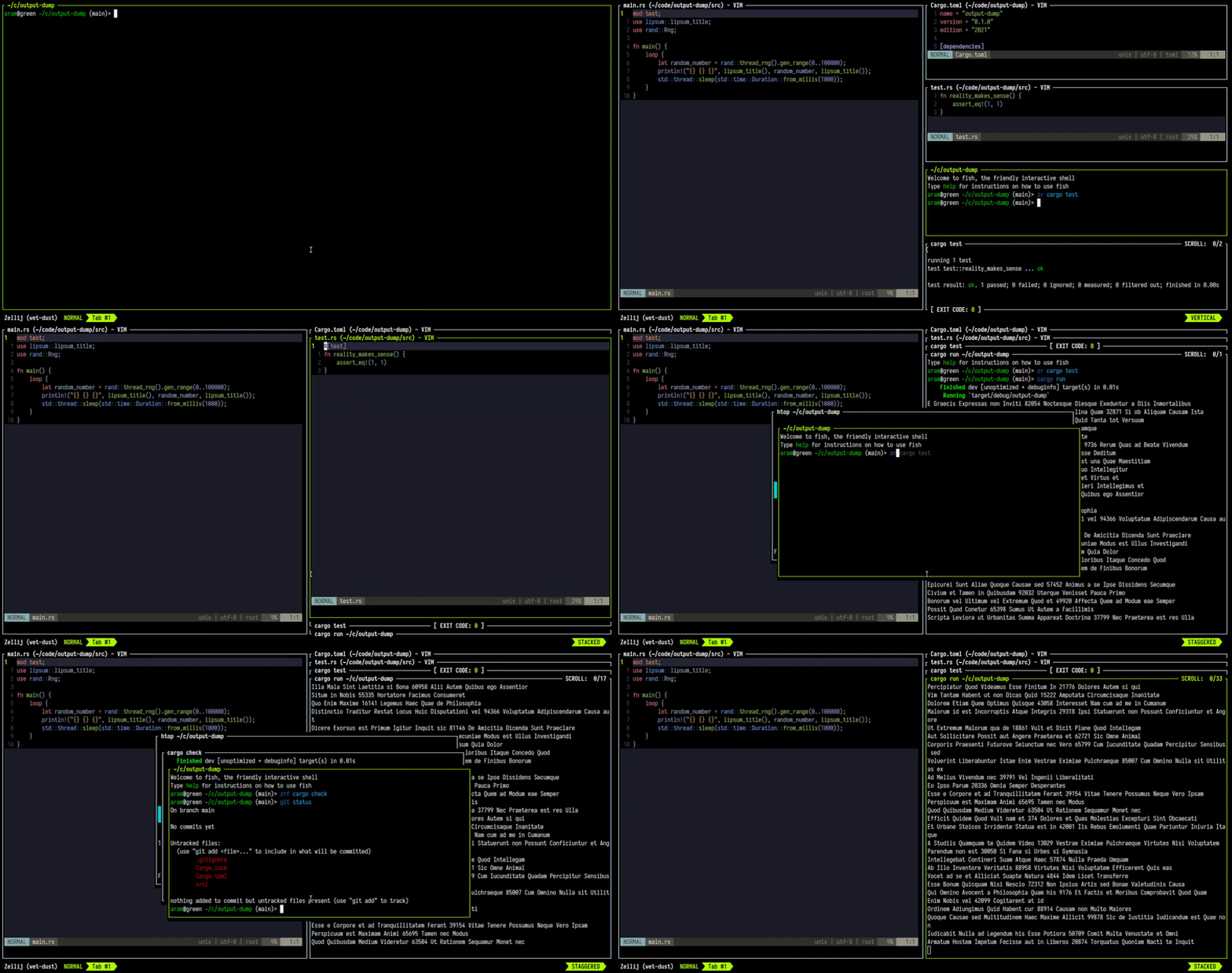
Zellij is geared toward beginner and power users alike - allowing deep customizability, personal automation through layouts, true multiplayer collaboration, unique UX features such as floating and stacked panes, and a plugin system allowing one to create plugins in any language that compiles to WebAssembly.
Zellij includes a built-in web-client, making a terminal optional.
You can get started by installing Zellij and checking out the Screencasts & Tutorials.
For more details about our future plans, read about upcoming features in our roadmap.
How do I install it?
The easiest way to install Zellij is through a package for your OS.
If one is not available for your OS, you could download a prebuilt binary from the latest release and place it in your $PATH. If you'd like, we could automatically choose one for you.
You can also install (compile) with cargo:
cargo install --locked zellij
Try Zellij without installing
bash/zsh:
bash <(curl -L https://zellij.dev/launch)
fish/xonsh:
bash -c 'bash <(curl -L https://zellij.dev/launch)'
Installing from main
Installing Zellij from the main branch is not recommended. This branch represents pre-release code, is constantly being worked on and may contain broken or unusable features. In addition, using it may corrupt the cache for future versions, forcing users to clear it before they can use the officially released version.
That being said - no-one will stop you from using it (and bug reports involving new features are greatly appreciated), but please consider using the latest release instead as detailed at the top of this section.
How do I start a development environment?
- Clone the project
- In the project folder, for debug builds run:
cargo xtask run - To run all tests:
cargo xtask test
For more build commands, see CONTRIBUTING.md.
Configuration
For configuring Zellij, please see the Configuration Documentation.
About issues in this repository
Issues in this repository, whether open or closed, do not necessarily indicate a problem or a bug in the software. They only indicate that the reporter wanted to communicate their experiences or thoughts to the maintainers. The Zellij maintainers do their best to go over and reply to all issue reports, but unfortunately cannot promise these will always be dealt with or even read. Your understanding is appreciated.
Roadmap
Presented here is the project roadmap, divided into three main sections.
These are issues that are either being actively worked on or are planned for the near future.
If you'll click on the image, you'll be led to an SVG version of it on the website where you can directly click on every issue
Origin of the Name
From Wikipedia, the free encyclopedia
Zellij (Arabic: الزليج, romanized: zillīj; also spelled zillij or zellige) is a style of mosaic tilework made from individually hand-chiseled tile pieces. The pieces were typically of different colours and fitted together to form various patterns on the basis of tessellations, most notably elaborate Islamic geometric motifs such as radiating star patterns composed of various polygons. This form of Islamic art is one of the main characteristics of architecture in the western Islamic world. It is found in the architecture of Morocco, the architecture of Algeria, early Islamic sites in Tunisia, and in the historic monuments of al-Andalus (in the Iberian Peninsula).
License
MIT
Sponsored by


相關資源

herdr
CLI为编码 agent 设计的终端复用器:分屏运行 Claude Code、Codex 等,标记每个窗格工作中、阻塞或空闲,断开连接后会话继续运行;agent 也能通过 CLI 创建窗格、互相发消息。
herdrdev/herdr44.4k
Codex CLI
CLIOpenAI 官方在本地运行的编码 Agent,Rust 实现,可读写代码、执行命令并在系统沙箱中运行;可用 ChatGPT 订阅登录,也可配置 API Key。
openai/codex130k
RTK (Rust Token Killer)
CLI在命令输出进入 agent 上下文之前做过滤和压缩的 Rust 命令行代理,覆盖 git、测试、grep、ls 等上百种命令,最多可减少约 90% 的 bash 输出;通过钩子自动改写 Claude Code、Codex 等 agent 执行的命令。
rtk-ai/rtk83.6k
ripgrep
CLI按正则递归搜索目录内容的高速文本搜索工具(命令名 rg),默认遵守 .gitignore 并自动跳过隐藏文件与二进制文件,支持按文件类型过滤,是编码 agent 检索代码库的常用命令。
BurntSushi/ripgrep69.2k
tmux
CLI终端复用器:在一个终端里创建多个会话与窗格,断开后进程仍在后台运行;agent 常用它托管长时间任务、驱动交互式程序,不少多 agent 并行会话工具也以它为底座。
tmux/tmux49.9k
fd
CLI简单快速的 find 替代品:语法直观,支持正则与 glob 匹配,默认忽略隐藏文件和 .gitignore 中的路径,还能对搜索结果并行执行命令,适合 agent 快速定位文件。
sharkdp/fd44.8k