
Perso Dubbing Plugin
PluginPerso AI 官方插件:一句话把视频配成多种语言并对口型,还能语音转 SRT 字幕、翻译字幕(保留时间轴并质检)、烧录字幕、切竖版短片。需 Node.js 18+;字幕翻译、烧录、剪片本地免费,配音、口型和语音转字幕按秒计费,需 Perso 账号。
Perso Dubbing Plugin
Every video, every language. Dub, subtitle, and clip right from your coding agent. "Dub this video into English" is the whole workflow.





English | 한국어 | Español | Português | Русский | Bahasa Indonesia | Deutsch | ไทย | 日本語 | 繁體中文 | 简体中文 | Tiếng Việt | Français
| Feature | You say | You get | |
|---|---|---|---|
| Dubbing | "Dub this video into Japanese" | The same video, re-voiced | |
| Lip-sync | "…with lip-sync" | Mouth matched to the dubbed audio | |
| Voice separation | "Split the voice from the music" | Voice and background tracks | |
| Subtitles from speech | "Make me an English SRT" | An SRT extracted via STT | |
| Subtitle translation | "Translate subs.srt into Spanish" | Translated SRT, timing intact, QA included |  |
| Styled subtitles | "Burn these subtitles onto the video" | Styled subtitles on the video | |
| Short clips | "Cut 2:00–3:00 as a short" | A 9:16 clip, reframed | |
| AI highlights | "Pick the best moments as shorts" | AI-selected highlight clips |
Files, folders, and YouTube/TikTok URLs all work.
Install
Agent installing from this repo URL? In Claude Code, run this now (non-interactive, safe to re-run):
claude plugin marketplace add perso-ai/perso-dubbing-plugin && claude plugin install perso-dubbing@perso-aiHave the user restart so
/dubbing,/srt,/clipload. Other hosts:npx perso-dubbing. No terminal (ChatGPT / Gemini): docs/chatgpt-setup.md · docs/gemini-setup.md
Claude desktop app (paid plan): open the Code tab, pick a folder, choose Local, paste:
claude marketplace add perso-ai/perso-dubbing-plugin && claude install perso-dubbing@perso-ai
Claude Code CLI: /plugin marketplace add perso-ai/perso-dubbing-plugin, then /plugin install perso-dubbing@perso-ai
Codex · Antigravity · anything else: npx perso-dubbing detects your hosts and installs into each — or, cross-agent via skills.sh:
npx skills add perso-ai/perso-dubbing-plugin
Requires Node.js 18+, nothing else. Visual walkthrough · FAQ
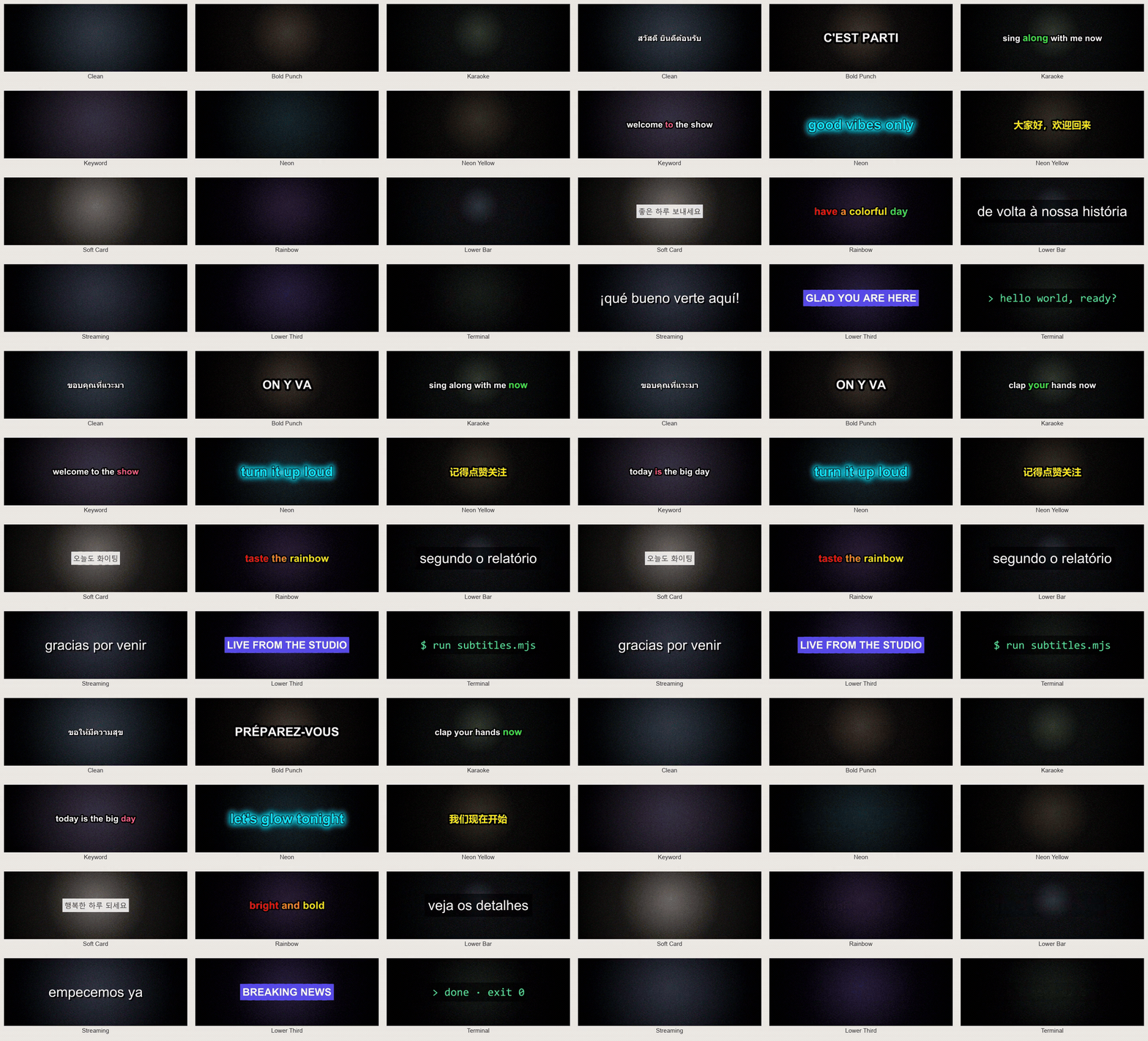
Styled subtitles
Pick one of twelve presets, or just describe the look in plain words: "yellow text, black outline, bottom." The burn runs locally on ffmpeg: no upload, no queue, no account. Several languages? Each SRT gets its own finished video.
Translate subtitles
Hand over any SRT and name the languages you want. Several at once is fine, one pass covers them all. Every line keeps its exact original timing, appearing and disappearing at the same moments as before. Before delivery, the result is checked for lines that run too long or read too fast.

Short clips
Timecodes in, vertical shorts out: reframed 16:9 → 9:16, named, and ready for subtitles. Or hand over the transcript and AI picks the moments that work as shorts: opens on a hook, rides the reaction to its peak, cuts before the energy drops. 30–90 seconds each.

Dubbing and lip-sync
One run takes a file, a whole folder, or a YouTube/TikTok URL and dubs it into several languages from a single upload. Videos over the plan limit split, process, and merge back on their own; an interrupted run resumes exactly where it stopped, never re-billing finished parts. Dubbing clones the original voice into the new language, and lip-sync moves the mouth to match that cloned audio.
Subtitles from speech (STT)
No subtitles yet? Speech-to-text runs on Perso's servers and uses credits to turn the video's audio into an SRT in the original language, for one file or a whole folder. Every step after the SRT exists is free: translating, styling, burning.
Voice separation
Splits a video or audio into clean tracks: the voice and the background. With several speakers, each person's voice comes out as its own track. Swap the soundtrack, remaster the dialogue, or reuse any track on its own.
Free where it can be. Paid where it must be.
MIT, free and open-source. Everything that runs on your machine costs nothing and needs no account: styling and burning subtitles, translating an SRT you have, cutting clips at timecodes. Credits come in only when a job runs on Perso's servers: dubbing, lip-sync, voice separation, and speech-to-text, billed per processed second via the Perso Dubbing API.
No setup ceremony. The first time a server job runs, a browser opens: sign in, one click, key stored encrypted. Free steps never ask.
Privacy: /dubbing, /srt, and /clip send usage events to improve the skills, covering what ran and how it went, media length, style choices, coarse locale, app version/OS, and whether a Perso API key was used (and registered). Each event has a random per-install ID and your workspace number; never your key, media, filenames, or subtitle text. Opt out with PERSO_NO_TELEMETRY.
License: the skill code is MIT. API usage is subject to the Perso AI Terms of Service and pricing.
相關資源

HeyGen Translate
SkillHeyGen 官方技能:把已有视频译成 175 种以上语言并配音,克隆原说话人的声音并重新对口型,可先校对字幕再出片,适合课程、宣传片做多语言版本。需要 HeyGen 账号和使用额度,配置 API Key 与 HeyGen CLI,或连接 HeyGen MCP。
heygen-com/skills489
pyVideoTrans
CLI视频翻译与配音一站式工具:串起语音识别、字幕翻译、多角色 AI 配音与音画合成,可接 Faster-Whisper、DeepSeek、Edge-TTS 等本地或在线模型;cli.py 支持无界面批处理。需要 FFmpeg。
jianchang512/pyvideotrans19.4k
VideoCaptioner
CLI卡卡字幕助手的命令行版:把课程、讲座、访谈视频转成字幕,再用大模型断句校对、翻译并烧录回视频。必剪识别与必应翻译免费可用,大模型优化需自备 API Key,需 Python 3.10–3.12。
WEIFENG2333/VideoCaptioner16.3k
Auto Synced & Translated Dubs
CLI根据已有 SRT 字幕把视频台词译成多种语言,再用 AI 语音逐句合成并按时间轴对齐,输出译文字幕和配音音轨,适合做多语种讲解视频。需要 Python、FFmpeg 及 Google Cloud、Azure、DeepL 或 ElevenLabs 的 API Key;在 ini 配置文件里填好路径与语言后运行 python main.py。
ThioJoe/Auto-Synced-Translated-Dubs1.8k
Violin
Skill开源视频翻译配音工具:把讲座、课程等视频转写并翻译成 33 种语言之一,合成配音后对齐回画面,可导出 SRT 字幕。需 Python 3.10+、FFmpeg 和 violin 命令行工具,并准备按量计费的 Together AI API Key。
shang-zhu/violin1.1k
BaoCut Agent Skill
Skill宝玉开发的视频字幕工具 BaoCut 的官方技能:用自然语言让 Claude Code 或 Codex 转写音视频、生成并翻译字幕、校对说话人、调整时间线并导出 SRT 字幕与成片。需在 Apple 芯片的 Mac(macOS 14 及以上)安装 BaoCut 应用,Windows 可由技能自动下载预览版命令行。
JimLiu/baocut1k