
Airtest
CLI网易开源的跨平台 UI 自动化测试框架:基于图像识别定位元素,无需侵入代码即可自动化 Android/iOS/Windows 上的游戏与 App;airtest run 执行用例,airtest report 生成 HTML 报告。
Airtest · 
Cross-Platform UI Automation Framework for Games and Apps
跨平台的UI自动化框架,适用于游戏和App (中文版点这里)
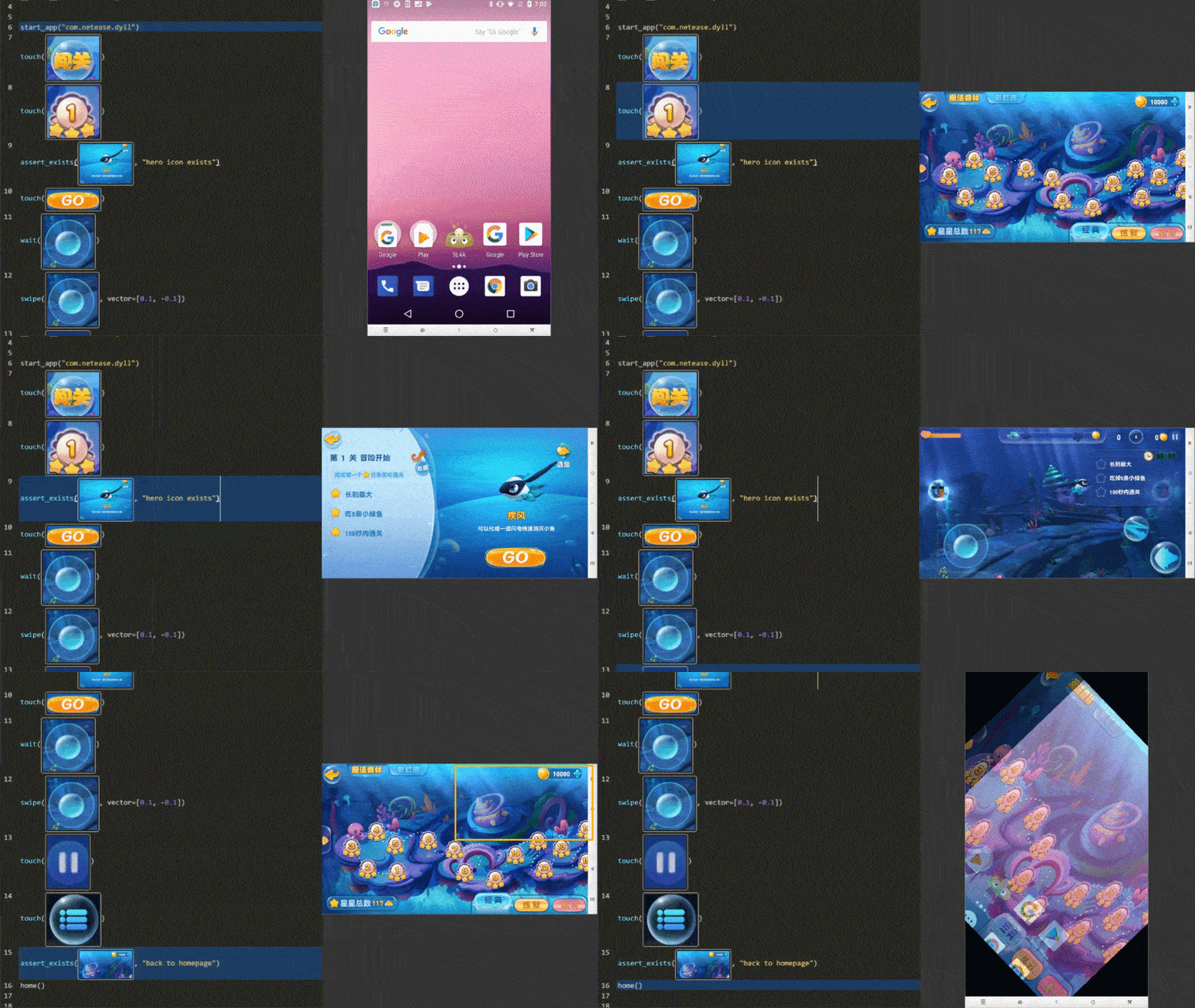
Features
-
Write Once, Run Anywhere: Airtest provides cross-platform APIs, including app installation, simulated input, assertion and so forth. Airtest uses image recognition technology to locate UI elements so that you can automate games and apps without injecting any code.
-
Fully Scalable: Airtest cases can be easily run on large device farms, using commandline or python API. HTML reports with detailed info and screen recording allow you to quickly locate failure points. NetEase builds Airlab on top of the Airtest Project.
-
AirtestIDE: AirtestIDE is an out of the box GUI tool that helps to create and run cases in a user-friendly way. AirtestIDE supports a complete automation workflow:
create -> run -> report. -
Poco: Poco adds the ability to directly access object(UI widget) hierarchy across the major platforms and game engines. It allows writing instructions in Python, to achieve more advanced automation.
Get started from airtest homepage
Supported Platforms
Installation
Use pip to install the Airtest python library.
pip install -U airtest
On MacOS/Linux platform, you need to grant adb execute permission.
# for mac
cd {your_python_path}/site-packages/airtest/core/android/static/adb/mac
# for linux
# cd {your_python_path}/site-packages/airtest/core/android/static/adb/linux
chmod +x adb
Download AirtestIDE from our homepage if you need to use the GUI tool.
Documentation
You can find the complete Airtest documentation on readthedocs.
Examples
Airtest aims at providing platform-independent API so that you can write automated cases once and run it on multiple devices and platforms.
- Using connect_device API you can connect to any android/iOS device or windows application.
- Then perform simulated input to automate your game or app.
- DO NOT forget to make assertions of the expected result.
from airtest.core.api import *

# connect an android phone with adb
init_device("Android")
# or use connect_device api
# connect_device("Android:///")

install("path/to/your/apk")
start_app("package_name_of_your_apk")
touch(Template("image_of_a_button.png"))
swipe(Template("slide_start.png"), Template("slide_end.png"))
assert_exists(Template("success.png"))
keyevent("BACK")
home()
uninstall("package_name_of_your_apk")
For more detailed info, please refer to Airtest Python API reference or take a look at API code
Running .air cases from CLI
Using AirtestIDE, you can easily create automated cases as .air directories.
Airtest CLI provides the possibility to execute cases on different host machines and target device platforms without using AirtestIDE itself.
# run cases targeting on Android phone connected to your host machine via ADB
airtest run "path to your .air dir" --device Android:///

# run cases targeting on Windows application whose title matches Unity.*
airtest run "path to your .air dir" --device "Windows:///?title_re=Unity.*"

# generate HTML report after running cases
airtest report "path to your .air dir"

# or use as a python module
python -m airtest run "path to your .air dir" --device Android:///
Try running provided example case: airtest/playground/test_blackjack.air and see Usage of CLI. Here is a multi-device runner sample.
Contribution
Pull requests are very welcome.
Thanks
Thanks for all these great works that make this project better.
相关资源

Maestro
CLI用 YAML 编写 Android、iOS 与 Web 应用的端到端 UI 测试;CLI 内置 MCP 服务器(maestro mcp),编码 agent 可在模拟器上点击、断言并生成测试。需 Java 17+。
mobile-dev-inc/Maestro16.1k
agent-device
CLICallstack 出品,让编码 agent 通过无障碍快照操作并验证 iOS、Android、鸿蒙与桌面应用:点击、填表、截图、日志与性能采样,内置 MCP 服务器。需 Node.js 22.12+。
callstack/agent-device5kMaestro MCP
MCP移动端 UI 测试框架 Maestro 的 CLI 内置 MCP(maestro mcp):让 agent 在 iOS / Android 模拟器、Android 真机或 Chromium 浏览器上查看屏幕、点击、滚动、断言,并编写和运行 YAML 端到端测试流程。需安装 Maestro CLI 与 Java 17+,官方维护。
mobile-dev-inc/maestro16.1k
Mobile MCP
MCP让 agent 操作 iOS / Android 的模拟器与真机:优先读取无障碍树,必要时按截图坐标点击,还能滑动、装卸应用、录屏和读取设备日志。本机需装好 Xcode 或 Android 平台工具。
mobile-next/mobile-mcp9.7k
Test Android Apps
Plugin在安卓模拟器上复现问题:安装构建、用 adb 驱动界面、导出 UI 树、截图与抓 logcat,并用 Simpleperf、Perfetto 采集性能证据。OpenAI 官方 Codex 插件,需要 Android SDK。
openai/plugins7.5k
MCP Appium
MCPAppium 官方 MCP 服务:让 agent 在 Android / iOS 模拟器与真机上创建会话、定位元素、点击输入与截图,并生成 Java/TestNG 测试代码。需准备 Android SDK 或 Xcode。
appium/appium-mcp498