
Maestro
CLI用 YAML 编写 Android、iOS 与 Web 应用的端到端 UI 测试;CLI 内置 MCP 服务器(maestro mcp),编码 agent 可在模拟器上点击、断言并生成测试。需 Java 17+。
[!TIP] Great things happen when testers connect — Join the Maestro Community

Maestro is an open-source framework that makes UI and end-to-end testing for Android, iOS, and web apps simple and fast.
Hand-write your first YAML flow with the CLI in under 5 minutes, build flows visually in Maestro Studio, or add Maestro MCP to your coding agent for agentic UI testing.
Flows run on any emulator, simulator, browser, or physical Android device. Physical iOS devices are not yet supported.
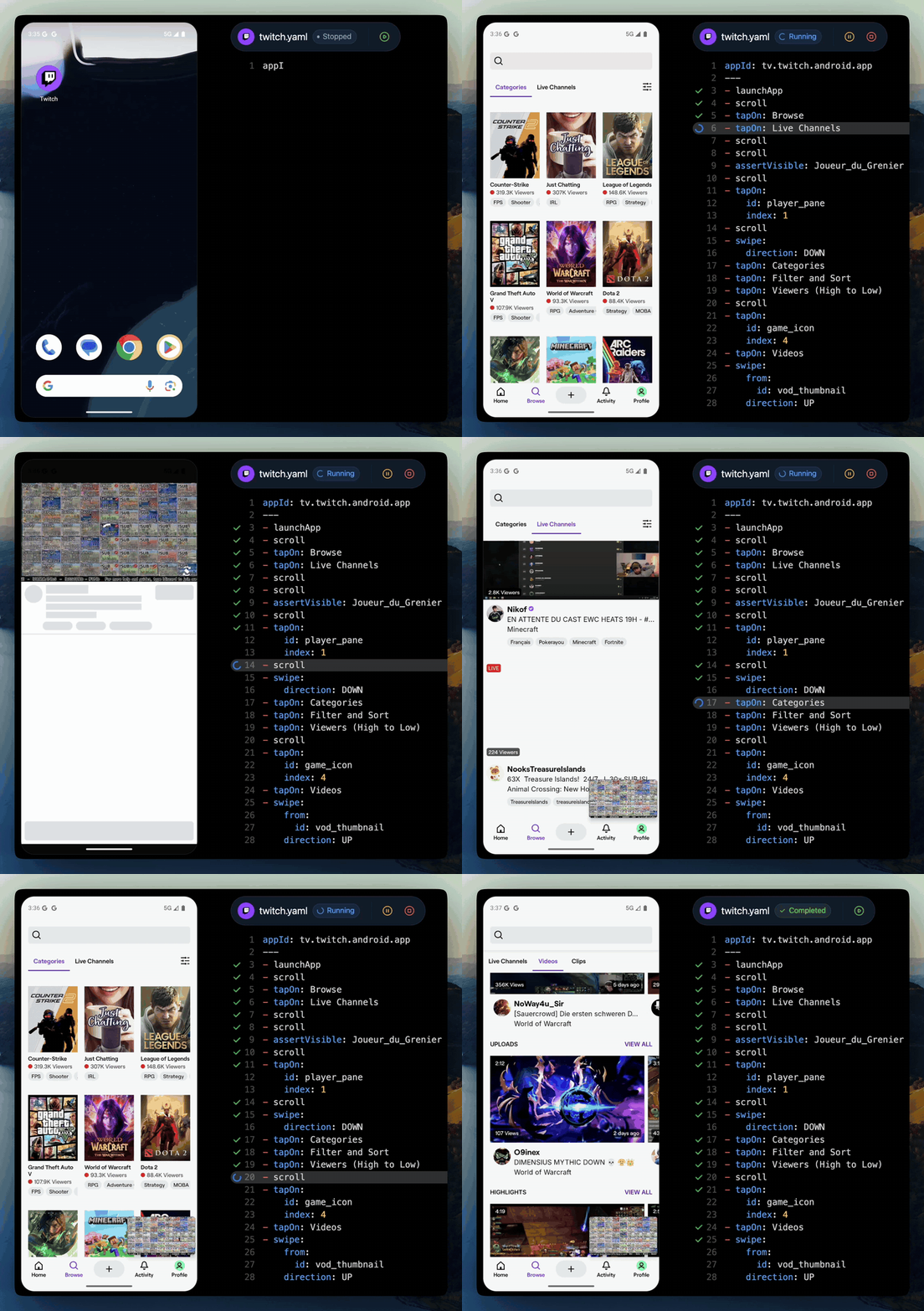
Table of Contents
- Why Maestro?
- Getting Started
- Maestro MCP – Agentic UI Testing
- Maestro Studio – Test IDE
- Maestro Cloud – Parallel Execution & Scalability
- Resources & Community
- Contributing
Why Maestro?
Maestro is built on learnings from its predecessors (Appium, Espresso, UIAutomator, XCTest, Selenium, Playwright), plus 3 decisions made early: drive the app through the platform's accessibility layer, install as a single binary with no drivers or SDK, and keep every test a flat list of YAML commands.
- Human-readable YAML flows – express interactions as commands like
launchApp,tapOn, andassertVisible. - Built for coding agents – the Maestro MCP server ships inside the Maestro CLI (
maestro mcp, nothing else to install). Claude Code, Cursor, Codex, Grok Build, or any MCP client can control your app on a live device: inspect the screen, tap, scroll, assert, and check its own work while it builds. Ask for a flow when you want a repeatable test — that's agentic UI testing. - Framework agnostic – React Native, Flutter, native iOS and Android, Ionic, and hybrid apps all use the same commands. Meta uses Maestro to test React Native itself, and Expo supports Maestro as its preferred E2E testing platform.
- Cross-platform coverage – one flow syntax for Android, iOS, and web, on emulators, simulators, browsers, and physical Android devices.
- Resilience & smart waiting – built-in flakiness tolerance and automatic waiting handle dynamic UIs without manual
sleep()calls. - Fast iteration & simple install – one install line, no drivers, no SDK, no dependencies; flows are interpreted, so there's no compilation step. First test in 5 minutes.
Simple Example:
# flow_contacts_android.yaml

appId: com.android.contacts
---
- launchApp
- tapOn: "Create new contact"
- tapOn: "First Name"
- inputText: "John"
- tapOn: "Last Name"
- inputText: "Snow"
- tapOn: "Save"
Getting Started
Maestro requires Java 17 or higher to be installed on your system. You can verify your Java version by running:
java -version
Installing the CLI:
Run the following command to install Maestro on macOS, Linux or Windows (WSL):
curl -fsSL "https://get.maestro.mobile.dev" | bash
The links below will guide you through the next steps.
- Installing Maestro (includes regular Windows installation)
- Add Maestro MCP to your coding agent
- Run your first test with the Maestro CLI (or just ask your agent to do it for you)
Maestro MCP – Agentic UI Testing
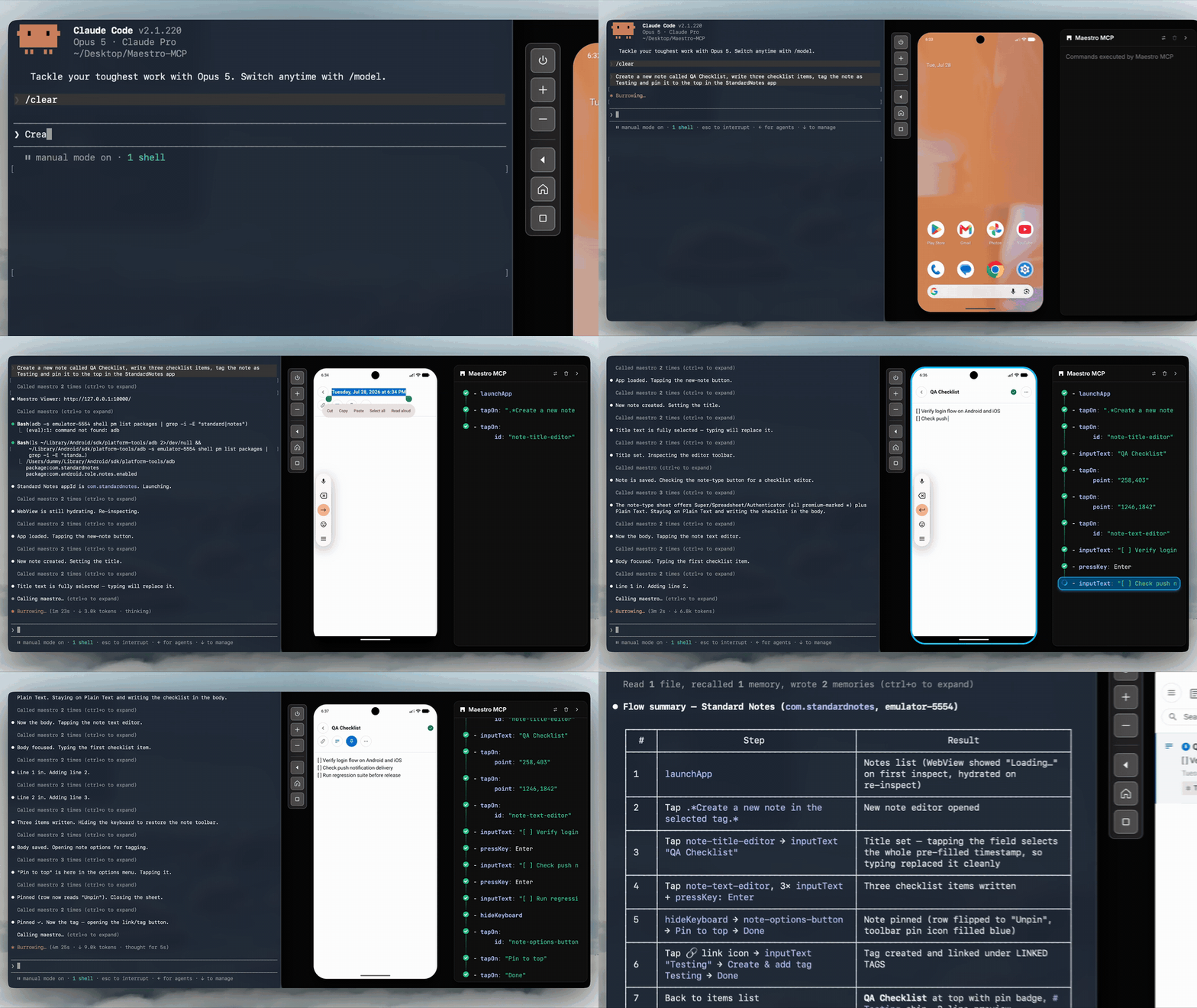
Maestro MCP ships inside the Maestro CLI and works with Claude Code, Cursor, Codex, Gemini CLI, Copilot, Grok Build, or any MCP client. It gives your agent a live device (an emulator, simulator, or physical Android device), and Maestro Viewer embeds that device inside your coding agent, showing every MCP command as it runs.
With Maestro MCP, your agent can control the app directly: inspect the screen, tap, scroll, and assert. While it builds or changes a feature, it checks its own work on the device.
Your agent can also write tests. Ask for an end-to-end flow and it writes plain YAML, runs it until it passes, and the flow stays in your repo as a deterministic test for CI.
Setup for each coding agent is in the Maestro MCP docs.
Maestro Studio – Test IDE
Maestro Studio Desktop is a lightweight IDE that lets you design and execute tests visually — no terminal needed. It is also free, even though Studio is not an open-source project. So you won't find the Maestro Studio code here.
- Simple setup – just download the native app for macOS, Windows, or Linux.
- Visual flow builder & inspector – record interactions, inspect elements, and build flows visually.
Maestro Cloud – Parallel Execution & Scalability
When your test suite grows, run hundreds of tests in parallel on dedicated infrastructure, cutting execution times by up to 90%. Includes built-in notifications, deterministic environments, and complete debugging tools.
Pricing for Maestro Cloud is completely transparent and can be found on the pricing page.
Resources & Community
Contributing
Maestro is open-source under the Apache 2.0 license — contributions are welcome!
- Check good first issues
- Read the Contribution Guide
- Found a bug or want a feature? See how to open a good issue
- Fork, create a branch, and open a Pull Request.
If you find Maestro useful, ⭐ star the repository to support the project.
Built with ❤️ by Maestro.dev
相关资源

agent-device
CLICallstack 出品,让编码 agent 通过无障碍快照操作并验证 iOS、Android、鸿蒙与桌面应用:点击、填表、截图、日志与性能采样,内置 MCP 服务器。需 Node.js 22.12+。
callstack/agent-device5kMaestro MCP
MCP移动端 UI 测试框架 Maestro 的 CLI 内置 MCP(maestro mcp):让 agent 在 iOS / Android 模拟器、Android 真机或 Chromium 浏览器上查看屏幕、点击、滚动、断言,并编写和运行 YAML 端到端测试流程。需安装 Maestro CLI 与 Java 17+,官方维护。
mobile-dev-inc/maestro16.1k
Mobile MCP
MCP让 agent 操作 iOS / Android 的模拟器与真机:优先读取无障碍树,必要时按截图坐标点击,还能滑动、装卸应用、录屏和读取设备日志。本机需装好 Xcode 或 Android 平台工具。
mobile-next/mobile-mcp9.7k
MCP Appium
MCPAppium 官方 MCP 服务:让 agent 在 Android / iOS 模拟器与真机上创建会话、定位元素、点击输入与截图,并生成 Java/TestNG 测试代码。需准备 Android SDK 或 Xcode。
appium/appium-mcp498
Midscene Skills
Skill基于 Midscene.js 视觉识别的跨平台 UI 自动化技能合集:用自然语言操控浏览器、桌面、Android、iOS 与鸿蒙设备,并可搭建 Vitest + Midscene E2E 测试。需自备视觉模型 API Key,Midscene 官方维护。
web-infra-dev/midscene-skills318
Airtest
CLI网易开源的跨平台 UI 自动化测试框架:基于图像识别定位元素,无需侵入代码即可自动化 Android/iOS/Windows 上的游戏与 App;airtest run 执行用例,airtest report 生成 HTML 报告。
AirtestProject/Airtest9.6k