
Azure CLI
CLI微软 Azure 官方命令行(az),管理虚拟机、存储、资源组等 Azure 资源,支持 JMESPath 查询与表格、JSON 等输出格式,脚本场景有明确的退出码。使用前需 az login 登录。
Microsoft Azure CLI


A great cloud needs great tools; we're excited to introduce Azure CLI, our next generation multi-platform command line experience for Azure.
Take a test run now from Azure Cloud Shell!
Installation
Please refer to the install guide for detailed install instructions.
A list of common install issues and their resolutions are available at install troubleshooting.
Developer installation (see below)
Usage
$ az [ group ] [ subgroup ] [ command ] {parameters}
Get Started
Please refer to the "get started" guide for in-depth instructions.
For usage and help content, pass in the -h parameter, for example:
$ az storage -h
$ az vm create -h
Highlights
Here are a few features and concepts that can help you get the most out of the Azure CLI.
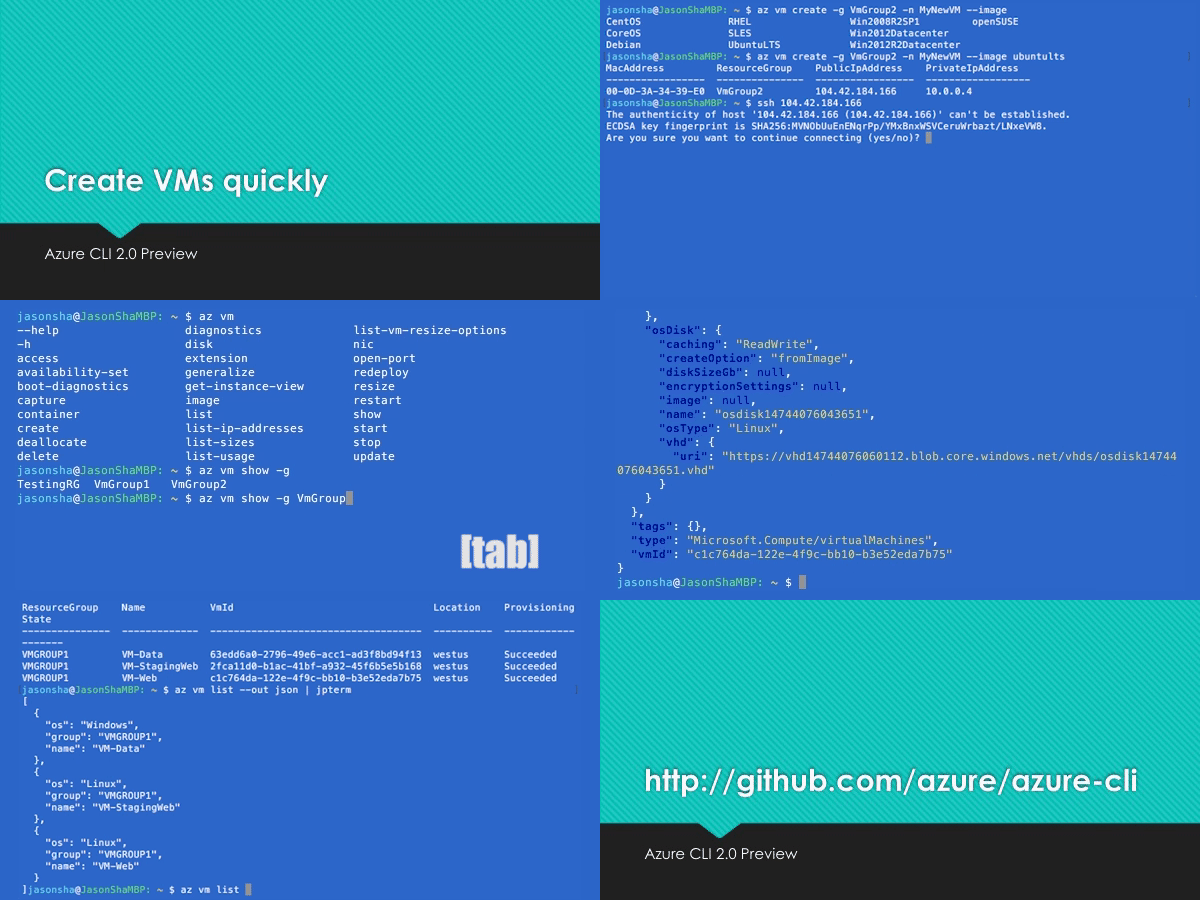
The following examples are showing using the --output table format, you can change your default using the az configure command.
Tab completion
We support tab-completion for groups, commands, and some parameters
# looking up resource group and name
$ az vm show -g [tab][tab]
AccountingGroup   RGOne  WebPropertiesRG

$ az vm show -g WebPropertiesRG -n [tab][tab]
StoreVM  Bizlogic

$ az vm show -g WebPropertiesRG -n Bizlogic
Query
You can use the --query parameter and the JMESPath query syntax to customize your output.
$ az vm list --query "[?provisioningState=='Succeeded'].{ name: name, os: storageProfile.osDisk.osType }"
Name                    Os
----------------------  -------
storevm                 Linux
bizlogic                Linux
demo32111vm             Windows
dcos-master-39DB807E-0  Linux
Exit codes
For scripting purposes, we output certain exit codes for differing scenarios.
| Exit Code | Scenario |
|---|---|
| 0 | Command ran successfully. |
| 1 | Generic error; server returned bad status code, CLI validation failed, etc. |
| 2 | Parser error; check input to command line. |
| 3 | Missing ARM resource; used for existence check from show commands. |
Common scenarios and use Azure CLI effectively
Please check Tips for using Azure CLI effectively. It describes some common scenarios:
- Output formatting (json, table, or tsv)
- Pass values from one command to another
- Async operations
- Generic update arguments
- Generic resource commands -
az resource - REST API command -
az rest - Quoting issues
- Work behind a proxy
- Concurrent builds
More samples and snippets
For more usage examples, take a look at our GitHub samples repo or https://learn.microsoft.com/cli/azure/overview.
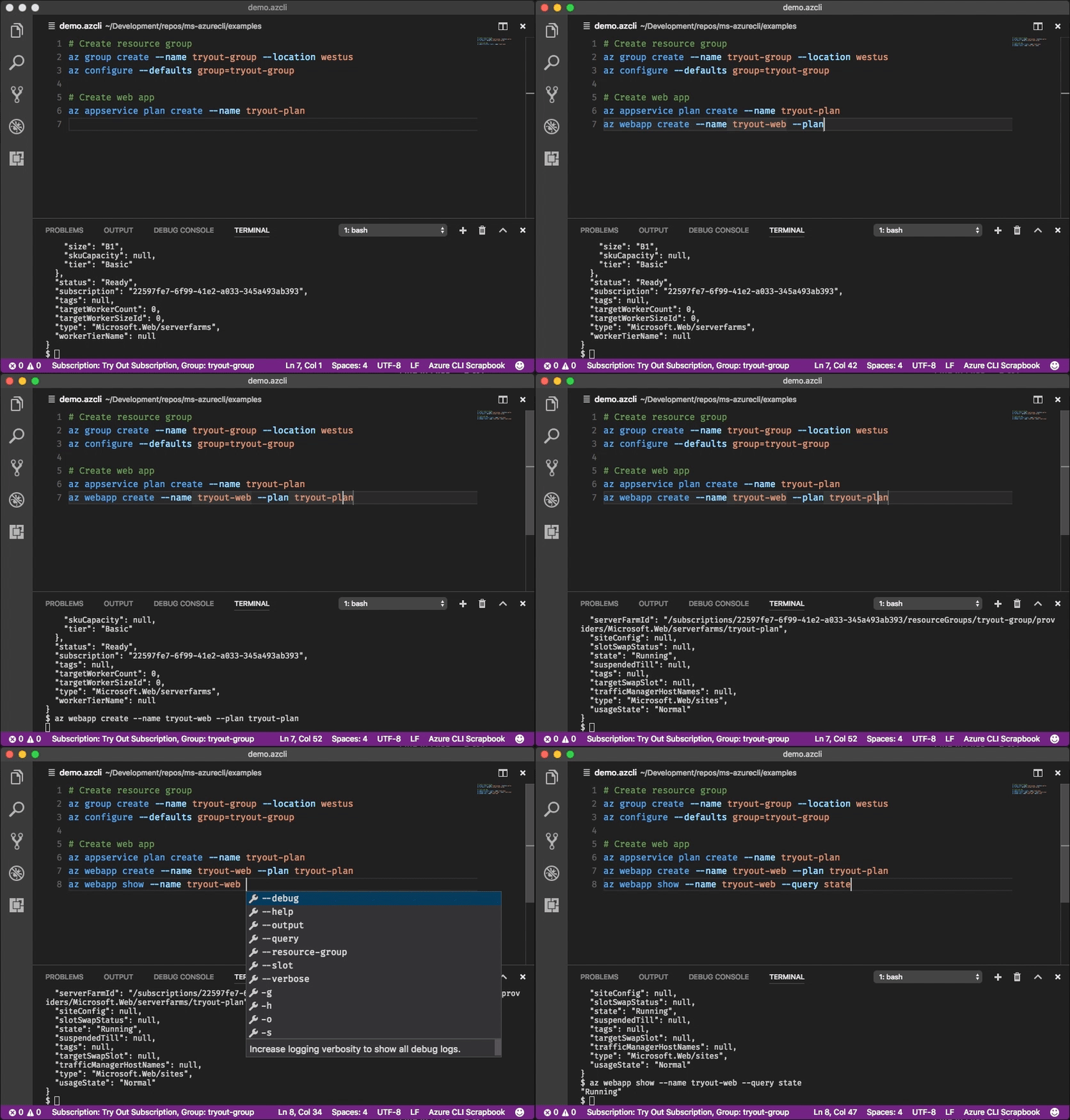
Write and run commands in Visual Studio Code
With the Azure CLI Tools Visual Studio Code extension, you can create .azcli files and use these features:
- IntelliSense for commands and their arguments.
- Snippets for commands, inserting required arguments automatically.
- Run the current command in the integrated terminal.
- Run the current command and show its output in a side-by-side editor.
- Show documentation on mouse hover.
- Display current subscription and defaults in status bar.
- To enable IntelliSense for other file types like
.ps1or.sh, see microsoft/vscode-azurecli#48.
Data Collection
The software may collect information about you and your use of the software and send it to Microsoft. Microsoft may use this information to provide services and improve our products and services. You may turn off the telemetry as described in the repository. There are also some features in the software that may enable you and Microsoft to collect data from users of your applications. If you use these features, you must comply with applicable law, including providing appropriate notices to users of your applications together with a copy of Microsoft's privacy statement. Our privacy statement is located at https://go.microsoft.com/fwlink/?LinkID=824704. You can learn more about data collection and use in the help documentation and our privacy statement. Your use of the software operates as your consent to these practices.
Telemetry Configuration
Telemetry collection is on by default. To opt out, please run az config set core.collect_telemetry=no to turn it off.
Reporting issues and feedback
If you encounter any bugs with the tool please file an issue in the Issues section of our GitHub repo.
To provide feedback from the command line, try the az feedback command.
[Microsoft internal] You may contact the developer team via azpycli@microsoft.com.
Developer installation
Docker
We maintain a Docker image preconfigured with the Azure CLI. See our Docker tags for available versions.
$ docker run -u $(id -u):$(id -g) -v ${HOME}:/home/az -e HOME=/home/az --rm -it mcr.microsoft.com/azure-cli:<version>
Edge builds
If you want to get the latest build from the dev branch, you can use our "edge" builds.
You can download the latest builds by following the links below:
| Package | Link |
|---|---|
| MSI | https://aka.ms/InstallAzureCliWindowsEdge |
| Ubuntu Bionic Deb | https://aka.ms/InstallAzureCliBionicEdge |
| Ubuntu Focal Deb | https://aka.ms/InstallAzureCliFocalEdge |
| Ubuntu Jammy Deb | https://aka.ms/InstallAzureCliJammyEdge |
| RPM el8 | https://aka.ms/InstallAzureCliRpmEl8Edge |
On Windows, you need to uninstall the official version before installing the edge build. (See https://github.com/Azure/azure-cli/issues/25607#issuecomment-1452855212)
You can install the edge build on Ubuntu Jammy with the following command:
curl --location --silent --output azure-cli_jammy.deb https://aka.ms/InstallAzureCliJammyEdge && dpkg -i azure-cli_jammy.deb
And install the edge build with rpm package on RHEL 8 or CentOS Stream 8:
dnf install -y $(curl --location --silent --output /dev/null --write-out %{url_effective} https://aka.ms/InstallAzureCliRpmEl8Edge)
Here's an example of installing edge builds with pip3 in a virtual environment. The --upgrade-strategy=eager option will install the edge builds of dependencies as well.
$ python3 -m venv env
$ . env/bin/activate
$ pip3 install --pre azure-cli --extra-index-url https://azurecliprod.blob.core.windows.net/edge --upgrade-strategy=eager
To upgrade your current edge build pass the --upgrade option. The --no-cache-dir option is also recommended since
the feed is frequently updated.
$ pip3 install --upgrade --pre azure-cli --extra-index-url https://azurecliprod.blob.core.windows.net/edge --no-cache-dir --upgrade-strategy=eager
The edge build is generated for each PR merged to the dev branch as a part of the Azure DevOps Pipelines.
Get builds of arbitrary commit or PR
If you would like to get builds of arbitrary commit or PR, see:
Try new features before release
Developer setup
If you would like to setup a development environment and contribute to the CLI, see:
Contribute code
This project has adopted the Microsoft Open Source Code of Conduct.
For more information see the Code of Conduct FAQ or contact opencode@microsoft.com with any additional questions or comments.
If you would like to become an active contributor to this project please follow the instructions provided in Microsoft Open Source Guidelines.
相關資源

Azure Skills
Skill微软官方 Azure 技能集:部署前准备与校验、部署、线上诊断、AKS、配额查询、合规审计、云迁移与 Foundry;插件版还接入 Azure MCP Server。需要 Azure 账号并用 az 登录。
microsoft/azure-skills1.6kAzure Skills Plugin
Plugin微软官方 Azure 插件:打包 azure-prepare、azure-deploy、azure-diagnostics、azure-cost 等二十多个技能,并接入 Azure MCP 与 Foundry MCP,可查询资源、估算成本、部署与排障。需 Azure 订阅并用 az 登录。
microsoft/azure-skills1.6kAzure MCP Server
MCP微软官方:一个服务器覆盖存储、Cosmos DB、AKS、App Service、Key Vault、Monitor 等数十种 Azure 服务,让 agent 查询和管理云资源。需先登录 Azure 账号。
microsoft/mcp3.8kMicrosoft Agent Skills
Skill微软官方技能合集:170 多个技能,以 Azure SDK(Python、.NET、TypeScript、Java、Rust)与 Microsoft Foundry 开发为主,另含插件、自定义 agent 与 MCP 配置。官方建议按项目挑选安装,避免一次装全。
microsoft/skills3.1k
Microsoft Learn MCP Server
MCP检索并读取 Microsoft Learn 官方文档与 Azure、.NET 等代码示例,减少 agent 给出过时的微软技术答案。微软官方维护,远程接入免费且无需密钥。
MicrosoftDocs/mcp1.9k
Pulumi
CLI用 TypeScript、Python、Go 等通用编程语言定义云基础设施,pulumi up 即可预览并部署到 AWS、Azure、GCP、Kubernetes 等 300 多个提供方。Pulumi 官方维护,开源。
pulumi/pulumi25.8k