
BMad Method
Skill敏捷 AI 驱动开发方法:内置分析师、产品经理、UX 设计师等角色技能,把想法整理成产品简报、PRD 与 PRFAQ,再拆成任务交给 agent 实现。需 Claude Code 等支持技能的工具,并装好 Node.js、Git 与 uv,之后让 bmad 技能执行 bmad setup。




Agile Ai Driven Development — turn an idea or change request into working software without giving up the thinking.
Ai Driven Development (AiDD) covers the whole effort, not only the code: what to build, how it holds together, and how it changes as you learn. BMad Method is the agile way to do it — decisions stay explicit, context carries forward, and the process sizes itself to the work. Small changes go straight to build. Complex work gets the depth it needs. The same method covers a weekend prototype and a system with years of history behind it.
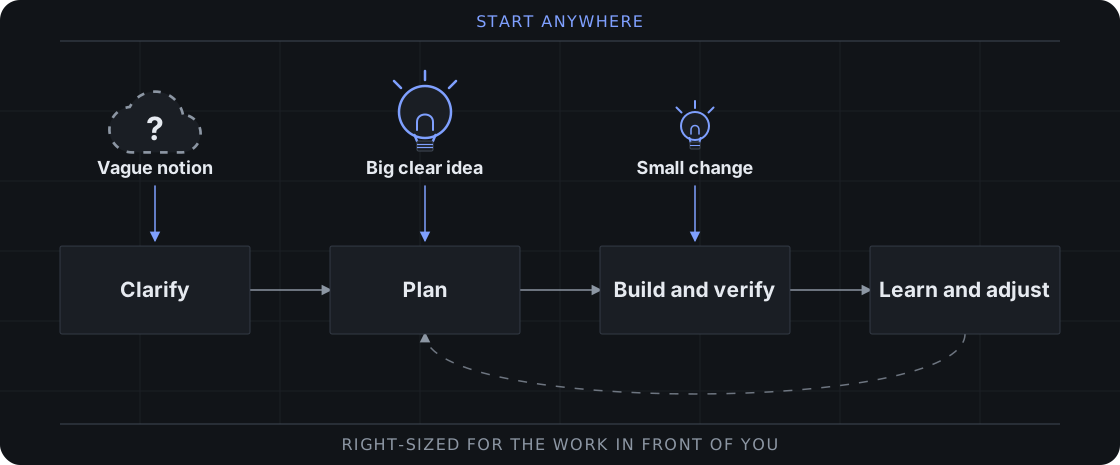
Start anywhere. Use BMad end to end, or carry its briefs, specifications, and architecture into your existing delivery workflow.
Start Building
BMad ships on two lines. The stable release is v6.12, installed by the npm installer and frozen aside from bug fixes. V7 is in preview alpha on this branch: its skills, install path, and docs change often. The v7 release ETA is October 16, 2026, and it might be sooner. Both routes need uv for BMad setup and Python scripts.
Stable: v6.12 (recommended if stability is needed until v7 is finalized for release)
With Node.js 20.12+ and Python 3.10+, run in your project:
npx bmad-method install
Open your project in your AI coding tool, invoke bmad-build with what you want to change, and run bmad-help whenever you want guidance on what comes next. The v6.12 source and documentation live on the V6.12 branch.
V7 Preview Alpha (recommended for solo or small teams that can pivot as things will change before beta)
Expect breaking changes between updates. You need an AI coding tool that supports skills.
Skills CLI — with Node.js and npm and Git, run in your project:
npx skills add bmad-code-org/BMAD-METHOD --skill '*'
--skill '*' installs the full BMad Method and asks which coding tools to install to. To pick skills instead, run the command without --skill '*' and include bmad for setup and help, plus the module record for each module you pick skills from: bmod-method and bmod-core-tools.
Claude Code plugin — add the marketplace inside Claude Code:
/plugin marketplace add bmad-code-org/bmad-plugins
Codex plugin — add the marketplace from your terminal:
codex plugin marketplace add bmad-code-org/bmad-plugins
For either marketplace, install bmad-method for the delivery workflows and
bmad-core-tools for standalone skills, including the bmad hub.
Open your coding tool in the project and ask the bmad skill to run
bmad setup. Then invoke bmad-build with what you want to change. Ask
bmad whenever you want guidance on what comes next or what is optional.
Ask for bmad status to check versions and see what to run next. Ask for bmad setup to install updates: it runs npx skills update, then refreshes the project and cleans up renamed and removed skills. With a plugin marketplace, update there, then ask for bmad setup.
Report preview problems in GitHub Issues or on Discord.
Next steps
Build your first project with BMad →
Add BMad to an existing codebase →
BMad is free and open source, with no paywalled workflows or gated community.
Why BMad?
Coding assistants are effective at implementation, but they often turn unstated assumptions into code. BMad keeps you in control while its agents and workflows make the important decisions explicit and preserve them as context for the work that follows.
- Right-sized process — Go directly to implementation for clear changes or add deeper planning for larger initiatives.
- New or existing code — Start from nothing, or establish verified context on a codebase you inherited and work from what is actually there.
- Durable context — Carry product and technical decisions forward instead of re-explaining them in every chat.
- Specialized perspectives — Bring in product, architecture, UX, development, and testing expertise when it helps.
- Guided collaboration — Use structured workflows and multiple-agent discussions without handing over judgment.
- One delivery path — Move from early thinking through reviewed implementation, correction, and learning.
See how much planning a change needs →
BMad Ecosystem
Install the core method or add official modules for specialized work.
| Module | Purpose |
|---|---|
| BMad Method | Plan and deliver software, from new prototypes to established codebases |
| BMad Builder | Skill, workflow, and agent builder |
| BMad Creative Intelligence Suite | Creative thinking partners for innovation, design thinking, and storytelling |
| BMad Test Architect | Enterprise testing add-on for BMad Method |
| BMad Loop | Builds, verifies, and retros a whole epic unattended |
| BMad Game Dev Studio | Ideate, design, and build games in any framework, including Unity, Unreal, Godot, and Phaser |
Documentation
- Build Your First Change — Install BMad and build a small project.
- Choose a Planning Path — Pick how much planning a change needs and see what each planning skill produces.
- Start in an Existing Codebase — Add BMad to an existing codebase.
Community
- Discord — Get help, share ideas, and collaborate.
- YouTube — Watch tutorials and master classes.
- GitHub Issues — Report bugs and request features.
- GitHub Discussions — Join longer community conversations.
- BMad Code — Explore the wider ecosystem.
Support and Contributing
BMad is free for everyone and always will be. Star the repository, buy me a coffee, or email contact@bmadcode.com for corporate sponsorship.
Contributions are welcome. Read CONTRIBUTING.md before opening a pull request.
License
MIT License — see LICENSE for details.
BMad and BMAD-METHOD are trademarks of BMad Code, LLC. See TRADEMARK.md for details.
If you would like to contribute, join us in the discord and read CONTRIBUTORS.md first.
相關資源

CCPM
Skill软件项目的规格驱动管理流程:先引导头脑风暴写出 PRD,再拆成 Epic 与带依赖的任务并同步为 GitHub Issues,可随时询问站会进度、下一步与阻塞项,也能派多个 agent 并行写代码。需要 Git、已登录的 gh 命令行和一个 GitHub 仓库。
automazeio/ccpm8.4k
notion-spec-to-implementation
Skill从 Notion 读取 PRD 或功能规格,梳理需求与待澄清点,生成实施计划页并拆出任务,把规格、计划与任务互相关联并持续更新进度。收录于 OpenAI 官方插件仓库(开发者标注为 Notion),需要连接 Notion MCP。
openai/plugins7.5k
Grill Me
Skill动手前让 agent 围绕计划或设计连续追问,每轮附上推荐答案,直到每个决策分支都问清楚。它会调用同仓库的 grilling 技能,安装时需要一并装上。
mattpocock/skills295k
office-hours(gstack)
Skillgstack 里的 YC 办公时间技能:创业模式用六个追问检验需求真实性、最窄切入点与未来适配度,构建模式为副业、黑客松和开源项目做头脑风暴,最后产出设计文档。由 Garry Tan 维护。
garrytan/gstack137k
alirezarezvani/claude-skills
Skill380 多个技能的大合集,覆盖工程、产品、营销、合规、财务与高管顾问等岗位,附大量纯标准库 Python 脚本;Claude Code 可按领域以插件安装,兼容 Codex、Gemini CLI 等十余种 agent。
alirezarezvani/claude-skills28.4k
Taskmaster
Plugin把需求文档(PRD)解析成带依赖关系的任务列表,支持复杂度分析、任务拆解与调研;插件打包了斜杠命令、子代理与 MCP 服务。需配置模型 API Key,或复用 Claude Code / Codex CLI 登录。
eyaltoledano/claude-task-master28.2k